Pioneer DMH-W2770NEX Review: Conditional Buy (7.6/10)
A Best Buy reviewer didn’t mince words: “CarPlay will disconnect from my iPhone and reconnect”—yet hundreds of other owners describe the opposite, calling it “flawless.” That split captures the real story of the Pioneer DMH-W2770NEX Double Din Car Stereo with Apple CarPlay & Android Auto: a feature-packed wireless head unit that can feel effortless when it behaves, and infuriating when it doesn’t. Verdict: Conditional buy — 7.6/10.
Quick Verdict
For drivers who prioritize wireless Apple CarPlay or Android Auto on a budget, the Pioneer DMH-W2770NEX Double Din Car Stereo with Apple CarPlay & Android Auto gets frequent praise for sound, responsiveness, and straightforward installs. But a recurring cluster of complaints—especially around disconnects, screen brightness, and missing physical controls—means it’s not a universal recommendation.
| Decision | Evidence from users | Who it fits best |
|---|---|---|
| Conditional Yes | Best Buy average: 4.4/5 with hundreds of reviews; “wireless carplay works flawlessly” | Daily drivers wanting wireless convenience |
| Yes | “The EQ was easy to tweak to get the best sound” (OnlineCarStereo) | People upgrading stock audio without adding amps immediately |
| Conditional | “CarPlay disconnects… often” (Best Buy) | iPhone users sensitive to connectivity hiccups |
| No (if picky) | “lack of a physical volume knob” (Best Buy cons) | Drivers who want tactile controls |
| Conditional | “screen… responsive and bright” vs “screen brightness” concerns (Best Buy) | Bright-sun regions or convertible/Jeep owners |
Claims vs Reality
Pioneer’s marketing leans hard on cable-free smartphone integration—wireless Apple CarPlay and wireless Android Auto—and the Pioneer DMH-W2770NEX Double Din Car Stereo with Apple CarPlay & Android Auto clearly delivers for a large share of buyers. A Best Buy reviewer celebrated that wireless setup as frictionless: “no button clicking or linking or plugging in my phone, simply just sit down and it works.” Another echoed the immediate pairing experience: “it connects to my phone before I even drive out of the driveway wirelessly.” For commuters and rideshare drivers, that “sit down and it works” rhythm is the entire point of paying for wireless.
Digging deeper into user reports, the same claim becomes the biggest point of failure for some owners. One Best Buy reviewer wrote: “it annoys me when carplay disconnects from bluetooth often,” describing distraction and repeated reconnection attempts while driving. Another went further, tying the issue to their installation experience and long wait times for service: “This receiver has been malfunctioning 4 months after having it installed… CarPlay will disconnect from my iPhone and reconnect… the newest issue is this ‘USB overcurrent’.” While marketing promises convenience, a subset of customers experience the opposite: a system that demands attention.
Pioneer also pitches sound shaping—like the built-in EQ—and this is where feedback tends to converge. An OnlineCarStereo reviewer (Nic) said: “The EQ was easy to tweak to get the best sound out of my speakers,” and another (Sherman) noted: “Good sound but i think i need a separate amp to power up my speakers.” That’s a subtle reality check: the unit can improve clarity and tuning, but some drivers chasing volume and punch still feel pulled toward an external amplifier.
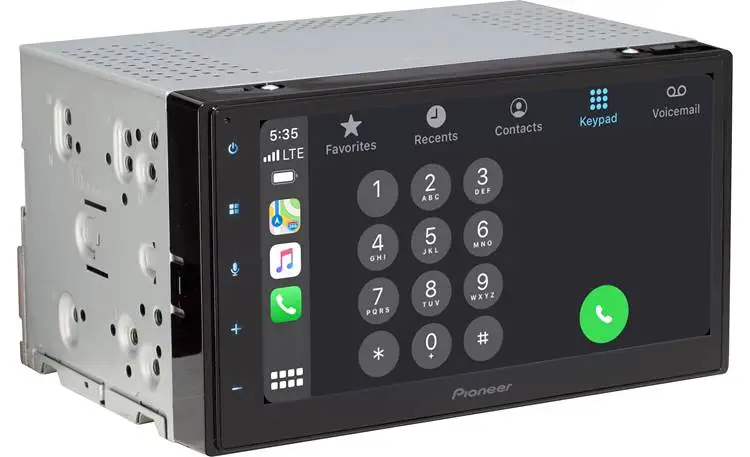
Finally, the screen experience is marketed as a 6.8" capacitive touchscreen, and many buyers describe it as quick and modern. One Best Buy reviewer praised a “fast, responsive and bright screen,” while another called it “very responsive” and said the color/contrast was “fantastic.” But multiple Best Buy “cons mentioned” highlight “screen” and “brightness,” suggesting that sunlight readability isn’t uniformly satisfying—especially for drivers in bright climates or vehicles with more glare.
Cross-Platform Consensus
Universally Praised
A recurring pattern emerged around wireless convenience: when it works, it transforms the daily drive. On Best Buy, one owner called wireless Apple CarPlay/Android Auto “life-changing,” writing: “simply just sit down and it works.” For drivers hopping in and out of the car—parents doing school drop-offs, delivery drivers, or commuters with short trips—automatic reconnection is the difference between “I’ll actually use CarPlay” and “I’ll just Bluetooth it.”
Sound quality and tuning flexibility also show up consistently across platforms. On OnlineCarStereo, Reddit-community-linked reviews highlight hands-on audio adjustments: “The EQ was easy to tweak to get the best sound out of my speakers.” That kind of comment usually comes from users who know their vehicle’s weak points—boomy factory tuning, thin door speakers, or odd cabin acoustics—and want quick control without adding a full DSP. Best Buy buyers frequently mirror that theme, praising “sound quality” as one of the most mentioned pros.
Installation is the other bright spot—though often entwined with retailer service. OnlineCarStereo’s Sherman said: “It was an easy install on my Silverado.” Best Buy reviews repeatedly talk about “free installation” or “smooth install by Geek Squad,” and one buyer framed the upgrade as a value play: “spent $400, saved $40,000,” explaining they wanted CarPlay rather than a whole new car. For practical upgraders—drivers extending the life of a 2012 Tahoe, 2013 CR-V, or older Camry—this head unit is commonly described as making the interior feel modern again.
After those stories, the consensus positives can be summarized:
- Wireless CarPlay/Android Auto feels effortless for many: “connects instantly every time you get in your car.”
- Sound tuning is approachable: “EQ was easy to tweak.”
- Installs are often described as straightforward: “easy install… loving how smooth this receiver works.”
Common Complaints
The most serious complaint category is instability—especially CarPlay disconnects. The frustration isn’t just that it drops; it’s that it can become a driving distraction. A Best Buy reviewer wrote: “CarPlay disconnects from bluetooth often and I’m having to either be without my music or get distracted while driving to repetitively try connecting.” Another described repeated visits and limited solutions: “They said the only thing they could do was take out and send to Pioneer to get serviced… could take 3+ weeks.” For drivers who rely on navigation, calls, and messaging—especially in unfamiliar areas—random disconnects undermine the entire “smartphone-driven lifestyle” pitch.
A second pain point is physical controls, specifically the missing volume knob. Best Buy’s aggregated “cons mentioned” include “volume knob,” and individual reviewers spell it out: “The only downside is not having a knob to quickly turn volume up and down.” For drivers who adjust volume constantly—city driving, highway wind noise, or switching between podcasts and music—touch controls can feel slower and less safe than a tactile dial.
Screen brightness/readability is another repeated critique. Best Buy summaries note “screen brightness” concerns, even while other users call it bright and responsive. That contradiction suggests real-world variance: vehicle dash angle, tint level, and sun exposure can turn a “fantastic” display into a “why can’t I see this?” moment. Convertible and Jeep drivers, or anyone in harsh sunlight, may feel this more sharply.
Common complaints, as users frame them:
- Wireless stability issues for some: “CarPlay will disconnect… and reconnect.”
- No physical volume knob: “downside is not having a knob.”
- Screen visibility complaints: concerns about “brightness.”
Divisive Features
The Pioneer DMH-W2770NEX Double Din Car Stereo with Apple CarPlay & Android Auto draws split reactions on “how complete” the upgrade feels. Some buyers are thrilled with a factory-like look and finish. One Best Buy reviewer said: “I was worried that it would look like a aftermarket… couldn’t have been more wrong, it looks fabulous.” For drivers restoring an older vehicle, that’s a major emotional win—modern features without looking like a tacky add-on.
But others discover friction in the ecosystem around it—extra parts, adapters, and add-ons. A Best Buy reviewer described being surprised by “a zillion more accessories for installation,” listing items like antenna adapters, steering wheel control adapters, dash kits, and satellite radio hardware. That’s not a product malfunction, but it changes the ownership story: what seems like a head unit purchase becomes a project with extra costs and decisions.
Even hands-free calling is divisive due to the external mic. One reviewer complained: “I have to have an external microphone mounted in order to have voice service capabilities,” while another dismissed the same reality as no big deal: “The external microphone doesn’t bother me since I don’t notice it.” For minimalist interiors or drivers who hate visible add-ons, that mic can feel like clutter; for everyone else, it’s a small compromise for better call clarity.
Trust & Reliability
The reliability narrative is polarized because the strongest negative stories focus on failures after months, not day-one issues. One Best Buy reviewer reported problems “4 months after having it installed,” describing repeated troubleshooting, service delays, and a new “USB overcurrent” warning. That kind of report raises a hard question for buyers who depend on a single head unit for charging, navigation, and calls: what happens when it becomes the weak link?
At the same time, long-term satisfaction exists in the same dataset. Another Best Buy reviewer wrote: “I’ve had it for a couple years now… it’s sleek, easy to use and love having wireless capabilities,” adding that it worked well even after upgrading to an “iPhone 16 Pro.” Those two experiences—failure within months vs. smooth use for years—are exactly why this purchase is best treated as conditional: it can be a great upgrade, but not everyone gets the same reliability outcome.
Alternatives
Competitors show up directly in buyer shopping stories. One Best Buy customer said they compared “a Kenwood, Alpine and Pioneer,” and ended up choosing Pioneer because “the pioneer was wireless.” That implies the alternative path for shoppers is simple: if you’re debating brands at the same price tier, the decision often comes down to wireless performance confidence and control preferences.
There’s also an in-story alternative outcome: one Best Buy review mentioned receiving a different brand after an issue: “The head unit I purchased came with the screen cracked so they upgraded me to the Sony for free.” That’s not a deliberate competitor comparison, but it does show that some buyers end up with a Sony as a substitute when something goes wrong at purchase/installation time.
For buyers considering Kenwood or Alpine, the data here doesn’t provide direct feature-by-feature user comparisons—only that these brands were in the consideration set and that wireless capability pushed at least one buyer toward Pioneer.
Price & Value
Price perception is one of the Pioneer DMH-W2770NEX Double Din Car Stereo with Apple CarPlay & Android Auto’s biggest drivers. Best Buy listings show it appearing on clearance, and buyers repeatedly frame it as strong value “under $400.” One reviewer called it “absolutely amazing bundle for the price,” while another emphasized bargain hunting: “awesome got a great deal with the open box… 10/10 would recommend.”
Resale and market pricing signals also appear via eBay listings, where the unit is commonly shown around the low-$400 range new—though the data includes outliers like auction liquidation. For budget-conscious upgraders, the real cost story often includes installation accessories. A long Best Buy review walked through surprise add-ons like adapters and satellite radio components. That means the “deal” can shift depending on your vehicle and feature goals—especially if you want steering wheel control integration or SiriusXM.
Buying tips embedded in community stories:
- Expect extra install parts: one buyer wasn’t aware “the extra components didn’t come with the radio.”
- Open-box deals can be compelling: “everything was the same and every accessory was included.”
- If you rely on SiriusXM or steering-wheel controls, budget for adapters/tuners.
FAQ
Q: Does wireless Apple CarPlay work reliably on the Pioneer DMH-W2770NEX?
A: Conditional. Many Best Buy reviewers say it “works flawlessly” and “connects instantly every time you get in your car,” but others report recurring dropouts: “CarPlay will disconnect from my iPhone and reconnect.” User experiences vary, and a few describe needing service or troubleshooting.
Q: Is the screen bright enough in daylight?
A: Mixed feedback. Some owners call it “fast, responsive and bright” with “fantastic” color and contrast, while Best Buy’s common cons include “screen brightness.” Sun-heavy regions or glare-prone dashboards may expose the downside more than shaded interiors.
Q: Do you really need extra accessories for installation?
A: Often yes, depending on vehicle and features. One Best Buy buyer said they “needed a zillion more accessories,” describing adapters for factory compatibility, steering wheel controls, and satellite radio. Others describe installation as “straightforward,” especially when using Geek Squad or a familiar vehicle platform.
Q: Is the lack of a volume knob a real problem?
A: For some drivers, yes. Multiple Best Buy users call out the “lack of a physical volume knob,” and one said it’s the “only downside.” If you frequently adjust volume while driving, tactile controls can feel safer and faster than on-screen adjustments.
Q: Does it improve sound without an external amplifier?
A: Many users say it helps, especially with tuning. An OnlineCarStereo reviewer said: “The EQ was easy to tweak to get the best sound,” and Best Buy buyers regularly praise sound quality. Still, one owner added: “I think I need a separate amp to power up my speakers,” suggesting volume-hungry setups may want more power.
Final Verdict
Buy the Pioneer DMH-W2770NEX Double Din Car Stereo with Apple CarPlay & Android Auto if you’re upgrading an older vehicle primarily for wireless CarPlay/Android Auto, want easy EQ tuning, and value a modern look—like the Best Buy owner who said it “looks fabulous” and another who loved that it “connects instantly every time you get in your car.” Avoid it if you can’t tolerate the risk of disconnects or you demand tactile controls, because some owners describe repeated dropouts and miss “a knob to quickly turn volume up and down.” Pro tip from the community: plan for install add-ons—one buyer learned the hard way that “the extra components didn’t come with the radio.”