Microsoft Surface Pro Keyboard Bundle Review Verdict
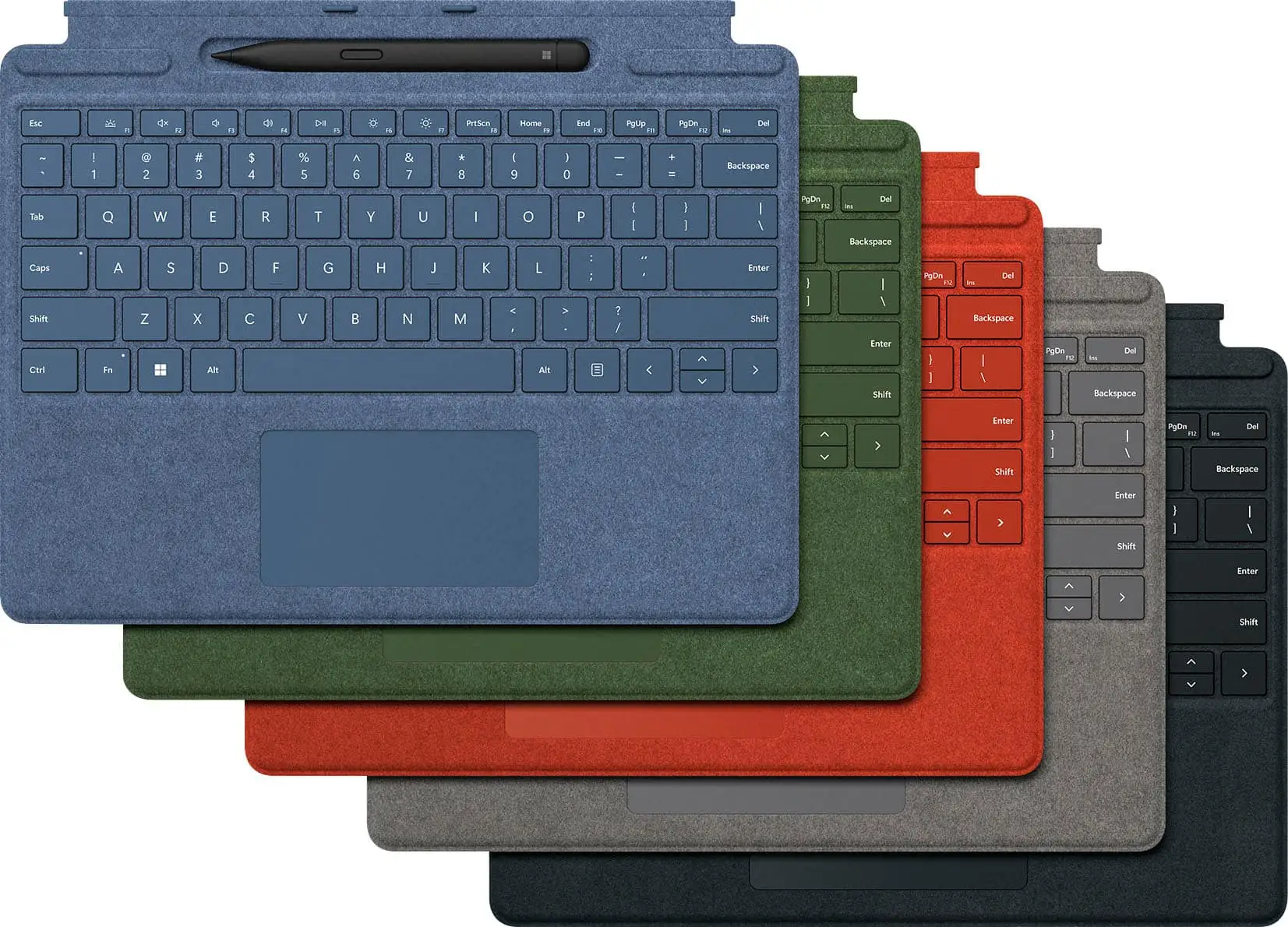
When Microsoft decided not to bundle a keyboard with the Surface Pro 8 or 9, many users described the Microsoft Surface Pro Keyboard with Slim Pen 2 Bundle (Alcantara) as “almost a required addition” (Trustpilot). With customer ratings hovering around 4.7–4.8/5 across platforms, the verdict from the community is clear: this pairing transforms the Surface Pro from a limited tablet into a serious productivity device. Score: 9/10 for Surface owners who type and sketch daily.
Quick Verdict: Conditional
| Pros | Cons |
|---|---|
| Premium Alcantara finish feels “buttery smooth” (Best Buy user fer*** ) | Price seen as “over-priced” by multiple buyers |
| Full-size, responsive keys with adjustable backlighting | Trackpad “diving board” click design frustrates some |
| Built-in Slim Pen 2 storage and charging | Pen haptic feedback limited to certain Surface models |
| Strong magnetic connection keeps keyboard secure | Must be attached physically, no wireless option |
| Slim Pen 2 praised for accuracy and comfort | Reports of occasional connection issues or cosmetic defects |
| Easy snap-on/off design for tablet-laptop transition | Backlighting brightness could be higher |
Claims vs Reality
Microsoft markets this bundle with “next‑level versatility” and a large glass touchpad, luxurious Alcantara material, and “our best performing pen yet.” The built-in tray is promoted as securely storing and charging the pen, while the typing experience is pitched as “fast, accurate… like a traditional, full‑size keyboard.”
Digging into user experiences, the claim of “traditional laptop feel” holds up well. A verified buyer on Best Buy highlighted: “Keys have a great rebound and feel – much like a traditional keyboard – which I like. Great space between the keys.” Multiple Reddit users described typing as accurate and comfortable, with one noting, “unlike other tablet keyboard accessories I’ve tried, my hands don’t feel cramped… it’s just like a full‑size keyboard.”
The pen accuracy and feel also match the hype for supported devices. A Reddit user reported, “The Surface Slim Pen 2 is a lot more responsive… feels better in the hand… my handwriting translates better.” However, the much-touted tactile haptic feedback does not work on the Surface Pro X, a disappointment for some. As one owner noted, “...only compatible with Surface Laptop Studio and Surface Pro 8… so as a Pro X owner, that was a bummer.”
Cross-Platform Consensus
Universally Praised
The Alcantara finish is one of the most celebrated aspects. Best Buy user fer*** enthused, “feels real and authentic… buttery smooth… satisfying clicks.” This tactile luxury matters for professionals who handle the keyboard daily in client-facing environments. Students echo the joy of small details — “Magnetic clicking… is so satisfying” (Best Buy user hanna ho).
Typing performance earns consistently high marks across sources. From business users to casual note-takers, the spacing and travel of keys match laptop standards. Reddit user remarked, “Slim… yet sturdy… no flex… accurate typing.” This reliability makes it viable for extended work sessions, critical for corporate and academic workflows.
The Slim Pen 2’s storage-and-charging integration is a major functional win, especially for those who sketch, annotate PDFs, or use Microsoft Whiteboard. “Helps keep the pen charged at all times… never have to worry about losing your pen,” wrote laov on Best Buy. For artists, 4096 pressure levels and precise erasing capability provide a near-laptop drawing pad experience.
Common Complaints
Cost comes up again and again. Nodle hs on Best Buy called it “a mere additional $300… forced into purchasing items that flesh-out the capabilities.” This resentment stems from the fact that, without the keyboard, the Surface Pro is hamstrung for productivity.
The trackpad’s design divides opinion. Several highlighted the “diving board” hinge making only the bottom clickable. For folks who rely heavily on trackpad navigation, especially in cramped travel setups, this design can slow workflow or lead to misclicks.
Pen haptics—marketed as simulating pen-on-paper—are a let-down for buyers with incompatible devices. One Reddit user admitted, “...writing tip friction doesn’t feel like paper… as a Pro X owner, that was a bummer.”
Divisive Features
While many are wowed by the magnetic secure connection, a few find it “almost too difficult to remove” (Trustpilot). For casual tablet users switching modes frequently, this extra grip may feel inconvenient. Similarly, some prefer larger trackpads for gesture-heavy navigation, while others love the compact glass pad’s precision.
Trust & Reliability
Durability stories are generally positive — Best Buy reviewers praise construction as “much more durable than previous models.” Six-month owners report Alcantara holds up well, resisting visible wear better than older fabric covers. Magnet strength is frequently called “significantly stronger” than past generations, reducing detachment anxiety.
Yet, isolated quality concerns must be noted. Early mac on Best Buy returned one unit citing “massive gap between track pad and palm rest” and visible blemishes on pen trough. While rare, such defects underscore the importance of checking your unit immediately on arrival.
Alternatives
Only the Apple Magic Keyboard for iPad came up indirectly in user comparisons, and while cheaper, it lacks backlighting and a trackpad. Owners framed the Surface Pro bundle as “arguably one of the best tablet keyboards… with the possible exception of the iPad Magic Keyboard” (Trustpilot). For those considering Bluetooth third-party keyboards, users caution about potential “connection or input lag” absent here due to direct magnetic interface.
Price & Value
At $279.99 retail ($213.99 on Amazon.fr for AZERTY), the bundle’s cost remains a sticking point. eBay listings show used models around $165–$170, holding value moderately well. Buyers suggest seeking open-box sales; one Best Buy user scored “almost half the price of new… full price would have been worth it just for convenience.”
For heavy stylus users, paying extra for integrated charging and storage is often deemed worth it — not for occasional typists, who could opt for just the keyboard sans pen.
FAQ
Q: Does the Slim Pen 2 work with all Surface devices?
A: It connects via Bluetooth to many Surface models, but haptic feedback works only with Surface Pro 8, Pro 9, and Laptop Studio.
Q: Is the keyboard wireless?
A: No, it must be physically attached via magnetic connector, ensuring no lag but preventing use when detached.
Q: How durable is the Alcantara finish?
A: Users report it resists fingerprints better than older covers. After months, most see minimal wear if cleaned occasionally.
Q: Can the backlighting brightness be increased?
A: Yes, using the F1 key—three brightness levels—but several users note it’s not very bright.
Q: Does storing the pen in the tray drain the keyboard’s battery?
A: The keyboard draws power from the Surface, and the pen charges while docked without affecting typing performance.
Final Verdict: Buy if you own a Surface Pro 8/9 or Pro X and rely on keyboard input or digital pen work daily — the bundle delivers laptop-class usability and pen precision. Avoid if you mostly use touch input or have incompatible devices where pen haptics won’t work. Pro tip from the community: look for open-box or regional discounts to offset the premium price.