Logitech Wave Keys MK670 Combo Review: Comfort Wins
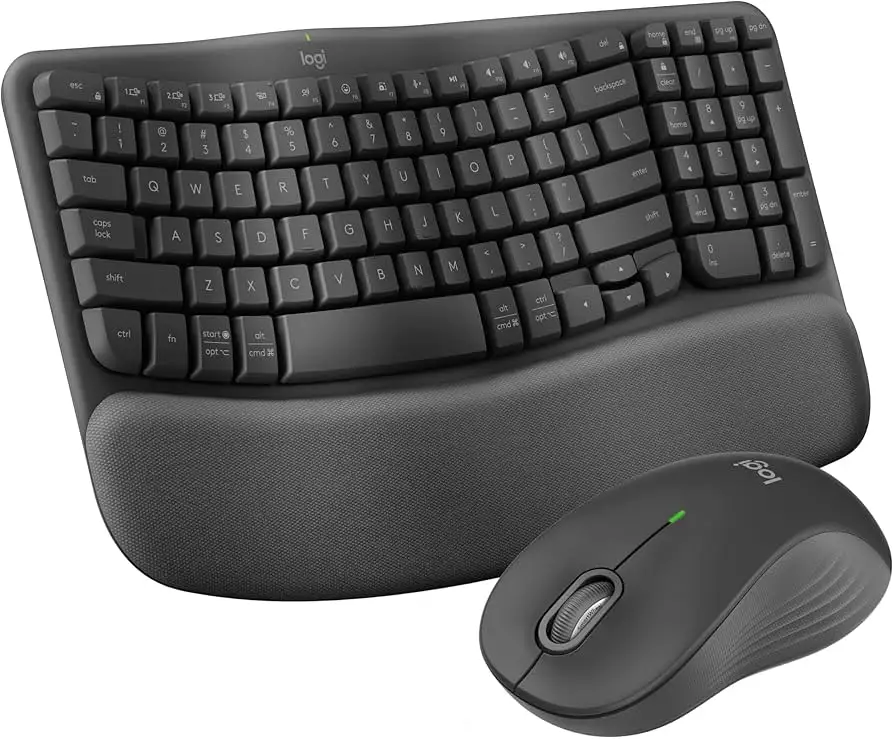
Digging into user experiences, the Logitech Wave Keys MK670 Combo with M550 Mouse earns a solid 8.4/10 across platforms, largely for its comfort-focused design and reliable connectivity. Ergonomic benefits are consistently praised, with many reporting reduced wrist strain and improved typing posture. However, there’s a pattern of complaints about compact key layout quirks, mushy key feel, and occasional mouse connectivity issues. For office workers, writers, and remote professionals, this combo delivers on day‑long comfort, but some power users may find the function key setup and compatibility limitations frustrating.
Quick Verdict: Conditional Buy
| Pros | Cons |
|---|---|
| Cushioned palm rest reduces wrist strain | Compact layout may frustrate users used to full-size keyboards |
| Quiet keys and mouse clicks ideal for shared spaces | Mouse occasionally drops connection for some users |
| Strong wireless connectivity via Bluetooth or Logi Bolt | Function/media key setup requires extra steps for traditional F-key use |
| Multi-device pairing (up to 3) | Not compatible with Logitech Unifying receiver |
| Sustainable design with recycled materials | Mushy key feel not preferred by some typists |
| Long battery life (up to 3 years keyboard, 2 years mouse) | Missing advanced mouse buttons (e.g., side scroll) |
Claims vs Reality
Logitech markets the MK670’s “cushioned palm rest with deep memory foam” as a game‑changer for wrist comfort. Digging deeper into user reports, the comfort claim holds up: A Best Buy reviewer noted, “best keyboard really comfortable. I have hand issues and this is the first keyboard that my hands don’t hurt.” Trustpilot feedback from an accountant echoed, “no more wrist pain!” after switching from a standard keyboard. The palm rest’s vinyl‑like surface also scored points with home users for being easy to clean.
Another major claim is “peaceful connectivity” with long battery life. While many users confirm stable connections — “connection stays strong even at a distance” according to one Best Buy buyer — Staples reviews revealed some cracks. One customer complained, “the mouse will not stay connected… after vacation we realized the problem.” This suggests the connectivity promise mostly delivers, but occasional hardware issues can derail the experience.
Logitech also touts “compact keys with all you need” as a space‑saving feature. While this benefits travelers and those in tight desk setups, some found the layout unintuitive. A Staples reviewer warned, “if you’re used to your home, end, page up, page down, and delete keys being between the main keyboard and the 10‑key, this may not be for you.” The marketing omits that adapting to the compact arrangement can slow productivity for certain workflows.
Cross-Platform Consensus
Universally Praised
Across Amazon, Best Buy, and Reddit, the ergonomic wave design consistently earns praise for improved typing posture. A Trustpilot reviewer described the “wave shape” as making “your hands wrap around the keys and the pad supports your wrists at the exact correct angle.” For office workers in open-plan settings, the quiet operation is a boon — one Best Buy customer highlighted “no pain after 3.5 hours of typing… size fits nicely on desk. Mouse is very responsive.” Multi-device pairing is another standout, with a user noting, “connects with Bluetooth to 3 computers plus the dongle” without lag.
Writers and remote professionals appreciate the tactile yet muted key presses. An Amazon buyer called the typing “buttery smooth… minimizing finger strain even after hours.” The mouse’s silent touch technology is particularly valued in shared environments: “super quiet satisfying click,” said one Best Buy reviewer. The combo’s sustainable materials also resonate with eco-conscious buyers — multiple sources mention the 61% (keyboard) and 65% (mouse) recycled plastic content.
Common Complaints
However, recurring frustrations center on the compact layout and function key configuration. Users who rely heavily on F‑keys or legacy system shortcuts find the “mashed together function keys” (as one Trustpilot user put it) an extra hurdle, requiring the Fn key. The mushy feel of keys is divisive; one Best Buy reviewer said, “they are not ‘clicky’ and make little noise… I prefer better tactile feel.” Mouse limitations crop up too — absence of thumb buttons and side scroll drew disappointment from long-time Logitech mouse fans.
Connectivity issues, while not widespread, are severe when they occur. Staples feedback includes accounts of the mouse disconnecting unpredictably and even one report of the keyboard “crashing my computer when I downloaded its software.” Although many enjoy years of trouble-free use, these outliers suggest occasional hardware or driver instability.
Divisive Features
The compact design splits opinion. For travelers and small-desk users, it’s a win: “perfect size for travel… fits in my backpack,” said a Best Buy customer with arthritis. But for data-entry professionals, the unusual placement of navigation keys is a productivity drag. The quiet, mushy keys likewise divide typists — those who value silence love them, while mechanical keyboard enthusiasts find them unsatisfying. Even the ergonomic curve’s subtlety is debated; some prefer the gentler wave here over more aggressive designs, while others wanted a more pronounced split.
Trust & Reliability
Trustpilot patterns show high satisfaction for comfort and ergonomics but mixed confidence in software stability. Reports of systems stalling or crashing after installing Logitech Options+ indicate the need for cautious setup, especially in enterprise environments. On Reddit, durability stories are encouraging: one user replaced a decade-old K350 with the MK670 and found it “very comfortable to use… key strokes are whisper quiet” with no early wear.
Long-term owners praise the build quality — “keys show no signs of wear even after extensive use,” said an Amazon reviewer — but compatibility limitations with older Logitech receivers (Unifying) are a sticking point for multi-device setups. The absence of indicator LEDs for certain functions (Num Lock, Fn mode) also drew criticism from seasoned users.
Alternatives
Several buyers compared the MK670 to Logitech’s older K350 and MK550 combos. The K350 offers a larger footprint and more pronounced wave, which some prefer for full-size comfort, but sacrifices portability. The MK550 includes a more feature-rich mouse with side buttons, appealing to power users. However, both lack the MK670’s modern aesthetics and sustainable materials. One Best Buy user noted the MK670 is “smaller than the MK710… both mouse and keyboard work great” for multi-device workflows, suggesting it fits better in compact or mobile setups.
Price & Value
Official pricing hovers around $89.99 new, while eBay listings show new units trending between $55–$69, and refurbished as low as $39.95. This resale resilience suggests decent value retention, especially for lightly used models. Community tips include watching for holiday sales at major retailers and considering refurbished units if budget is tight — several users reported “excellent condition” from eBay purchases. Given the long battery life and durable build, the upfront cost is justified for those who’ll use it daily.
FAQ
Q: Can the MK670 connect to multiple devices at once?
A: Yes, it supports pairing with up to three devices via Bluetooth or Logi Bolt, switchable using the F1–F3 keys. Users report seamless switching between desktop, laptop, and tablet.
Q: Is the MK670 compatible with Logitech’s Unifying receiver?
A: No, it uses the Logi Bolt USB receiver. Several buyers noted disappointment when their existing Unifying setups couldn’t integrate the MK670.
Q: How quiet is the keyboard and mouse?
A: Both are designed for low-noise operation. The mouse’s Silent Touch reduces click noise by 90% compared to older models, and users praise the keyboard’s whisper-quiet keys.
Q: Does the keyboard have backlit keys?
A: No backlighting is included. This may be a drawback for early-morning or low-light work, as one home user mentioned preferring illuminated keys.
Q: How is the battery life in real-world use?
A: Many report months without needing a change. The keyboard can last up to 3 years, mouse up to 2 years on included batteries, depending on usage and connection type.
Final Verdict: Buy if you’re an office worker, writer, or remote professional seeking comfort, low noise, and multi-device flexibility in a compact form. Avoid if you need a traditional full-size layout, mechanical key feel, or Unifying receiver compatibility. Pro tip from community: Learn the Fn key shortcuts early to minimize frustration with function/media key switching.