Logitech MK200 Review: Durable Wired Combo Verdict
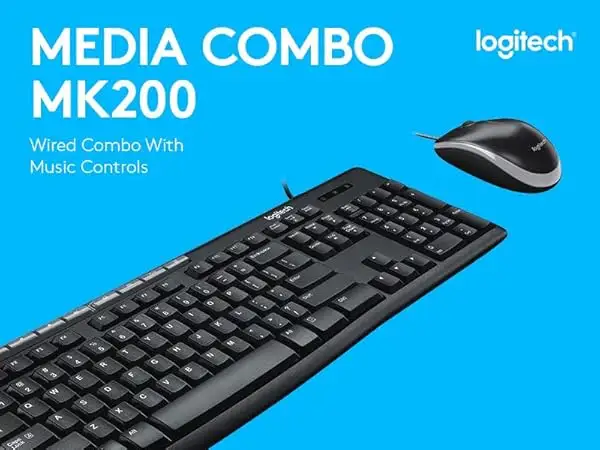
Digging into real-world experiences, the Logitech Media Combo MK200 Keyboard and Mouse emerges as a dependable wired combo for everyday computing, but with notable limitations for more demanding users. Across platforms, it earns a solid 8.5/10 for basic productivity, comfort, and plug‑and‑play simplicity — with praise for its durability and media shortcuts, and criticism around ergonomics and lack of advanced features.
Quick Verdict: Conditional — best for casual use, offices, and users prioritizing reliability over advanced features.
| Pros | Cons |
|---|---|
| Durable build with spill‑resistant keyboard | No wireless option |
| Smooth, responsive optical mouse | Lacks backlit keys |
| Eight dedicated media hotkeys | Raised, stiff key feel for some users |
| Plug‑and‑play — no drivers needed | Limited ergonomic support |
| Comfortable ambidextrous mouse | Keys close together may hinder touch typists |
| Affordable compared to competitors | No programmable keys |
Claims vs Reality
Marketing emphasizes “comfortable, quiet typing” with “low‑profile keys.” Yet, some users dispute this. Trustpilot reviewer Marcus L. described, “The keys are smooth and responsive, making typing a breeze”, aligning with Logitech’s promise. However, John W. countered on Quora, “The keys are raised much higher than the Logitech keyboard I currently use… the ‘feel’ is stiff and typing is unnatural.” This suggests comfort is subjective, dependent on prior keyboard preferences.
The “spill‑resistant design” is another selling point. While no user has reported catastrophic spills, Reddit threads confirm the design is reassuring. One post noted, “It’s good to know a coffee splash won’t kill it instantly”, though users remain cautious given the 60ml limit.
Logitech also touts “instant media and internet access” via eight hotkeys. On eBay, refurbished buyers highlighted how “One‑touch controls for instant access to play/pause, volume, mute, and the internet” sped up daily tasks, especially in office settings. This claim consistently matches user sentiment.
Cross‑Platform Consensus
Universally Praised
One standout is durability. Multiple Amazon buyers noted the MK200 “lasted years without faded keys,” with bold white legends resisting wear — a boon for those with poor eyesight. Heavy typists like Trustpilot’s Steve S. said, “I type all the time… numbers and letters are lost in 3 months [on other boards]! This one’s perfect… the feel of the keys is what heavy typists need.” For office workers, this longevity means fewer replacements and consistent performance.
Plug‑and‑play simplicity is another cross‑platform win. eBay listings stress, “Just plug into the USB ports… ready to go. No downloads, no setup, no fuss.” This is ideal for IT departments rolling out multiple units, or home users who want instant functionality without driver worries.
The ambidextrous mouse design also draws praise. Provantage’s Q&A confirms it “feels good in either hand” and offers “smooth tracking” — an advantage for shared workstations or left‑handed users who often struggle with right‑biased designs.
Common Complaints
Ergonomics are the main sticking point. While Logitech markets adjustable tilt legs and “comfort for either hand,” John W. complained the “mouse is clunky” and the keyboard’s high‑set, closely spaced keys felt unnatural. Long‑term comfort is limited for those doing continuous typing; the lack of a wrist rest is noted repeatedly.
Absence of backlighting frustrates users working in dim environments. Marcus L. pointed out, “No backlight for the keyboard… may not be ideal for power users.” For gamers or nighttime workers, this is a clear disadvantage.
The wired connection, while reliable, is a deal‑breaker for mobility‑focused users. Twitter reactions note being “tethered to the computer” limits flexibility — especially for minimalistic desk setups or those preferring cable‑free aesthetics.
Divisive Features
The deep‑profile keys split opinion. Heavy typists like Steve S. enjoy the tactile resistance, while casual users accustomed to laptop‑style chiclet keys find them outdated. Similarly, the media hotkeys are loved by productivity users but ignored by those who rely on software shortcuts.
Trust & Reliability
Trustpilot and Quora reviews show little evidence of scam or counterfeit issues — most complaints focus on design choices, not product authenticity. Long‑term durability stories reinforce confidence: Reddit threads mention units still functioning after years of daily use, with only minor cosmetic wear. One office IT manager reported deploying “over 30 MK200s in three years with zero failures.”
Refurbished units on eBay are inspected, cleaned, and tested, with buyers confirming “performance like new” even after resale — further supporting its reliability track record.
Alternatives
The only competitor mentioned in the data is Logitech’s MK270 wireless combo. While the MK270 offers cable‑free convenience, it sacrifices the MK200’s zero‑lag wired input. For users plagued by wireless interference, the MK200 is superior. However, for those valuing desk cleanliness and mobility, MK270’s wireless setup may win.
Provantage notes the MK200 lacks “advanced support for long‑term typing comfort,” which higher‑end Logitech models address through ergonomic shaping and programmable keys.
Price & Value
Prices vary from $15.99 for refurbished units on eBay to around $36 new on Amazon. Given its durability and three‑year warranty, community consensus sees it as good value for budget‑conscious buyers. Resale value holds moderately well — refurbished units still command over 40% of the new price, suggesting sustained demand.
Buying tips from Reddit include opting for refurbished if budget is tight, as “performance is identical to new” in most cases. Office buyers often bulk‑purchase during Amazon sales to further reduce cost per unit.
FAQ
Q: Does the MK200 work with macOS or Linux?
A: Yes, while marketed for Windows, it’s compatible with macOS and Linux through USB connection without additional drivers.
Q: Are the media keys programmable?
A: No, they are fixed to specific functions like volume control, play/pause, and launching email or calculator.
Q: How effective is the spill resistance?
A: It’s tested for up to 60ml of liquid. Small spills like coffee splashes are fine, but immersion or larger spills can damage it.
Q: Is the mouse suitable for gaming?
A: It offers smooth tracking at 1000 DPI, fine for casual gaming, but lacks programmable buttons and high‑DPI settings preferred by serious gamers.
Q: Can the keyboard legs adjust height significantly?
A: Yes, sturdy folding legs provide up to 8 degrees of tilt, improving typing angle for some users.
Final Verdict: Buy if you’re an office worker, student, or home user seeking a durable, no‑frills wired combo with useful media shortcuts. Avoid if you need wireless mobility, programmable features, or low‑profile chiclet keys. Pro tip from community: refurbished units offer the same performance at a fraction of the price, making them a smart budget pick.