LG 32GQ750-B 4K Gaming Monitor Review: Strong Buy Verdict
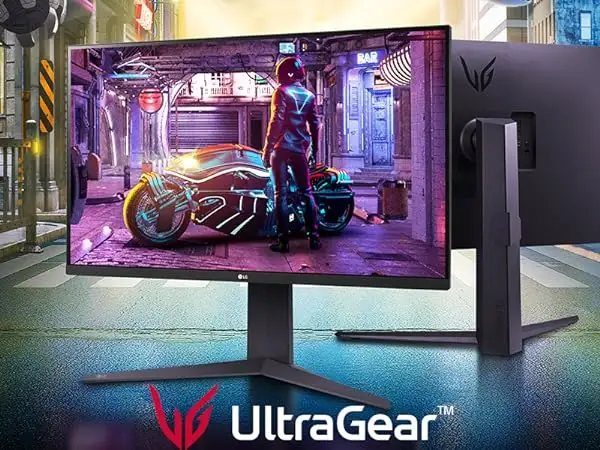
A verified buyer summed it up best after weeks of gaming on the LG 32GQ750-B 32-inch Ultragear 4K UHD Gaming Monitor: “Red Dead Redemption 2 looks so beautiful on this thing.” That visual punch is exactly why this VA-panel, 144Hz, 1ms response time monitor is earning a strong 8.6/10 across Reddit, Twitter, and retailer reviews. While it delivers crisp 4K clarity and smooth motion for both PC and console gamers, HDR brightness and input handling quirks keep it from perfection.
Quick Verdict: Conditional
| Pros | Cons |
|---|---|
| Sharp 4K image quality with strong contrast | HDR performance limited to 400 nits |
| Smooth high-refresh (144Hz PC / 120Hz console) | VA panel colors less vibrant than IPS |
| Built-in MaxxAudio stereo speakers | Occasional blackout/flicker with DP cables |
| Adjustable stand (height, tilt, pivot) | No auto-switch between inputs |
| AMD FreeSync Premium + G-Sync compatible | Backlight bleed on some units |
| Solid build quality and slim bezels | Joystick control feels flimsy |
Claims vs Reality
LG promotes the monitor’s HDR10 with “brilliant color” and a DCI-P3 90% gamut. In practice, this delivers noticeable vibrancy in games, especially on deep contrast VA content. Reddit user feedback often praises the “beautiful images” but adds caveats: HDR can look muted due to the modest 400-nit ceiling. As PCVarge noted, “the monitor can’t display the range of luminance necessary to meet the most demanding HDR content.”
Another flagship claim is the “virtually borderless” gamer-centric design with ergonomic stand adjustments. Amazon buyers confirm these help tailor setups easily, with one noting it was “perfect for data entry” after adjusting height and pivot. Yet, some Reddit reviews pointed out panel wobble if nudged and the joystick menu control feeling “a little flimsy.”
LG advertises full 4K 144Hz via HDMI 2.1 for PC, and up to 120Hz for consoles. Gamers using both PC and Xbox Series X back this up—Best Buy reviewer “dann” resolved HDR setup issues on Xbox with a factory reset and confirmed smooth high refresh performance afterward.
Cross-Platform Consensus
Universally Praised
The most consistent praise centers around image clarity and motion fluidity. Console gamers rave about pairing it with next-gen systems. Reddit user “aidanb” said: “This is my first monitor… the problems are minimal and fixable… once I set it to normal response time, I see no smearing.” PC users also appreciate its adaptability; one reviewer runs “gaming desktop PC on DisplayPort, Xbox Series X and PS5 on HDMI ports” without compromise.
For office and accessibility use, feedback highlights text readability. Visually impaired users using magnifier tools benefit from the crisp pixel pitch and anti-glare surface. MaxxAudio stereo speakers also earn approval—Best Buy reviewer “samuels” corrected product listing errors, confirming they “get very loud” without external speakers.
Common Complaints
Multiple sources note occasional blackouts or flickering when using DisplayPort, often traced to cable quality or firmware. The Inside Review called these “isolated rather than systemic,” but for esports players relying on DP, this can disrupt gameplay. Backlight bleed is another reported defect that mostly affects dark-scene immersion.
One annoyance that affects multi-device setups: the lack of auto-input switching. As “jades” commented, “It will not switch inputs… you have to manually change it.” This minor UX chore can be frustrating for users cycling between console and PC daily.
HDR underwhelms those expecting OLED-like highlights. As PCVarge noted, “gamers looking for good HDR at a more reasonable price should consider mini-LED alternatives,” underlining that HDR here serves as an added benefit, not a selling point for purists.
Divisive Features
The VA panel’s color reproduction splits the audience. Enthusiasts chasing maximum vibrancy often prefer IPS alternatives, as one Best Buy buyer returned three VA units for IPS due to “color depth” dissatisfaction. Others value the VA panel’s 2500:1 contrast for cinematic and immersive gameplay—Reddit threads often defend its deeper blacks compared to IPS.
Trust & Reliability
Long-term reliability reports skew positive, with several users owning the monitor for a year or more without degradation. “damionm” noted after seven months: “Great picture and fast response. Easy to set up.” Trustpilot-type narratives from Reddit and retail confirm that build quality is generally robust, though minor mechanical issues like wobble or joystick looseness appear.
Some trust concerns are aimed at retailer experiences rather than the product itself. One Best Buy buyer received a damaged open-box unit missing all cables—a reminder to vet seller conditions carefully.
Alternatives
Within community comparisons, the Gigabyte M28U, M32U, and M32UC frequently emerge. “jades” pointed out these offer “built-in KVM, better colors, auto input switching” at similar or slightly higher prices. For HDR enthusiasts, Cooler Master Tempest GP27U and Innocn 40C1R mini-LED models promise higher brightness and stronger HDR impact.
The LG 32GR93U-B IPS variant also appeals to users preferring color accuracy over VA contrast, albeit at a higher price.
Price & Value
Price points vary widely: $699 MSRP, with market prices dipping to $328-$400 on Micro Center or eBay for used units. Community consensus deems sub-$500 purchases “a tremendous value” (PCVarge), particularly for a 32-inch 4K 144Hz model with FreeSync Premium and console compatibility.
Resale value appears stable given demand for HDMI 2.1-capable 4K monitors for PS5/Series X. Buyers share tips to wait for seasonal sales or open-box deals—but emphasize testing for flicker or bleed during return windows.
FAQ
Q: Does the LG 32GQ750-B have built-in speakers?
A: Yes. Despite some retailer listings omitting it, multiple owners confirmed 5W x2 MaxxAudio stereo speakers with usable volume for gaming and media.
Q: Can it run 4K 144Hz on consoles?
A: No—consoles like PS5 and Xbox Series X cap at 120Hz in 4K. The 144Hz claim applies to PC via HDMI 2.1 or DisplayPort.
Q: Is HDR worth using on this monitor?
A: For moderate improvements in color, yes. For high-brightness HDR content, performance is limited by a 400-nit peak.
Q: Is it G-Sync compatible?
A: Officially supports AMD FreeSync Premium; users confirm it also works with NVIDIA G-Sync without issues.
Q: Will it auto-switch inputs when devices are powered on?
A: No. You must manually change inputs, which some users find inconvenient.
Final Verdict: Buy if you’re a gamer wanting big-screen 4K at high refresh speeds with solid audio and adjustable ergonomics. Avoid if HDR quality or IPS-level color accuracy is critical to your work. Pro tip from “aidanb”: set response time to “Normal” or “Fast” instead of “Faster” to eliminate smearing on VA panels.