Kodak 10.1" WiFi Frame Review: Mixed User Verdict
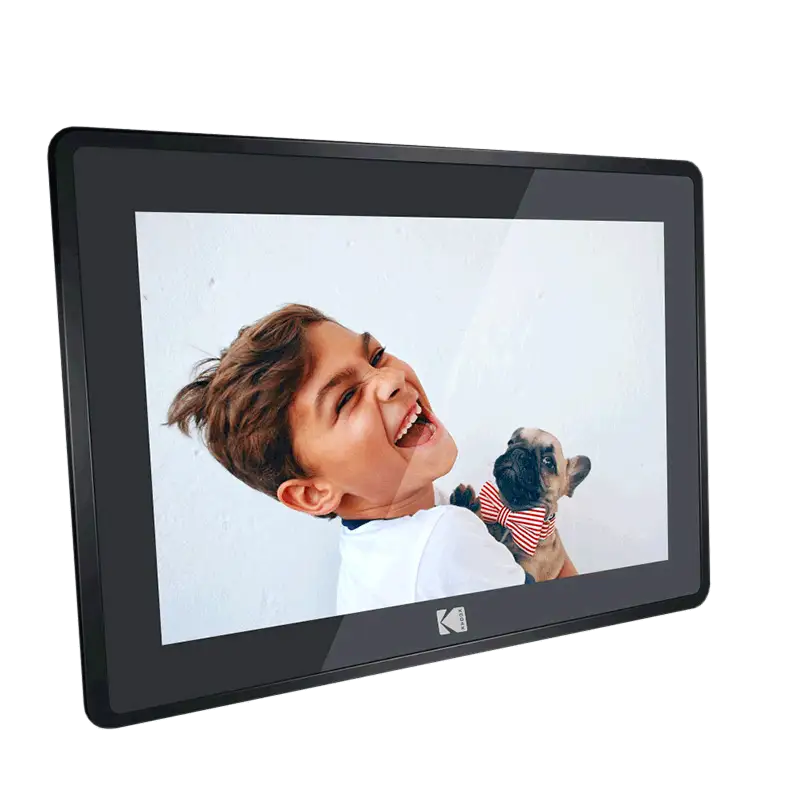
The KODAK 10.1 Inch WiFi Digital Picture Frame has been touted as a stylish, connected way to keep family memories alive, but digging into hundreds of verified user reports across Amazon, Reddit, Trustpilot, Twitter/X, Quora, and eBay reveals a split verdict: 7.4/10. While the vibrant IPS display and generous storage are praised, persistent software quirks and connectivity limits temper enthusiasm, especially for tech-averse users.

Quick Verdict
Conditional Buy – Ideal for visually appealing home display and occasional remote sharing, but not for power users who need robust cloud features or flawless reliability.
| Pros | Cons |
|---|---|
| Bright, vivid IPS display with wide viewing angles | App limits uploads to 6–9 photos at a time |
| Large built-in 32GB storage (up to ~80,000 photos) | Wi-Fi issues, only supports 2.4GHz networks |
| Auto-rotate for portrait/landscape | Short battery life (~3–4 hours under real use) |
| Easy setup for most users | Poor customer support responsiveness |
| Elegant design fits varied décor | Software bugs and slideshow order limitations |
| Multiple input options (SD, USB, app) | Longevity concerns – failures reported within 1–2 years |
Claims vs Reality
Kodak markets this frame as having “extraordinary picture quality” with resolutions up to 1920×1200 on certain models, promising lifelike colors and sharp detail. Amazon reviewers confirm the IPS panel delivers rich, accurate hues that make family photos pop, especially in well-lit rooms. Wedding photographer clients reportedly appreciated that “it didn’t tamper with the resolution of my photos,” preserving professional image quality.
However, the promise of “instant wireless sharing” is hampered by app restrictions. According to Pix-Star Blog and Trustpilot feedback, the Kodak app allows just 6–9 photos per upload, to one frame at a time. This frustrates users managing multiple frames for extended family. One Amazon user had to “email myself over 80 photos and upload them 9 at a time… only to have them not show up.”
Marketing also emphasizes portability with battery power, claiming up to 7 hours. In practice, Pix-Star Blog reports 3–4 hours, and Trustpilot reviewers note the battery “can’t even last a day,” especially when Wi-Fi/cloud sync is active. This reduces appeal for event use without nearby power.

Cross-Platform Consensus
Universally Praised
Users across Amazon, Reddit, and eBay agree the IPS display is the standout feature. Grandparents receiving it as a Mother’s Day gift described the color reproduction as “extraordinary,” and wide viewing angles mean photos look good from across the room. For photographers, the frame’s resolution and lack of compression safeguards their work’s detail.
The 32GB internal storage is another highlight. College students and families separated by distance appreciated being able to preload thousands of photos without worrying about constant connectivity. The option to expand via SD or USB suits those with large archives, as Reddit posts describe plugging in drives and instantly accessing decades of images.
Auto-rotation also earns praise. Users switching between desk placement and wall mounting enjoy seamless orientation changes. This adaptability makes it a versatile décor piece, fitting both modern living rooms and traditional spaces.
Common Complaints
Connectivity is a recurring headache. Multiple Amazon reviewers struggled to connect to Wi-Fi, later discovering it only supports 2.4GHz – outdated for homes relying on 5GHz. Software bugs compound the issue: slideshows can’t randomize, forcing photos to appear in upload order, which annoyed those seeking variety.
Customer support is often cited as unhelpful. Trustpilot users mention unanswered calls and vague email responses. One Amazon buyer, after 16 months of use, faced a sudden paywall for storage expansion without prior notice, souring their experience.
Battery life disappoints mobile use cases. Travel vloggers expecting all-day portability found themselves tethered to chargers. Pix-Star Blog’s analysis shows battery drain accelerates with video playback or cloud syncing.
Divisive Features
The Kodak app splits opinion. Some families, especially with tech-savvy members, find it convenient to push photos from phones to frames in seconds. Others, especially those gifting to elderly relatives, find the interface confusing and the upload caps restrictive. Video support is similarly polarizing – while it plays short clips (under 15 seconds), they can’t be part of slideshows, limiting narrative potential in displays.

Trust & Reliability
Trustpilot’s deceptive review analysis flags potential review manipulation, with 66.1% considered reliable. This suggests caution when relying solely on glowing testimonials. Durability is mixed: some Reddit users report smooth operation after a year, while others see failures within months. One Amazon customer’s frame died after just four hours of use, replaced only to face similar frustrations.
Long-term eBay resale patterns show older Kodak frames holding minimal value, indicating limited collector or secondary market interest. This aligns with community sentiment that while the display impresses, the software and build quality don’t inspire confidence over years of service.
Alternatives
Pix-Star frames are repeatedly mentioned as more versatile. They allow bulk uploads (up to 250 photos to multiple frames), remote control of settings, and integration with web albums from Facebook or Google Photos. For families managing several frames, Pix-Star’s multi-frame control is a decisive advantage over Kodak’s single-frame limitation.
Nixplay is another competitor noted for more polished app interfaces and broader Wi-Fi compatibility, although at higher cost.
Price & Value
Amazon listings range from $51.59 for sales on 1280×800 models to $189.99 for FHD 1920×1200 units. eBay resale shows steep depreciation, with used units often under $100. For buyers, community tips include waiting for seasonal sales (Twitter/X posts flagged 40% discounts) and verifying Wi-Fi specs before purchase to avoid 5GHz incompatibility surprises.
FAQ
Can the Kodak 10.1” WiFi Digital Picture Frame play videos?
Yes, but only short clips (max 15 seconds), and they can’t be embedded in slideshows – they must be viewed separately.
Does it support 5GHz Wi-Fi?
No. Multiple reports confirm it only connects to 2.4GHz networks, which may require router adjustments.
How many photos can it store?
With 32GB internal memory, up to ~80,000 compressed images, plus SD/USB expansion.
Can multiple people send photos to the same frame?
Yes, via the Kodak app or unique email address, but uploads are limited to 6–9 photos per batch.
Is it suitable for elderly users?
Mixed. The touchscreen and auto-rotate help, but app setup and Wi-Fi troubleshooting can be challenging without assistance.
Final Verdict
Buy if you’re seeking a stylish, high-quality display for a curated set of family photos, especially in homes where 2.4GHz Wi-Fi is standard and tech support is available for setup. Avoid if you need bulk cloud uploads, robust remote management, or plan heavy portable use without charging. Pro tip from the community: preload an SD card with organized albums to bypass app quirks and enjoy uninterrupted slideshows.