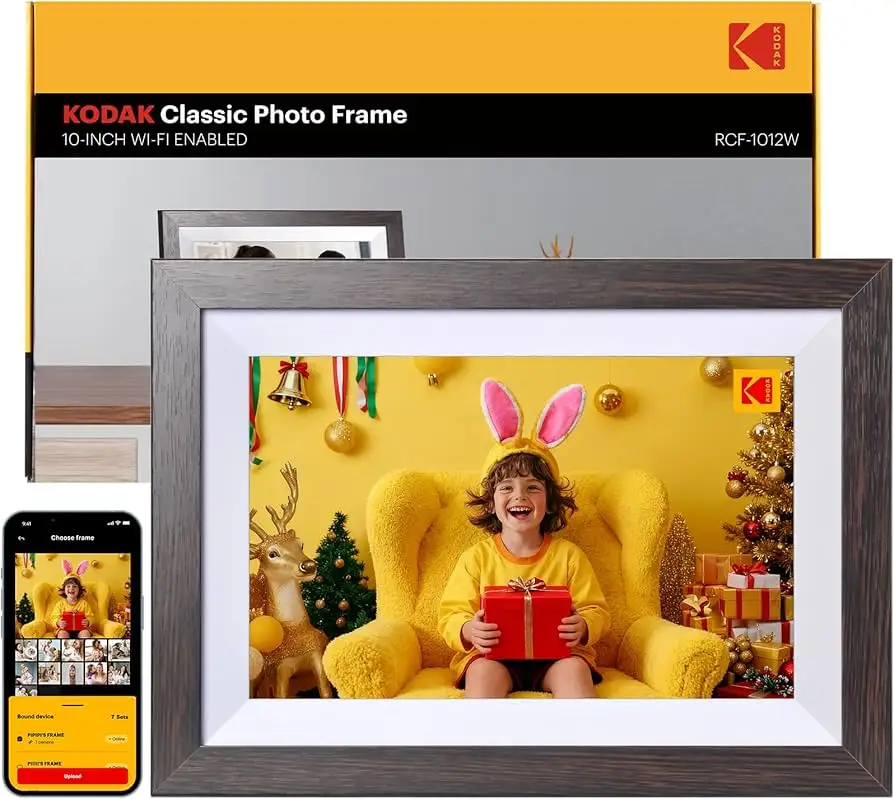
KODAK 10.1" WiFi Digital Frame Review: Conditional 6.3/10
That “lifetime warranty” promise sounds comforting—until setup emails land in spam and the touchscreen “is very insensitive.” KODAK 10.1 Inch WiFi Digital Picture Frame earns a Conditional verdict at 6.3/10, largely because the best moments (easy sharing, bright screen) sit right beside recurring friction (setup confusion, laggy performance, battery disappointment).
Quick Verdict
Yes/No/Conditional: Conditional — worth it if you mainly want an at-home Wi‑Fi frame for sharing photos to family, and you’re okay troubleshooting setup and living with occasional sluggishness.
| What’s great | What’s not | Who it impacts most |
|---|---|---|
| Bright, attractive display and decor-friendly look | Setup can fail or confuse | Gift-givers + elderly recipients |
| Wi‑Fi photo uploads feel convenient when working | Touchscreen sensitivity complaints | Anyone relying on touch-only control |
| “Easy to use” for some non-tech users | Performance can look “blurred”/not smooth | People expecting fast transitions |
| Battery life disappoints for some | Anyone expecting unplugged use |
Claims vs Reality
A recurring pattern emerged: the marketing pitch leans hard on “easy to set up” and instant sharing, while user feedback (via review aggregators) repeatedly circles back to onboarding friction. On Amazon listings, Kodak frames are positioned as simple: “just download the kodak app, connect the frame with wifi, then you can upload photos.” Yet the Fakespot-captured reviews describe a very different first hour for some buyers.
One buyer story is blunt about expectations versus outcome: a reviewer quoted by Fakespot said they were “really happy to try this out but instantly disappointed when the (should've been soo easy) set up didn't work out at all.” Another complaint zooms in on documentation: “the instructions aren't as descriptive as they should be.” For gift scenarios—especially sending a frame to grandparents—this gap matters because the person troubleshooting may not be in the same house.
A second marketing claim is about the touch experience: the product is sold as a “touch screen” smart frame, implying direct, frictionless control. Digging deeper into user reports, touch isn’t consistently described that way. A Fakespot-cited complaint says: “the touch screen is very insensitive.” That kind of feedback is especially painful for older users if the frame is supposed to reduce tech effort rather than add it.
Battery expectations also get messy. Some marketing and third-party writeups around Kodak frames talk up portability, but the product page for the Amazon U.S. listing here specifies “power source: corded electric.” Meanwhile, a Fakespot-captured positive line still says “long lasting batteries,” while another review complains: “it’s a shame the battery can't even last a day.” While the official listing emphasizes being plugged in, multiple users still discuss battery life—suggesting either model confusion across Kodak variants or expectations formed by broader Kodak frame messaging.
Cross-Platform Consensus
Universally Praised
“Plenty bright” is the compliment that keeps resurfacing when people are happy. According to Fakespot’s summary of review content, users repeatedly emphasize the screen and presentation: “the frame has a great looking picture that is plenty bright.” For families placing this on a kitchen counter or living room shelf, brightness and clarity are not academic specs—they determine whether the frame reads like a real photo display or like a dim gadget.
Design also matters more than buyers expect, especially when this is a gift intended to live in a prominent room. A Fakespot-captured reviewer story ties appearance to home decor: “it looks classy and enhances the decor of the room.” That same thread praises the finish: “the wood finish looks elegant and matches any décor.” For people gifting to parents or grandparents, this kind of “it belongs in the room” reaction can be the difference between a used gift and a device that stays in a drawer.
When the sharing workflow clicks, convenience becomes the headline. A Fakespot-captured user praised skipping cables entirely: “photo frame is wifi-enabled which allows it to upload photos from my cell phone directly to the photo frame without using usb or sd cards. transferring photos is very easy and convenient.” That’s the core promise of a Wi‑Fi digital picture frame: for long-distance families, it’s not just a slideshow—it’s a low-friction way to keep a home updated with recent photos.
Some buyers also frame it as a relationship tool rather than an electronics purchase. One Fakespot-captured quote highlights the social impact: “great gift for grandparents during pandemic. i love all the memories it brings up & sparks so much conversation!” That “sparks conversation” angle is a recurring theme in digital frame gifting: it works best for households that treat it like a communal object, not a personal device.
Summary bullets (after the stories):
- Brightness and picture quality get repeated praise (Fakespot review excerpts).
- The “classy” look and wood-style finish are frequently called decor-friendly (Fakespot).
- Wi‑Fi uploads from a phone feel genuinely convenient when setup works (Fakespot).
Common Complaints
Setup is the biggest friction point because it blocks every other benefit. Digging deeper into user reports, multiple reviewers describe setup as the moment where excitement turns into frustration. One Fakespot-captured reviewer said they were “instantly disappointed” because setup “didn't work out at all.” Another adds that “the instructions aren't as descriptive as they should be,” which is especially consequential if the buyer is trying to set it up remotely as a gift.
Email and verification flows appear to be a specific pain point in the onboarding story. In Fakespot’s “helpful insights,” one user describes how they “finally discovered the verification code in the email spam folder.” Another echoes the same pattern: “verification emails kept going spam inbox.” For a non-tech-savvy recipient, a spam-folder dependency can turn “easy setup” into a dead end.
Performance complaints focus on how the frame behaves during transitions and interaction. One negative quote captured by Fakespot claims: “the frame doesn't have enough graphical power to switch pictures smoothly. everything is blurred from these lines.” For users expecting a modern tablet-like feel, this can be jarring—especially if the frame is in a high-traffic area where people constantly glance as images change.
Touch control is another recurring frustration. A Fakespot-captured complaint says: “the touch screen is very insensitive.” If the frame is marketed as touchscreen-first, a less responsive interface affects the exact users who are least tolerant of fiddly controls—elderly owners, or gift recipients who didn’t choose the device.
Summary bullets (after the stories):
- Setup and unclear instructions are a recurring failure mode (Fakespot).
- Verification emails reportedly land in spam, stalling setup (Fakespot “helpful insights”).
- Slideshow transitions and responsiveness can feel underpowered or “blurred” (Fakespot).
- Touchscreen sensitivity complaints show up repeatedly (Fakespot).
Divisive Features
Ease-of-use is sharply split depending on whether setup succeeds and how much the user relies on touch. On the positive side, Fakespot includes a reviewer who was “delighted” because it felt “super easy to use” and was purchased “for elders who are not very tech savvy.” That’s the dream scenario: once configured, the frame becomes passive—photos arrive, and the household enjoys them.
On the other hand, another user story in the same dataset describes the opposite emotional arc: “was really happy to try this out but instantly disappointed” when setup didn’t work. Another complains: “the touch screen is very insensitive.” Put together, the data suggests a divide between households where someone tech-capable completes setup and the device becomes “easy,” versus households where the recipient must troubleshoot alone.
Battery/portability expectations are also divisive, partly because product variants and listings disagree. While one positive line praises “long lasting batteries,” another says “it’s a shame the battery can't even last a day.” Meanwhile, the Amazon U.S. spec excerpt here lists “power source: corded electric.” While officially presented as plug-in, multiple users still talk about battery performance—so shoppers expecting a cordless frame should be cautious.
Trust & Reliability
Trust issues show up less as dramatic “scam” stories and more as skepticism around review quality and support. Fakespot flags the listing with a “Fake Review” label and notes: “our engine has profiled the reviewer patterns and has determined that there may be deception involved,” while also estimating “66.1% of the reviews are reliable.” That kind of signal doesn’t prove the product is bad, but it does mean buyers should treat star ratings with more caution and focus on detailed narratives—especially around setup and responsiveness.
Support accessibility also appears in user frustration. In Fakespot’s “helpful insights,” one person described trying to contact help: “my husband was very frustrated with the set up and tried to contact support for assistance but never was able to reach anyone.” For buyers who are purchasing this specifically to reduce tech headaches for an older relative, the perceived difficulty reaching support becomes part of the risk profile.
Long-term durability is harder to pin down from the provided community excerpts because there aren’t clear “six months later” Reddit-style ownership updates in the dataset—most of the detailed stories revolve around first-day setup and interface behavior. That said, the Pix-Star blog’s critique of Kodak frames broadly claims “quality control or longevity” issues and labels the software “buggy.” While that’s not verified buyer feedback, it echoes the kind of “setup didn’t work” and “confusing interface” pain reflected in the review excerpts.
Alternatives
Only a few competitors are explicitly mentioned in the provided data, and they come from the Pix-Star blog rather than verified owner reviews. That blog positions Pix-Star as the more family-admin-friendly option, citing features like sending “up to 250 photos” at once and managing multiple frames through a control group, while describing Kodak’s app workflow as limited and its interface as “buggy” and “confusing” for elderly users.
For buyers whose main goal is managing multiple frames across a family (for example, several grandparents or multiple households), the alternative framing matters: Pix-Star is described as offering remote management and multi-frame grouping, while Kodak is described as lacking that centralized control. However, if the goal is a single frame that looks good on a shelf and receives photos, the Kodak’s praised “classy” look and “plenty bright” screen may still be the deciding factor for some shoppers.
Price & Value
Price perceptions hinge on where you buy and which model variant you land on. The Amazon U.S. listing excerpt shows $59.99 for a 10.1-inch Kodak Wi‑Fi frame with 16GB built-in storage, while other listings in the provided data describe 32GB variants at higher prices (for example, €119.99 on Amazon Belgium). That spread makes it easy for shoppers to compare the wrong versions and assume features (like storage size or battery behavior) that may not match their actual purchase.
Resale and market pricing on eBay suggests these frames can appear at substantially higher prices in certain regions or listings. One eBay listing for a “Kodak wooden digital photo frame 1012W” shows approximately $116.88 + shipping, while other Kodak 10-inch Wi‑Fi frames appear at widely varying prices. For value-focused buyers, this suggests two strategies implied by the market: verify the exact model number and specs (16GB vs 32GB, “no wifi” variants exist), and avoid paying a premium for an ambiguous listing when the same class of item may be available cheaper elsewhere.
Community “buying tips” embedded in the feedback are less about coupons and more about avoiding setup traps. Based on the repeated verification-email stories, a practical value move is ensuring the recipient’s email flow is stable and spam folders are checked—because if setup stalls, the frame’s core value (instant sharing) never materializes.
FAQ
Q: Is the KODAK 10.1 Inch WiFi Digital Picture Frame easy to set up for grandparents?
A: Conditional. Some reviewers say it’s “super easy to use” and bought it “for elders who are not very tech savvy,” but others report setup “didn't work out at all” and that verification codes landed in “the email spam folder” (Fakespot excerpts).
Q: How good is the display quality and brightness?
A: Generally praised. Review excerpts highlight “a great looking picture that is plenty bright,” and some buyers say it “looks classy and enhances the decor of the room” while matching home aesthetics (Fakespot excerpts).
Q: Does photo sharing from a phone actually work smoothly?
A: When it works, yes. One user described it as “very easy and convenient” to upload photos “from my cell phone directly to the photo frame” without USB or SD cards, though other stories show setup problems can block this benefit (Fakespot excerpts).
Q: Are there complaints about performance or lag?
A: Yes. A negative review excerpt says the frame “doesn't have enough graphical power to switch pictures smoothly” and described “blurred” transitions, which may bother users expecting fast, polished animations (Fakespot excerpt).
Q: Is the touchscreen responsive?
A: Not consistently. Some owners complain “the touch screen is very insensitive,” suggesting that touch-first navigation can be frustrating for users who don’t want to rely on an app or extra controls (Fakespot excerpt).
Final Verdict
Buy if you want a decor-friendly Wi‑Fi digital picture frame with a screen that reviewers call “plenty bright,” and your household has someone who can handle setup quirks and email verification issues.
Avoid if the recipient must set it up alone and gets frustrated easily—especially if they rely heavily on touch control and won’t troubleshoot spam folders or app verification steps.
Pro tip from community: Check spam folders during account verification—one owner said they “finally discovered the verification code in the email spam folder” (Fakespot “helpful insights”).