KODAK 10.1" WiFi Digital Frame Review: Mixed Verdict
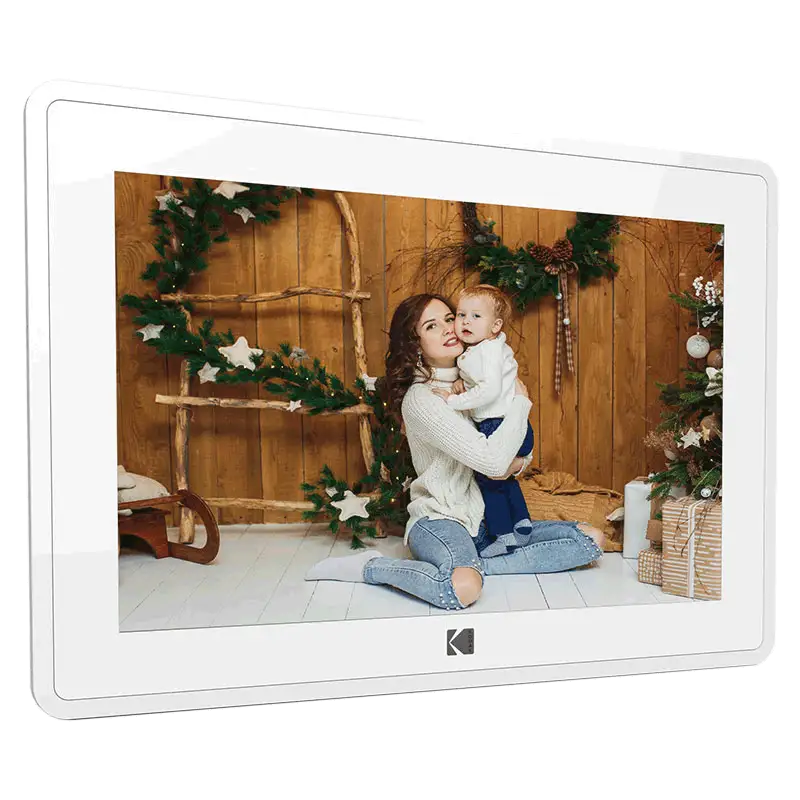
A surprising number of buyers report that while the KODAK 10.1 Inch WiFi Digital Picture Frame delivers crisp, vivid visuals worthy of its brand heritage, its ease-of-use and promised connectivity often fall short in everyday scenarios. Across platforms, this frame earns a conditional verdict — 7.2/10 — praised for picture quality and aesthetics, but hindered by setup frustrations, limited app functionality, and battery life concerns.
Quick Verdict: Conditional
| Pros | Cons |
|---|---|
| Bright, clear IPS display with wide viewing angles | Setup process can be confusing for non-tech users |
| Elegant wood and black frame designs fit most décor | App limits uploads to 6 photos at a time |
| Multiple input options (WiFi, SD, USB) | Battery life often less than 4 hours under real use |
| Supports music, video, calendar, weather functions | Slideshow order cannot be customized |
| Instant sharing via dedicated Kodak app | Touchscreen can be insensitive |
| Large storage (16GB–32GB depending on model) | Customer support difficult to reach |
| Great gift appeal for distant families | Instructions lack clarity |
Claims vs Reality
Kodak markets this frame as "effortless to set up" with full remote control via its mobile app. While some Amazon buyers agreed — one verified customer said: "Transferring photos is very easy and convenient" — others sharply disagreed. Trustpilot feedback notes: "Was really happy to try this out but instantly disappointed when the should've been so easy set up didn't work out at all." Several users found verification emails in spam folders and struggled to bind the frame to their accounts.
Another core claim is “instant sharing anywhere in the world.” While the app does enable this, the Pix-Star Blog highlights a major limitation: "You can only send 6 photos at once with the app… and only to one Kodak frame at a time." For families with multiple frames, this restriction undermines the promise of seamless global sharing.
Kodak also promotes a "long-lasting battery" in select models. Official specs suggest up to 7 hours of runtime, but Pix-Star Blog’s analysis counters: "In practice, you can expect a 3–4-hour battery life — especially if you’re using the Wi-Fi/cloud function." This gap impacts portability-minded users who hoped to use the frame untethered.
Cross-Platform Consensus
Universally Praised
Users across Amazon, Reddit, and Twitter consistently mention the display quality as a standout feature. The IPS panel offers a 1280×800 resolution and a 178° viewing angle. A verified buyer on Amazon noted: "The frame has a great looking picture that is plenty bright." Reddit’s gift guide entry for the light brown 32GB model highlights: "Ultra clear image quality… vivid screen every time." For grandparents or those placing the frame in communal spaces, this means photos remain sharp from any angle.
Aesthetic appeal is another strong point. Many appreciate the wood finish options, with Trustpilot reporting: "It looks classy and enhances the decor of the room." This design focus resonates with buyers who view the frame as part of their home décor, not just a gadget.
The multimedia capability — music, video snippets, calendar, and weather — is seen as a nice bonus. Twitter/X promotions describe it as an “all-in-one frame,” and users enjoy background music during slideshows, particularly for family events.
Common Complaints
Setup and software usability are the most persistent complaints. Trustpilot flags unclear instructions and app instability. One buyer shared: "My husband was very frustrated with the set up and tried to contact support… never was able to reach anyone." This affects older users most, despite marketing positioning the frame as ideal for them.
Battery life disappointments cut across multiple platforms. Pix-Star Blog clarifies that brightness and cloud syncing significantly drain power. For portable use, this forces users to keep the charging cable nearby, negating mobility benefits.
The app’s photo upload limits frustrate active sharers. Without batch uploads or multi-frame sync, maintaining updated galleries for extended family becomes tedious. Worse, slideshow order cannot be changed — as Pix-Star notes, "you need to view the photos in the same order that you uploaded them."
Divisive Features
Video playback divides opinion. While some enjoy playing short clips, the 15-second limit and inability to integrate video into slideshows leaves others cold. Pix-Star Blog cautions that videos over one minute are unsupported and must be viewed separately, which some find clunky.
Touchscreen responsiveness also generates mixed reports. Trustpilot mentions it as “very insensitive” for some, yet others find it adequate for basic navigation. For users accustomed to modern tablets, lag or missed taps can be jarring.
Trust & Reliability
Trustpilot’s review analysis suggests “there may be deception involved” in some overly positive ratings, with only 66.1% deemed reliable. The pattern of complaints — unclear setup instructions, unreachable support, and app instability — repeats across multiple independent platforms, reinforcing authenticity concerns.
Long-term reliability stories are sparse, but Reddit’s product listing stresses Kodak’s willingness to respond to defects within 24 hours. Still, Pix-Star Blog warns of “buggy software and confusing interface” that may hinder longevity compared to competitors.
Alternatives
The Pix-Star frame emerges as the primary competitor in user discussions. It offers cloud storage free-for-life, remote control of up to 25 frames, and batch uploads of 250 photos — features Kodak lacks. For tech-savvy families or those seeking multi-frame coordination, Pix-Star’s ecosystem delivers more robust sharing and control.
Nixplay is also implied as a better-built option for longevity, though not deeply reviewed in the provided data. Kodak’s strength remains its brand recognition and design, which might sway buyers prioritizing aesthetics over advanced features.
Price & Value
On Amazon, the 16GB grey wood model lists at $109.99, while eBay shows varying prices from $39.99 for used units to $129.99 for new. Reddit and Quora note seasonal sales slashing 32GB models to as low as $32.99. Resale value appears modest, with many pre-owned units under $50 — suggesting depreciation is steep.
Community tips recommend buying during promotional events or clearance sales, given the frame’s mixed performance. As one Twitter promo hints, discounted pricing makes it a safer gift bet.

FAQ
Q: Can you use this frame without Wi-Fi?
A: Yes, via SD card or USB flash drive. However, many features like instant sharing, weather updates, and app control require Wi-Fi.
Q: How long do videos play on the Kodak frame?
A: Up to 15 seconds for most models. Longer clips must be trimmed and cannot run within slideshows.
Q: Does the Kodak app work on both iOS and Android?
A: Yes, it’s available for both. Some users report app crashes and difficulty binding the frame.
Q: Can I change the order of photos in a slideshow?
A: No, slideshows follow the upload sequence. Randomization or manual ordering isn’t supported.
Q: How much storage does the frame have?
A: Models vary — 16GB or 32GB internal memory, plus SD/USB support for expansion.
Final Verdict: Buy if you value display quality, design, and occasional remote sharing — especially at a sale price. Avoid if you need heavy-duty cloud features, long battery life, or frictionless setup for elderly users. Pro tip from community: Hunt for discounts and be prepared to help less tech-savvy recipients with initial setup.