HP Sprocket Studio Plus Review: Great Prints, Fussy Setup
“Great photo’s but not easy to get there.” That single Best Buy line captures the dominant tension around the HP Sprocket Studio Plus 4x6" Wireless Instant Photo Printer: users rave about the output, then warn you to budget patience for pairing and cropping. Verdict: Conditional buy for phone-first printing and scrapbooking fun — 8/10.
Quick Verdict
Conditional
| What user feedback highlights | Pros (with source) | Cons (with source) |
|---|---|---|
| Print quality vs drugstore | “Almost as crisp as having them printed at the drugstore” (Best Buy) | “Prints may not be as crisp as professional-grade prints” (PrinterOptions.com) |
| Setup experience | “Much easier to set up… it works like a charm” (Best Buy) | “Spent over an hour to get the printer to see my devices” (Best Buy) |
| Phone-centric workflow | “All you need is your cell phone” (Best Buy) | “Only uses iOS and Android… no Windows or macOS drivers” (Liangxintiyu.com review) |
| Physical size | “Doesn’t take up much room on your desk” (Best Buy) | Paper needs space behind printer during passes (KnowTechie review) |
| Cropping/edges | “Nice color quality” (Best Buy) | “I lose part of the side image with each print” (Best Buy) |
Claims vs Reality
HP’s marketing leans hard on “simple operation” and “wi‑fi enabled,” and some owners agree. Best Buy reviewer Ericm said: “Much easier to set up… no complications no registration… it works like a charm.” For buyers who want a printer that behaves more like an appliance than a hobby, that kind of “works out of the box” story is the ideal.
Digging deeper into user reports, the setup claim isn’t universally experienced. Best Buy reviewer Tigert described pairing as “a bear and a half,” adding: “I probably spent over an hour to get the printer to see my devices.” Another Best Buy reviewer, Vitani pj, reported spending “about an hour trying to connect… via wifi (bluetooth i gave up on),” then offered a workaround: connecting their phone to a 2.4 GHz band first.
HP also sells “borderless” and “picture-perfect” output, yet multiple owners talk about small but meaningful framing losses. Best Buy reviewer Chinmayj noted: “Super tiny edge doesn’t print,” and Tigert warned: “The photo’s may not print exact, I lose part of the side image with each print.” For scrapbookers or anyone printing carefully composed portraits, that turns “instant lab-quality” into a learning curve.
Finally, portability and power claims get muddy. The Amazon specs explicitly state: “The hp sprocket studio plus does not come with a rechargeable battery… connect… using the ac adapter.” Yet Amazon’s feature text also suggests you can “go wireless.” User feedback in the provided data focuses on desk use and Wi‑Fi/phone convenience rather than truly battery-powered printing, so buyers expecting a take-anywhere, no-cord experience may feel misled by the marketing language.
Cross-Platform Consensus
Universally Praised
A recurring pattern emerged across retailer reviews and long-form writeups: when it finally prints, people like what comes out. Best Buy reviewer Teresa framed it emotionally and practically, calling the printer a way of “creating tangible memories,” and adding: “Pictures clear and the quality high… used at least twice a week.” For families building albums or grandparents curating photos, that frequency suggests it becomes a routine, not a novelty.
Several reviewers anchor their praise to “drugstore-quality” expectations—high praise for a phone-driven dye-sub printer. Best Buy reviewer Chinmayj said: “Almost as crisp as having them printed at the drugstore… nice color quality.” Another Best Buy reviewer, Tivo user, described specifically shopping for dye sublimation and landing on this model: “I wanted dye sublimination in a small package… it’s definitely a great lab quality… affordable!”
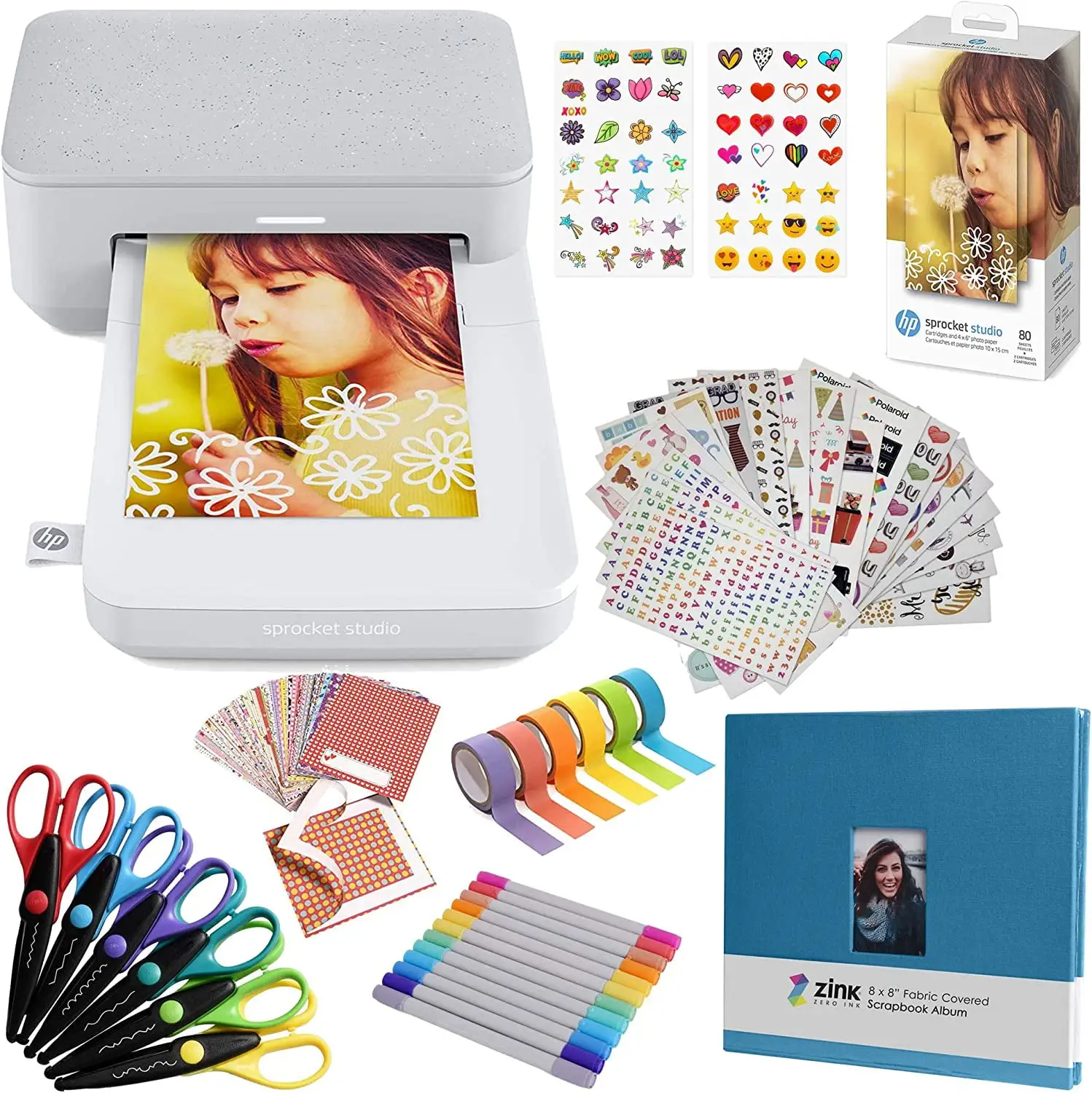
The app’s creative tooling also gets consistent love from people who enjoy decorating, scrapbooking, and quick projects. Best Buy reviewer Chinmayj liked that the app has “multiple text, boarder, sticker… options,” while Amazon’s product description positions the HP Sprocket app for “frames, text, stickers” and collages. For classroom use and crafts, that “edit then print” loop matters more than printer specs. Best Buy reviewer Jadi nero said it “workout perfectly… in my sunday school classroom to take pictures for the holidays with santa,” which is exactly the kind of event-based printing HP is aiming for.
Finally, size and countertop friendliness show up repeatedly. Best Buy reviewer Juan said it’s “super convenient… doesn’t take up much room on your desk,” and Patrickb called it a “space saver.” For apartment dwellers or anyone avoiding a full-size inkjet setup, “desktop-ready” is not just marketing; it’s a deciding factor.
After those stories, the praise clusters into a few themes:
- Output meets “drugstore-quality” expectations (Best Buy)
- The app enables stickers/text/collage creativity (Best Buy; Amazon description)
- Small footprint works for desks, classrooms, and craft corners (Best Buy)
Common Complaints
The most persistent friction point is connectivity—especially when buyers expect a quick Bluetooth-style pairing experience. Best Buy reviewer Tigert reported: “Spent over an hour to get the printer to see my devices,” only succeeding after moving it “next to the gateway.” Best Buy reviewer Vitani pj echoed the time sink: “About an hour trying to connect… via wifi (bluetooth i gave up on).” For party settings where multiple people want to print “right now,” that kind of setup delay can kill the vibe.
A second complaint is framing/cropping and the reality of what “borderless” means in practice. Tigert described losing image on the sides: “I lose part of the side image with each print,” and Chinmayj noted a “super tiny edge doesn’t print,” suspecting “the edge with the rollers.” KnowTechie’s review reinforces the same implication from a different angle: “Make sure you pay close attention… as you will most likely need to crop it to make it look right.” For detail-oriented photographers, this turns into trial prints and wasted paper.
Cost-per-print anxiety also shows up, not always as a hard complaint but as a hesitation. KnowTechie highlighted that replacements are bundled: “You can’t buy the paper and cartridges separately,” and called out pricing (“a pack… costs $47 on amazon”) while estimating around “$0.44 per print.” For high-volume printing—vacations, weddings, classroom activities—users may love the convenience and still resent the consumables model.
The complaints, in short, concentrate around:
- Pairing can be slow or finicky, especially on iPhone/Wi‑Fi setups (Best Buy; KnowTechie)
- Prints may require cropping and may trim edges (Best Buy; KnowTechie)
- Consumables bundles create uncertainty about running costs (KnowTechie; Amazon listing details)
Divisive Features
The HP Sprocket app itself is both the magic and the dependency. For casual users, it’s the reason the product is fun. Best Buy reviewer Just 1 Cheryl said: “So easy and convenient (after doen loading the app).” Chinmayj appreciated the creative controls. That’s the “phone-first” audience HP designed for: pick a photo, add text/stickers, print.
But digging deeper into more technical reviews, app-only printing becomes a limitation rather than a benefit. The Liangxintiyu.com review states: “Only… works strictly with iOS and Android devices,” and adds that even though Wi‑Fi “should let you connect… from a computer,” the lack of “windows or macos drivers” makes it “impossible in practice.” If your workflow involves a laptop, camera SD cards, or batch edits from desktop software, that’s not a small tradeoff—it changes whether the printer fits your life at all.
Trust & Reliability
Longer-form reviews in the dataset focus less on outright failure and more on reliability in the sense of “will it connect and behave.” KnowTechie reported occasional instability: “Toward the end… the app would occasionally force close,” suggesting updates could introduce quirks for some users.
There’s also a practical reliability angle tied to the physical printing process. KnowTechie warns not to place the printer too close to a wall because “a print will go in and out… multiple times,” and the Liangxintiyu.com review describes the paper moving “forward and backward several times” per print. For cramped desks, the printer can feel “temperamental” if you don’t give it space—an issue PrinterOptions.com also hints at by noting “issues with the printer’s roller being temperamental.”
Alternatives
Two competitors repeatedly surface in expert-style reviews: Canon Selphy models. The Liangxintiyu.com review compares it directly to the Canon Selphy CP1500, calling the CP1500 “our current top pick,” and says the Sprocket Studio Plus “falls a little short on speed and features,” with “higher cost per photo.” If your priority is faster prints and broader input options (like printing from computers or memory cards), that review argues Canon has an edge.
KnowTechie also points budget-minded readers toward the Canon Selphy CP1500, noting you “don’t have to rely on an app for printing” and can print from “memory cards, and flash drives.” On the other hand, if your priority is a phone-only, social-account-to-print pipeline with stickers/collages, those same reviews position the HP Sprocket Studio Plus 4x6" Wireless Instant Photo Printer as unusually focused on mobile simplicity—when the connection behaves.
Price & Value
On Amazon, the product page lists $189.99 (with additional shipping/import fees shown for Brazil in the provided text) and an overall rating of “4.4 out of 5 stars” based on “208 reviews” (Amazon specs snippet). Best Buy lists it at $149.99 with “4.2 out of 5 stars with 46 reviews,” and several reviewers describe it as “affordable” relative to dye-sub expectations, like Best Buy reviewer Tivo user calling it “a great lab quality… that’s affordable!”
Resale data suggests meaningful discounts are common on the secondary market. eBay listings in the dataset show “pre-owned” around $69.99 and “open box” around $98.49, alongside higher listings that approach retail. For deal-hunters, that spread implies the printer’s value proposition improves dramatically if you buy used/open-box—especially if you’re comfortable verifying it pairs and prints correctly.
Buying tips emerge indirectly from user stories:
- If you rely on Wi‑Fi, Vitani pj’s workaround was to use the “2.4 g version” of their network (Best Buy).
- If you care about precise framing, Tigert recommended budgeting “sample photo paper for a learning curve” (Best Buy).
- If you’re sensitive to running costs, KnowTechie’s discussion of bundled paper/ribbon and per-print cost suggests planning consumables upfront.
FAQ
Q: Is the print quality actually “lab quality”?
A: Many owners describe it as close to store prints. Best Buy reviewer Chinmayj said it’s “almost as crisp as having them printed at the drugstore,” and Tivo user called it “great lab quality.” However, PrinterOptions.com also notes some feel it’s “not as crisp as professional-grade prints.”
Q: Does it work well with iPhone and Wi‑Fi?
A: It can, but setup may take patience. Best Buy reviewer Tigert said it was “a bear and a half” to pair with two iPhones, while Vitani pj reported success by using a 2.4 GHz network: “Connect your phone to the 2.4 g… first then use the hp sprocket app.”
Q: Will it crop my photos or leave borders?
A: Multiple users report minor trimming. Best Buy reviewer Tigert said, “I lose part of the side image,” and Chinmayj noted a “super tiny edge doesn’t print.” KnowTechie also advises watching the preview because you’ll “most likely need to crop it to make it look right.”
Q: Can I print from a PC or Mac?
A: The provided expert review data warns against expecting that. The Liangxintiyu.com review states it “works strictly with iOS and Android devices” and says that, despite Wi‑Fi, it lacks Windows/macOS drivers, making computer printing “impossible in practice.”
Q: Are the prints durable for scrapbooks and albums?
A: Durability claims are echoed by reviewers and marketing. PrinterOptions.com says prints are “durable… waterproof,” and KnowTechie reported: “I never encountered any smudges or tears.” Amazon’s description similarly calls them “waterproof” and “tear-resistant.”
Final Verdict
Buy the HP Sprocket Studio Plus 4x6" Wireless Instant Photo Printer if you’re a phone-first memory keeper—scrapbookers, families making albums, and event hosts—who values “drugstore-quality” 4x6 prints and app-based stickers/text. Best Buy reviewer Teresa’s “used at least twice a week” routine is the clearest picture of the happy path.
Avoid it if you need dependable, fast, frustration-free connectivity every time or you expect desktop printing. Best Buy reviewer Tigert’s warning—“great photo’s but plan on… a learning curve”—is the caution flag.
Pro tip from the community: Best Buy reviewer Vitani pj recommends using a 2.4 GHz Wi‑Fi band for setup/printing, saying that’s “what worked for me.”