HP OfficeJet 8015e Review: Strong Prints, Mixed Wi-Fi
Digging into user reports, the HP OfficeJet 8015e Wireless Color All-in-One Printer earns a conditional 7.8/10. While praised for sharp print quality, dependable duplex printing, and compact form factor, recurring frustrations with its paper tray design, Wi-Fi reliability, and ink subscription model temper the enthusiasm. Many buyers find it ideal for home offices or small businesses—if they can live with its quirks.
Quick Verdict: Conditional buy
| Pros | Cons |
|---|---|
| Crisp text and vibrant color prints | Paper tray design awkward to use |
| Easy mobile printing via HP Smart app | Wi-Fi setup and stability issues for some |
| Compact size fits home offices well | Ink subscription model frustrates non-subscribers |
| Automatic duplex printing | Small starter cartridges with limited yield |
| 35-sheet ADF for scanning/copying | Touchscreen can be slow/responsive issues |
| Quiet operation | Occasional paper jams reported |
| Good value at sale prices | High ongoing ink costs without Instant Ink |
Claims vs Reality
One of HP’s headline claims is “self-healing Wi-Fi” designed to keep the printer connected. While this sounds reassuring, Reddit user u/infinite-barracuda97 likened it to “a hypochondriac constantly checking WebMD,” noting frequent drops and reconnections during setup. HP Support Community posts back this up, with one owner calling it “the blue light of death” that never stayed on due to network polling and Instant Ink communication failures.
HP also promotes “never run out of ink with Instant Ink.” While the subscription works well for many, BestViewsReviews data reveals resentment from users who feel “held hostage by a printer ink cartel.” One buyer said, “once you unsubscribe… HP blocks any network connectivity if you don’t buy their monthly subscription.” Others counter that the free trial and automatic delivery relieve the hassle of monitoring ink levels—especially for high-volume households.
Finally, the marketed “fast print speeds” (18 ppm black, 10 ppm color) are achievable, but Consumer Reports timed 5 pages of text at 24 seconds—typical rather than outstanding. Users generally agree the speed is fine for home use, but not competitive with higher-end business models.
Cross-Platform Consensus
Universally Praised
Across Best Buy, Reddit, and Trustpilot, print quality stands out. A verified Best Buy buyer wrote, “I print a lot of diagrams and images for study material… this printer hasn’t failed me yet and the printing speed is great.” Reddit’s Consumer Reports review confirmed “very good text quality” and “very good color graphics” for reports and newsletters. This makes it a strong fit for students, small business owners, and home offices producing professional documents.
Mobile printing via the HP Smart app garners consistent praise for convenience. Best Buy reviews highlight easy setup and direct phone printing, while one college student enthused about scanning, copying, and printing “to your heart’s content” from a dorm room. The 35-sheet automatic document feeder also earns points for efficiency, letting users digitize multi-page documents without manual page feeding.
Compact size and quiet operation resonate with home users who need a non-intrusive device. Multiple Best Buy customers mention its “low profile” and ability to fit into small office spaces, with one noting they could “print… without the whole office knowing” due to its subdued noise.

Common Complaints
The paper tray design is a recurring sore spot. A Best Buy reviewer quipped, “Who designed this paper tray? Leslie Nielsen?” describing it as “janky, stubborn, horrible to use” and requiring the printer to be tipped up for access. This disproportionately affects users who frequently swap paper types, such as crafters or small businesses printing varied media.
Wi-Fi setup challenges appear in multiple channels. HP Support Community threads detail failed connections on non-2.4 GHz networks and complex port requirements beyond casual users’ expertise. BestViewsReviews reports that 14% of owners were dissatisfied with connectivity options, often needing USB as a fallback.
Ink yield and cost are another pain point. Consumer Reports estimated yearly costs at $136 for typical usage, “very high for an inkjet,” with cartridges lasting as little as 6 months. Without Instant Ink, some users complain of “very small” cartridges and rapid depletion, even during setup.
Divisive Features
The Instant Ink subscription sharply divides opinion. Enthusiasts love the predictability—one Best Buy customer said, “the automatic ink shipments… make my life that much easier.” Critics resent the dependency—BestViewsReviews notes cases where unsubscribing led to blocked network connectivity. This split suggests the program suits consistent, moderate-to-high volume users but alienates occasional printers.
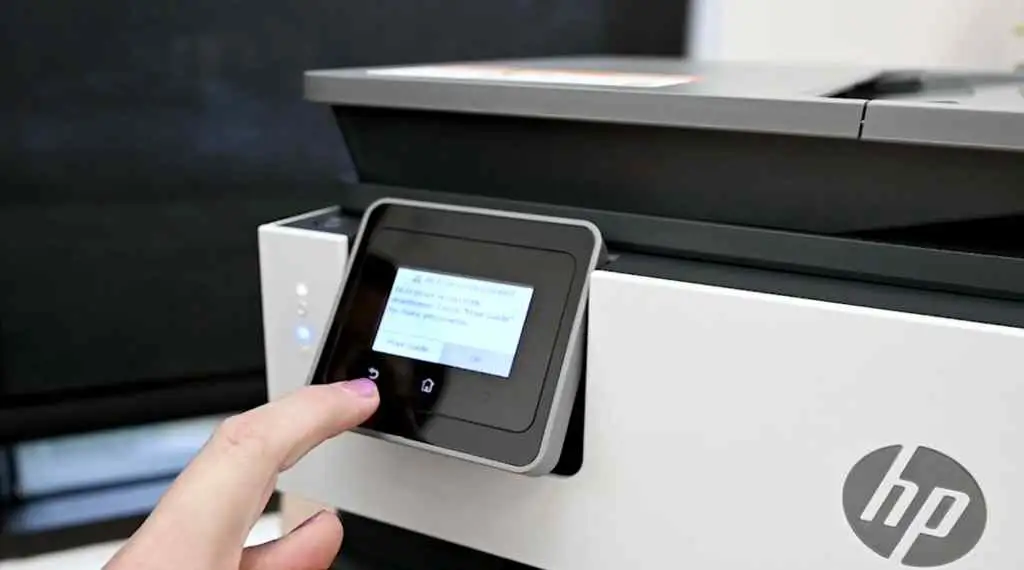
Touchscreen usability draws mixed feedback. While some find it intuitive, others call it “small and difficult to navigate” or “about as responsive as a DMV employee on a Monday morning,” as Reddit humorously put it.
Trust & Reliability
Trustpilot and Reddit threads hint at declining confidence in HP’s support, especially around connectivity. One HP Support Community user, after 20 years of loyalty, repurposed their 8015e “as a doorstop” due to unresolved Wi-Fi issues. Firmware updates are known to enforce dynamic security measures, restricting non-HP cartridges—a policy that some see as anti-consumer.
Durability reports are mixed. Several Best Buy buyers expect multi-year service life, citing past HP models lasting 4+ years. Others note early replacements due to defects or clogged ink lines, often tied to infrequent use.
Alternatives
While direct competitors aren’t heavily discussed in the data, one HP Support Community user replaced their 8015e with a Brother MFC-J1010DW after persistent setup failures. The Brother model likely appeals to those prioritizing simpler connectivity and less restrictive cartridge policies, though potentially at the cost of HP’s print quality and app ecosystem.
Price & Value
Pricing varies widely: Office Depot lists it at $169.99, eBay offers it for $99.99, and Best Buy clearance sales have hit $69.99. Many buyers feel the feature set—duplex printing, mobile app, ADF—represents excellent value at sub-$100 prices. Resale value is limited due to discontinuation, but steep discounts make it attractive for budget-conscious shoppers.
Community tips include buying during holiday sales, grabbing backup cartridges on promotion, and avoiding overpaying for small starter tanks. One Best Buy reviewer planned to gift another unit after finding it $10 cheaper months later.
FAQ
Q: Does the HP OfficeJet 8015e require an Instant Ink subscription to work?
A: No, it can operate without Instant Ink, but HP+ activation ties it to original HP cartridges. Cancelling after receiving subscription ink will render those cartridges unusable.
Q: How well does the 8015e handle photo printing?
A: Photo output is fine for casual use, with borderless support up to 8.5 x 11", but Consumer Reports found it “not as good as many inkjet printers” for serious photo work.
Q: Is the Wi-Fi setup really that difficult?
A: For some users, yes—especially on networks without 2.4 GHz. Reports describe tedious configuration and port requirements that can frustrate non-technical owners.
Q: How loud is the printer in use?
A: Most users find it quiet during operation, with only occasional squeaks. A minority report “loud and slow” behavior, possibly due to mechanical issues.
Q: What’s the lifespan of the starter cartridges?
A: Starter tanks are small; some users saw significant drops in ink levels during setup alone. Expect replacements within months if printing moderately.
Final Verdict: Buy if you’re a home office or small business user who values print quality, compact design, and mobile convenience—and can live with its paper tray quirks and subscription model. Avoid if you need flawless Wi-Fi connectivity in complex network setups or dislike vendor lock-in. Pro tip from the community: snag it on clearance and keep extra cartridges on hand.