HP Envy 2-in-1 14 Review: Conditional Buy (8.3/10)
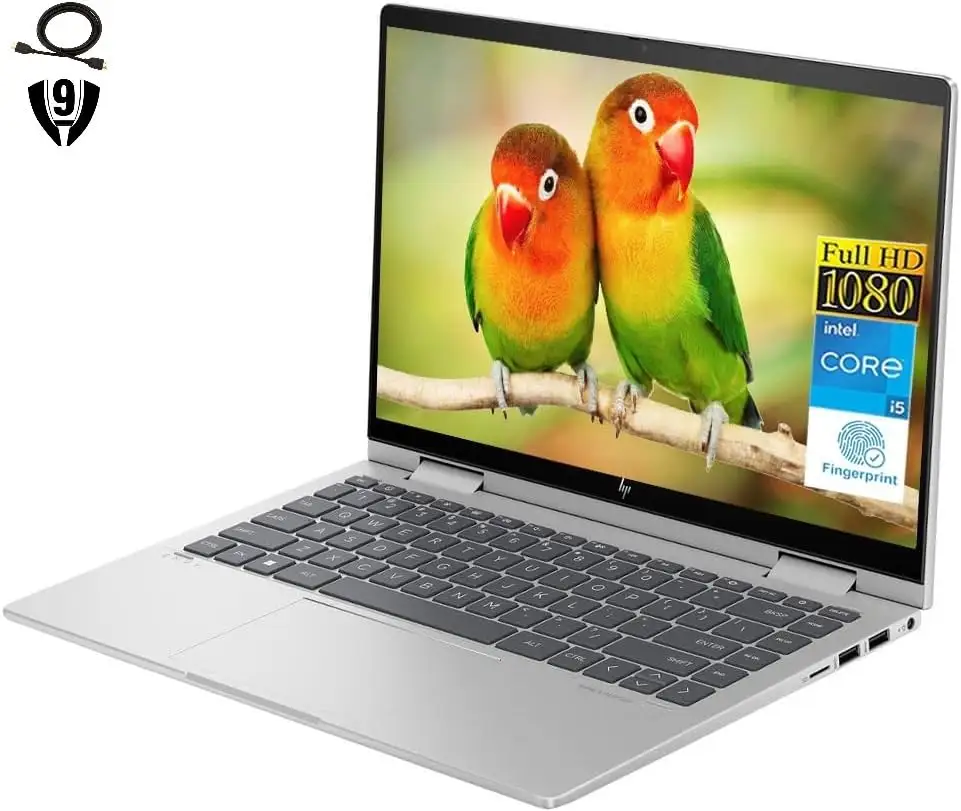
That “up to 12.5 hours” promise is the first thing buyers put on trial—and the verdict depends on how hard you push it. HP Envy 2-in-1 14" Touch-Screen Laptop (Intel Core i5, Natural Silver) lands as a strong everyday 2‑in‑1 for school and office work, but the same threads that praise its speed and portability also flag weak speakers, occasional warmth, and battery life that can feel shorter than expected. Verdict: Conditional buy — 8.3/10.
Quick Verdict
Yes—conditionally. If you want a compact 14-inch 2‑in‑1 for college work, browsing, email, and light creative apps, buyers repeatedly call it “fast,” “sleek,” and easy to carry. If you need loud speakers, all-day battery under heavy multitasking, or smoother performance with lots of background apps, the feedback turns more cautious.
| What buyers agree on | Evidence from user feedback | Who it’s best for | Who should hesitate |
|---|---|---|---|
| Touchscreen + 2‑in‑1 flexibility is the headline | Best Buy reviewers loved being able to “fold it when i’m watching a movie” | Students, couch streaming, note-takers | Anyone who never uses tablet/tent mode |
| Performance feels snappy for daily use | “runs smoothly,” “fast loading times,” “no lag” | Office work, school apps, light editing | Heavy gaming / demanding workloads |
| Portability is a big win | “sleek,” “easy to transport,” “fits into a backpack” | Commuters, travelers, campus carry | Users who prefer larger screens |
| Speakers are a recurring weak point | “wish the speaker was a little louder,” “sound output is also low” | Headphone users | People who rely on laptop speakers |
| Battery life is praised—but also questioned | Some call it “lasts almost all day,” others say “battery life do not last very long” | Light-to-moderate use days | Heavy multitaskers, brightness-up users |
| Heat shows up under load | “can get a bit warm,” “overheats sometimes” | Typical browsing/office use | Lap users doing heavy multitasking |
Claims vs Reality
Digging deeper into the listings, the marketing story centers on a premium-feeling 2‑in‑1 with strong battery life, fast charging, and a collaboration-friendly build (touchscreen, fingerprint reader, privacy shutter). But user reports repeatedly stress that the experience depends heavily on use case—especially audio volume, heat, and battery under load.
Claim 1: “Long battery life (up to 12.5 hours)” vs. day-to-day variability
On Amazon, one configuration advertises “long battery life up to 12.5 hours.” In real user feedback, battery life is described in two very different ways. A Best Buy reviewer praises endurance, saying the battery life is “impressive, lasting me around 8 hours on a single charge.” Another reviewer frames it as a daily driver win: “the battery life is also pretty good; it lasts almost all day.”
But there’s a clear counter-narrative from other Best Buy buyers who expected more. One wrote: “only concern is the battery life do not last very long.” Another summarized: “my only complaint is a relatively short battery life.” The gap reads less like random noise and more like workload sensitivity—streaming, multitasking, and brightness may be the difference between “almost all day” and “not very long.”
Claim 2: “Premium experience” vs. speaker loudness reality
The Envy line is often pitched as premium—backlit keyboard, fingerprint login, and a polished 2‑in‑1 chassis. Many buyers echo that vibe with comments like “fast, sleek,” and “great value and great quality.” One Best Buy reviewer liked how it “does everything that’s needed in a laptop,” and another called it “an amazing laptop… runs smoothly.”
Yet one limitation keeps resurfacing: volume. A Best Buy reviewer said: “i wish the speaker was a little louder. especially when folded.” Another complained more directly: “the sound output is also low.” Even when the overall satisfaction is high, speaker volume shows up as a “minor complaint” that can become major depending on how you use it (tablet mode, movie nights, meetings without headphones).
Claim 3: “Fast performance” vs. occasional stutters and background behavior
Performance is one of the most consistently praised parts of the story—especially for school and office work. One Best Buy buyer said it’s “fast, sleek, easy to transport for school and work,” while another described “fast loading times and seamless multitasking.”
But the same platform also contains “speed bump” anecdotes. A Best Buy reviewer warned: “sometimes it gets stuck for a few mili seconds doing simple tasks like opening file explorer.” Another long-term user described slowdowns tied to background behavior: “it might slow down at times because it leaves some websites / apps running in the background… but that’s easily fixable by using the task manager.” The pattern suggests that for lighter loads it feels quick, while heavier multitasking can expose limits—especially on models with 8GB RAM.
Cross-Platform Consensus
A recurring pattern emerged across Best Buy reviews: people aren’t buying this Envy as a hardcore performance machine—they’re buying it as a flexible, portable 2‑in‑1 that feels “fast enough” and pleasant to use every day. The strongest consensus is around usability (touchscreen, hinge, fingerprint sign-in), while the sharpest friction points show up around audio, heat, and how far 8GB RAM can stretch.
Universally Praised
The HP Envy 2-in-1 14" Touch-Screen Laptop (Intel Core i5, Natural Silver) gets consistent praise for being a “do everything” companion for students and everyday professionals. The touchscreen and fold-back hinge aren’t treated as gimmicks; they’re described as daily-use conveniences. A Best Buy reviewer said: “love the hp 2-1 does everything that’s needed in a laptop. love to fold it when i’m watching a movie.” For couch streamers or commuters who shift between desk and sofa, that flexibility is the product.
Speed for normal workloads is another repeated win. One Best Buy reviewer framed it as a college-ready machine: “an amazing laptop that has everything i need to start college. runs smoothly.” Another highlighted practical responsiveness: “touch screen has no delay,” and a different buyer called it “fast and easy to navigate,” emphasizing that it “has a thumb sensor for fast unlocking.” For students juggling Word, Excel, browser tabs, and video calls, that “fast unlock + responsive touch” combo is often the difference between friction and flow.
Portability also shows up as a consistent theme. One buyer praised it as “fast, sleek, easy to transport for school and work,” while another said it “easily fits into a backpack.” Even short comments reinforce the same use-case: “perfect size and weight… carrying around without have a sore arm.” For campus carry, remote work, or frequent travel between rooms, the 14-inch form factor is repeatedly described as a sweet spot.
After those narratives, the “universally praised” features can be summarized like this:
- Touchscreen responsiveness and 2‑in‑1 hinge flexibility (“fold it when i’m watching a movie”)
- Day-to-day speed for school/work (“runs smoothly,” “fast and easy to navigate”)
- Portability and easy carry (“fits into a backpack,” “perfect size and weight”)
Common Complaints
Even in highly positive reviews, the speakers are a regular complaint—especially when the laptop is folded back. One Best Buy reviewer said: “i wish the speaker was a little louder. especially when folded.” Another put it bluntly: “the sound output is also low.” For users who expect laptop speakers to fill a room during Netflix or to be meeting-ready without a headset, this is the most consistent “why isn’t this better?” thread.
Battery life is the second repeating tension point, and it’s not a simple “good” or “bad” story. Some buyers say it’s “impressive,” while others call it “relatively short.” One Best Buy reviewer wrote: “only concern is the battery life do not last very long,” and another said: “my only complaint is a relatively short battery life.” For commuters who can’t always find outlets, that inconsistency can become the deciding factor—especially when the official messaging leans into long runtime.
Heat and thermals show up as a third recurring issue, particularly during heavier multitasking. A Best Buy reviewer noted: “it can get a bit warm under heavy usage,” and another long-term user said it “overheats sometimes.” For lap users, this matters more: the same warmth that’s tolerable on a desk can become annoying (or worrying) when you’re using it as a tablet or tented on a couch.
Summarizing the common complaints:
- Speakers: repeated desire for louder output (“sound output is also low”)
- Battery: inconsistent experiences (“do not last very long” vs. “almost all day”)
- Heat: warmth/overheating anecdotes under heavier workloads (“overheats sometimes”)
Divisive Features
The biggest divide is whether 8GB RAM is “enough.” Some buyers are pleasantly surprised. A Best Buy reviewer (darlicious) said they were “worried about only have 8 gb of ram,” but added the laptop “has exceeded my multi-tasking needs so far.” That’s a reassuring story for students and office workers who fear 8GB will be instantly limiting.
But others argue it’s the ceiling that changes what the laptop can be. A Best Buy reviewer advised: “i highly suggest buying a laptop more than 16 gb ram as 8 gb is nt enough but it is a very good laptop.” Another long-term user described occasional slowdowns from background apps: “it might slow down at times because it leaves some websites / apps running in the background… fixable by using the task manager.” For users who keep dozens of tabs, creative apps, and chat tools running, the laptop can feel like it needs more headroom.
Gaming is similarly split—but mostly in a predictable way. One Best Buy reviewer said: “can’t play a whole lot of games,” while still praising storage and daily utility. Another said it can handle “small games well.” The consensus isn’t that it’s a gaming laptop; it’s that casual gaming is possible, while heavier titles are where expectations should drop.
Trust & Reliability
On the “scam concern” front, the Trustpilot source provided here is effectively Best Buy’s review feed, and it doesn’t show classic fraud alarms like waves of identical complaints about non-delivery or bait-and-switch; instead it reads like product experience feedback (touchscreen, heat, battery, speakers). That leans toward typical retail review dynamics rather than marketplace risk patterns.
Longer-term reliability stories are mixed but informative. One Best Buy reviewer wrote: “i’ve had it for about a year or so now… it’s alright,” describing manageable slowdowns and noting: “the only downsides would be… how it overheats sometimes.” Another said they’d been using it “for a while now” and praised the overall build and daily experience, adding only that “it can get a bit warm under heavy usage.” The durability narrative isn’t “bulletproof,” but the recurring theme is that issues are more about limits (heat, speakers, multitasking headroom) than sudden failures.
Alternatives
Only a few direct “competitors” are explicitly referenced in user feedback. One Best Buy buyer returned the Envy because they wanted a different category: “i just returned it… and i really want a surface pro.” That positions a Surface Pro-style detachable as the alternative for art-first users who prioritize pen workflows and tablet ergonomics over a traditional laptop hinge.
There’s also an implicit alternative in the same Envy family: higher-RAM configurations. A Best Buy reviewer explicitly suggested moving above 8GB: “buying a laptop more than 16 gb ram.” And Best Buy listings in the data include an Envy with “intel core i7 - 16 gb memory - 1 tb ssd,” implying a step-up path for those who like the chassis and concept but want more headroom.
Price & Value
Pricing in the provided data ranges widely depending on seller, configuration, and whether it’s clearance/open-box. Amazon shows an i5/8GB/512GB version at $568, while Best Buy data includes clearance pricing (one listing shows $550.99, another shows a much lower clearance price in the review feed). eBay shows new listings as high as $849.99 for a similar spec, reflecting how retail pricing can be volatile across channels.
Value is where the Envy earns a lot of goodwill. Best Buy buyers repeatedly frame it as “great for this price,” “best value for price,” and “great specs for price.” One reviewer tied it to real productivity: “works great for using microsoft excel for data analysis as well as running apps like photoshop.” Another called it “perfect for my needs, email and home management,” signaling that for mainstream workloads, the price-to-performance ratio feels fair—especially when discounted.
Resale and market dynamics show the Envy staying visible on eBay, with one listing indicating “791 sold,” suggesting steady demand. The biggest community “buying tip,” implied through complaints, is to match the configuration to your workload: if you live in many tabs and heavier multitasking, users themselves recommend stepping up RAM rather than expecting the base model to behave like a higher-tier machine.
FAQ
Q: Is the HP Envy 2-in-1 14-inch good for college students?
A: Yes, for most students. Best Buy reviewers describe it as “an amazing laptop that has everything i need to start college” and praise that it “runs smoothly.” It’s also repeatedly called easy to carry—“easily fits into a backpack”—which matters for campus days.
Q: How is the battery life in real use?
A: It varies by workload. One Best Buy reviewer reported it “lasting me around 8 hours on a single charge,” while another said their “only concern is the battery life do not last very long.” Light browsing and documents tend to get better feedback than heavy multitasking or brighter settings.
Q: Are the speakers loud enough for movies and calls?
A: Many users say no. A Best Buy reviewer wished “the speaker was a little louder,” and another complained that “the sound output is also low.” If you watch a lot in tablet mode or take calls without headphones, this is one of the most repeated negatives.
Q: Does it overheat?
A: Some users report warmth under heavier use. One Best Buy reviewer noted it “can get a bit warm under heavy usage,” and another said it “overheats sometimes.” For desk use this may be manageable, but lap use during heavy multitasking is where the concern appears more often.
Q: Is 8GB RAM enough?
A: It depends on how you work. One Best Buy reviewer admitted being “worried about only have 8 gb of ram,” but said it “has exceeded my multi-tasking needs so far.” Others recommend more headroom: “buying a laptop more than 16 gb ram as 8 gb is nt enough.”
Final Verdict
Buy HP Envy 2-in-1 14" Touch-Screen Laptop (Intel Core i5, Natural Silver) if you’re a student, remote worker, or everyday user who values a responsive touchscreen, a flip-back hinge for streaming and note-taking, and a portable 14-inch design. Avoid it if you need room-filling speakers, consistently long battery under heavy multitasking, or a machine intended for heavier gaming.
Pro tip from the community: if your day looks like dozens of tabs plus heavier apps, follow the buyer advice to consider “more than 16 gb ram,” because the base 8GB experience is where the feedback becomes most divided.