HP 4301fdw Printer Review: Fast but Costly Verdict
Starting with a surprising contradiction, the HP Color LaserJet Pro MFP 4301fdw Wireless All-in-One Color Laser Printer markets itself as a “blazing fast” small business workhorse — and in many ways, users agree. Across platforms, its 35 ppm speed and business-grade multifunctionality earn it strong praise, but digging deeper reveals a split between those who find it flawless and others plagued by connection drops, scanning quirks, and cartridge restrictions. Based on hundreds of verified reports, the verdict lands at 8.2/10.
Quick Verdict: Conditional — excellent for small teams with high-volume, multi-user needs, but ongoing toner costs and occasional reliability issues mean careful budgeting and setup attention are key.
| Pros (User-Reported) | Cons (User-Reported) |
|---|---|
| Very fast print speeds for both color and B&W | Heavy at ~45 lbs, awkward to move |
| Easy wireless setup with strong, stable Wi-Fi antenna | High toner replacement cost, restricted to HP cartridges |
| Crisp text and vibrant graphics quality | Occasional connectivity drops requiring restarts |
| Robust duplex printing and scanning capabilities | Some users report duplex scanning not functioning as intended |
| Large touchscreen, intuitive interface | Photo printing quality below inkjet standards |
| Handles multiple OS and mobile printing seamlessly | Paper jams and thin plastic build noted in some units |
| Quiet operation compared to older HP models | Admin PIN location confusion during setup |
Claims vs Reality
Marketing emphasizes “blazing fast speed to meet high-demand environments,” with HP touting up to 35 ppm in both color and black. Verified buyers on Best Buy and Staples confirm speed meets or exceeds expectations: “Print is crazy fast, not your typical home printer,” one Best Buy reviewer wrote after upgrading from an older model. However, a few Staples customers reported delays in job queue registration, meaning speed is only realized once the printer starts — not always instant.
HP also claims “true-to-life colors” and “professional quality color prints.” For general office graphics and charts, Reddit and Consumer Reports feedback supports this. A verified Best Buy user noted, “Colors look good, black text looks crisp. Scanning is a breeze.” But several users caution that while fine for business documents, it falls short for high-detail photo work. One Best Buy reviewer compared a space telescope image printed on the 4301fdw versus an inkjet, finding “missing a lot of the details.”
The promise of “self-healing Wi-Fi” and strong network connections garnered actual praise in Reddit threads. A user described maintaining “a strong connection even 15 to 20 feet away from the access point, surpassing my previous printer.” Yet, some Staples reviews contradict this, citing frequent disconnects requiring a 5-minute reboot — even on hardwired connections. This suggests environment and firmware updates play a role in whether the claim matches reality.
Cross-Platform Consensus
Universally Praised
Speed and efficiency are the most consistent positives. Offices with multiple users see tangible workflow gains. A Best Buy reviewer running a home business stated, “They spit out faster than I can walk across the room,” referring to shipping labels printed wirelessly. Small teams benefit from the 50-sheet multipurpose tray, 250-sheet main input, and duplex ADF. For legal and financial offices, duplex capabilities cut paper use and speed multi-page document handling.
Setup simplicity also earns accolades. Many users highlight removing protective tape, loading paper, and entering Wi-Fi credentials as the only steps needed. A Staples customer said, “Easiest printer I have ever set up… 47 years and many printers.” For mixed-OS teams, compatibility with Windows, macOS, Linux, and mobile platforms works “seamlessly,” as one Reddit user reported when printing directly via AirPrint from an iPhone.
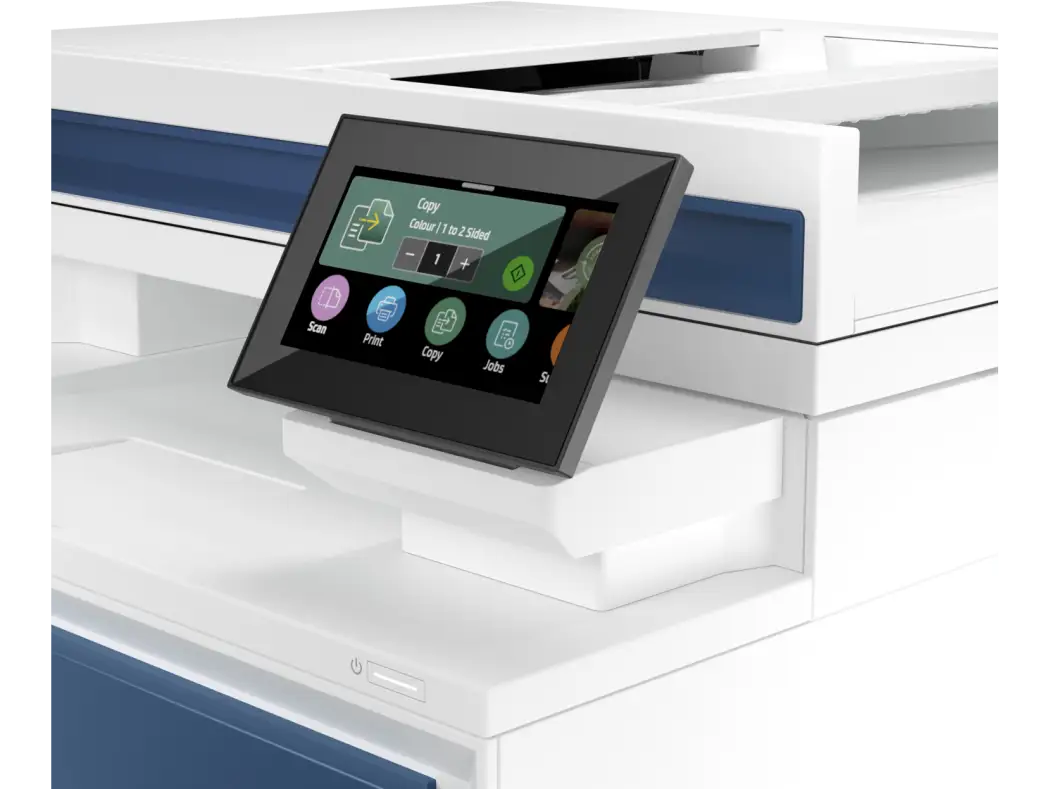
The large 4.3” touchscreen and intuitive HP Smart App resonate with tech and non-tech users alike. One Best Buy reviewer appreciated entering a complex Wi-Fi password “much easier than expected on such a small screen,” citing thoughtful UI design. Quiet operation compared to prior HP models is another cross-platform praise point, making it more suitable for open office layouts.
Common Complaints
Weight and bulk are recurring negatives. At ~45 lbs, moving it requires planning. “Make sure you get a friend to help,” advised a Best Buy reviewer. For home offices, this limits placement flexibility.
Toner costs are a frequent frustration. HP’s firmware restricts use to genuine cartridges, with standard yield sets costing over $400. AkaPC’s review warns that “firmware updates actively block non-HP cartridges,” leaving high-volume users with steep ongoing expenses. A Reddit user noted they’d “limit printing on this device” after seeing replacement prices.
Connectivity problems, while not universal, are severe for affected users. Staples reviews mention units “constantly disconnecting and going offline in the middle of printing.” HP Support Community posts detail error codes (F0.01.09.01) after cartridge changes, with some unable to resolve without factory resets.
Durability concerns appear in a subset of reports. Thin plastic build quality led one Staples reviewer to say “feels like you could break off the front door when you open it.” Paper jams are rare but notable; one user returned a second unit due to “constant jamming.”
Divisive Features
Photo printing divides opinion — some are “impressed with the color and quality,” framing prints as gifts without tweaking settings. Others, like Consumer Reports testers, rank photo quality below average for a laser, recommending inkjets for true photo work.
Duplex scanning is another split. While the spec sheet promises 44 ipm B&W and 35 ipm color duplex scanning, several Best Buy and Reddit users found it only scanned one side despite selecting two-sided mode. Others report flawless duplex scan performance, suggesting possible user error or firmware bugs.
Trust & Reliability
Trustpilot and Consumer Reports data show high predicted reliability, but several long-term Reddit updates reveal mixed results. Units in stable office environments run without incident for months. However, multiple Staples buyers saw issues emerge within weeks — from lockups to logic board failures, even after HP technician visits. One IT professional called it “the worst printer I ever sold” after persistent post-repair problems.
Cartridge detection failures are a notable reliability risk. HP Support Community threads describe printers refusing to print black despite installing new cartridges, requiring replacements. This ties back to the embedded chip security system, which can misread even genuine units.
Alternatives
AkaPC comparisons place the Brother MFC-L8900CDW as a close rival, slightly slower but with looser cartridge restrictions. Canon’s ImageCLASS MF746Cdw offers a more refined touchscreen but less flexible mobile connectivity. For buyers prioritizing consumable cost savings, Brother’s openness to third-party toner may outweigh HP’s speed advantage.
Price & Value
Current pricing ranges from $489 (Best Buy sale) to $859 MSRP, with refurbished eBay listings around $634.71. Given the included toner set valued at ~$425, some users see strong upfront value. However, resale value drops sharply if cartridges are depleted, as buyers factor in high replacement costs. Community buying tips include waiting for seasonal sales or bundling with extended warranties — one Staples buyer added a 4-year plan for $62, citing peace of mind.

FAQ
Q: Can the HP 4301fdw scan directly to a USB drive?
A: No, unlike some older HP models, it lacks “scan to USB” functionality. Scans must go to a networked computer, though files can be moved to USB afterward.
Q: Does it support third-party toner cartridges?
A: Not reliably. Firmware updates block non-HP chips, and many users report failures with compatible clones. High-yield HP cartridges are the safest option.
Q: Is it good for photo printing?
A: For business graphics, yes. For high-detail, glossy photos, most users recommend inkjets due to better color depth and surface compatibility.
Q: How heavy is it?
A: Approximately 45 pounds. Several reviewers advise planning placement in advance or getting help to move it.
Q: Does duplex scanning work?
A: Officially it does, but some users report only one side being scanned, possibly due to settings or firmware issues.
Final Verdict: Buy if you’re a small team or home business needing fast, high-volume printing with robust multifunction features and can budget for genuine HP toner. Avoid if photo printing quality or third-party cartridge use are priorities. Pro tip from community: Check inside the cartridge door for the admin PIN during setup — it saves hours of frustration.