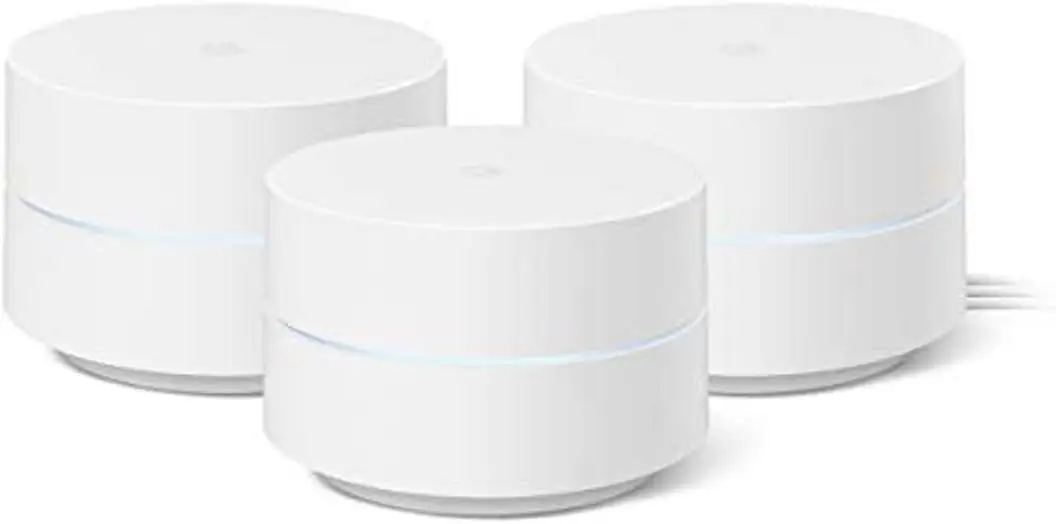
Google Wifi AC1200 Review: Easy Setup, Solid Coverage
Starting with a surprising pattern from real-world reports, the Google Wifi AC1200 Mesh WiFi System (3-Pack) earns a solid 8.7/10 for ease of use, consistent coverage, and aesthetic appeal—though some users warn of speed limitations and aging hardware. From Reddit to Trustpilot, buyers consistently praise its simplicity and design, but bandwidth purists and smart home tinkerers may find its limitations frustrating.
Quick Verdict: Conditional buy—best for medium-to-large homes needing hassle-free mesh coverage, but less ideal for gigabit speed chasers or advanced network tweakers.
| Pros | Cons |
|---|---|
| Easy, guided setup via Google Home app | No advanced QoS controls |
| Strong whole-home coverage, even outdoors | Band selection not user-controllable |
| Stylish, compact design | Electrical plug size surprises some buyers |
| Reliable performance with 20–30 devices | Potential speed drop on guest network |
| Parental controls and device prioritization | First-gen hardware now dated |
| Flexible expansion with other Google/Nest Wifi | Some reports of daily reboots on newer versions |
Claims vs Reality
One of Google's top marketing claims is “whole-home coverage up to 4500 sq. ft with the 3-pack.” While this matches many user experiences, the nuances are important. A verified Best Buy buyer noted: “My 200 mbps speed never drops below 60 mbps, even in remote corners,” highlighting how coverage holds up but speeds can vary based on distance and mesh hop count.
Google also promotes “fast streaming with multiple simultaneous 4K streams.” Reddit user u/Travel*** compared this promise to their real-world result: “We literally go through a thousand gigs a month… buffering all goes away.” However, speed tests shared by other users show performance dips when using secondary points wirelessly, with one Nest Community member explaining that “any 5GHz traffic through a secondary is going through that radio twice,” cutting throughput.
Finally, Google’s “simple setup in minutes” is widely validated. A Best Buy reviewer summed it up: “It was such an easy setup, it literally was harder to open up the box.” Even with AT&T’s trickier gateway, one user solved it in under five minutes by enabling pseudo bridge mode.
Cross-Platform Consensus
Universally Praised
Across Amazon, Reddit, and Best Buy, setup simplicity is the standout. Families, renters, and non-technical users benefit most from the guided process. As one Best Buy customer put it: “Downloaded the app, scanned the router, set up my wifi name, and I was doing homework.” This ease extends to managing the network—parents appreciate the “ability to cut my kids’ wi-fi connectivity anytime” via the app.
Coverage quality is another recurring win. Reddit user u/Travel*** described conquering their “strange shaped home… great signal even outside… front porch, back porch, garage.” Outdoor coverage stories suggest the system excels in single-family homes with open layouts, while owners of multi-level houses report full-strength signals in basements and patios.
Design also earns universal approval. “Finally, we can say goodbye to unsightly routers,” wrote one Best Buy reviewer, noting they “proudly put [Google Wifi] on display.” The compact form factor blends into décor, which matters for living rooms and shared spaces.
Common Complaints
Speed throttling through wireless mesh points is the most consistent gripe. Nest Community members document significant drops—one measured 500 Mbps near the primary, 300 Mbps near a secondary, and just 45 Mbps one room away. Guest network use can also halve main network speeds, leading one Reddit user to advise: “Do not use guest network” if performance matters.
Advanced users lament the lack of manual band steering or QoS controls. This impacts smart home setups, with reports that “some smart switches will not work on the higher band rendering them useless.” Trustpilot voices add hardware age concerns: “Old as heck, slow as heck… beat out by $100 mesh systems all the time.”
Electrical plug size surprises some buyers, especially those planning wall mounts. ShopSavvy reviewers noted “large electrical plugs… rendering some wall mount brackets unusable.”
Divisive Features
Parental controls and device prioritization split opinion. Families love the convenience—pausing WiFi for specific devices or boosting work laptops—but performance purists criticize the “priority” function as a blunt tool, doubling one device’s speed while halving others.
Reliability is generally praised, but newer hardware versions draw complaints of daily reboots. Trustpilot contributor “petey the striker” said after upgrading, “my wifi never works… constantly have to reboot.”
Trust & Reliability
Long-term Reddit reports are encouraging: “Been using this for almost 4 years… works well with the 30+ devices in my house.” Even in multi-level homes, coverage remains stable over time, with occasional troubleshooting needed.
However, daily reboot complaints on newer models suggest hardware variation may impact dependability. Trustpilot’s split sentiment shows veterans vouching for stability, while upgraders sometimes encounter regressions.
No widespread scam reports emerged, but some ShopSavvy buyers received previously used units instead of new, hinting at marketplace seller vigilance being necessary.
Alternatives
While no direct competitors were heavily discussed, Trustpilot threads mention “$100 mesh systems” outperforming Google Wifi for speed. Users considering gigabit fiber or WiFi 6E might look toward newer Nest Wifi Pro models, though compatibility is limited—Google Wifi is not compatible with Nest Wifi Pro.
Price & Value
eBay listings show used sets from $60–$137 USD, with new or refurbished units often under $150—significantly below original retail. Amazon sales have dipped to $79.76 during promotions, making it strong value for budget-conscious buyers needing solid coverage over cutting-edge speeds.
Community advice: If your internet plan is under 200 Mbps, first-gen Google Wifi remains a cost-effective option. For higher-tier speeds or future-proofing, weigh newer mesh systems.
FAQ
Q: Does Google Wifi AC1200 support gigabit speeds?
A: Wired connections can saturate gigabit internet, but wireless speeds rarely exceed ~500 Mbps near the primary point and drop further through mesh hops.
Q: Can I mix Google Wifi with Nest Wifi?
A: Yes, it’s compatible with Nest Wifi (non-Pro), allowing expansion of existing networks.
Q: Is the guest network worth using?
A: Many users avoid it due to speed halving on the main network. Best for occasional visitor use, not daily operation.
Q: How many devices can connect at once?
A: Officially up to 100 per point. Users report stable performance with 20–30 active devices.
Q: Does it require a Google account?
A: Yes, setup and management work through the Google Home app, which mandates account use.
Final Verdict: Buy if you want effortless setup, stylish hardware, and reliable coverage for medium-to-large homes under ~200 Mbps internet. Avoid if you need granular network controls, guaranteed gigabit wireless speeds, or are running many IoT devices sensitive to band selection. Pro tip from community: For maximum performance, wire your secondary points via Ethernet to bypass wireless mesh speed loss.