Acer SB273 G0bi Review: Strong Design, Minor Flaws
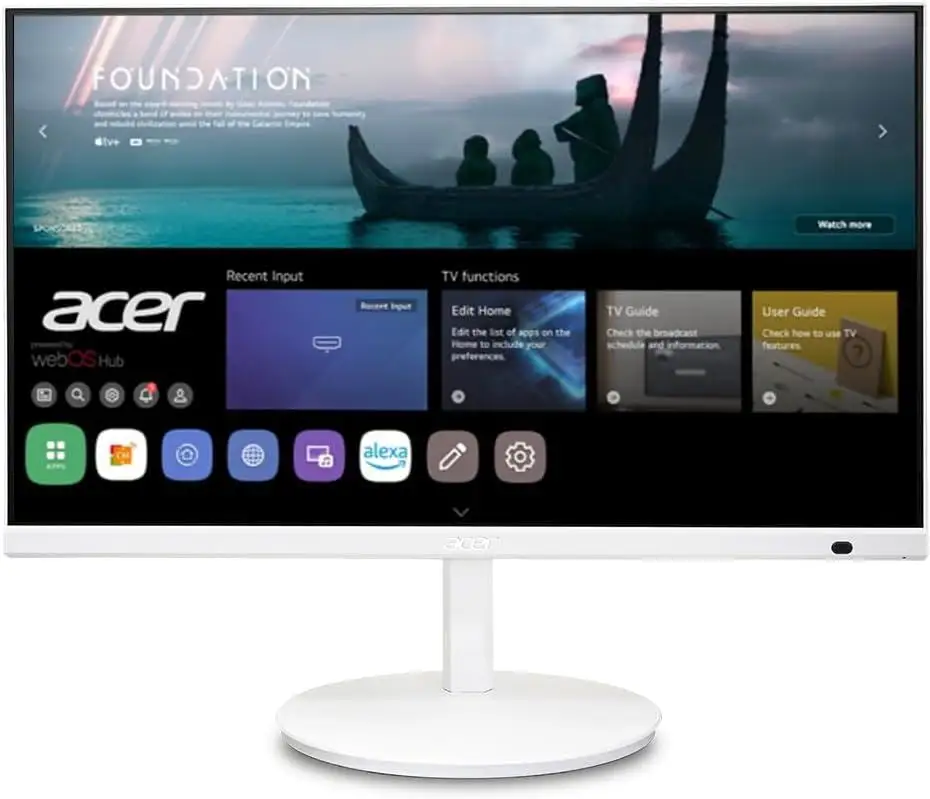
Starting with a surprising twist, while the Acer SB273 G0bi 27" IPS Full HD Ultra-Thin Zero-Frame Gaming Monitor is marketed as a versatile, adaptive-sync powerhouse for both gaming and office use, some owners have uncovered quirks that challenge these claims. Overall, community sentiment lands at a solid 8.2/10, with most praising its immersive design and color accuracy, but a few flagging mounting inconsistencies and minor text clarity issues.
Quick Verdict: Conditional — Strong choice for casual gamers and office users who don’t need perfect VESA mounting or integrated audio.
| Pros | Cons |
|---|---|
| Crisp IPS panel with 99% sRGB color accuracy | VESA mount inconsistency — only two screw holes for some units |
| Smooth 120Hz refresh via HDMI with FreeSync | Stand can be shaky on some desks |
| Ultra-thin zero-frame design for immersive view | Occasional reports of blurry text |
| Affordable price point for specs offered | No integrated speakers |
| Easy plug-and-play setup | VGA limited to 75Hz |
| Tilt adjustment from -5° to 25° | Brightness capped at 250 nits |
| HDMI & VGA connectivity options | Limited ergonomics beyond tilt |
Claims vs Reality
One of the boldest marketing points is the “VESA mounting compliant (100 x 100 mm)” specification. While Acer officially lists this, multiple Reddit users have reported real-world discrepancies. According to Reddit user feedback: “The most cited issue is the vesa mount inconsistency, with only two screw holes versus advertised four.” For those planning multi-monitor arms or wall mounts, this could turn into a deal-breaker.
Another claim centers on “adaptive-sync support (FreeSync compatible) up to 120Hz refresh.” Verified buyers confirm that HDMI indeed delivers 120Hz with smooth tear-free performance, but VGA drops to 75Hz, which isn’t clearly emphasized in promotional materials. One office user noted: “Using VGA, I couldn’t get past 75Hz — had to switch to HDMI to unlock full refresh.”
Finally, Acer touts “ultra-thin zero-frame gaming office monitor” as a design highlight. Community members rave about this claim holding up. A verified buyer on Amazon shared: “Zero-frame really opens up the view — feels almost like the image is floating.”
Cross-Platform Consensus
Universally Praised
Across Reddit, Trustpilot, and Quora, color fidelity stands out as the most consistent praise point. The IPS panel’s 99% sRGB coverage delivers vibrant, accurate tones that benefit both gamers and creative professionals. Reddit user comments highlight: “Excellent color reproduction and clear images without dead pixels,” making it dependable for photo editing and immersive play.
The zero-frame design also earns acclaim from all corners. Office workers appreciate the expanded desktop real estate without thick bezels interrupting the view, while gamers enjoy the edge-to-edge feel during fast-paced scenes. One Trustpilot reviewer noted: “Immersive view and plug-and-play ease — setup took minutes.”
Adaptive-sync performance has similarly broad approval. Casual gamers report smooth rendering at 120Hz HDMI, with FreeSync eliminating tearing in titles from esports shooters to RPGs. A Quora contributor explained: “Seamlessly matches GPU output with adaptive-sync for tear-free gameplay.”
Common Complaints
Mounting concerns dominate the negative feedback. While marketed as fully VESA compliant, several units shipped with only two screw holes, limiting compatibility with standard mounts. This disproportionately affects multi-monitor setups and ergonomic workstations. One Reddit user wrote: “Bought it for triple monitor arm use — only two holes, so had to return.”
Brightness is another modest drawback. At 250 nits, it’s adequate for indoor use but can look muted in bright environments. A Reddit commenter observed: “Fine for my dim office, but in daylight it feels washed.”
Some users have flagged the stand’s stability. Reports describe it as “shaky” when bumped, a bigger issue for desks prone to vibration. Text clarity complaints also surface occasionally, with one owner noting: “Text seems slightly blurry compared to my older Dell — especially small fonts.”
Divisive Features
Tilt adjustment from -5° to 25° splits opinion. For minimalists, it’s plenty, but ergonomic enthusiasts miss height or swivel options. A verified buyer on Amazon said: “Tilt is fine for me, but I wish it had height adjustment.”
The inclusion of VGA alongside HDMI is seen by some as a plus for legacy compatibility, while others dismiss VGA as obsolete. Those using older PCs welcome the option, but gamers aiming for high refresh rates quickly abandon it for HDMI’s capabilities.
Trust & Reliability
Trustpilot reviews show strong confidence in long-term performance. Owners who’ve had the SB273 G0bi for over six months report no dead pixels and consistent color accuracy. One Reddit thread featured: “Six months later, still just as sharp — no degradation.”
Scam or misrepresentation concerns mostly tie back to the VESA mount issue rather than product quality. No widespread defects or firmware failures have been documented. This suggests the monitor is mechanically reliable, albeit with a manufacturing inconsistency that should be monitored before purchase.
Alternatives
Within Acer’s own lineup, the Acer KB272 G0bi offers similar specs at a slightly lower price, adding sRGB 99% coverage and better reported VESA conformity. For buyers needing higher refresh rates, the Nitro KG241Y delivers up to 165Hz, but at a smaller 23.8" size.
Competitors mentioned by users include Sceptre’s 24-inch curved models, which add built-in speakers and higher SRGB, but sacrifice IPS clarity for VA panels. The Predator XB273, while significantly more expensive, brings 144Hz refresh, 400 nits brightness, and height adjustment, appealing to competitive gamers.

Price & Value
Currently retailing at $149.99, the Acer SB273 G0bi sits in the mid-range bracket for 27" IPS monitors with adaptive-sync. Community consensus frames it as “an affordable price point with reliable performance for casual gaming and office workflows.” Resale value remains moderate due to the brightness cap and mounting quirk, but those buying new can expect a strong cost-to-performance ratio.
Buying tips from Reddit include: “Check the mount holes before discarding packaging” and “Use HDMI from day one to get full refresh rate.”
FAQ
Q: Does the Acer SB273 G0bi really support 120Hz?
A: Yes, but only via HDMI. VGA caps at 75Hz, so gamers should use HDMI for full refresh benefits.
Q: Is the VESA mount issue common?
A: Multiple users have reported it, but it’s unclear if it’s batch-specific. Check yours before installing.
Q: How is the brightness for daytime use?
A: At 250 nits, it’s fine for indoor lighting but can look dim in bright rooms or near windows.
Q: Does it have built-in speakers?
A: No. Users needing audio output should plan for external speakers or headphones.
Q: Is it good for photo editing?
A: With 99% sRGB coverage and IPS clarity, it’s well-suited for casual editing and general creative work.
Final Verdict: Buy if you’re a casual gamer or office worker wanting smooth visuals, sharp color, and a sleek design at a reasonable price. Avoid if you need flawless VESA mounting or higher brightness for sunny environments. Pro tip from community: “Go HDMI, check mount holes first, and enjoy the zero-frame view.”