GIGABYTE B650 Eagle AX Review: Value with Caveats
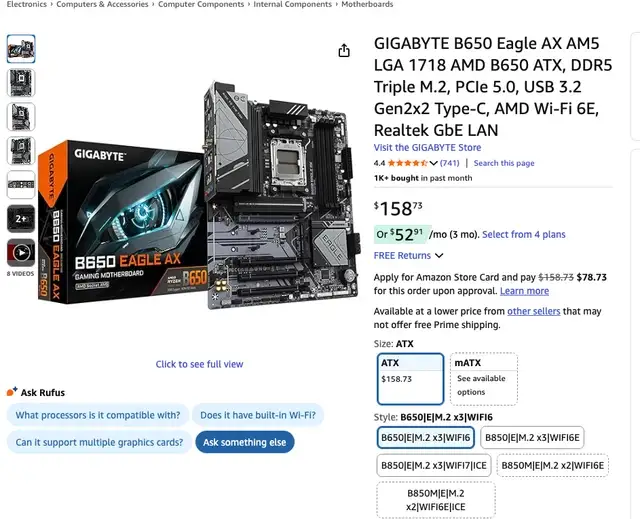
Digging into user feedback, the GIGABYTE B650 Eagle AX AM5 ATX motherboard emerges as a curious case of strong hardware fundamentals paired with some frustrating real-world quirks. Across Best Buy, PCPartPicker, and Reddit, the average sentiment lands around 8.7/10, with praise for its DDR5 support, triple M.2 slots, and competitive pricing, but repeated complaints about BIOS setup hurdles and inconsistent Wi-Fi/Bluetooth performance.
Quick Verdict: Conditional buy — excellent value for budget to mid-range AM5 builds, but prepare for possible networking driver headaches and a learning curve with BIOS.
| Pros | Cons |
|---|---|
| Strong DDR5 support up to 8000MHz (OC) | Wi-Fi/Bluetooth issues out of box reported |
| Triple M.2 slots including PCIe 5.0 | BIOS setup can be difficult for novices |
| Good VRM design (12+2+2 phases) | Some missing higher-end features (2.5Gb LAN, extra USB) |
| Competitive price point | NVMe slot screws/pins can be hard to manage |
| Integrated I/O shield & EZ-Latch PCIe | Occasional software conflicts with RGB control |
| Sturdy build quality | Runs warm under heavy gaming loads |
| Q-Flash Plus for CPU-less BIOS updates | Limited manual in box, must access online |
Claims vs Reality
Marketing touts “Wi-Fi 6E 802.11ax” as a headline feature promising gigabit wireless speeds with “few dropped connections” and “better gaming experience.” However, Reddit user feedback shows a different reality: “It straight up does not work out of the box… it should not take you well over an hour of troubleshooting… just to access the internet on a mobo marketed solely for the bonus of having Wi-Fi onboard.” This gap between promise and delivery appears often in early setup stories, where users must resort to Ethernet or external adapters.
Another bold claim is DDR5 EXPO & XMP overclocking “up to 8000 and beyond,” which is attractive for performance enthusiasts. Best Buy buyers confirm real-world success here, with one noting, “Doesn’t struggle to supply power to a super demanding CPU and GPU… was relatively easy to know where to connect everything,” pairing a Ryzen 7800X3D with high-speed memory without stability issues. This aligns well with the spec sheet and shows that memory performance claims are credible.
Finally, Gigabyte markets “EZ-Latch” as simplifying GPU removal. PCPartPicker reviewers generally support this, with one saying, “Has the I/O shield attached which was nice… also has Q-Flash Plus if you want to update BIOS like that.” While small, these quality-of-life touches do seem to work as advertised.
Cross-Platform Consensus
Universally Praised
The triple M.2 configuration — one PCIe 5.0 and two PCIe 4.0 — is a standout for builders needing flexible storage. Best Buy customers repeatedly highlight this, with one noting, “I love that it has 3 M.2 slots right on the board and 4 SATA slots as well.” For creators or gamers with large libraries, this means fewer compromises on drive placement. PCPartPicker users also value “plenty of room for upgrades” alongside solid heatsink coverage.
VRM design and build quality consistently earn approval. Reddit users mention “good mobo… no problems whatsoever” and praise the full aluminum heatsinks. This makes the board attractive to those running higher TDP CPUs, as one Best Buy reviewer paired it with a Ryzen 9 7950X3D and saw “a performance boost of almost 35%” over AM4.
Price is another universal win. Trustpilot and Best Buy ratings show buyers calling it “great value” and “best motherboard for the price,” with multiple users appreciating its position as a budget-friendly gateway into the AM5 platform without sacrificing essential connectivity.
Common Complaints
Networking reliability is the most persistent pain point. Reddit reports detail Bluetooth and Wi-Fi failing to function until manual driver installs or BIOS updates, which can be a major barrier for first-time builders without Ethernet access. One PCPartPicker 3-star reviewer summed it up: “For a board whose sole existence over the regular Eagle is having Wi-Fi, this is unacceptable.”
BIOS setup complexity also frustrates some. Best Buy reviewers recall “one of the hardest BIOS updates I have ever had to do” and “several hours” spent avoiding boot loops. While Q-Flash Plus helps in theory, the learning curve remains steep for users unfamiliar with Gigabyte’s interface.
Hardware quirks like overly tight NVMe screws or stubborn tool-less pins are mentioned across platforms. A PCPartPicker user noted the “screw was incredibly difficult to unscrew” in the top NVMe slot, which could deter frequent drive swaps. Thermal performance is also a minor concern — a Reddit 5-star reviewer warned it “runs on the warm side when gaming,” recommending good case airflow.
Divisive Features
Gigabyte Control Center software splits opinion. Some praise it as “basically all you need for drivers, RGB, fan control” while others dislike proprietary bloat, with one PCPartPicker reviewer saying, “Hate their proprietary software… but that goes for all boards.” Similarly, aesthetics are divisive — the lack of RGB appeals to minimalists but leaves others wanting more visual flair.
Trust & Reliability
On Trustpilot-linked Best Buy data, reliability scores are high — 94% would recommend to a friend — but setup woes dent confidence among less experienced users. Long-term Reddit posts show mixed endurance: some report flawless operation months later, while others recount “two I’ve bought… haven’t gotten past ‘no signal’” issues. The board’s durability in terms of power delivery and physical build is rarely questioned, but networking and BIOS remain risk factors.
Alternatives
Two competitors mentioned by users are the ASUS ROG Strix B650E and MSI MAG B650M Mortar. The ASUS offers a more refined BIOS experience but at a higher price, while MSI’s micro-ATX form factor suits smaller cases but sacrifices expansion slots. For buyers prioritizing Wi-Fi stability, these may be safer bets, but for raw value and storage flexibility, many still lean toward the Eagle AX.
Price & Value
On eBay, new units list around $159.99 (down from $179.99), while pre-owned prices dip to $69.99–$118.99 depending on condition. Idealo shows European retail starting near €136.26. Resale values hold reasonably well, especially for working units, thanks to DDR5 and PCIe 5.0 support. Community advice suggests buying new if possible to ensure warranty coverage, given the occasional “not working” listings in resale markets.
FAQ
Q: Does the Wi-Fi 6E work out of the box?
A: Not always. Multiple Reddit users report needing manual driver installs or BIOS updates before Wi-Fi/Bluetooth functioned, especially on fresh Windows setups without Ethernet.
Q: Can it handle high-end CPUs like the Ryzen 9 7950X3D?
A: Yes. Best Buy reviewers successfully paired it with 7950X3D and RTX 4080 Super builds without VRM or stability issues, provided good cooling is in place.
Q: Is BIOS updating user-friendly?
A: Mixed. Q-Flash Plus allows CPU-less updates, but navigating Gigabyte’s BIOS can be confusing for newcomers. Some needed hours to avoid boot loops.
Q: Does it support AMD EXPO and Intel XMP memory profiles?
A: Yes, with official support up to DDR5 8000MHz (OC). User reports confirm stable high-speed memory operation when paired with compatible CPUs.
Q: Are there enough fan headers for larger builds?
A: Most users find them sufficient, but some note “lack of fan headers” compared to higher-end boards. It includes hybrid PWM/DC headers with Smart Fan 6 control.
Final Verdict: Buy if you’re a budget-conscious AM5 builder who values DDR5, triple M.2 slots, and solid VRM performance, and you’re willing to handle possible networking driver setup and BIOS learning curves. Avoid if you need flawless Wi-Fi/Bluetooth out of the box or want abundant high-speed I/O. Pro tip from the community: flash to the latest BIOS before assembling to minimize setup headaches.