Garmin DriveSmart 86 Review: Big Screen, Mixed Value
“Hands down the best in‑car GPS I’ve ever used,” wrote Best Buy reviewer Brandonr — and in the very same review, he warns the unit is so big that “finding a suitable mounting position that doesn't block your view of the road may be difficult.” That tension between “best ever” and “hard to live with” runs through most real‑world talk about the Garmin DriveSmart 86 Car GPS Navigator. Verdict from the crowd: a premium, feature‑dense sat nav that many love for clarity and control, but others find overpriced, fussy, or occasionally wrong. Score based on user sentiment across platforms: 7.6/10.
Quick Verdict
Conditional yes — great if you want a dedicated, big‑screen Garmin with deep routing options; not worth it if your phone already meets your needs or you expect flawless voice search.
| What users like | What users don’t like | Who it matters to |
|---|---|---|
| Large, sharp 8" display | Bulky size makes placement tricky | Drivers in smaller cars |
| Accurate maps for many areas | Some report wrong turns or missing POIs | Travelers in unfamiliar cities |
| Strong traffic + detours (when paired) | Live services require phone/app | People wanting “standalone” GPS |
| Fast, responsive interface | Voice assistants inconsistent | Hands‑free/voice‑first users |
| Free lifetime map updates | Mount reliability and heat issues | Hot climates, rough roads |
Claims vs Reality
Garmin markets the DriveSmart 86 as an easy, smarter way to drive, with an 8‑inch high‑resolution display, voice assist, and live traffic when paired. Digging deeper into user reports, those claims largely land — but with caveats that show up repeatedly.
Claim 1: “Bright, crisp, high‑resolution maps on a large display.”
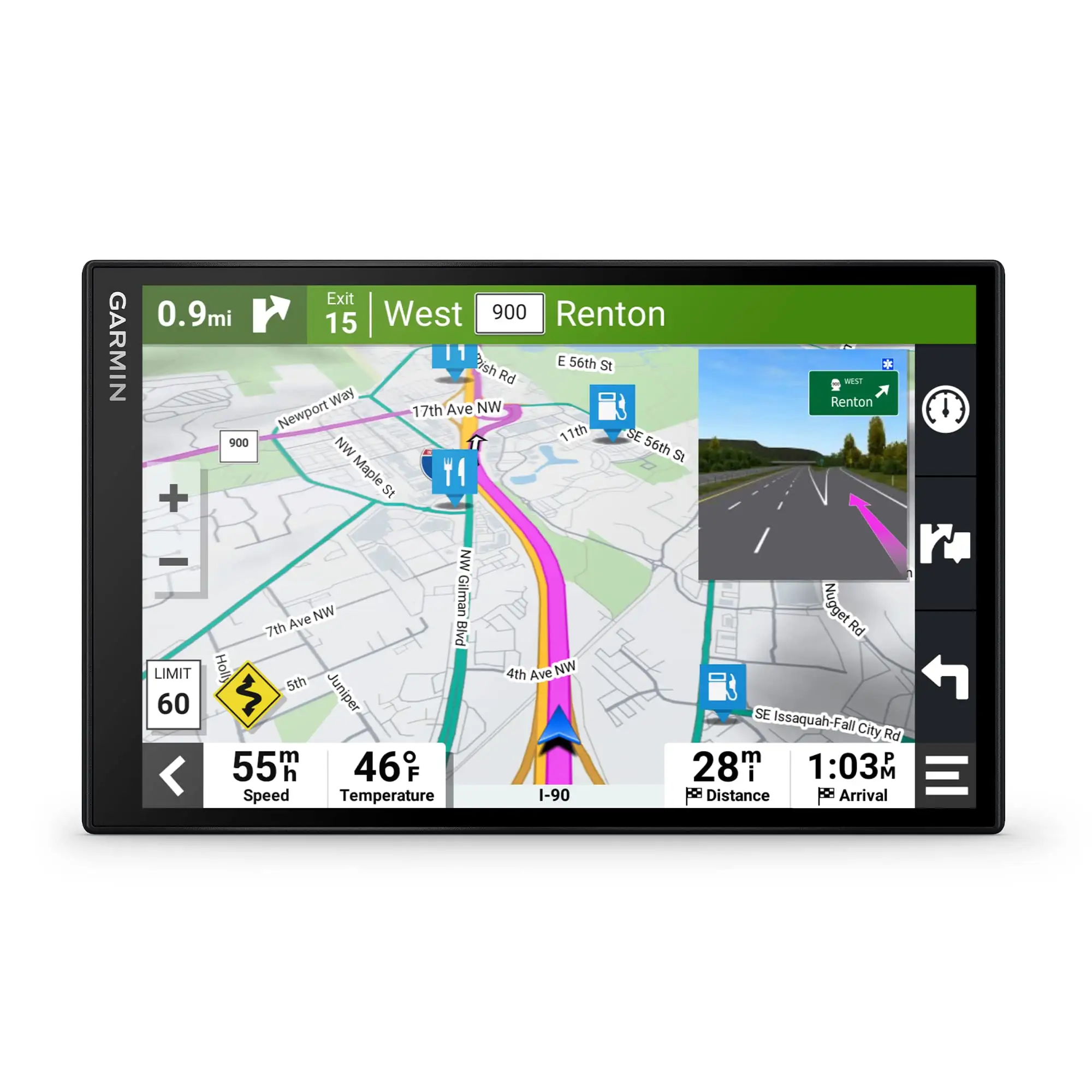
Many owners say the screen is the reason to buy this unit. Best Buy reviewer Scotch called it a “huge screen, brilliant color,” and Sasha said the “big screen size” makes it easy to see everything while driving. Brandonr emphasized that the 8‑inch panel makes directions “super easy to read… without having to spend a lot of time trying to read off a smaller version or your phone.”
But the same size that delights some creates real‑world headaches for others. Expert Reviews noted the “size requires careful positioning,” and Best Buy buyers echo this. Brandonr warned the screen’s footprint can block sightlines unless you find a side‑window or low mount. While Garmin positions the big display as pure benefit, users show it’s a trade‑off: better visibility, harder placement.
Claim 2: “Convenient voice assist / Alexa built‑in.”
On paper, Garmin Voice Assist and Alexa should mean hands‑free, low‑friction navigation. Some buyers like that idea; Kaileyl wrote that “the voice command feature also makes it easier to navigate while keeping my eyes on the road.”
However, multiple platforms highlight inconsistency. Tom’s Guide criticized that “voice controls are temperamental” and that the unit “can’t understand postal/zip codes.” Expert Reviews found “basic commands only gave us relevant results roughly half the time.” Even a happy owner like Brandonr disabled “Ok Garmin” because turning it off “improved overall performance and responsiveness a lot.” While Garmin touts voice as a key advantage, user experience suggests it’s optional at best and frustrating at worst.
Claim 3: “Live traffic, fuel prices, weather, and smart notifications.”
When paired with the Garmin Drive app, these features are meant to keep routes current. Many owners say it works well. Brandonr called having both HD radio traffic and phone data “extra reliable and extra accurate,” claiming it “often times beats Google Maps or Waze in accuracy.” Kaileyl praised “real‑time traffic updates and alternate route suggestions.” Expert Reviews also described connected features as strong.
Still, the dependency on a phone is a sticking point. One Best Buy reviewer (unidentifiable name) liked the GPS but didn’t like that “for it to have live updates it needs to connect with your phone,” and described call audio getting hijacked by the GPS. The marketing frames live services as integrated convenience; users remind you it’s only as good as your smartphone pairing and settings.
Cross‑Platform Consensus
Universally Praised
A recurring pattern emerged: people who buy the DriveSmart 86 specifically for a standalone, big‑screen Garmin experience tend to be thrilled with the core navigation and visibility. The screen is the loudest applause line. Best Buy reviewer Brandonr raved about “the large 8 in screen” letting him read directions quickly. Scotch similarly liked that it can be used “either horizontally or vertically,” highlighting dual orientation as practical for fitting into different dashboards. For older drivers or anyone who dislikes squinting at a phone, that extra real estate is the main draw.
Map coverage and route detail also get broad praise, especially from long‑time Garmin users. Brandonr said “the map coverage is superb… all the tiny roads, including the dirt ones, are there. Parking lots are there.” Cav 76, who’s owned Garmin units for “almost 20 years,” called this model “the best yet,” crediting “sharp, large, and clear map” updates that even pick up construction zones. Michaelh described upgrading from an older Nuvi and being pleased that “new maps as well as new features makes us very pleased with the purchase.”
Users also consistently like the depth of settings and routing tools compared to phone apps. Brandonr called it “packed full of settings, features, and controls beyond anything you'll find on your phone,” praising multi‑stop route planning and optimization for delivery‑style driving. A reviewer named Armon said his shipping team values the big screen and hands‑free notifications, noting they can connect phones to get texts and calls “still stay handsfree.” For fleet users, road‑trippers, or anyone who wants more control than Google Maps offers, that configurability is a real advantage.
Common Complaints
The biggest friction point is value versus smartphones. Tom’s Guide’s blunt take was that the DriveSmart 86 “feels redundant… for such a high price,” arguing it “offers nothing your phone can’t also do.” Expert Reviews was more positive overall but still questioned the point of Alexa when “with the smartphone and Alexa app, I already have Alexa in my car.” This sentiment matters most for buyers who don’t strongly prefer dedicated GPS hardware.
Mounting and physical practicality are another recurring issue. Tom’s Guide complained the suction cup was “next to useless on my dashboard,” only reliable on glass. Best Buy’s pros/cons summary notes “mount” issues among cons. Brandonr said the included mount is “for windows only, not your dash,” and Big K reported it “sometimes… looses grip from the windshield.” For drivers in bumpy vehicles or hot climates, this can turn into a daily annoyance.
Accuracy and POI search inconsistencies appear across sources. Matm on Best Buy called it “the worst gps i’ve ever owned,” claiming it gives “wrong turns” and doesn’t alert to closures or detours. On Garmin’s forums, a user reported that in Las Vegas the unit “could not find many common locations… even if I typed the address,” adding “Google Maps did not have the same problem.” BestViewsReviews aggregates similar issues, noting some users say it “takes wrong exits” or shows gas stations far away. While many praise map coverage, a meaningful minority experience misses, especially in dense or rapidly changing areas.
Divisive Features
Voice control and Alexa are sharply split. Some owners lean on it for safer driving — Kaileyl said voice commands help keep eyes on the road, and Brenda loved “Garmin voice assist to simply finding a destination.” On the other side, Tom’s Guide and Expert Reviews both found voice unreliable, and Brandonr improved performance by disabling “Ok Garmin.” For voice‑first users, this is either a nice bonus or a reason to ignore the feature entirely.
Connected services are similar: praised when working, criticized for dependence. Fans like Brandonr say dual‑source traffic can “beat Google Maps or Waze.” Skeptics dislike needing their phone for core “smart” features, as the Best Buy “good gps” reviewer described. If you want a truly independent device, the pairing requirement feels like a mismatch; if you’re fine tethering, it’s a strength.

Trust & Reliability
Across long‑term ownership stories, durability is generally good but not flawless. Stephend, after “more than 2 years,” said it’s “fast and reliable” with Bluetooth that “works flawlessly.” Cav 76 and other long‑time Garmin owners express confidence in the brand’s consistency.
Yet a handful of users report serious failures. Michael 627 on Best Buy gave 1 star after six months, saying “now it don't work no more… out of town with no gps.” BestViewsReviews includes complaints about battery degradation and shutdowns even while plugged in. These posts are outnumbered by positive long‑term remarks, but they show that reliability isn’t universally guaranteed.
There were no scam‑pattern reports in the provided verified‑review data; concerns were focused on performance, not authenticity.
Alternatives
Only competitors mentioned in user data are smartphones with Google Maps/Apple Maps/Waze and other Garmin/TomTom models. Tom’s Guide argues a phone makes the DriveSmart 86 redundant, especially given price. Their review suggests most drivers already get similar navigation plus better voice assistants through a smartphone.
Expert Reviews took the opposite stance for sat nav fans, saying that if you want a dedicated unit, the DriveSmart 86 is “right up there” and even preferable to the TomTom Go Discover for those who prioritize Garmin’s UI and larger screen. They also point to the smaller DriveSmart 76 as a more practical choice in tight cabins. So the alternatives split by user type: phone for general drivers, smaller Garmin or TomTom for people who want dedicated GPS without the bulk.
Price & Value
Official pricing in reviews centers around $350 / £280, while Amazon AU listings show a higher current price. Users are highly sensitive to the premium. Tom’s Guide calls it “very expensive,” and their verdict hinges on that cost versus phone navigation.
Resale data on eBay shows substantial depreciation. Refurbished units appear around $230, and used bundles can drop closer to $120–$170 depending on condition. That suggests a buying tip from the community: if you want this model, consider certified refurbished or lightly used to soften the price blow, especially since map updates are free for life.
FAQ
Q: Does the DriveSmart 86 work well without a phone?
A: It can navigate offline with preloaded maps, but many users say key features need pairing. A Best Buy reviewer noted live updates “needs to connect with your phone,” and Tom’s Guide stressed traffic services only work through the Garmin Drive app.
Q: How good is the 8‑inch screen in real driving?
A: Most owners love it for clarity. Best Buy reviewer Brandonr said it’s “super easy to read,” and Scotch called it “huge… brilliant color.” The downside is size; multiple users warn it can be hard to mount without blocking sightlines.
Q: Are the maps and routing accurate?
A: Many report excellent coverage and dependable routes, like Brandonr saying “all the tiny roads… are there.” But a minority see errors. Best Buy reviewer Matm complained of “wrong turns,” and a Garmin forum user said it missed common Las Vegas locations.
Q: Is voice control reliable?
A: Mixed. Some buyers praise it for safer navigation, but several reviews call it inconsistent. Tom’s Guide said voice controls are “temperamental” and don’t handle zip codes well, while Brandonr disabled “Ok Garmin” to improve performance.
Q: Is it worth buying over Google Maps or Waze?
A: Only if you want a dedicated Garmin with more settings and a bigger display. Fans say traffic and routing can rival phone apps, but critics like Tom’s Guide argue it “offers nothing your phone can’t also do” for far less money.
Final Verdict
Buy if you’re a road‑trip regular, delivery driver, or long‑time Garmin user who wants a large, easy‑to‑read dedicated GPS with deep routing customization and free lifetime map updates. Avoid if you expect flawless POI search, rely on voice commands, or feel your smartphone already covers navigation needs.
Pro tip from the community: Best Buy reviewer Brandonr recommends doing a full firmware/map update via Garmin Express before first use, saying it “will greatly improve your experience of the device.”