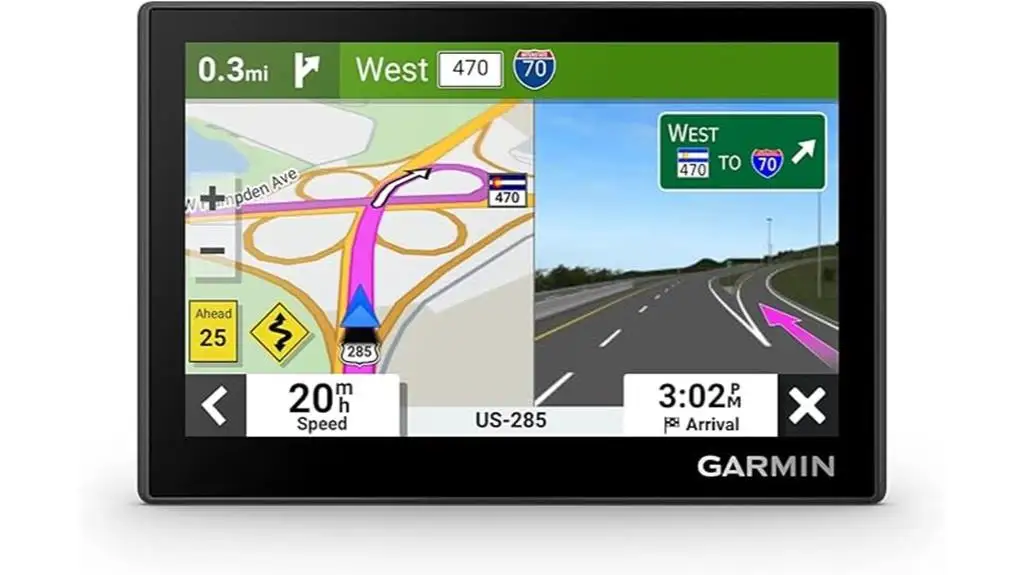
Garmin Drive 53 (Renewed) Review: Solid, But Caveats
The most telling line in the feedback isn’t about maps or traffic—it’s about confidence: a Best Buy reviewer wrote, “it responds to screen touch easily and finds its satellites fairly quickly… it’s been flawless ever since.” That tension between “flawless” and “liability” runs through nearly every platform discussing the Garmin Drive 53 GPS Navigator (Renewed). Verdict: a strong basic dedicated GPS with a few recurring deal-breakers. Score: 7.6/10.
Quick Verdict
The Garmin Drive 53 GPS Navigator (Renewed) is a conditional “yes”: it’s widely appreciated as a simple, compact, easy-to-read alternative to phone navigation, but multiple users flag low audio volume, occasional map/routing oddities, and setup friction.
| Decision | Who it fits | Evidence from users |
|---|---|---|
| Yes | Drivers replacing older Garmin units | Best Buy reviewer: “An excellent upgrade from my old garmin nuvi 1450.” |
| Yes | “Old school” users avoiding phones | Best Buy reviewer: “My parents… refuse to use their phones… he loved it.” |
| Conditional | People sensitive to audio clarity | ShopSavvy TLDR: “volume… too low… even at maximum settings.” |
| Conditional | Those relying on perfect local maps | Best Buy 2-star: “the directions i’m getting are a liability.” |
| No | Users needing advanced routing options | Fakespot snippet: “it only has the fastest time option.” |
Claims vs Reality
Garmin’s marketing and retailer specs emphasize a “bright, high-resolution… glass… touchscreen,” “simple on-screen menus,” and traffic features depending on the bundle. Digging deeper into user reports, the reality is closer to “great hardware feel, uneven real-world execution.”
One big claim is ease and clarity. On Best Buy, multiple reviewers echo that promise with experience-based comments: “Typing on the unit is very responsive,” and another says, “It is great. easy to use and follow!! also easy to set up.” That matters most for drivers upgrading from older nüvi-era devices or anyone who wants a dedicated GPS that doesn’t interrupt phone calls. Garmin’s own press release frames it as a “dedicated gps navigator” to avoid phone drain and interruptions, and the Best Buy gifting stories align with that use case: “My parents are a little old school… this was a great surprise.”
A second claim is traffic and alerts improving situational awareness. Some users explicitly like those warnings: a Best Buy reviewer said, “I especially like the traffic cam warnings.” But the gap appears when the user expectation is “smartphone-like” traffic intelligence or deeper routing controls. The Fakespot-derived snippet complains, “it only has the fastest time option. was expecting an upgrade,” suggesting that some buyers interpret “traffic” and “alerts” as meaning a more customizable route engine than what they actually get.
The most serious marketing-vs-reality conflict shows up around map accuracy. While the device is sold with “detailed map updates,” one Best Buy reviewer delivers a harsh counterpoint: “they updated everything except the map,” and describes a repeated highway guidance issue they view as unsafe—“it’s dangerous” and “the directions i’m getting are a liability.” Best Buy also includes Garmin’s response encouraging a “map error report,” underscoring that some reported issues may be map-data/vendor driven rather than purely device hardware.
Cross-Platform Consensus
A recurring pattern emerged across sources: people who want a dedicated, compact navigator often love the basics, while people expecting smartphone-level polish and flexibility are more likely to get irritated.
Universally Praised
The first consistent win is straightforward day-to-day navigation for people who don’t want to rely on a phone. On Best Buy, a reviewer frames it as a practical tool for routine travel: “I routinely have to travel out of town for appointments. garmin allows me to store my favorite locations and use in a rental car.” That story captures the core appeal: a predictable interface and saved places that follow you between vehicles, which is especially valuable for frequent renters, caregivers shuttling to medical visits, or commuters who just want a “set it and forget it” dash device.
Second, multiple comments point to screen responsiveness and input comfort as a meaningful upgrade—particularly for users coming from older resistive screens. Best Buy’s 5-star “excellent gps” review says, “Typing on the unit is very responsive.” Another Best Buy review reinforces the same theme after setup work: “excellent after downdoading updates and tinkering… the unit is made in china.” Even when the praise is paired with caveats, it suggests that once configured, interaction can feel quick and modern enough for older-school GPS buyers.
Third, there’s strong affinity for the “basic GPS that just works” positioning. A Best Buy reviewer summed it up: “good basic gps… i wanted a basic, not too large gps… and this seems to fill the bill.” That’s echoed by ShopSavvy’s TLDR pros emphasizing the beginner-friendly learning curve: “easy to use and program” and “compact design… fits well in various spaces.” For drivers with smaller dashboards, older vehicles without CarPlay/Android Auto, or anyone tired of phone mounts, this “compact and predictable” story is the most repeated positive.
Common Complaints
The most repeated functional complaint across sources is audio volume. ShopSavvy’s TLDR calls it out directly: “volume of voice prompts is too low… even at maximum settings.” Fakespot’s extracted snippet aligns: “hard to hear the voice instructions.” This disproportionately affects drivers in loud cabins (older trucks, convertibles), anyone with hearing sensitivity, or people who rely on voice guidance more than glances at the screen. In those contexts, “quiet voice prompts” isn’t a small nit—it changes whether the device feels trustworthy at highway speed.
Another complaint pattern is setup and onboarding friction. ShopSavvy flags: “initial set up can be challenging due to a lack of included instructions,” and a Best Buy reviewer describes a learning/charging struggle that ended in abandonment: “couldn't figure out how to use it or charge the battery… used my ancient gps.” Even a positive reviewer mentions extra steps: “I had to do two updates and spent half an hour tinkering.” For gift buyers (especially for parents), these stories imply that the “out of the box” experience can be a hurdle unless someone helps with updates and settings.
The sharpest complaint cluster is around map/routing trust in specific regions. The Best Buy 2-star review reads like a warning label, describing directions that repeatedly send them into a risky lane-crossing: “it would direct me to turn right to the south interstate and then have me cross three lanes… it’s dangerous.” That same reviewer’s disappointment is pointed: “all of this does me no good when the directions i’m getting are a liability.” While it’s one user story, it’s detailed enough to highlight the worst-case scenario: when a dedicated GPS is wrong, it can feel more dangerous than a phone map you already distrust less.
Divisive Features
Even the interface and address entry split opinion. ShopSavvy describes entry as painful—“entering addresses can be cumbersome and time consuming” and “user interface… difficult and frustrating to navigate.” Yet Best Buy has the opposite experience from other users: “Impressed!!! it’s so easy to use, simple to add addresses… it works really quickly and it does not have any glitches.” That contradiction suggests variability: differences in user expectations, prior Garmin familiarity, update status, or even how people search (exact address vs POI/landmark).
Map confidence is similarly split. One Best Buy reviewer describes a rocky first boot—“it didn't seem to know that california existed”—but then says a few landmark searches fixed it and “it’s been flawless ever since.” Meanwhile, the 2-star reviewer insists the underlying map problem persisted despite checking updates: “i immediately searched for updates before i used the new system.” Taken together, the feedback implies that early indexing/initialization may confuse some users, and that a subset may run into genuine map-data errors that updates don’t solve quickly.
Trust & Reliability
On Trustpilot via Fakespot, the “minimal deception” note and “over 90% high quality reviews” claim appears in the summary, but the useful part for buyers is the recurring real-world frustrations embedded in those snippets—especially audio (“hard to hear the voice instructions”) and routing limitations (“only has the fastest time option”). Those are the types of issues that don’t sound like fake-review patterns; they sound like expectation mismatches and design tradeoffs.
Long-term durability stories are thin in the provided community data, but the Best Buy gifting and replacement narratives hint at the lifecycle: people buy it because an older Garmin “broke” or is outdated. One buyer calls it “an excellent upgrade from my old garmin nuvi 1450,” while another expects “updated” maps to fix a long-standing local error and feels burned when it doesn’t. The most reliability-relevant lesson in the feedback is less about hardware failure and more about whether the maps in your specific area behave safely.
Alternatives
Only one explicit alternative is named in the user-sourced summaries: smartphone navigation, particularly Google Maps. ShopSavvy’s bottom line states that if setup and international travel are priorities, “you might want to consider using smartphone apps like google maps.” That frames the trade: phones often win on live data and UI familiarity, while the Garmin Drive 53 (Renewed) wins for drivers who want a dedicated screen, fewer phone interruptions, and a consistent mount-and-go routine.
The Best Buy comments also imply another “alternative”: older Garmin units people already own. One reviewer reverted: “I went on a trip and used my ancient gps.” That’s not a competitor model, but it’s a real behavioral alternative—if the new device’s learning curve or quirks frustrate the user, they may fall back to what they already know.
Price & Value
Amazon’s listing shows a renewed option and a common street price around the low-$100s (the provided feed includes “$129.95” and ShopSavvy cites “lowest… $99.99 at amazon”). Value perceptions match that band: Fakespot snippets highlight “price was reasonable and a good value,” and Best Buy’s enthusiastic reviewer ends with “definitely worth the money.”
Resale-market data from eBay shows broad Garmin pricing noise across many models, but the presence of listings like “garmin drive 53 ex 5" gps navigator” around “$70.00” indicates a resale floor that bargain hunters watch. For buyers considering renewed, that matters: if you’re price-sensitive, community behavior suggests people treat the Drive 53 as a commodity navigator—easy to replace, easy to sell, but not sacred.
Buying tips embedded in the feedback cluster around setup: plan for updates and a short learning session. The Best Buy reviewer who ended up happy still said, “I had to do two updates and spent half an hour tinkering,” implying that value improves when you treat the first day as “configure and update,” not “plug in and drive immediately.”
FAQ
Q: Is the Garmin Drive 53 actually easy to use for non-tech drivers?
A: Often yes, but not universally. A Best Buy reviewer said, “It is great. easy to use and follow!! also easy to set up,” and another gift buyer noted their “old school” parents loved it. Still, ShopSavvy warns “initial set up can be challenging” without clear instructions.
Q: Are the voice directions loud enough in a typical car?
A: Multiple sources say volume can be a problem. ShopSavvy’s TLDR notes the “volume… is too low” even at max, and a Fakespot snippet echoes “hard to hear the voice instructions.” If your cabin is noisy, this is one of the most repeated complaints.
Q: Do map updates fix navigation problems?
A: Sometimes, but user experiences conflict. One Best Buy reviewer described early confusion—“it didn't seem to know that california existed”—but said it became “flawless” after searching landmarks. Another user reported checking updates immediately and still called the routing “dangerous” and a “liability.”
Q: Does it feel like a real upgrade from older Garmin nüvi devices?
A: Many buyers say yes, especially for touch responsiveness. A Best Buy reviewer called it “an excellent upgrade from my old garmin nuvi 1450,” highlighting responsive typing. But at least one dissatisfied user said Garmin “updated everything except the map,” suggesting the upgrade can feel cosmetic if map behavior disappoints.
Q: Is it a good buy as a renewed unit?
A: Feedback supports the value proposition at lower prices, but the same core issues apply. Fakespot snippets call the price “reasonable and a good value,” while repeated complaints focus on volume and routing options rather than condition. The best “renewed” strategy implied by users is to run updates and test local routes early.
Final Verdict
Buy the Garmin Drive 53 GPS Navigator (Renewed) if you’re an “old school” driver who wants a compact dedicated GPS, responsive typing, and simple turn-by-turn without relying on your phone—like the Best Buy buyer whose dad “loved it,” or the frequent traveler storing favorites for rentals.
Avoid it if you depend on loud voice prompts, need advanced routing controls beyond “fastest time,” or can’t tolerate occasional map-data surprises—especially if you relate to the reviewer who warned the directions felt like a “liability.”
Pro tip from the community: treat day one as setup time—one Best Buy reviewer said the device became excellent only after “downloading updates and tinkering,” and another found it “flawless” after searching well-known landmarks to “get it oriented.”