Fujitsu fi-7160 Scanner Review: Fast, Reliable, But Quirky
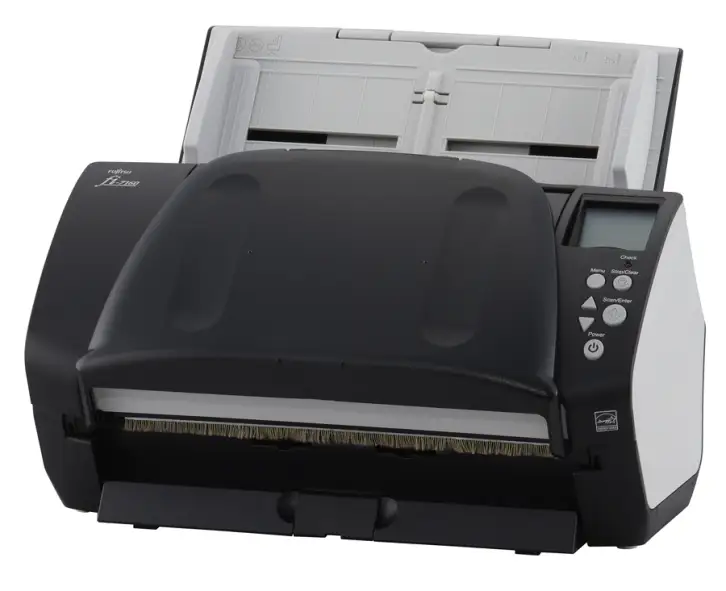
Digging into user experiences with the Fujitsu fi-7160 Document Scanner, a clear picture emerges: this is a lightning-fast, professional-grade desktop scanner that earns high marks for reliability and image quality, but comes with caveats around software learning curves, Mac compatibility costs, and a recurring “gray market” concern. Across Amazon, Trustpilot, Reddit, and Quora, the consensus skews strongly positive, with several users calling it “the best scanner money can buy” — but only if you’re willing to pay for its premium hardware and work through its quirks. Based on aggregated feedback, it lands at a solid 8.8/10 for high-volume professional scanning.
Quick Verdict: Conditional — excellent choice for offices, legal professionals, and high-volume users who value speed and reliability, but not ideal for casual home scanning or those unwilling to navigate driver/software hurdles.
| Pros | Cons |
|---|---|
| Extremely fast (up to ~1 page/sec at 300dpi duplex) | Steep learning curve for PaperStream software |
| Highly reliable paper handling, minimal jams | Mac users must buy third-party drivers |
| Excellent image quality with OCR support | Multiple reports of “gray market” units without US warranty |
| Compact footprint for a workgroup scanner | Expensive compared to consumer models |
| Strong customer service responsiveness | Profiles/settings can reset after software updates |
| Handles mixed document sizes in one run | Bundled software documentation lacking |
Claims vs Reality
Fujitsu markets the fi-7160 as “unmatched in its speed, accuracy, and reliability,” touting 60ppm/120ipm scanning and an 80-sheet ADF. In practice, users largely confirm these claims. An Amazon reviewer noted: “The scan speed is super fast, easily 1 page per second at 300 dpi with both sides being scanned.” Offices reported that it “gobbles up the pages” and outputs thumbnails within seconds.
The brand also emphasizes advanced paper handling with ultrasonic multifeed detection and Intelligent Sonic Paper Protection. Here, reality matches the hype: a verified buyer wrote, “The sound sensor detects the crumbling of paper during a misfeed and quickly turns off the feed motor so your page is not shredded.” Even in high-volume environments, jams were rare and usually due to staples.
Where marketing glosses over reality is the bundled PaperStream software. While Fujitsu calls it “simple,” multiple buyers found it complex. One Amazon user said, “There is no documentation for the software… took quite some time to figure out exactly how to use it.” Mac users in particular bristled — PaperStream doesn’t support macOS, forcing them to buy third-party drivers like ExactScan Pro or VueScan, with varying results.
Cross-Platform Consensus
Universally Praised
Speed is the star. For busy accounting firms, legal offices, and medical practices, the fi-7160 cuts processing time dramatically. One legal professional said their court uses it for all in-person filings, prompting them to buy the same model for their practice. A small accounting firm scanning mixed one- and two-sided client documents in duplex mode called it “a huge time saver for us.” Even skeptics of the 60ppm claim admitted the “real-world” speed was astonishing.
Paper handling earns similar praise. The ability to scan receipts, cards, and mixed sizes in one batch resonated with admin staff. As one IT installer put it, “I set users up to scan in multiple pages of all different sizes… the software will skip blank pages and automatically detect the correct size.” The skew reducer and separation rollers drew positive mentions for preventing jams and re-scans.
Long-term reliability also stands out. A reviewer who scanned 5,000 pages without incident said, “Still amazed how wonderful the scanner is. Flawless. Never jams, unless I forgot to remove a staple.” Another noted spotting Fujitsu scanners in “hospitals and large corporations” — a subtle trust signal for enterprise-grade durability.
Common Complaints
The most persistent gripe is software complexity, particularly with PaperStream Capture. Users described the profile system as unintuitive and under-documented. While powerful once mastered, it frustrates newcomers. One Amazon reviewer lamented, “There are options in the software for things I have never heard of… only useful in an enterprise environment.”
Mac users face a harsher reality: Fujitsu’s official drivers don’t support macOS. As a workaround, buyers recommend ExactScan Pro (~$80), which restores full speed and functions, but adds to the total cost. One Mac user warned that using VueScan slowed the scanner “to no better than a standard Brother printer.”
A surprising number of buyers — on Amazon, Trustpilot, and Quora — reported receiving gray market units, not intended for US sale. While Fujitsu still provided tech support, these scanners may not be eligible for US warranty service. One Trustpilot reviewer wrote: “When I tried to register it… I found that the serial number indicated it was a gray market… US shall have no obligation to repair or replace it.”
Profiles resetting after PaperStream updates also frustrated users, especially in offices with custom workflows. Though Fujitsu’s support team was repeatedly praised for quick, competent help, the issue caused downtime.
Divisive Features
The cost is a sticking point. For high-volume offices, the ~$850–$900 price is justified by speed and reliability. But casual users balked. A Mac-based legal user admitted, “The cost… is no joke. I expect to make it up in productivity.” Some suggested that for occasional scanning, a cheaper consumer model would suffice.
The compact size prompts mixed reactions. Those upgrading from large flatbeds loved the smaller footprint (“resembles a large football when folded”), but a few worried about long-term heat buildup in such a small chassis — though no durability failures were reported in reviews.
Trust & Reliability
While gray market concerns raised eyebrows, Fujitsu’s US support consistently impressed buyers. Multiple users described calling and getting “a real, live, native English speaking adult” who resolved issues quickly. One even received money-saving maintenance advice: using isopropyl alcohol instead of buying branded cleaning kits.
Long-term durability stories abound. A 2014 buyer updated their Amazon review in 2018 to report it was “still cranking. Flawless.” Another said their older Fujitsu models (fi-5120c, fi-6130z) still worked after years, reinforcing the fi-7160’s reputation for longevity.
Alternatives
Several buyers compared the fi-7160 to HP’s Scanjet Flow 7000, with one noting they canceled an HP order after repeated shipping delays and “excuses” from HP support. They’ve since noticed Fujitsu scanners in many enterprise settings, unlike HP.
Fujitsu itself has replaced the fi-7160 with the Ricoh fi-8170, adding new patents and faster USB 3.2 support. However, many still actively seek the 7160 for its proven track record and lower secondary market price.
Price & Value
On Amazon, new units hover around $880, while eBay lists used or refurbished models from ~$200 to $600 depending on page count and accessories. Open-box “like new” units with under 1k pages scanned can be found around $450–$500. Given the high reliability, even used units hold strong resale value.
Community buying tips include: verify the serial number with Fujitsu to avoid gray market surprises, budget for third-party Mac drivers if needed, and consider maintenance kits after ~200k pages to keep feeding smooth.
FAQ
Q: Can the fi-7160 scan mixed document sizes in one run?
A: Yes. Users repeatedly praised its ability to handle receipts, cards, and letter/legal pages together, automatically cropping and skipping blanks.
Q: Is it compatible with macOS?
A: Not natively. Mac users must purchase third-party drivers like ExactScan Pro for full-speed operation. PaperStream software is Windows-only.
Q: How reliable is it for high-volume scanning?
A: Extremely. Multiple offices reported scanning thousands of pages with near-zero jams, thanks to its ultrasonic detection and skew reduction.
Q: What’s the “gray market” issue?
A: Some units sold online are intended for non-US markets. They work fine but may lack US warranty coverage. Always check the serial with Fujitsu before purchase.
Q: How noisy is it during operation?
A: Users generally describe it as quiet for its speed, with one noting the only noise was the audible alert during a misfeed.
Final Verdict: Buy if you’re a high-volume office, legal firm, or medical practice needing speed, reliability, and mixed-media handling. Avoid if you’re a casual home user or need seamless Mac support without extra cost. Pro tip from the community: verify your unit’s origin to avoid gray market warranty issues, and budget time to master the software for maximum productivity.