Escort M2 Smart Dash Cam Review: Conditional Buy (7/10)
A dash cam that can be “100% unusable” if the app won’t connect—that’s the tension at the heart of the Escort M2 Smart Dash Cam. One Amazon reviewer summed up the nightmare scenario as: “it legit will not connect to the drive smarter app… there’s no way to view any videos or adjust any settings,” calling it a “‘$200 piece of plastic’.” And yet, across Best Buy and Amazon, plenty of owners still praise the clean radar-detector integration and footage quality enough to keep it. Verdict: Conditional buy — 7/10.
Quick Verdict
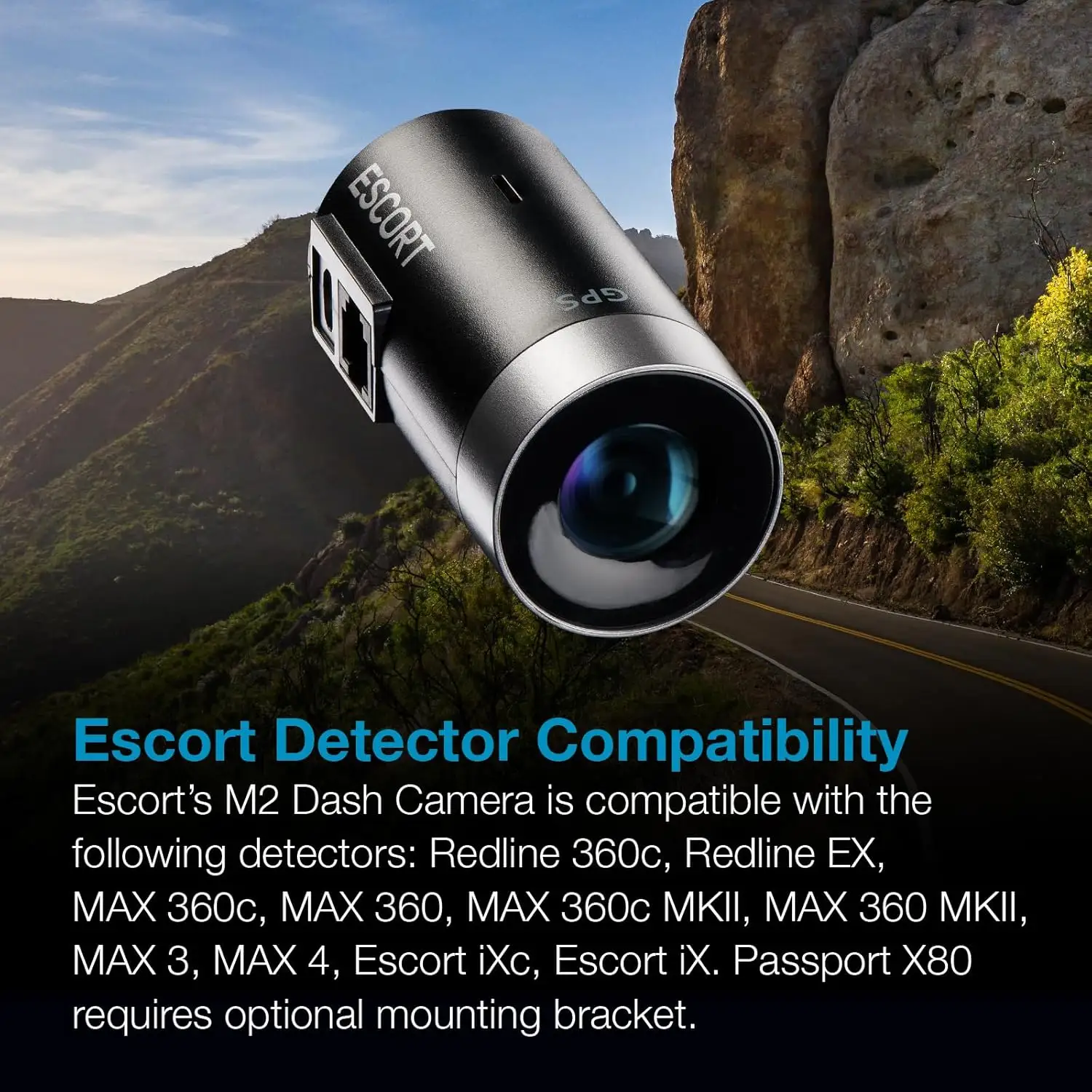
For owners already running an Escort-compatible detector, the Escort M2 Smart Dash Cam is often described as the “clean setup” option—one mount, fewer wires, and GPS overlays—so long as you can tolerate (or work around) frequent complaints about the Drive Smarter app.
Buy? Conditional (best if you already own a compatible Escort radar detector and don’t mind pulling the SD card when the app misbehaves)
| What matters | Pro (user-backed) | Con (user-backed) |
|---|---|---|
| Radar-detector integration | “attaches perfectly to my radar… so less cables” (Best Buy) | Some expected deeper integration: “systems are really all stand alone” (Best Buy) |
| Video clarity | “videos are clear” (Best Buy) | “only 1080p… should be better” (Best Buy) |
| App experience | Some say it’s fine: “the app works great” (Best Buy) | Others: “‘drive smarter’ software is garbage” (Best Buy) |
| Reliability over time | Some long-term satisfaction: “over a year… no issues” (Best Buy) | Reddit failure report at ~2 years: “camera sensor malfunction” (Reddit) |
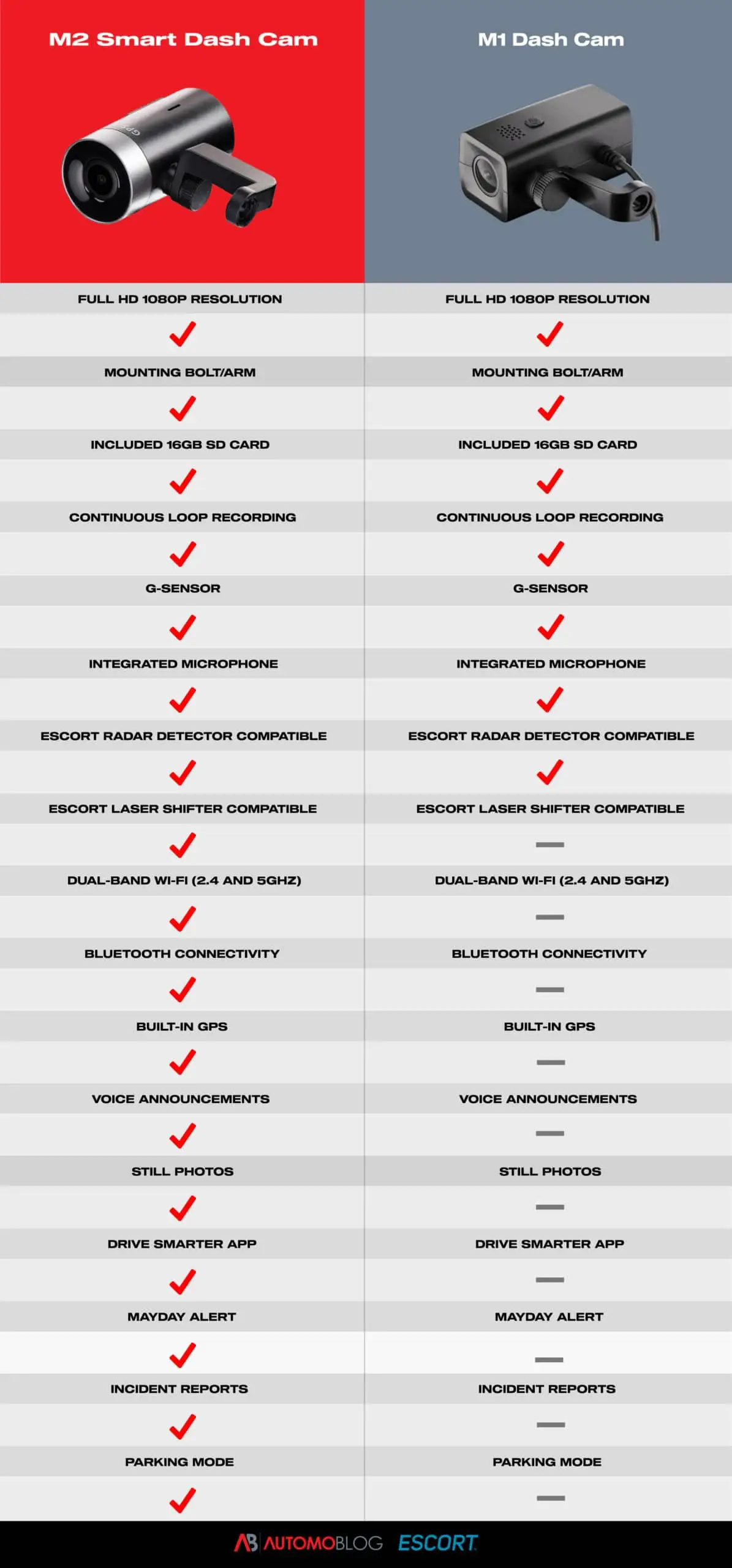
| Parking-mode promise | Officially supports parking mode (hardwire required) | Confusion/expectations gaps around setup and power needs appear in user narratives |
Claims vs Reality
Escort’s marketing centers the Escort M2 Smart Dash Cam around three big ideas: clean integration with Escort detectors, cloud/app convenience, and safety features like Mayday alerts and incident reports. Digging deeper into user feedback, a recurring pattern emerged: owners love the physical integration and the idea of an “all-in-one” ecosystem—but the app experience can either unlock the product or effectively brick it for certain workflows.
Claim 1: “Seamless” app control and cloud video management
While the product messaging emphasizes Drive Smarter for video access and settings, user experiences split sharply. A verified buyer on Amazon noted: “the bluetooth connection has worked fine… what doesn't work almost at all is the wi-fi connection between the iphone and camera, which is used for viewing/downloading the gallery.” For that buyer, the workaround became the real product: “I simply take out the micro sd card and use my laptop to view videos.”
On the harsher end, a Best Buy reviewer didn’t describe inconvenience—they described total failure: “it legit will not connect to the drive smarter app… there’s no way to view any videos or adjust any settings.” For app-dependent users (people who expect phone-based playback after an incident), this gap is decisive.
Claim 2: Integrated “complete driver alert system” with your Escort detector
Many buyers actually do experience the tidy, integrated install Escort advertises—especially those who already want minimal windshield clutter. A Best Buy reviewer wrote: “small, attaches perfectly to my radar and connects directly to it, so less cables in the way… great resolution also.” Another framed it as the main reason to buy: “the fact that is has the same power source makes it super convenient, saves space on the windshield” (Best Buy).
But some owners expected the “integrated system” to behave like a single unified product in-app. One Best Buy complaint was blunt: “the app doesn't work as advertised… then why buy an integrated system?” That user’s frustration wasn’t only bugs—it was the feeling the ecosystem promise didn’t match how separate the detector/camera can feel when troubleshooting.
Claim 3: Safety features (Mayday alerts, incident reports, emergency locking)
The feature set is a strong selling point on paper, and some owners report the camera doing what they hoped in real incidents. A Best Buy reviewer described practical value: “i actually had to use my dash cam today due to a minor accident and it worked exactly how i hoped it would,” highlighting that the camera records with “gps coordinates, and speed” on the video.
Yet the Automoblog review (a published review, not a customer post) underscores a key caveat: top features are tied to the app, and the reviewer said: “i was never able to successfully use it once,” describing a “perpetual circle” and connection that “fizzles out.” When emergency features depend on software access, app stability becomes part of the safety story.
Cross-Platform Consensus
The loudest agreement across Amazon, Best Buy, and Reddit isn’t about 1080p vs 4K—it’s about whether the Escort M2 Smart Dash Cam feels like a sleek extension of your radar detector or a camera held back by software friction. Digging deeper into user reports, three themes keep resurfacing: the “clean install” win, the “good enough” footage with GPS overlays, and the Drive Smarter app as either tolerable, glitchy, or infuriating.
Universally Praised
A recurring pattern emerged around the physical concept: people buy the Escort M2 Smart Dash Cam because it reduces clutter. For drivers who hate dangling cords and suction-cup sprawl, the integration is the whole point. A verified buyer on Amazon said their main reason was “seamless integration” and avoiding “more bulk and/or wires.” On Best Buy, a customer echoed the appeal: “attaches perfectly to my radar… so less cables in the way.”
Video quality is also repeatedly described as solid—especially for everyday evidence, not cinematic capture. A Best Buy reviewer stated simply: “the videos are clear.” Another called it a “good picture (although not 4k)” (Best Buy). For commuters and highway drivers who prioritize readable scene context and a reliable record of events, this “clear enough” framing shows up again and again.
GPS overlays—speed, time, coordinates—land as practical value, particularly for accident documentation. One Best Buy reviewer highlighted exactly what they wanted: “10/10 perfect video quality with speed mph on the video.” Another described the benefit in incident use: “i actually had to use my dash cam today due to a minor accident and it worked exactly how i hoped it would,” emphasizing that the footage includes “date, time, gps coordinates, and speed.”
Common Complaints
The Drive Smarter app is the center of gravity for complaints. Some users describe mild friction; others describe a nonfunctional product experience. A Best Buy reviewer summarized their frustration as: “nice camera, ‘drive smarter’ software is garbage,” adding: “i cannot connect to the settings… customer service… could not assist.” Another user described the integration promise breaking down in practice: “the app doesn't work as advertised… then why buy an integrated system?”
On Amazon, similar pain shows up as unreliable Wi‑Fi gallery access even when Bluetooth settings control works: “what doesn't work almost at all is the wi-fi connection… used for viewing/downloading the gallery.” For drivers who want quick phone downloads after an incident—rideshare drivers, frequent travelers, or anyone who needs to send footage fast—this is a high-impact failure mode.
Price-to-spec complaints also recur, especially around 1080p. A Best Buy reviewer wrote: “camera works however its only 1080p… for the price i would expect the software to work better.” Another put it more bluntly: “at this price level, the 1080p resolution is not honestly good” (Amazon). The core gripe isn’t that 1080p is unusable—it’s that the cost sets expectations for smoother software and higher resolution.
Divisive Features
The same app experience that some users call broken is described as fine—or at least manageable—by others. A Best Buy reviewer said: “the app instantly picked it up and began working!” Another: “starts up quick and the app works great as well.” In contrast, a Best Buy one-star reviewer said they tried for over an hour and “it didn't connect once.”
Even when users dislike the app, opinions split on how much it matters. Some treat it as optional: a Best Buy reviewer advised that if the app is glitchy, “you can just pop the micro sd card in your computer.” That’s a workable trade-off for drivers who only need footage occasionally—but a poor fit for people who bought into the “cloud video management” story.
Trust & Reliability
Digging deeper into durability stories, the most alarming long-term report comes from Reddit rather than the big retail platforms. Reddit user (username not provided in the excerpt) posted: “escort m2 failed after 2 years, camera sensor malfunction,” adding they were offered “10% off” out of warranty and warning: “if you’re looking for something that lasts maybe skip the escort m2.” The same thread includes their loss of confidence: “i can no longer trust the device to record 24/7.”
In retail reviews, reliability is narrated in more moderate terms—some steady long-term satisfaction, some software degradation. A Best Buy reviewer said: “i have had this for over a year and have not had any issues with it,” while another who bought twice still flagged the weak spot: “overall i’m satisfied… however, the software can be glitchy,” describing an update where “it took forever to clear media data to free up space.”
While the official product positioning leans on safety features and automation, the trust story in user feedback often hinges on consistency—whether it connects when you need it, and whether it keeps recording without surprises. The Reddit failure report is a reminder that hardware longevity concerns exist alongside software complaints, even if not widespread in the provided data.
Alternatives
When buyers sour on the Escort M2 Smart Dash Cam, the alternatives mentioned in the data skew toward mainstream dash-cam brands rather than other radar-mounted systems. In the Reddit thread, one commenter said: “i’ve had bad luck with dash cams until i got a garmin,” adding: “i have a garmin dc20 that's about 10 years old and still going.” Another pointed to durability reputation: “garmin and blackvue… these two brands just work.”
Viofo comes up as the “works without drama” option in that same community context. Reddit user recommendations included: “my viofo a229 duo has been flawless so far,” and another added: “my a129 duo from 2018 is still going strong.” The trade-off implied by these comments is clear: you may lose the single-mount Escort ecosystem aesthetic, but gain a more trusted standalone dash cam experience.
Price & Value
The Escort M2 Smart Dash Cam often gets judged less on raw footage quality and more on whether the premium is justified by integration. Best Buy reviewers who like the clean install still criticize value: “it’s convenient… but it can be better for her price,” and “for the price i would expect the software to work better.” On Amazon, one reviewer liked the setup but still said: “at this price level, the 1080p resolution is not honestly good.”
Resale and deal-hunting show up indirectly via pricing references in the data: the M2 is commonly listed around the $150–$200 range new, and eBay listings in the data show new units around “$144.00” and “$149.95.” For value-focused buyers, the community advice embedded in reviews is essentially: buy it for the tidy Escort detector pairing, and consider it more attractive “if its on sale” (Best Buy).
Buying tips implied by user behavior are also pragmatic. Multiple reviewers default to SD-card workflows when the app is frustrating—“you can just pop the micro sd card in your computer” (Best Buy) and “I simply take out the micro sd card and use my laptop” (Amazon). That suggests a value threshold: if you’re okay treating it like a recorder first and an app-connected device second, the price becomes easier to swallow.
FAQ
Q: Does the Escort M2 Smart Dash Cam really integrate cleanly with an Escort radar detector?
A: Yes—many owners say the main benefit is reduced clutter. A Best Buy reviewer wrote it “attaches perfectly to my radar… so less cables in the way,” and others like that it “shares 1 power source and main mount” (Best Buy). The clean install is a top reason people buy it.
Q: How good is the video quality if it’s only 1080p?
A: Owners often call it clear enough for evidence, but some feel it’s underwhelming for the price. One Best Buy reviewer said “the videos are clear,” while another complained, “however its only 1080p… should be better.” Expectations seem higher because it’s a premium add-on camera.
Q: Is the Drive Smarter app required to use the camera?
A: You can record without relying on the app, but the app affects convenience and settings access. Several users work around app issues by pulling the card: “you can just pop the micro sd card in your computer” (Best Buy). But others say if the app won’t connect, it blocks key controls.
Q: What’s the biggest day-to-day complaint from real owners?
A: Connectivity and usability in the Drive Smarter app. A Best Buy reviewer said “‘drive smarter’ software is garbage,” and an Amazon reviewer reported Wi‑Fi gallery access “doesn't work almost at all.” Some users are fine with it, but the negative experiences are detailed and repeat across platforms.
Q: How does it hold up long-term?
A: Reports vary. Some Best Buy owners say “over a year… no issues,” while Reddit includes a durability warning: “escort m2 failed after 2 years, camera sensor malfunction.” Software reliability is also part of the long-term story, with one owner saying updates can be “glitchy” (Best Buy).
Final Verdict
Buy the Escort M2 Smart Dash Cam if you’re an Escort radar detector owner who prioritizes a clean windshield setup and you’re comfortable using the microSD card as a fallback when the app is temperamental.
Avoid it if your workflow depends on fast, reliable phone downloads and settings access through Drive Smarter—because some owners describe repeated connection failures, including the one-star warning that it “legit will not connect to the drive smarter app” (Best Buy).
Pro tip from the community mindset: if the app acts up, several owners fall back to the simplest path—“just pop the micro sd card in your computer” (Best Buy)—treating the app as optional rather than essential.