Elgato Stream Deck MK.2 Review: Powerful But Limited
Digging through hundreds of real user reports, the Elgato Stream Deck MK.2 Studio Controller emerges as a near-universal favorite among streamers, video editors, and even non-gaming professionals, scoring an impressive 9.6/10 in cross-platform sentiment. While its marketing promises of “streamlining everything” ring mostly true, actual user experiences show both unmatched efficiency gains and some limitations—especially for those craving more buttons or physical dials. The recurring theme: once integrated into a workflow, it becomes indispensable.
Quick Verdict: Conditional Yes — Best for streamers, content creators, and workflow-heavy professionals; overkill for casual users.
| Pros | Cons |
|---|---|
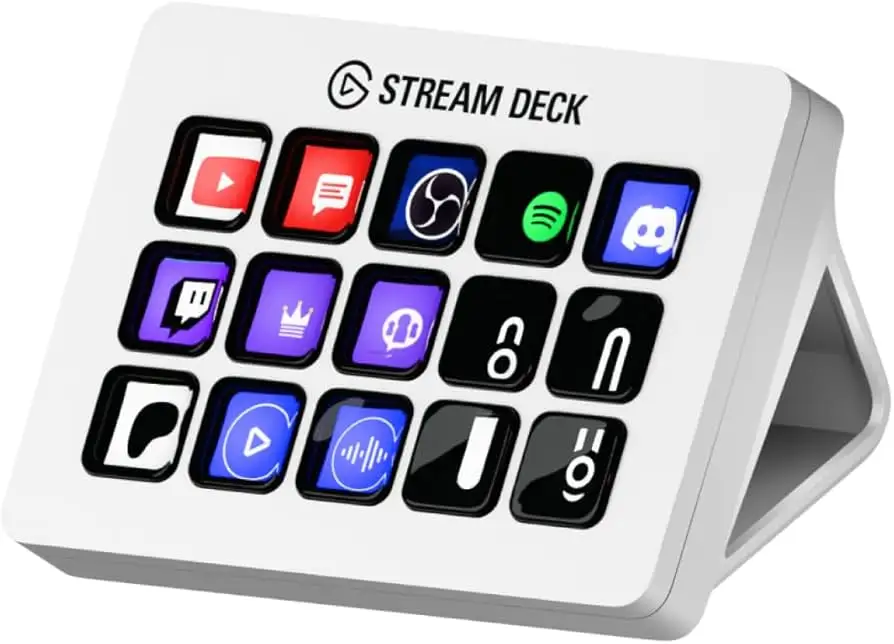
| Highly customizable 15 LCD keys with visual feedback | No wireless option |
| Seamless integration with OBS, Twitch, YouTube, and more | Stand angle is fixed, not adjustable |
| Multi-action macros save significant time | Limited native Adobe app support |
| Easily personalized with interchangeable faceplates | Doesn’t work well with USB hubs |
| Durable build and high-quality materials | Price may be high for casual users |
| Broad non-streaming use cases (office, DAW, smart devices) | 15-key limit can require nested folders |
| Detachable USB-C cable and sturdy stand | No physical audio dial |
Claims vs Reality
Marketing highlights the 15 customizable LCD keys as a gateway to “unlimited actions” via plugins and hotkeys. While users universally praise this flexibility, several noted that the 15-key layout can feel constrained. A Reddit user explained: “Once you get into it, you will regret not getting the XL model instead… you will always want more buttons.” This reinforces that while technically unlimited via folders, the physical layout still shapes usability.
Elgato promotes “one-touch tactile operation” for instant control of apps, audio, and lighting. Best Buy buyer Chris confirmed: “With a push of one button I can open Microsoft Flight Simulator, sim dashboard, head tracking software, and OBS Studio… it’s saved a considerable amount of time.” However, Tom’s Hardware points out the lack of haptic feedback, meaning tactile feel is solid but not click-confirmed.
The interchangeable faceplate is marketed as a personalization win. Users agree it’s a welcome cosmetic upgrade over the original, with Trustpilot reviewers noting the quality and ease of swapping designs. Yet, as one Amazon reviewer admitted, “Cosmetics alone aren’t enough reason to upgrade if you already own the original.”
Cross-Platform Consensus
Universally Praised
Across Reddit, Best Buy, Sweetwater, and Trustpilot, the workflow acceleration is the standout benefit. A verified Best Buy buyer wrote: “I can now do 90% of my editing without touching the keyboard. One hand on the trackball, one on the Stream Deck, eyes on the screen.” This proves valuable for video editors, DAW users, and live streamers alike.
Streamers repeatedly cite the ability to manage scenes, shoutouts, and sound effects without alt-tabbing. Reddit user comments highlight synergy with tools like Streamerbot: “Just being able to adjust stream/game volume and shout people out is a godsend.” For live production, Sweetwater’s reviewer confirmed it “simplifies controlling a Blackmagic ATEM switcher” with Bitfocus Companion software.
Non-streamers also find immense value. Best Buy buyer Pew Pew shared: “Even as a non-streamer I find this device really saves time… Discord mute and deafen without leaving a game.” This versatility extends to smart home control, office shortcuts, and simulation rigs.
Common Complaints
The lack of a wireless option is a recurring frustration. Smartcarting’s review noted: “If you stand for your meetings, you may have to worry about the cord knocking things over.” Coupled with reports that it “doesn’t work well with a USB hub,” this limits placement flexibility.
Native support gaps for Adobe apps are another sore point. Tom’s Hardware flagged that while plugins exist, there’s no built-in integration, making Loupedeck a better fit for heavy Adobe users. Quora’s expert review echoed this, finding the 15-button layout “too small” for complex Da Vinci Resolve workflows.
The fixed stand angle divides opinion. While sturdier than the original’s adjustable stand, some users wish for tilt flexibility, especially for ergonomic setups.
Divisive Features
The 15-key limit is both a strength and a weakness. For minimalists, it’s enough—Tom’s Hardware noted some could “get by with six buttons” thanks to folders. But for power users, Reddit threads advise skipping straight to the XL. As one user put it: “Save time and money, just get the big one up front.”
Personalization via interchangeable faceplates excites design-focused users but leaves purely functional buyers indifferent. For some, it’s an aesthetic bonus; for others, it’s irrelevant compared to workflow impact.
Trust & Reliability
Trustpilot data shows confidence in build quality (“lasts a long time” scoring 9.8/10) and tech support responsiveness. Long-term Reddit users report stable performance over months, with Zahmirc stating: “Been working flawlessly for 9 months; no issues, no bugs.”
Durability also extends to professional environments—Best Buy’s mastering studio reviewer described installing units in multiple rooms to “free engineers to keep main rooms busy.” Reports of malfunctions are rare but acknowledged; Trustpilot lists “possibility of malfunction” as a theoretical con, not a widespread reality.
Alternatives
The most cited alternative is the Stream Deck XL, offering 32 keys for roughly $245. Reddit consensus warns that MK.2 buyers often “regret not getting the XL” if they outgrow 15 keys. For Adobe-heavy workflows, Loupedeck earns mentions for its physical dials and native app support, though starting at $269 makes it pricier.
Touch Portal, a free mobile app, is recommended by Reddit users as a trial step: “Might be a good way to see if you will actually use it… before spending money.” Stream Deck Mobile also offers this test drive for button functionality without hardware.
Price & Value
Retail pricing hovers at $149.99 new, with eBay listings for pre-owned units ranging from $50–$120, indicating strong resale value. Sweetwater and Best Buy buyers call it “worth the investment” for time savings alone, though multiple users suggest watching for sales to offset cost.
Given its longevity and cross-use potential, value retention is high. Professionals integrating it into daily workflows—whether streaming or editing—report ROI in reduced keystrokes and smoother multitasking.
FAQ
Q: Is the Elgato Stream Deck MK.2 only for streamers?
A: No. Users employ it for office shortcuts, DAW control, smart home automation, and simulation rigs. Its plugins and macro options suit any repetitive or multi-app workflow.
Q: Can I expand beyond 15 actions?
A: Yes. You can nest folders and create profiles with unique layouts. However, multiple users note this can be less efficient than having more physical buttons.
Q: Does it support Adobe apps?
A: Not natively. Plugins and custom hotkeys can bridge the gap, but heavy Adobe users may prefer devices like Loupedeck.
Q: Is it portable?
A: Physically yes, but it requires a direct USB connection and doesn’t perform well through hubs. No wireless version exists.
Q: How steep is the learning curve?
A: Most users find setup easy, with drag-and-drop programming. Some mention a muscle memory period before commands become second nature.
Final Verdict
Buy if you’re a streamer, content creator, or professional with multi-app workflows—especially if tactile control and plugin integration matter. Avoid if you need wireless flexibility, heavy Adobe integration, or dislike nested menus. Pro tip from Reddit: “If you think you might outgrow 15 keys, get the XL first and save yourself the upgrade later.”