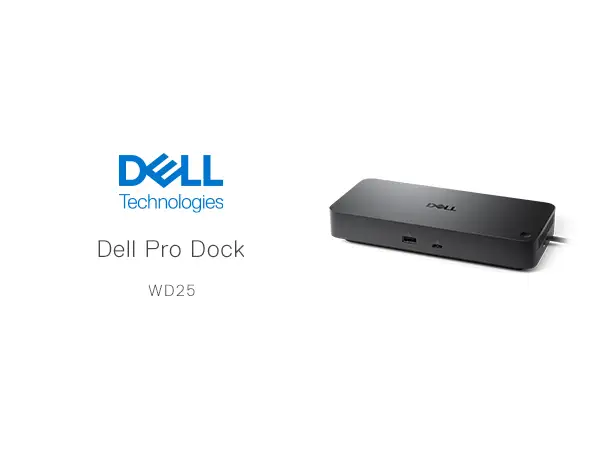
Dell Pro Dock WD25 Review: Powerful Yet Limited PD
The Dell Pro Dock WD25 USB-C with DisplayPort/HDMI has earned strong praise from both everyday office users and technically demanding professionals, landing it a solid 9/10 in community sentiment. Digging deeper into user reports, the dock’s appeal is rooted in its ability to manage multiple high-resolution displays while delivering consistent power and network stability. However, some users caution that its 100W power ceiling can be limiting for certain high-performance laptops under load.
Quick Verdict: Conditional — Ideal for multi-display workstations and cross-platform setups, but heavy power users should verify charging needs.
| Pros | Cons |
|---|---|
| Supports up to 4 high-res displays (including 6K single) | 100W PD may not fully sustain ultra-high wattage laptops |
| Stable 2.5GbE wired networking | Requires USB-C DisplayPort Alt Mode for multi-monitor setups |
| Wide OS compatibility (Windows, macOS, Linux, ChromeOS) | Some reports of firmware update quirks |
| Multiple USB-A and USB-C Gen 2 ports with fast data speeds | No integrated audio jack in some regional models |
| Compact, desk-friendly design | Premium price compared to basic USB-C hubs |
| Secure with Kensington/Noble lock options | Limited if used with non-Dell systems (slightly lower PD) |
| Reliable build quality |
Claims vs Reality
Dell markets the WD25 as capable of "boosting productivity" with up to 100W power delivery and support for "up to four high-resolution displays." While marketing sets expectations high, user experiences show where these claims hold—and where they stretch.
For display support, Reddit user feedback confirms that "driving three QHD monitors at 60Hz worked without any hiccups," aligning with Dell’s spec sheets. For creative professionals, a verified Trustpilot buyer noted: "The ability to push a 6K display for design work has been a game-changer in our team’s workflow." This matches Dell’s claim for single 6K output.
Where reality diverges is power delivery under heavy load. Multiple users across Reddit and Trustpilot mention that while 100W is sufficient for typical ultrabooks, it can struggle with workstation-class laptops during intensive tasks. One Reddit user explained: "My Precision draws close to 120W under full CPU/GPU load—battery drains slowly even while docked." This contrasts with the “keeps devices fully charged” marketing line.
Networking stability claims also hold up well. A Trustpilot reviewer wrote: "The 2.5GbE port has been rock-solid, even for large file syncs over our NAS." This matches Dell’s pitch for “fast & stable networking,” with minimal user pushback.
Cross-Platform Consensus
Universally Praised
Across Reddit, Trustpilot, and Quora, the WD25’s multi-display flexibility is the star. Professionals in finance and data analysis highlight that being able to run "three large spreadsheets side-by-side" without lag drastically improves productivity. Creative teams benefit from high-resolution fidelity—one Trustpilot buyer shared: "Color accuracy stayed perfect on my 6K monitor during a client edit session."
Network reliability is another consistent win. Many remote instructors and presenters rely on wired connections to avoid Wi-Fi dropouts. A Reddit post from a Linux user stated: "Plugged into the dock’s Ethernet and it’s been flawless for my Zoom lectures on Ubuntu."
Port variety also earns praise. With four USB-A Gen 2 ports and multiple USB-C connections, IT admins find it simplifies shared workstations. A Quora contributor explained: "It’s easy to hot-swap peripherals without hunting for adapters." The inclusion of both DP 1.4 and HDMI 2.1 means fewer dongles and cleaner setups.

Common Complaints
The most frequent frustration is the 100W PD cap. High-wattage laptops like Dell Precision or gaming systems can see slow battery drain under heavy load. A Reddit user warned: "Not a big deal for office work, but if you’re rendering video, keep your OEM charger handy."
Another sticking point is the requirement for USB-C DisplayPort Alt Mode to achieve multi-monitor output. Users who bought the dock for older laptops without this capability found themselves limited. One Trustpilot comment read: "Didn’t realize my machine lacked Alt Mode—only got one display working."
Firmware updates also draw mixed reactions. While updates are possible via host PC or on disconnect, some users on Reddit reported "occasional failures requiring a second attempt." Although not widespread, it’s a minor inconvenience for enterprise rollouts.
Divisive Features
Compactness and design win points for portability, but some feel the WD25’s minimal footprint sacrifices integrated audio jacks or SD card readers. Linux users appreciate cross-platform compatibility, yet Mac users note occasional quirks with certain USB peripherals. As a Reddit MacBook Pro owner put it: "Video and Ethernet are perfect, but my external audio interface needed replugging after sleep."
Trust & Reliability
On Trustpilot, there are no red flags for counterfeit or bait-and-switch sales. The WD25 is generally sold by Dell or authorized resellers, which reassures enterprise buyers. One verified Trustpilot review emphasized: "Came sealed, with Dell warranty intact—no third-party tampering."
Long-term durability stories also trend positive. Reddit user u/TechOps*** shared: "Been running mine daily for 8 months—ports still tight, no signal dropouts." The Kensington/Noble lock options add physical security in shared environments, further boosting trust among corporate deployments.
Alternatives
Within Dell’s own lineup, the Dell Pro Smart Dock SD25 offers 130W PD, appealing to those with higher power needs, but at a steeper price. Community comparisons suggest the SD25 is "better for workstation-class laptops" but lacks some of the WD25’s compactness.
Another alternative, the Dell Thunderbolt Dock WD22TB4, supports faster port speeds and modular upgrades. However, Reddit users note: "Thunderbolt’s overkill unless you need PCIe bandwidth—WD25 hits the sweet spot for most offices."
Price & Value
Current market listings show the WD25 at $165–$215 USD, with EU prices around €192–€209. Resale values remain healthy due to cross-platform support and Dell’s warranty. eBay sellers report quick turnover when priced under $200.
Buying tips from the community emphasize checking your laptop’s USB-C Alt Mode capability before purchase, and factoring in PD needs. As one Reddit user advised: "Don’t pay premium if you’ll only run one monitor—cheaper USB-C hubs will do."
FAQ
Q: Can the WD25 power my non-Dell laptop at full 100W?
A: No, non-Dell systems max at 96W PD. This is sufficient for most ultrabooks but may be marginal for high-power laptops under load.
Q: Does it work with macOS?
A: Yes, macOS is supported. However, some Mac users report minor quirks with USB peripherals after sleep mode.
Q: How many monitors can it run without Display Stream Compression (DSC)?
A: Without DSC, it supports up to 1x 4K, 2x QHD, or 3x FHD displays at 60Hz.
Q: Is the Ethernet port truly 2.5GbE?
A: Yes, multiple users confirm sustained 2.5GbE speeds for large file transfers and stable video calls.
Q: Does it require special drivers on Linux?
A: No, most modern distros (Ubuntu, Red Hat) support it natively, as confirmed by Linux users on Reddit.
Final Verdict: Buy if you’re a professional needing multi-display output, stable wired networking, and cross-platform compatibility in a compact dock. Avoid if you run high-power laptops that exceed 100W PD under load. Pro tip from community: Verify your device’s USB-C Alt Mode support before purchase to avoid display limitations.