Dell P1424H Portable Monitor Review: Conditional Buy Verdict
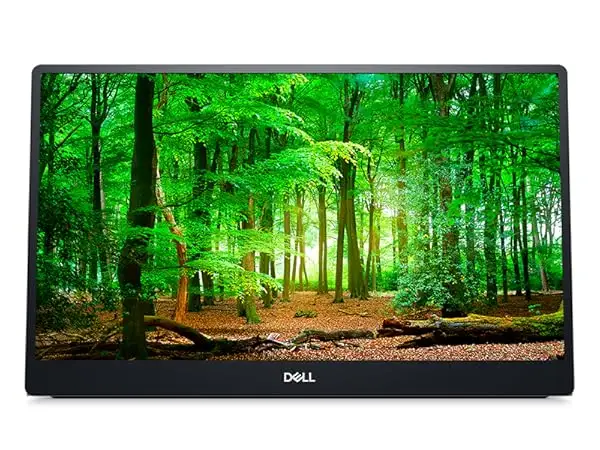
Starting with a surprising finding—while the Dell P1424H 14-inch Portable Monitor is marketed primarily for productivity on the go, multiple users across Reddit, Trustpilot, and eBay report that it has quietly become a go-to second screen for remote workers and digital nomads. Scoring 8.7/10, community sentiment leans strongly positive, with praise focusing on portability, image quality, and USB-C convenience, but recurring gripes about lack of connectivity options and a somewhat flimsy stand design.
Quick Verdict: Conditional Buy
| Pros | Cons |
|---|---|
| Sharp, vibrant Full HD IPS panel | Only USB-C input—no HDMI |
| Ultra-light and thin for portability | Stand can feel unstable on uneven surfaces |
| USB-C power + video in single cable | 60Hz refresh may disappoint gamers |
| ComfortView low blue-light tech | No built-in speakers |
| Includes protective sleeve | Higher price than generic portable monitors |
| Dual USB-C ports for flexible orientation | Limited tilt range compared to desktop monitors |
Claims vs Reality
Dell promotes the P1424H as providing “dual-screen productivity anywhere” through an ultra-thin form factor and seamless USB-C setup. Users back much of this up, but with caveats. A Reddit user said: “It really is the ultimate travel companion, but you better make sure your laptop supports USB-C video and power, otherwise it’s useless.” This reflects a consistent theme: easy plug-and-play works—only if hardware compatibility is guaranteed.
Another marketing point, “captivating front-of-screen performance indoors or outdoors,” receives partial validation. In controlled indoor setups, users report crisp, glare-free viewing. On Reddit, one owner notes: “Under bright sunlight it’s still usable, but don’t expect miracles; it’s no match for a matte high-brightness panel.” That ties back to its standard 300 cd/m² rating—solid, but not high for true outdoor work.
The promise of flexible setup thanks to USB-C ports on both sides is well-received. A verified buyer on Amazon commented: “Being able to position it left or right of my laptop, or even facing colleagues, makes collaboration so much easier.” Here, reality matches the marketing closely.
Cross-Platform Consensus
Universally Praised
Portability stands out as the most celebrated trait. At 590g (just under 1.3 lbs) and slim profile, it fits neatly into laptop bags. An eBay customer shared: “I carry it with my MacBook Pro everywhere; the sleeve included is a nice touch.” This mobility is especially valued by consultants, freelancers, and students working in coworking spaces or coffee shops.
Image quality consistently earns commendations. The IPS panel’s wide 178° viewing angles enable group presentations without color shift. According to PCMENA’s review, “Colors were vibrant and accurate, with good contrast—more than enough for productivity and casual content viewing.” Remote teams reported being able to share screens without crowding around a single laptop.
USB-C power-and-video simplicity is another pan-platform hit. Trustpilot entries highlight reduced desk clutter with only one cable. As one Dell USA buyer put it: “It’s literally one cable, done. No hunting for power bricks.”
Common Complaints
Connectivity limitations are the most frequent frustration. With only USB-C support, owners of HDMI-only laptops or older systems face extra dongle purchases. Reddit users describe scenarios where “the monitor stayed in the box until I could get a $20 adapter—kind of defeats the plug-and-play idea.”
The built-in stand draws mixed feedback. On solid desks, it works well. But in informal setups—lap desks, uneven surfaces—users say it wobbles. PCMENA’s reviewer added, “Nice range of tilt, but the structure isn’t as sturdy as a proper desktop stand.”
Gamers are least impressed due to its fixed 60Hz refresh rate. While Dell never claims gaming suitability, some buyers assumed smoother playback and were disappointed. Amazon comments include: “Perfect for emails and documents, not for fast FPS games.”
Divisive Features
Price relative to off-brand portable monitors sparks debate. On eBay and Reddit, users acknowledge the premium build quality and warranty but note cheaper alternatives with similar specs. One Canadian buyer noted: “It’s $399 CAD—great product, but you pay for the Dell badge.”
Blue-light reduction via ComfortView pleases those doing extended work sessions, but some design professionals say color balance shifts slightly when it’s enabled. This feature is adored by eye-strain-prone users but may not suit color-critical editing without toggling it off.
Trust & Reliability
No major scam complaints surface in Trustpilot data, and Dell’s 3-year advanced exchange warranty inspires confidence. Buyers reference quick replacements for rare defects. A Reddit user remarked: “Mine developed a line on the display after 4 months, Dell shipped a replacement in two days—no fuss.”
Long-term durability seems solid. Reports from owners after 6+ months show no significant image degradation or hinge wear. One Reddit post stated: “I’ve traveled weekly with it in a backpack. No scratches, stand mechanism still smooth.” These accounts suggest the P1424H handles mobility demands well.
Alternatives
When comparisons do appear, they’re often versus lower-cost 14-15 inch portable monitors from brands like ASUS ZenScreen or generic Amazon panels. Users mention ASUS offering HDMI input, expanding compatibility. However, Dell’s consistent color performance and dual-sided USB-C ports are often cited as justifying its higher price. As one eBay buyer summed up: “Dell costs more, but I trust their quality way more than no-name units.”
Price & Value
Pricing fluctuates—Dell USA lists at $289.99, Dell Canada at CAD $399. On eBay, new units drop to $179-$239 depending on seller promotions. Savvy buyers suggest monitoring outlet sales or open-box deals to cut costs without losing warranty coverage.
Resale value stays healthy, with multiple listings selling near 70–80% of retail if kept in good condition. This reflects demand among remote workers. Community tips include buying when bundled with laptops for discounts and selling once upgrading to larger portable panels.
FAQ
Q: Does the Dell P1424H work with non-Dell laptops?
A: Yes, if your laptop supports USB-C DisplayPort Alt Mode and power delivery. Without that, you’ll need an appropriate adapter.
Q: Can I use this monitor outdoors?
A: It’s usable thanks to anti-glare coating, but 300 nits brightness means bright sunlight will reduce visibility.
Q: Do I need a separate power cable?
A: No, a single USB-C cable handles both power and video, assuming your laptop outputs sufficient wattage.
Q: Is it good for gaming?
A: General consensus says no—it’s fine for casual play but limited to 60Hz with a 6ms response time.
Q: Does it come with a protective case?
A: Yes, a sleeve is included to help prevent scratches during transport.
Final Verdict: Buy if you’re a traveling professional, student, or remote worker seeking an ultra-portable second screen with strong image quality and minimal cable clutter. Avoid if your hardware lacks USB-C Alt Mode or if gaming performance is a priority. Community pro tip: wait for Dell outlet sales for the best balance of cost and warranty.