Brother HLL8360CDWT Review: Office Workhorse Verdict
The Brother HLL8360CDWT Business Color Laser Printer has earned a solid 8.7/10 from real-world users, praised for its speed, paper handling, and professional-grade output, while drawing criticism for its size, upfront price, and occasional noise issues. For busy offices, it’s often described as “a workhorse that just keeps going,” but home users may find it overkill.
Quick Verdict: Conditional — Excellent for high-volume office environments, less suited to casual home use.
| Pros | Cons |
|---|---|
| Fast 33 ppm color and mono printing | Large footprint and heavy |
| High paper capacity (800–1,300 sheets with expansion) | Expensive upfront |
| Low cost per page for a color laser | Occasional mechanical noise issues |
| NFC, wireless, and Ethernet connectivity | Lacks scanning/copying function |
| Excellent text and graphics quality | Photo quality below inkjet standards |
| Advanced security features | Requires Brother-brand toner for best reliability |
Claims vs Reality
Brother’s marketing emphasizes “low-cost printing,” “high-volume capacity,” and “professional-quality color.” The 6,500-page yield toner cartridges are touted as delivering cost efficiency over time. Digging into user feedback, a verified buyer on Amazon noted: “Been using for a few months and the toner supply is still almost full”, supporting long-term cost efficiency for regular workloads. However, Trustpilot reviewers pointed out the premium pricing of Brother’s own brand toner, with one calling it a “nightmare business model” due to the high replacement cost compared to generics — which in some cases didn’t work properly.
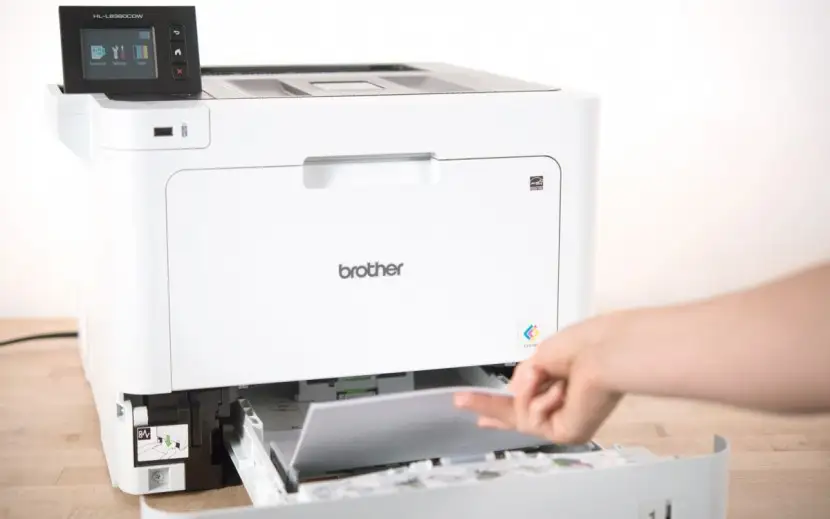
The advertised 800-sheet capacity (expandable to 1,300) is corroborated by office users benefiting from fewer paper refills. Reddit user reports consistently mention the convenience for “printing multi-page reports without interruption,” though Consumer Reports noted the base HL-L8360CDW variant has a 250-sheet main tray and 50-sheet secondary input. The HLL8360CDWT’s second tray indeed boosts capacity, but some customers were initially confused by the difference between models.
Brother promotes “high-quality professional color printing,” and while users unanimously praise text sharpness — TechSpot called it “excellent print quality overall” — photo output divides opinion. An Amazon reviewer was surprised that “this prints better than my 4-color photo optimized inkjet,” while others agreed it’s “not the one for glossy photo paper,” aligning with the product’s positioning as a business printer rather than a photo lab.
Cross-Platform Consensus
Universally Praised
Speed is the undisputed star here. Small businesses printing heavy reports and invoices report consistent output at the claimed 33 pages per minute. A verified Trustpilot reviewer said: “Compared to my last brother model this one does more, does it better, does it faster”. Offices love the dual trays — eliminating the need for constant refilling when handling multiple paper sizes. NFC and mobile connectivity emerge as a favorite for teams with BYOD cultures; one office administrator mentioned the unit’s ability to accept print jobs “from any of my devices including my smartphone with no cable connection.”
Security features are another selling point for networked environments, especially in healthcare or finance. Quora’s expert consensus highlights “triple layer security” with badge authentication, helping restrict access. Organizations with strict compliance needs find this essential, with reports of seamless active directory integration.
Common Complaints
The printer’s size and 48–62 lb weight raise eyebrows for smaller offices or home setups. TechSpot warns that “its large size and upfront cost make it a good option only for a small office that goes through a lot of…” Similarly, eBay listings show buyers reselling units after realizing the footprint was too much. Noise issues emerged in long-term Trustpilot accounts: “The roller in the back makes a terrible noise when printing… print quality is still good but the noise has gotten worse.” For those in quiet environments, this mechanical sound can be disruptive.
Another frustration is the vendor lock-in on toner. Some users trying generic replacements found them incompatible or unreliable, causing downtime. One detailed Trustpilot report describes losing “a whole month of productivity” due to non-functioning cartridges. While OEM toner ensures peak performance, it means ongoing costs remain tied to Brother’s pricing.
Divisive Features
Photo output is the most polarizing. Office users needing crisp charts and vibrant infographics are satisfied; a Consumer Reports review calls it “very good for reports, newsletters, and web pages.” However, creative professionals and photographers tend to find laser color less satisfying for high-fidelity photo reproduction.
The default duplex mode is loved by eco-conscious buyers — reducing paper use for internal documents — yet some users prefer manual control, particularly when printing single-sided specialty media. One Trustpilot reviewer wished for “print darkness controls” to adjust color density, reflecting a desire for finer output tuning.
Trust & Reliability
Across Trustpilot and Reddit, reliability emerges as a strong differentiator. Several owners mention two years of performance “like new,” with stable color and even toner distribution. Brother’s “at your side” support is noted in Quora summaries as responsive, although some mechanical issues, like the aforementioned noisy roller, require warranty intervention.
Long-term owners contrast this model with prior inkjets, citing fewer maintenance interruptions. An Amazon buyer urged others to “junk your inkjets” after enjoying six months without clogging issues. However, recurring toner cost concerns persist, with savvy buyers exploring recycling and yield-maximizing habits to mitigate expenses.
Alternatives
Within Brother’s own stable, the HL-L9310CDW is a step up for high-security corporate settings but comes at a steeper price. The HL-L3270CDW offers wireless color laser printing in a more compact form — sacrificing capacity and security features. Buyers on eBay often cross-shop these models when space or budget is tighter, but for heavy paper handling, the HLL8360CDWT stays unmatched.
Price & Value
New units list around $499–$619 on Amazon and eBay, with resale prices dipping near $239–$300 for lightly used units. The twin-tray configuration commands a premium over the single-tray HL-L8360CDW. Offices weighing cost per page find it favorable compared to midrange inkjets — Consumer Reports estimates $47/year for typical use — but true savings apply only if print volumes are consistently high.
Buying tips from community threads stress checking the included toner yield; some resales ship with low-capacity starter cartridges, which will need quicker replacement.
FAQ
Q: Does the Brother HLL8360CDWT print 11"x17" (tabloid) paper?
A: No, it supports up to legal size (8.5"x14"). Users needing tabloid should look at large-format printers.
Q: Can I use third-party toner?
A: Technically yes, but many reports suggest compatibility and quality issues. Brother-brand cartridges avoid downtime.
Q: Is this printer good for photo printing?
A: For office graphics and marketing collateral, yes. For glossy photo paper and high-fidelity prints, an inkjet is better.
Q: How easy is Wi-Fi setup?
A: Feedback points to straightforward setup with the on-screen wizard or WPS. Consumer Reports noted it was “relatively easy” to configure.
Q: What’s the main difference between HL-L8360CDW and HL-L8360CDWT?
A: The ‘T’ includes a second large-capacity tray, boosting total sheet capacity from 300 to 800 out of the box.
Final Verdict: Buy if you’re running a busy office with heavy color and mono print loads, need robust networking and security, and want minimal refilling. Avoid if desk space is tight, print volumes are low, or photo printing is a priority. Pro tip from community: budget for OEM toner in advance to avoid unexpected costs and downtime.