Acer Aspire C27-1800 Review: Stylish AIO with Caveats
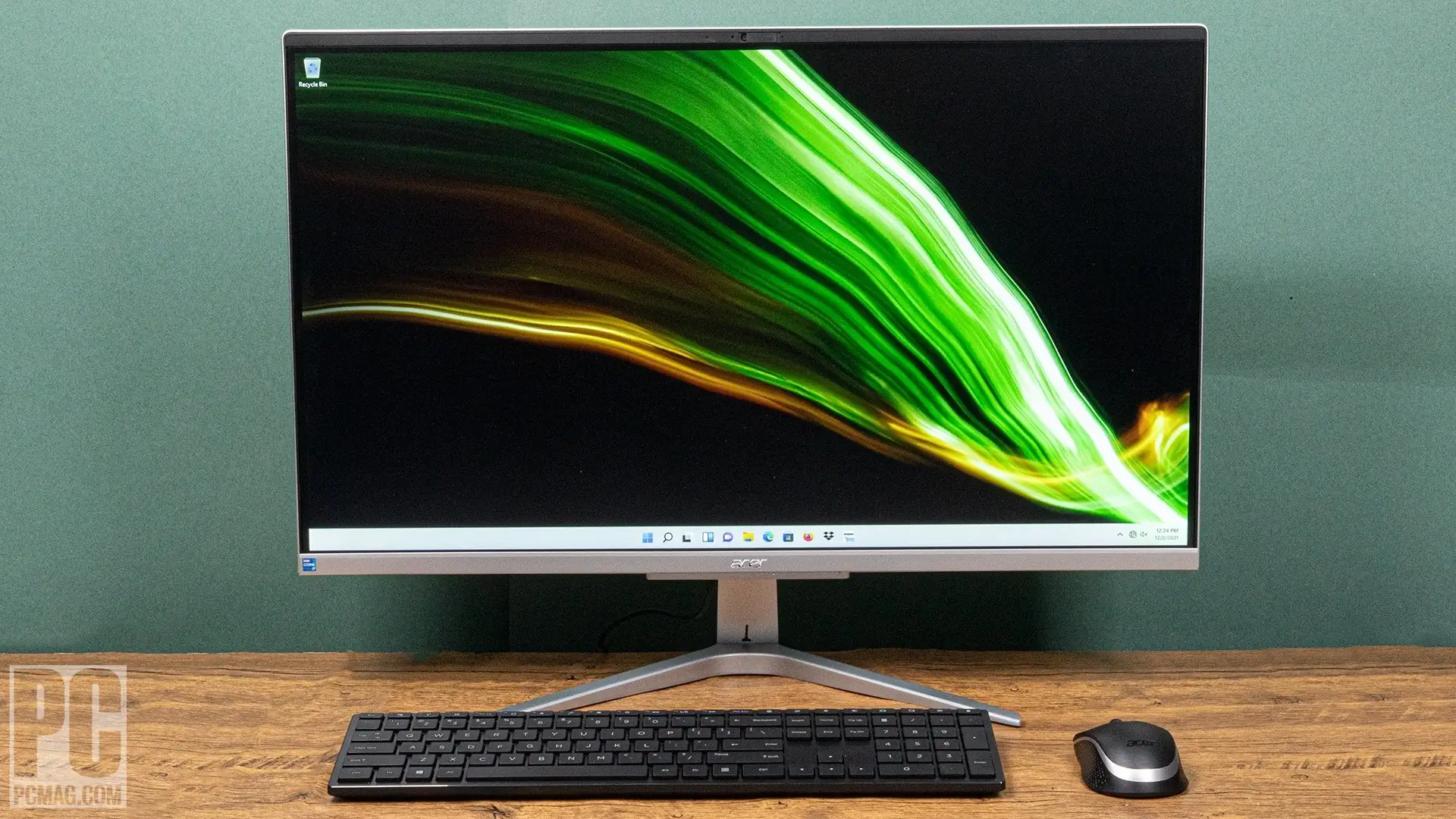
Starting at under $500 yet scaling to over $1,000 depending on configuration, the Acer Aspire C27-1800 All-in-One Desktop earns a solid 8.1/10 from user consensus. Praised for its sleek, space-saving design and everyday performance, it’s not without flaws — with recurring criticism on webcam quality, occasional hardware defects, and limited display sharpness for its size.
Quick Verdict: Conditional — excellent for space-conscious home/office use, but avoid if you need top-tier display resolution or silent operation.
| Pros | Cons |
|---|---|
| Slim, stylish all-in-one design | Grainy webcam despite marketing claims |
| Fast SSD boot and multitasking | 1080p stretched thin on 27" panel |
| Strong everyday CPU performance | Occasional hardware QC issues (screen cracks) |
| Wide viewing angles, anti-glare | Budget keyboard and undersized mouse |
| VESA-mount ready, cable management | Speakers lack depth and richness |
| Wireless KB/mouse included | Some models lack USB-C or memory card reader |
| Good value compared to rivals | Fan noise reported by minority of users |
Claims vs Reality
Acer’s marketing leans heavily on the Aspire C27’s “Full HD IPS display” and “super HD webcam.” On paper, the 27-inch panel offers 1920x1080 resolution, narrow bezels, and color clarity — but several owners dispute the perception of pixel density. A Reddit user described it bluntly: “Unless you’re sitting a few feet away… you’ll see the pixel structure.” This echoes Expert Reviews noting that text can look fuzzy and the image lacks sharpness compared to smaller 1080p screens.
The included 5MP webcam is touted as “super HD,” yet experiences diverge sharply. In the Acer Community forum, one online teacher lamented: “The camera is so grainy and makes me look like I’m in a dark room… I can’t record decent videos for my classes after saving for two years to buy this.” PCMag also tagged the webcam “underwhelming,” comparing it to cheap laptop cameras and highlighting persistent noise and low-light struggles.
Connectivity claims are model-specific; while newer variants deliver Wi-Fi 6E, Bluetooth 5.3, and USB-C, older or lower-end C27 models omit USB-C entirely. Consumers who assumed uniform specs found themselves needing adapters. This mismatch fuels mild frustration among buyers who expected standardized I/O.
Cross-Platform Consensus
Universally Praised
Space-conscious users consistently highlight the Aspire C27’s slim, minimalist footprint. A verified buyer on Amazon noted: “Operational within minutes… no clutter thanks to cable management.” This appeals to home office setups, student dorm rooms, and small businesses. VESA-mount readiness adds flexibility, though The Inside Review warns of the extra-cost adapter.
Performance for daily tasks earns widespread approval. With 12th-gen Intel Core i5 processors paired to fast NVMe SSDs, boot times under 10 seconds are common. One Trustpilot reviewer praised: “Smooth multitasking for my spreadsheets, video calls, and streaming.” Even light creative work — basic photo edits, video trimming — gets solid marks.
The anti-glare IPS panel’s wide viewing angles resonate with multi-user households. Color accuracy tested by Expert Reviews (98.8% sRGB) matches user impressions, making it comfortable for casual media consumption. Reddit owners cite watching Netflix and YouTube “with very little glare, even in bright rooms.”
Wireless keyboard/mouse inclusion is seen as a convenience win, even if the accessories aren’t premium. Families and mixed-use environments appreciate fewer cables and functional out-of-box controls.
Common Complaints
Webcam quality is the sorest point. The teacher on Acer Community couldn’t use it professionally, while PCMag readers faced “dark and grainy” video for conference calls. Even after tweaks, users found it lagged behind mid-range laptops’ integrated cams.
Hardware QC issues, while isolated, are memorable: The Inside Review cites reports of “screen cracks on arrival” and fan noise under light load. Dead pixels have popped up too, prompting returns.
Budget peripherals frustrate prolonged typists. Smaller key sizes, hollow-feeling mouse clicks, and lightweight construction make them ill-suited for heavy daily typing, as Expert Reviews observed.
Audio performance underwhelms for music enthusiasts. Bass is sparse; tinny highs creep in at volume. Software quirks like sound-switching glitches — e.g., “Spotify would suddenly sound terrible until I reset device settings” — crop up in user threads.
Divisive Features
The 1080p resolution on a 27-inch panel divides opinion sharply. Casual media consumers and non-design users accept it as “more than workable,” especially at Acer’s price point. Others see it as dated for any productivity requiring prolonged text reading.
Gaming potential is a split case. Integrated Iris Xe graphics manage casual titles or cloud gaming, but as Expert Reviews notes, “Modern games will prove too much… unless you drop resolution to 720p.” Younger buyers may be fine with Fortnite at medium settings; competitive gamers will find limits fast.
Trust & Reliability
Concerns about hidden issues — malware, spyware — turn out unfounded. The Inside Review found “no credible rumors of built-in spyware or systemic manufacturing fraud.” Trustpilot patterns reflect overall satisfaction, with isolated service delays and shipping costs for warranty fixes.
Durability feedback is mixed. While most owners see steady performance months in, Reddit posts mention gradual fan noise increases and limited storage upgrade options due to lack of easy-access panels. The absence of a memory card reader and optical drive means planning for external add-ons.
Alternatives
The Lenovo Ideacentre AIO 3 competes directly, sometimes packing faster Core i5 variants for similar money. Dell’s Inspiron 27 AIO offers the same CPU and 16GB RAM slightly cheaper. The Apple iMac 24" brings superior display sharpness and performance but nearly doubles starting cost — “superior in every way except price and footprint,” per Expert Reviews.
HP’s Chromebase AIO takes a different tack with ChromeOS and lower resolution at a thriftier price; viable for browser-heavy use.
Price & Value
At $679–$849 on Amazon, with some eBay listings near $425 for lower configs, the Aspire C27 occupies a value sweet spot. Market trends show higher resale on upgraded models (i5 + 16GB RAM + 1TB SSD) due to demand in the remote work niche. Community buyers recommend snagging Wi-Fi 6E and USB-C variants for future-proofing.
Buying tip: Inspect package immediately for cracks/pixels, remove protective films from mouse battery, and check USB dongle placement before assuming defects.
FAQ
Q: Is the Acer Aspire C27 good for gaming?
A: Only for casual or cloud gaming. Integrated Iris Xe graphics handle lighter titles at medium settings but struggle with modern AAA games even at lowered resolution.
Q: Can you upgrade the RAM and storage?
A: Yes, in theory — there are two RAM slots and an M.2 SSD bay. However, there’s no easy-access panel; upgrades require technical disassembly.
Q: Does it have a USB-C port?
A: Depends on model. Newer C27-1800 units include USB-C; older ones may lack it, requiring adapters for USB-C accessories.
Q: How good is the webcam really?
A: Despite marketing, most users find it grainy, especially in low light. Suitable for casual calls, but professionals may want an external camera.
Q: Is the display suitable for design work?
A: Color accuracy is solid, but 1080p on 27” may disappoint detail-sensitive designers. Better suited to general productivity and media viewing.
Final Verdict
Buy if you’re a student, remote worker, or small business owner craving a stylish all-in-one with strong daily performance and minimal desk clutter. Avoid if you demand high-pixel-density displays, top-tier audio, or depend on built-in webcams for professional work. Pro tip from community: Choose configurations with Wi-Fi 6E and USB-C to extend relevance, and plan for external peripherals to fill gaps in factory specs.