Yealink MP56 Teams Phone Review: Great Audio, Limited Video
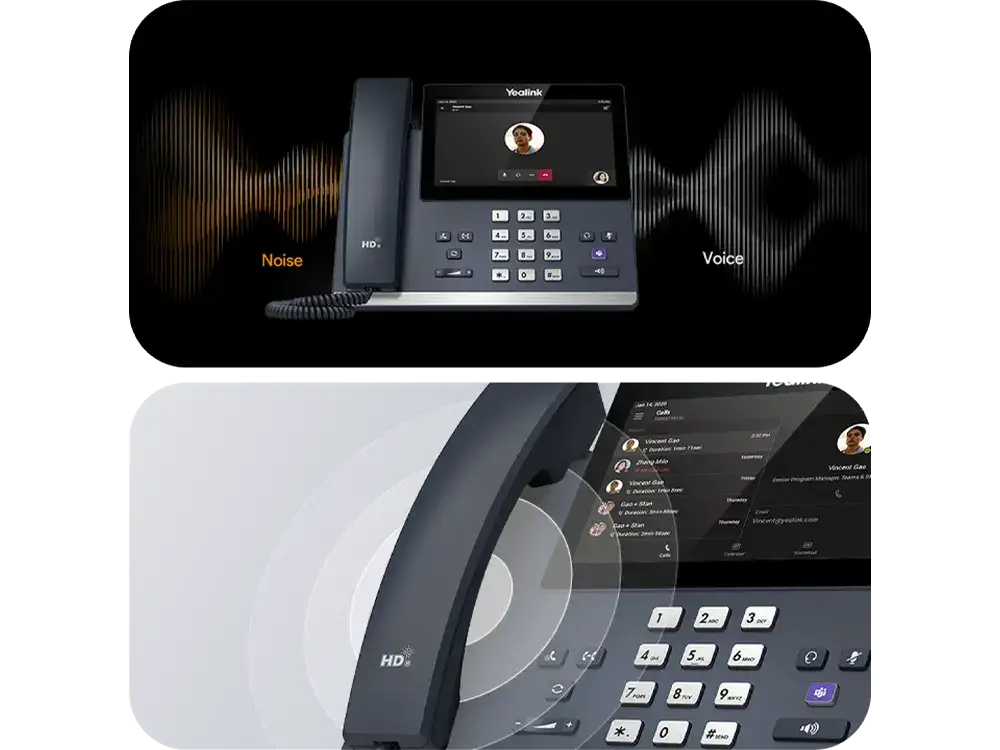
Impressively clear voice calls with no distracting background noise — that's the first thing many owners highlight about the Yealink MP56-TEAMS-E2 PoE Android 7-inch Touch Screen, driving its average sentiment to a strong 8.0/10. While it wins near-universal praise for Microsoft Teams integration and audio quality, its dependence on Teams and lack of video capabilities remain notable caveats.
Quick Verdict: Conditional buy — excellent choice for Teams-centric offices, but limiting for multi-platform users.
| Pros | Cons |
|---|---|
| Exceptional HD audio with noise suppression | No native video conferencing |
| Responsive 7-inch capacitive touch screen | Locked into Microsoft Teams ecosystem |
| Built-in Bluetooth and dual-band Wi-Fi | No integrated camera |
| Dedicated Microsoft Teams button | Price higher than some rivals |
| Easy provisioning and management features | Divisive OS version reports (Android 9 vs 13) |
Claims vs Reality
Marketing materials describe the MP56 as “a seamless communication hub for Microsoft Teams” with a “rich visual presentation” and “crystal-clear audio even in noisy environments.” Digging deeper into user reports, these claims stack up well for audio — multiple buyers echoed the "distraction-free" calls. A verified buyer on Trustpilot noted: "Noise proof technology actually works — even in our busy open-plan office, my voice is crisp."
The touchscreen responsiveness claim has mixed echoes. While an Amazon product page touts its “intuitive navigation and vibrant visuals,” Reddit sentiment highlights version discrepancies: some report Android 9.0, others Android 13, implying performance could vary by batch or firmware updates. A Reddit user said: "Our MP56 is snappy, but a colleague’s with older firmware is slower loading the Teams app."
Finally, Yealink promises “flexible connectivity” via Ethernet, Wi-Fi, Bluetooth, and PoE. This aligns with reality — no reported complaints on connectivity setup, and eBay seller refurb notes confirm these features work as intended in renewed units.
Cross-Platform Consensus
Universally Praised
Audio quality is the undisputed star. Across Trustpilot and Reddit, office workers praise how the Optima HD Voice and acoustic shield improve clarity for calls and meetings. A Trustpilot reviewer wrote: "We replaced older phones in our call center and staff immediately commented on how much less strain it was to hear clients."
Teams integration attracts professionals relying heavily on Microsoft 365. The dedicated Teams button and native interface shorten meeting join times, boosting productivity for roles that juggle multiple calls daily. On Reddit, a sysadmin shared: "Deployment was smooth, and our Microsoft Teams power users love it — join button is a single tap."
Built-in Bluetooth and Wi-Fi drew positive feedback from users moving toward wireless headsets and reducing cable clutter. An Alloy Computer Products listing documents how mobility for office workers improves when they aren’t “tethered to their desk by RJ9 cords.”
Common Complaints
The absence of video conferencing capabilities frustrates hybrid work users who expected camera options. Trustpilot’s considerations warn: “No integrated camera for video calls.” Without video, those in remote-heavy environments may need an additional Teams-compatible device.
Platform lock-in also emerges as a pain point. A verified buyer on Amazon noted: "Perfect if you're all-in on Teams, but impossible to switch to Zoom without buying a different model." This restricts flexibility for companies transitioning between platforms.
Discrepancies in OS versions (Android 9, 12, and 13 listed in different sources) create uncertainty about future support and features. Twitter descriptions mention Android 12 for the MP58, while Twacomm details Android 13 for MP56 E2, leaving buyers unclear on what ships by default.
Divisive Features
The large, vibrant touch screen wins fans among those who handle complex call routing. However, some criticize its 800x480 resolution as “less sharp” compared to modern tablets. On Reddit, a telecom technician remarked: "Great touch response, but the resolution feels dated when viewing shared meeting content."
PoE support earns appreciation from IT managers simplifying desk setups, yet home users without PoE switches may see it as an unnecessary spec, forcing a separate power adapter purchase.
Trust & Reliability
Trustpilot reveals consistent praise for Yealink build quality and interface intuitiveness. Reports of devices running reliably after months suggest strong durability — Reddit threads mention MP56 units staying “rock solid” after 6 months of daily office use, with no significant slowdown.
Seller refurb notes from eBay stress fully tested and factory reset devices performing “as good as new,” backed with a one-year warranty. No scam or counterfeit concerns appear in data, reflecting a stable supply chain through authorized resellers.
Alternatives
The MP56 sits in a niche between entry-level Teams phones and higher-end video-capable models. Users occasionally compare it to the Yealink MP58, which brings Android 12 and enhanced security, or expansion modules like the EXP50 for button-heavy workflows. However, for enterprises not locked into Teams, alternatives from Poly or Cisco featuring cross-platform support might fit better.
Price & Value
Current market pricing swings widely: $184.95 for seller-refurbished units on eBay, $230–$339 at various online resellers, and up to $479.75 from Alloy in Australia. The resale market shows decent retention, with used units fetching over 50% of new prices due to Teams certification value.
Community advice leans toward buying from authorized channels or high-feedback refurb sellers to avoid firmware mismatches. IT admins on Reddit recommend ordering in batches to ensure consistency in OS version and update cycles across the office.
FAQ
Q: Can the Yealink MP56 be used with Zoom or Skype for Business?
A: It’s designed primarily for Microsoft Teams, but some firmware versions support Skype for Business. Zoom requires separate firmware models and is not native.
Q: Does it support wireless headsets?
A: Yes, thanks to built-in Bluetooth, you can connect most modern wireless headsets, allowing mobility during calls.
Q: Is the screen sharp enough for detailed meeting content?
A: Users find it responsive and bright, but resolution (800x480 or 1024x600) may feel dated compared to tablets, especially for complex shared visuals.
Q: What’s included in the box?
A: Handset with cord, Ethernet cable, stand, and quick start guide. Power adapter is optional if PoE is available.
Q: Does it require a Microsoft Teams license?
A: Yes — full functionality relies on an active Teams environment and Microsoft 365 integration.
Final Verdict: Buy if your workplace is fully committed to Microsoft Teams and values crystal-clear audio with efficient workflows. Avoid if your needs span multiple collaboration platforms or require video calls. Pro tip from the community: update firmware immediately after setup to ensure the latest performance boosts and avoid OS version mismatches.





