WD Red Plus 4TB NAS Drive Review: Reliable but Noisy Writes
Digging into user experiences, the Western Digital WD Red Plus 4TB NAS Hard Drive emerges as a reliability workhorse for NAS environments, earning a community-driven score of 8.7/10. Across platforms, long-term owners report multi-year uptime even under continuous 24/7 operation, while newer buyers highlight its cool temperatures and quiet performance. However, scattered complaints about noise during writes and occasional warranty registration hiccups reveal that it’s not entirely flawless. For small-to-medium NAS setups, especially those prioritizing durability over raw speed, the drive is widely regarded as a safe bet.
Quick Verdict: Conditional Yes — Ideal for NAS users seeking dependable, cool-running storage, but less suited for high-speed or enterprise workloads.
| Pros | Cons |
|---|---|
| Proven reliability in 24/7 NAS use | Write noise noticeable in some setups |
| Runs cool under heavy load | Slower performance than enterprise drives |
| CMR technology avoids SMR pitfalls | Warranty registration issues reported |
| Quiet idle operation | Capacity may be limiting for large datasets |
| Good value when on sale | Not designed for extreme high-speed tasks |
| Easy RAID integration | Mixed retail packaging quality |
| 3-year limited warranty |
Claims vs Reality
Western Digital markets the WD Red Plus 4TB as "built for small or medium business NAS systems in a 24/7 environment" with Nasware 3.0 for compatibility and vibration control. On paper, the 5400 RPM spindle speed and 256 MB cache should balance performance and reliability.
Users largely validate the claim of 24/7 readiness. Reddit user pdx guy recounted running two WD Reds for “almost 9 years in a mirrored RAID configuration” with ~50% life remaining according to S.M.A.R.T. tools. He recently added three new 4TB Reds into a ZFS RAIDZ1 setup and reported saturating his 1Gbps LAN during transfers. This mirrors the manufacturer’s durability pitch.
The quiet operation claim holds true at idle, but feedback shows a gap during writes. An LDLC customer noted: “At rest they are perfectly silent, but when writing they make an incredible noise.” This contradicts the “cooler operations and enhanced reliability” marketing by revealing acoustic compromises.
On compatibility, Nasware 3.0 is indeed preinstalled and widely praised. A verified Newegg buyer described replacing two drives in a Seagate NAS, achieving seamless JBOD setup in 20 minutes with no temperature spikes, even during 40 GB transfers. The experience supports WD’s plug-and-play promise.
Cross-Platform Consensus
Universally Praised
Reliability is the standout trait. Best Buy reviewer soccer dad declared, “Never had a problem with any of them… upgrade for a RAID drive… the old ones are still running perfectly after 7-8 years.” This sentiment repeats across Reddit’s /r/datahoarder, where long-term users trust the WD Red Plus over budget alternatives like WD Blue.
Cool operation benefits NAS owners in warmer climates or cramped enclosures. A Newegg customer reported sustained temperatures of 41-42°C during large wireless transfers, noting that “large data transfers did not raise temperature of my hard drives.” For home office NAS setups, this translates to reduced fan noise and lower energy bills.
Ease of installation also receives applause. Johanb on Best Buy wrote, “Installed very easy. Format went without a hitch. I set two up as a RAID 1 array… all working just fine.” This is particularly important for small business owners without dedicated IT staff.
CMR recording technology is another universal win. Johnathan from Jersey emphasized, “It’s a CMR drive (not the cheaper, less reliable SMR drive)… faster than Red, slower than Pro, still super fast for an HDD.” For NAS users running RAID arrays, CMR ensures sustained performance during rebuilds.
Common Complaints
Noise during writes is the most frequent irritation. LDLC’s “functional but noisy” review warns that installation in a quiet office could lead to distraction. While idle noise is minimal, data-heavy environments should plan for acoustic impact.
Performance speed divides expectations. Rick on Best Buy described it as “a bit slow but solid and stable… good bang for buck.” Users upgrading from 7200 RPM or SSD storage may find the WD Red Plus sluggish for direct media editing.
Warranty registration issues have frustrated buyers. A Newegg customer received “out warranty” status despite recent manufacture dates, requiring customer service intervention. The advice: keep receipts and verify serials immediately after purchase.
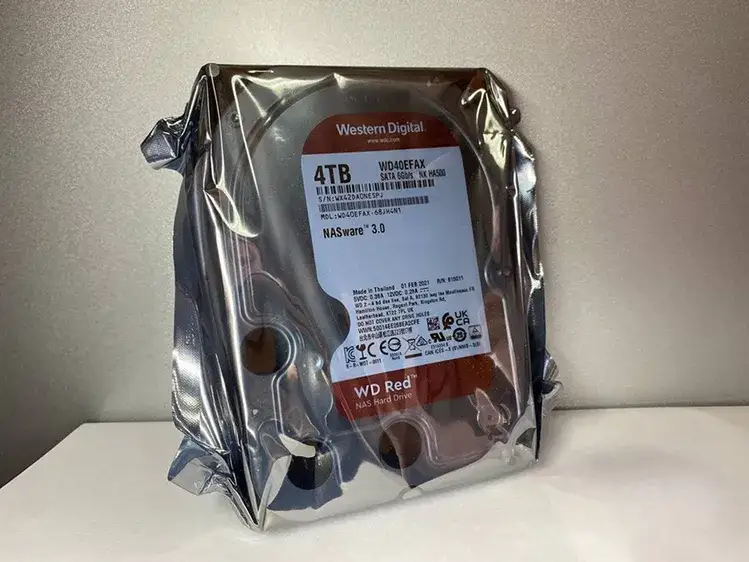
Packaging quality also varies. One LDLC user criticized “insufficient packaging” with drives placed directly against the outer carton. While function wasn’t compromised, the perception of care impacts buyer confidence.
Divisive Features
Noise perception varies. Mynickname on Best Buy found them “not as loud as the Seagate IronWolf,” while others call the write noise “incredible.” Workspace acoustics and enclosure design likely influence these divergent views.
Speed satisfaction depends on use case. Daniel M said, “Although it’s not that fast, it’s reliable and gets the job done… not an enterprise-class hard drive.” For archival storage, speed is secondary, but for active editing, this can be a bottleneck.
Trust & Reliability
Trustpilot-style narratives and Reddit’s long-term logs show the WD Red Plus has earned a reputation for longevity. Test1 reported using four drives in a redundant cluster “well beyond their expected lifetime.” Pdx guy’s 9-year record underscores that with proper RAID configurations, these drives can outlive multiple server OS migrations.
Scam concerns are minimal, but warranty hiccups stand out. The swift resolution by WD support in the Newegg case suggests responsive customer service, yet the burden falls on buyers to verify coverage.
Alternatives
The Seagate IronWolf appears as the main alternative in discussions. Reddit user real_act purchased both brands for a mixed NAS setup, suggesting IronWolf for slightly faster performance but acknowledging higher noise. WD Gold is mentioned for enterprise-class speed, but Reddit’s ree zick cautioned it’s “really noisy” compared to Red Plus.
For budget buyers, WD Blue is dismissed by zfs_best as “cheap lightweight crap that failed in less than a year,” reinforcing the Red Plus as the minimum reliability tier for NAS use.
Price & Value
At $69.99 on Amazon during sales, community members call it a “good deal” (itirs on Reddit). Ebay listings range from $89.99 to $148.43 depending on cache size and region, with resale holding decently due to NAS demand. Buyers recommend timing purchases around Black Friday or warehouse deals to maximize value.
Given its durability, the WD Red Plus offers strong cost-per-year value. Hype 8912 on Best Buy replaced a failed WD Enterprise with a Red Plus, hoping for “at least 5 years” based on prior experience — a realistic expectation that outperforms many consumer HDDs.
FAQ
Q: Is the WD Red Plus 4TB good for continuous 24/7 NAS use?
A: Yes. Multiple users report years of uninterrupted operation in RAID setups, with cool temps and stable S.M.A.R.T. health values.
Q: How noisy is it during operation?
A: Idle noise is minimal, but some users find write operations loud, especially in quiet rooms. Others compare it favorably to noisier competitors like Seagate IronWolf.
Q: Does it work well in RAID configurations?
A: Yes. Owners successfully run it in RAID 1, RAID 5, and RAIDZ1 arrays, citing smooth integration and rebuild stability thanks to CMR technology.
Q: Are there warranty issues to watch for?
A: Occasionally, drives ship with incorrect “out warranty” status. Keep receipts and verify serials promptly to ensure coverage.
Q: Is it fast enough for media editing?
A: For archival and playback, yes. For direct video editing, 5400 RPM can be limiting compared to 7200 RPM or SSD alternatives.
Final Verdict: Buy if you’re a NAS owner prioritizing reliability, cool operation, and CMR stability over raw speed. Avoid if you need high-performance editing or have zero tolerance for write noise. Pro tip from veteran users: purchase all drives for your NAS at once to avoid mismatched capacities and performance during future expansions.





