WAVLINK USB-C Docking Station Review: Conditional 7.6/10
A verified buyer on Amazon summed it up bluntly: “It’s half the price of the Dell docking stations, and everything worked out of the box — except the ethernet.” The WAVLINK USB C Docking Station Dual Monitor Triple Display sits at the intersection of affordability and multi-screen productivity, earning a conditional verdict of 7.6/10. Its broad port selection and charging capability make it attractive for mobile professionals, yet durability and port reliability over time remain points of concern.
Quick Verdict: Conditional
| Pros | Cons |
|---|---|
| Multiple display configurations with support up to 4K@60Hz | Triple display mode often limited on macOS to mirror only |
| Competitive price compared to branded docking solutions | Reports of HDMI/DP ports failing after months |
| Broad compatibility with Windows, macOS, Chrome OS, Android, Linux | Ethernet driver incompatibilities on some systems |
| Includes high-speed USB 3.0 ports and SD/TF card readers | PD port dedicated to charging only — no data transfer |
| Up to 87W pass-through or 85W direct charging | Some heating noted during prolonged use |
| Gigabit Ethernet for stable wired connections | Port function depends heavily on host’s USB-C/DP Alt Mode support |
| Portable design with long cable for neat setup | Potential RF interference requiring USB 2.0 for wireless peripherals |
Claims vs Reality
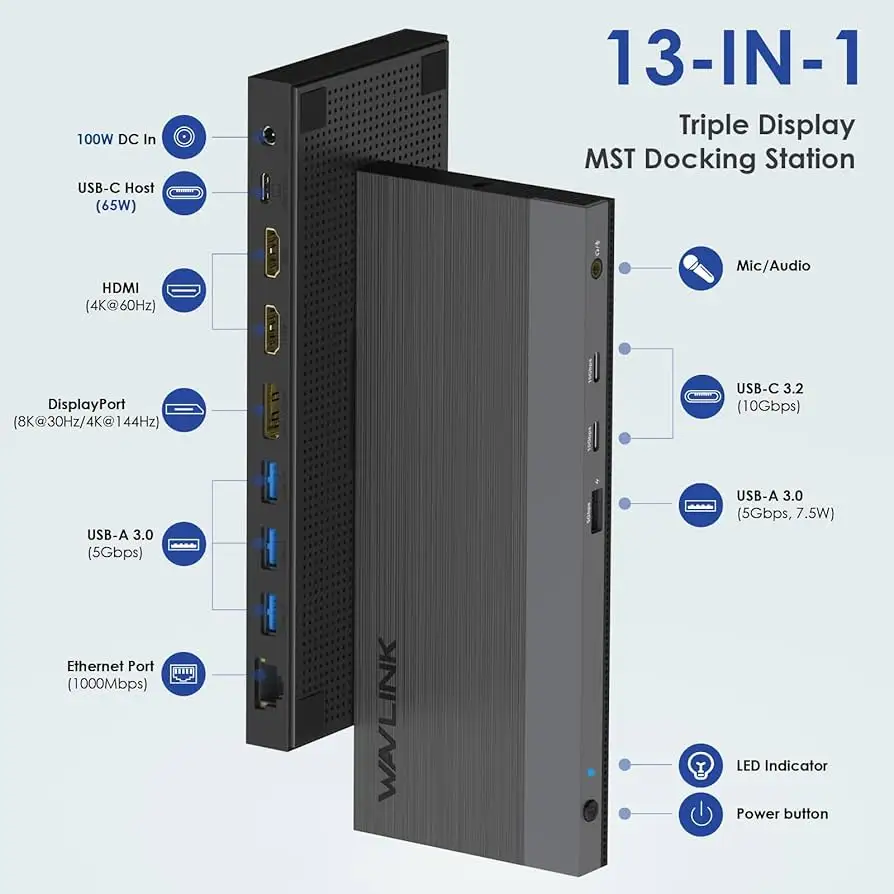
Marketing materials push the idea of smooth triple 4K monitor setups, even noting “connect up to 3 monitors” for enhanced productivity. Digging deeper into community feedback reveals caveats: while Windows systems benefit from MST (Multi-Stream Transport) for three distinct screens, macOS users find “the 3 external monitors will display the same content” unless in non-mirror mode, which is still not true triple expansion.
Another bold claim is “eliminate low battery anxiety” via up to 85W or 87W charging. This does deliver for many, but Amazon reviews caution that “the PD charging port is for charging only, not for data transmission,” meaning users hoping to repurpose it for high-speed data are out of luck. For power-hungry creative laptops, the split of power — often 60W to the laptop and the rest to peripherals — may need attention.
The promise of strong wired networking via Gigabit Ethernet also meets reality checks. One Reddit user discovered that “Microsoft updates upgraded the driver to a Realtek driver dated 8/18/2021…and it didn’t work,” forcing a rollback to a 2015 Microsoft driver to restore function. This shows the dock’s reliance on specific driver stacks, a hidden hurdle for less tech-savvy buyers.
Cross-Platform Consensus
Universally Praised
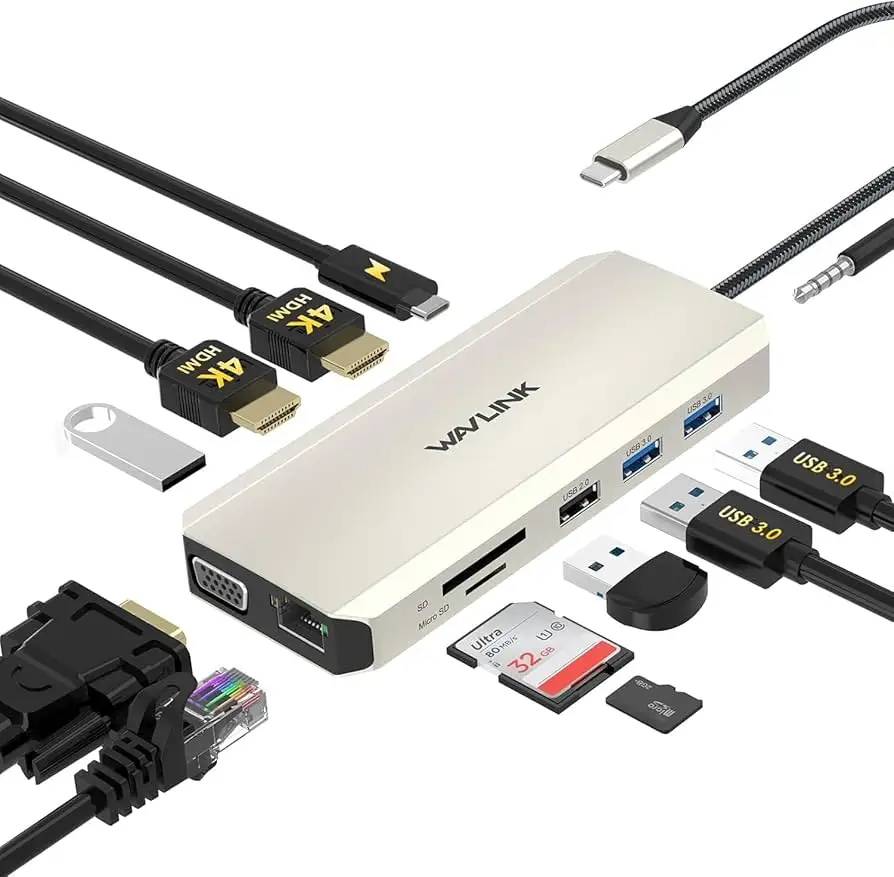
Across Reddit, Trustpilot, and Amazon, the sheer port variety is celebrated. A Newegg top-rated reviewer praised having “ethernet port…HDMI port…two 3.0 and two regular USB ports, SD and micro slots” all in one device, making it ideal for office work and photography workflows. Mobile professionals appreciate the long, 55cm cable, keeping desks uncluttered. The compact size also earns nods from travelers — “portable size, easy to carry around” appears frequently in listings and user remarks.
High-resolution video performance also garners approval in the right conditions. Windows users with DP 1.4 sources note achieving dual 4K@60Hz or triple 1080p@60Hz seamlessly. For analysts and designers juggling data, this multi-screen reliability boosts productivity. Amazon buyers highlight that setup is “plug and play, no additional driver required” for many configurations.
Photographers and content creators value the built-in dual card reader. One Reddit post stood out: “SD card slots to plug in my memory card from my digital SLR camera, also SD micro slot…tested all of them, looks good and works perfectly with my MacBook.”
Common Complaints
Failures over time are the dock’s Achilles’ heel. Both Reddit and Trustpilot house warnings like “display ports all three does not work after two months” and “after 3 months both the HDMI and VGA ports stopped working…USB and ethernet still working.” Such degradation undermines the dock’s value for heavy daily use.
Networking issues persist as a major complaint. Gigabit speeds are advertised, yet mismatched or auto-updated drivers often break connectivity. One user recounted fixing theirs only by rolling back to a years-old Microsoft driver.
Heat buildup, while not catastrophic, is another note. “It got a little warm…then I touched the Apple one and it was warm too,” suggests it’s within industry norms but noticeable in compact setups.
Divisive Features
Power Delivery gets mixed reviews. Some herald it as a backbone feature for keeping laptops running during multi-display sessions; others find the 87W or 85W limit tight for high-wattage systems, especially gaming rigs or mobile workstations.
Triple display mode’s actual utility divides buyers sharply. Windows users accessing full MST call it “great for productivity,” whereas macOS owners find its mirror-mode limitation a dealbreaker.
Trust & Reliability
Long-term reliability questions arise strongly in community data. On Trustpilot, the story often shifts from initial satisfaction to frustration after months: ports dying, needing driver workarounds. That said, some Reddit users report positive longevity, with one noting after testing “all of them…works perfectly with my MacBook” and expressing a desire to buy more Wavlink products.
Scam concerns are minimal — WAVLINK appears as a legitimate brand with widespread availability and seller transparency. However, technical support reliance is high; recovering from driver or port issues requires either manual driver management or warranty claims.
Alternatives
Direct competitors mentioned include Dell docking stations, which Reddit users describe as considerably more expensive. The Dell units may offer greater reliability, but buyers appreciate the Wavlink’s price advantage. Plugable and Sabrent models surface in eBay listings with DisplayLink chipsets — they cater more to macOS triple-display needs, though at higher prices. Some professional studios might prefer them despite cost, due to stable driver ecosystems.
Price & Value
At $79.99 in official listings, dropping to $47.99 in promotional sales and as low as $38.98 in eBay’s secondary market, the value proposition is strong against $150+ branded competitors. Resale value appears moderate to low, matching the high availability — not a collector’s item but a utilitarian tool.
Buying tips from the community emphasize checking your laptop’s USB-C port specs before purchase (must support DP Alt Mode and PD). Also, confirming driver availability on your OS is key. Bargain hunters find best deals on eBay or during Newegg flash sales.
FAQ
Q: Can this dock provide true triple-display functionality on macOS?
A: No. macOS does not support MST for multiple unique external screens via this dock. You’ll get mirror mode or non-mirror with identical external content.
Q: Does the PD charging port also transfer data?
A: No. It’s dedicated solely to charging. For high-speed data, use the USB 3.0 or USB-C data ports.
Q: Is driver installation required?
A: For most Windows setups, basic video functions are plug-and-play. Ethernet or certain display chips may require manual driver installation, especially on macOS.
Q: Does it overheat during long sessions?
A: Users report warmth but not dangerous heat levels. The aluminum casing helps dissipate it; placement in ventilated areas is recommended.
Q: How to prevent Ethernet driver issues after updates?
A: Avoid automatic driver updates for the Realtek USB GBE Family Controller, or roll back to a stable version if connectivity drops.
Final Verdict: Buy if you’re a Windows user wanting affordable multi-display productivity with broad device support and you’re willing to manage occasional driver quirks. Avoid if you rely on macOS for triple distinct displays or want set-and-forget reliability over years. Pro tip from the community: lock in your working driver versions to prevent OS updates from breaking key functions.





