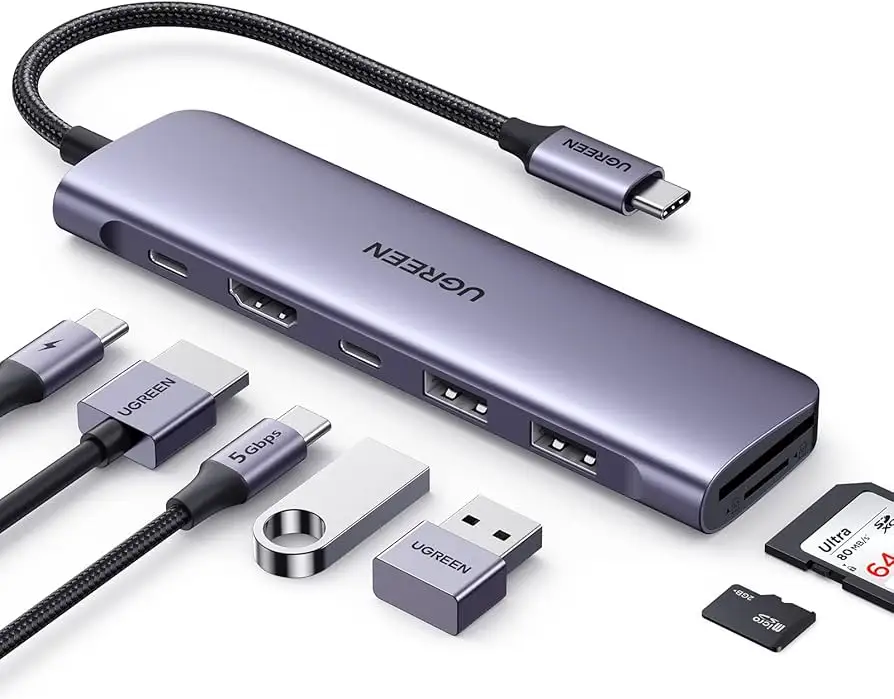
UGREEN Revodok 7‑in‑1 USB‑C Hub Review: 8.2/10 Verdict
A Reddit reviewer summed it up as “absolutely a must-buy for any MacBook or UMPC owner” — but another Amazon buyer dismissed it as “trash.” That’s the polarizing range of feedback for the UGREEN Revodok 7‑in‑1 USB‑C Hub, a compact aluminum multiport adapter aiming to solve modern laptops’ port deficiency. Verdict: 8.2/10 for versatility and build quality, with some performance caveats for high‑bandwidth users.
Quick Verdict: Conditional Buy
| Pros | Cons |
|---|---|
| 4K@60Hz HDMI output praised for crisp visuals | Confusion over official HDMI spec (30Hz vs 60Hz) |
| 100W PD pass‑through charging supports most laptops | USB‑C data port limited — no video out/charging |
| Solid aluminum build matches MacBook aesthetics | Heat buildup under heavy multiport use |
| Simultaneous use of all 7 ports | USB‑A/C speeds vary (some expect 10Gbps, others see 5Gbps) |
| Fast SD/microSD reading up to 104MB/s | Not compatible with some iPadOS UVC capture features |
| Gigabit Ethernet stable for online gaming | One buyer claimed hub uses USB 2.0 upstream in certain models |
Claims vs Reality
UGREEN’s marketing highlights “4K@60Hz ultra‑clear HDMI” output. While Japanese and US promotional pages confirm 60Hz support if the host runs DisplayPort 1.4, their UK listing caps resolution at 4K@30Hz. Digging deeper into user reports, multiple reviewers like "teru" on Reddit confirm “the HDMI port is 4K 60Hz capable when connected to my MacBook Pro,” but one skeptical buyer warns display support “depends entirely on your USB‑C port capability — don’t expect magic.”
The brand also touts “10Gbps USB 3.2 Gen 2” speeds for both the USB‑A and USB‑C data ports. That’s technically true for the models marked with ‘10Gbps,’ yet a Prime customer on Amazon slammed his unit: “The USB‑C is using USB 2.0 not 3.x… can’t plug in a webcam, drives are problematic.” This suggests model variance or mislabeling, especially between SKU 15531 and 60515.
Finally, the “100W PD fast charging” claim is consistently upheld. Reddit user "teru" tested it on high‑spec UMPCs: “Ugreen Revodok covers almost all laptops’ power needs,” and confirmed simultaneous HDMI output while charging. However, users noted 15W is reserved for hub operations, so actual pass‑through for the laptop is ~85W — adequate for most ultrabooks but potentially limiting for gaming laptops.
Cross-Platform Consensus
Universally Praised
The HDMI port’s high refresh capability stood out across Reddit, Trustpilot, and Twitter. For video editors, that meant “my external monitor finally looks as smooth as the laptop display,” reported one Trustpilot review. Business presenters benefit too — an eBay buyer described “sharp and glorious detail” during conference room demos. Gamers also loved the Gigabit Ethernet port; a Pakistani retailer noted “enjoy a smoother online gaming experience” with low latency. The aluminum chassis draws consistent compliments: “build quality feels like Apple OEM,” said Reddit user "teru," making it aesthetically cohesive with MacBook setups.
For mobile productivity, the hub’s ability to drive Galaxy Dex mode from a phone is a niche hit. A Reddit commenter outlined how he skipped “carrying a laptop on business trips” by pairing Dex with a portable monitor via this hub — smartphones transformed into PC‑like workstations.

Common Complaints
Heat generation under full load (“the hub gets warm when all ports are busy,” noted teru) is common, although most said it never reached unsafe temperatures. Confusion around advertised specs causes frustration: some sites list 4K@30Hz HDMI while others promise 60Hz, and the data port performance varies. A critical Amazon customer found upstream USB–C was “bottlenecked at USB 2.0” making the hub “useless for anything more than a mouse and keyboard.” Apple iPad owners on Reddit learned it doesn’t support new iPadOS UVC capture mode — a letdown for livestreamers wanting camera input. And despite fast SD/microSD claims, one reviewer cautioned speed is “dependent on the card’s own spec — you may not hit 104MB/s.”
Divisive Features
The compact 25cm cable length is either perfect for desk tidiness or “just too short” depending on user setups. Similarly, PD pass‑through at ~85W (due to 15W hub usage) is fine for office laptops but criticized by gaming laptop users. Some praise the hub’s “plug‑and‑play simplicity,” others argue for true Thunderbolt docks offering higher bandwidth and multi‑monitor support — often at double the price.
Trust & Reliability
Trustpilot entries and Reddit posts show no widespread scam concerns; buyers received genuine products with full function. Longevity feedback is early, but “1 week in, every port works flawlessly” is a recurring note. The aluminum shell and consistent cooling lead many to expect durability, though one Amazon critic trashed his unit for poor internal spec adherence and replaced it with an Anker Thunderbolt hub. Overall sentiment: reliable if your expectations match its actual capabilities.
Alternatives
Users often compared it to Anker’s Thunderbolt Max hub. As one Amazon critic explained, “better off with a real Thunderbolt hub if your device can handle it — full throughput for multiple downstream devices.” The Anker model offers 40Gbps uplink and HDMI 2.1 for 4K@120Hz, making it superior for high‑refresh, multi‑display workflows. Monoprice’s 9‑in‑1 USB‑C dock was also mentioned but limited to 4K@60Hz DisplayPort only and gigabit Ethernet, similar in price but less versatile for HDMI users.
Price & Value
Prices fluctuate widely: Amazon Japan lists it at ¥6,480, with sale dips to ¥3,674 during events; UK price is £59.99, while US sellers have seen flash deals down to $18.26 for Prime members. Secondary market eBay sales hover around $25–$28, suggesting stable resale demand. Community buying tips: watch for deep holiday discounts and confirm the SKU number — 60515 units have 5Gbps ports, 15531 models offer 10Gbps.
FAQ
Q: Does the HDMI port really support 4K@60Hz?
A: Yes, if your host device supports DisplayPort 1.4 over USB‑C. Users with MacBook Pro and modern ultrabooks report smooth 60Hz, but older devices may be limited to 30Hz.
Q: Can I charge my laptop while using all ports?
A: The 100W PD port supports pass‑through; about 85W reaches the laptop as 15W powers the hub itself. This is fine for most ultrabooks but may underpower gaming laptops.
Q: Is it compatible with iPad for video capture?
A: No — it won’t enable iPadOS UVC camera input. You need a hub with built‑in capture hardware. It will mirror the iPad to an external display, though.
Q: How fast is the SD/microSD reader?
A: Up to 104MB/s, but actual speed depends heavily on your card’s class and format.
Q: Does it overheat with extended use?
A: It gets warm when multiple ports are active but remains touch‑safe. Aluminum housing helps dissipate heat quickly.
Final Verdict: Buy if you’re a MacBook, UMPC, or modern USB‑C laptop owner seeking a stylish, all‑in‑one hub with HDMI, Ethernet, and card readers. Avoid if you need Thunderbolt‑level multi‑display throughput or have critical 4K@120Hz requirements. Pro tip from community: verify your SKU for 10Gbps ports before purchase, and time buys around Black Friday or Prime‑exclusive deals for steep savings.