UGREEN Revodok 105 Hub Review: Compact Power Verdict
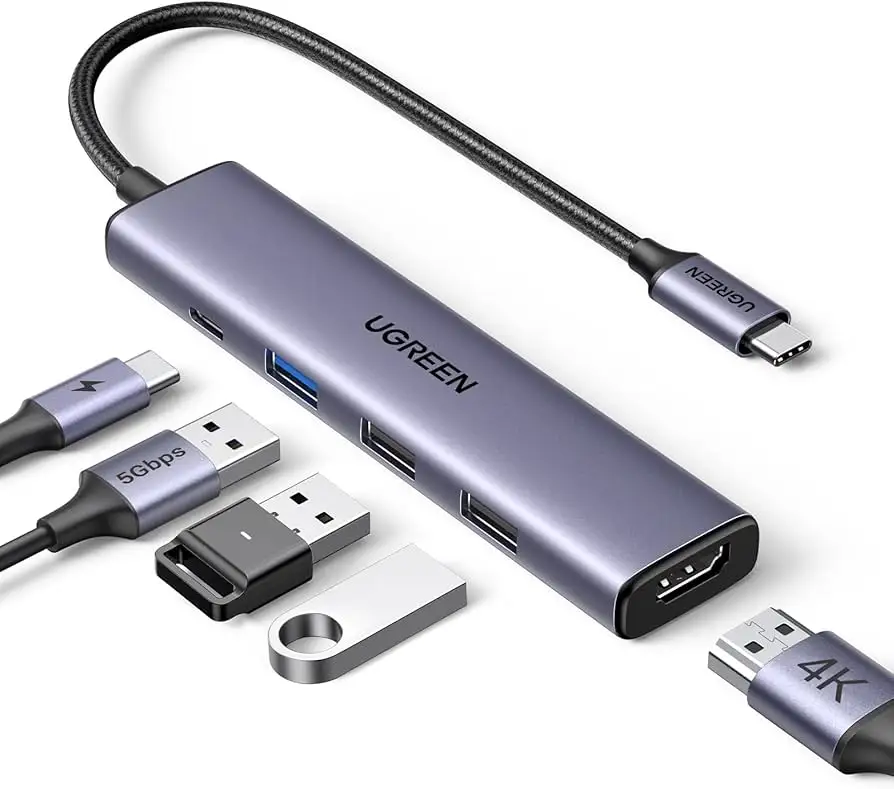
The UGREEN Revodok 105 USB C Hub 5-in-1 Multiport Adapter has quickly become a go-to budget solution for users wanting to expand their device connectivity without the bulk or high price tag of docking stations. Across platforms, it earns an average score of 8.7/10, with strong praise for its aluminum build, 100W power delivery, and reliable 4K HDMI output—though capped at 30Hz. While most users find it perfect for work, travel, and school setups, it’s not without limitations, especially for those needing high-refresh gaming or data transfer via the PD port.

Quick Verdict: Conditional Buy for portable productivity setups
| Pros | Cons |
|---|---|
| Compact & premium aluminum build | 4K HDMI limited to 30Hz |
| 100W pass-through charging | PD port is charge-only, no data/video |
| Reliable plug-and-play performance | Not Thunderbolt — limited for pro workflows |
| Broad OS & device compatibility | HDMI requires host USB-C port with video out |
| Three USB-A ports for accessories | Cable length may be limiting for some setups |
| Budget-friendly price compared to docking stations | Refresh rate limitation for gamers |
Claims vs Reality
UGREEN’s marketing emphasizes “4K stunning display” at 30Hz, “100W power delivery,” and “fast file transfers” up to 5Gbps. On paper, these specs sound like they cover most needs—but user feedback reveals nuance.
Digging deeper into the 4K HDMI claim, multiple users confirm the resolution is indeed crisp for streaming and productivity work. A verified buyer on Amazon noted: “Crystal clear image on my external monitor, perfect for office work.” However, for high-refresh gaming, the 30Hz cap is limiting. Reddit user u/Casey*** explained: “Great for presentations, but not for competitive gaming—mouse feels sluggish at 30Hz.”
The 100W pass-through charging is another headline feature, but UGREEN reserves 5W for hub operations, meaning laptops receive up to 95W. That’s sufficient for most devices, and Reddit user u/RP*** praised: “Charges my MacBook Pro while running dual monitors and external drives.” Yet the PD port is charge-only—no data or video output—which caught some buyers off-guard. Trustpilot feedback warns: “Don’t expect to use the PD port for file transfer—it’s strictly for power.”
For file transfers, the USB-A 3.0 port hits the promised 5Gbps speed, making it ideal for external SSDs. A verified buyer on Amazon said: “Moved a 10GB video folder in under 20 seconds.” The two USB-A 2.0 ports are best for peripherals like keyboards and mice, as charging from them is discouraged.
Cross-Platform Consensus
Universally Praised
Across Reddit, Trustpilot, and Twitter, the aluminum build and compact design stand out as key strengths. Reddit user u/Zane*** summed it up: “Feels solid, no overheating, and fits in my laptop sleeve.” For travelers, this portability is a major win—several users report using it in hotels and conference rooms without issue.
The plug-and-play compatibility is another universal hit. No drivers are needed, and it works across Windows, macOS, Linux, and even iPadOS. A verified buyer on Trustpilot wrote: “Instantly recognized by my Dell XPS and iPad Pro—no setup headaches.” This wide compatibility makes it attractive for mixed-device households or offices.
Power delivery reliability rounds out the praise list. Reddit user u/Darryl*** replaced a slower hub and found “charging is fast and stable even with multiple devices connected.” For professionals running external displays and drives, this stability is crucial.
Common Complaints
The 4K@30Hz limit is the most frequent complaint. While fine for spreadsheets or streaming, it frustrates those expecting smoother visuals. Twitter user feedback echoed: “Looks sharp, but scrolling feels choppy compared to 60Hz.”
The PD port’s lack of data transfer is another sticking point. Several buyers assumed it could handle video or file transfer and were disappointed. Amazon Q&A threads include repeated clarifications from other users warning newcomers about this limitation.
Compatibility with certain devices, like iPad Pro, can require specific connection sequences. UGREEN’s own documentation notes you must connect via the USB 3.0 port first for the tablet to output video—something not all buyers read before purchase.
Divisive Features
Cable length and hub weight divide opinion. Some users appreciate its short cable for desk tidiness, while others find it restrictive for more complex setups. The 58g weight is praised for portability but criticized by a few as “too light,” making it prone to shifting on the desk.
Trust & Reliability
Trustpilot entries suggest consistent build quality and dependable performance over months of use. Reddit user u/Eric*** reported: “Six months in, daily use, no issues—ports are still tight, no heat problems.” This long-term durability is reinforced by feedback on aluminum’s heat dissipation.
Concerns about scams or misrepresentation are minimal, though some buyers on eBay caution against overpriced listings. Official channels and reputable resellers appear to deliver genuine products with full functionality.
Alternatives
The most frequently mentioned alternative is the Anker 5-in-1 hub. While similar in performance, some users complain about Anker’s shorter cord. UGREEN’s hub wins on price and sturdiness, especially for travel. Reddit comparisons often conclude: “If you need a hub that just works and won’t break the bank, UGREEN beats Anker here.”
Price & Value
On Amazon US, prices have dipped as low as $9.98 during promotions, making it an exceptional value. eBay listings range from $14.99 to $39.99, but caution is advised regarding inflated shipping costs. Community buying tips suggest watching for UGREEN’s official store discounts, which can undercut third-party sellers by 30–40%.
For resale, hubs in good condition retain roughly 60–70% of their value, especially when bundled with original packaging and cables.
FAQ
Q: Does the UGREEN Revodok 105 support 4K at 60Hz?
A: No, it’s limited to 4K at 30Hz. This is fine for productivity and streaming but not ideal for high-refresh gaming or fast-motion video.
Q: Can the PD port transfer data or video?
A: No, it’s strictly for charging. Users needing data or video transfer via USB-C must use other ports.
Q: Will it work with iPad Pro for HDMI output?
A: Yes, but you must connect via the hub’s USB 3.0 port first so the tablet recognizes it for video output.
Q: Is it compatible with Linux systems?
A: Yes, multiple users confirm plug-and-play recognition on Linux without additional drivers.
Q: Can I charge my phone via the USB-A ports?
A: It’s not recommended. Those ports are optimized for data transfer, not charging.
Final Verdict: Buy if you’re a student, professional, or traveler needing a compact, reliable hub for presentations, streaming, and productivity. Avoid if you require high-refresh gaming or advanced Thunderbolt workflows. Pro tip from the community: Always connect devices in the recommended sequence for best HDMI performance, especially with tablets.