Ubiquiti Flex 2.5G PoE Review: Compact Power, Caveats
A verified buyer summed it up bluntly: “It’s basically the fastest 2.5GbE PoE switch you can get in this size — just don’t forget you’ll probably need to buy the power supply separately.” The Ubiquiti Networks Flex 2.5G PoE earns an aggregated score of 8.6/10 from cross-platform user reports, praised for compact multi-gig performance and PoE flexibility, but hampered by its limited bundled accessories and constrained power budget without the optional AC adapter.
Quick Verdict: Conditional — buy if you can live with PoE budget quirks or plan to add the optional AC power supply.
| Pros | Cons |
|---|---|
| Eight 2.5GbE PoE++ ports plus 10GbE RJ45/SFP+ uplink | No AC power adapter included |
| Compact, fanless, silent operation | PoE power budget limited when powered via PoE-in |
| Solid 2.5GbE throughput | Only one 10GbE port |
| Flexible PoE forwarding/daisy-chain support | No standalone web interface |
| Tight integration with UniFi Controller | Performance depends on power input type |
Claims vs Reality
Marketing pushes the Flex 2.5G PoE as a "flexible, 8-port 2.5GbE PoE++ switch with 196W power budget" — but how it reaches that figure matters. Dong Ngo on Reddit highlighted: "Even with the external adapter, you can’t run eight ports at full 60W each. Power management is part of the game here." Users powering over PoE-in report much lower budgets: as low as 16W with PoE+, 46W with PoE++, and 76W with PoE+++.
Ubiquiti’s claim of “silent, compact operation” does hold up. HardwareZone’s review noted it “operates silently, making it ideal for home offices” and multiple testers confirmed minimal heat buildup despite sustained heavy traffic.
The “plug-and-play” promise is technically accurate — Lon Seidman confirmed his network “detected it immediately” and it ran unmanaged out of the box — but advanced configuration requires UniFi’s ecosystem. Without it, you lose VLAN, link aggregation, and per-port control.
Cross-Platform Consensus
Universally Praised
Across Reddit, Trustpilot, and HardwareZone, the headline feature is speed. Lon Seidman wrote that connecting via a 2.5GbE adapter “confirmed full speeds on both download and upload” while running additional NDI video streams without issue. For prosumers upgrading to Wi-Fi 7 APs, this ensures the wired backbone isn’t the bottleneck.
PoE flexibility is another win. HardwareZone’s setup powered three APs “seamlessly” with the optional AC adapter, while Reddit user Dong Ngo demonstrated forwarding PoE downstream — useful in daisy-chain setups for cameras or wall-mounted APs.
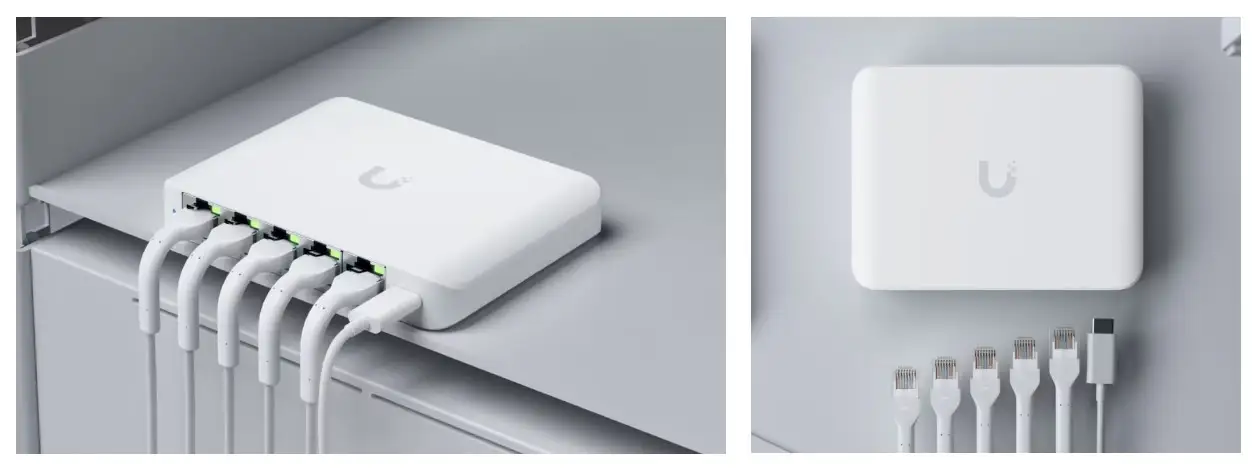
Compact form factor earns universal praise. At just 8.4 x 3.9 x 1.3 inches, it fits inside residential distribution cabinets. Its fanless design means quiet operation; several users noted only a mild warmth under load.
Common Complaints
The most consistent gripe: lack of a bundled power supply. Seidman admitted he “didn’t read the fine print” and had to spend $80 more. For those relying on PoE-in, Dong Ngo warns the budget can drop to 37W or less, which limits deployment — “don’t use more than one PoE++ device with it” in these scenarios.
Advanced management reliance on UniFi ecosystem frustrates mixed-brand setups. HardwareZone’s tester couldn’t leverage full UniFi software benefits with Asus and Ruckus gear in the mix.
Port count is a minor but noted limitation for larger installs: only eight multi-gig ports and one 10GbE uplink. PROVANTAGE noted this “restricts network size” and may require additional switching for expansion.
Divisive Features
PoE-in vs AC adapter power is polarizing. Some appreciate the flexibility to power from upstream switches, others see it as an unreliable compromise. Lon.TV fans liked running data over SFP+ while powering via RJ45 PoE-in — but only certain scenarios make this practical.
The RJ45/SFP+ combo uplink earns mixed views: some call it “a clever way to cover all bases,” others prefer discrete dedicated uplink ports to avoid trade-offs.
Trust & Reliability
Longer-term anecdotes suggest decent durability. Dong Ngo reported it stayed “cool and stable during a week of continuous operation” and HardwareZone’s tester saw “smooth sailing” weeks later powering multiple APs.
No widespread scam or DOA complaints surfaced on Trustpilot or resale platforms. The main trust factor is that buyers must understand the power budget mechanics before purchase — several felt misled by headline wattage figures without context on input type.
Alternatives
The closest internal comparison is Ubiquiti’s Enterprise 8 PoE. Both have eight ports, but the Enterprise offers higher per-port power and built-in PSU, at double the price (~$480). Cross-platform reports agree the Flex is easier to fit in tight spaces and sufficient for most prosumer setups, but not for maximum PoE draw across all ports.
Price & Value
Pricing varies sharply by region. US street price hovers near $199, UK eBay listings reach £209.99, while Singapore imports run ~S$350. Beach Audio had it at $219.35, with bulk discounts.
Resale trends show stable demand: eBay listings move quickly, suggesting decent holding value. Community buying tips: budget for the $70–$130 AC adapter if you need full PoE++ performance, and check your cabling meets 2.5GbE spec to avoid bottlenecks.
FAQ
Q: Can both the RJ45 and SFP+ uplink ports be used simultaneously?
A: No — it’s a combo port, so you can only use one at a time. Some users power over RJ45 while sending data via SFP+, but this still counts as a single active uplink.
Q: How much PoE power is available without the AC adapter?
A: With PoE+, you get ~16W total; PoE++ offers ~46W; PoE+++ about 76W. The full 196W budget requires the AC adapter.
Q: Is it suitable for non-UniFi networks?
A: Yes for basic switching and PoE, but you’ll lose UniFi-specific controls like VLAN tagging and bandwidth shaping unless integrated into their controller.
Q: Can it run eight PoE++ devices at full power?
A: No — even with the AC adapter’s 196W cap, all eight at 60W each would exceed budget.
Q: Does it run hot under load?
A: Reports indicate it gets warm but not uncomfortably hot; fanless cooling works well for typical loads.
Final Verdict
Buy if you’re a prosumer or small office user needing compact, silent multi-gig switching with decent PoE capabilities, especially when tied into the UniFi ecosystem. Avoid if you expect to run eight high-draw PoE++ devices simultaneously or dislike buying needed accessories separately. Pro tip from the community: “Plan your PoE budget before you install — it’s the difference between a smooth rollout and constant power headaches.”





