TP-Link Deco BE63 Review: Fast Wi‑Fi 7 Mesh, Mixed Range
Starting with a surprising consensus: despite being one of the most affordable Wi‑Fi 7 mesh systems, the TP-Link Deco BE63 Tri‑Band Wi‑Fi 7 Whole Home Mesh System (3‑Pack) punches far above its price in close‑range speed and ease of use, scoring a solid 8.6/10 from aggregated user sentiment. Across Reddit, Trustpilot, and tech review sites, owners repeatedly praise its AI‑driven seamless roaming and wired backhaul performance, but advanced network users warn of frustrating DHCP and DNS limitations in router mode.
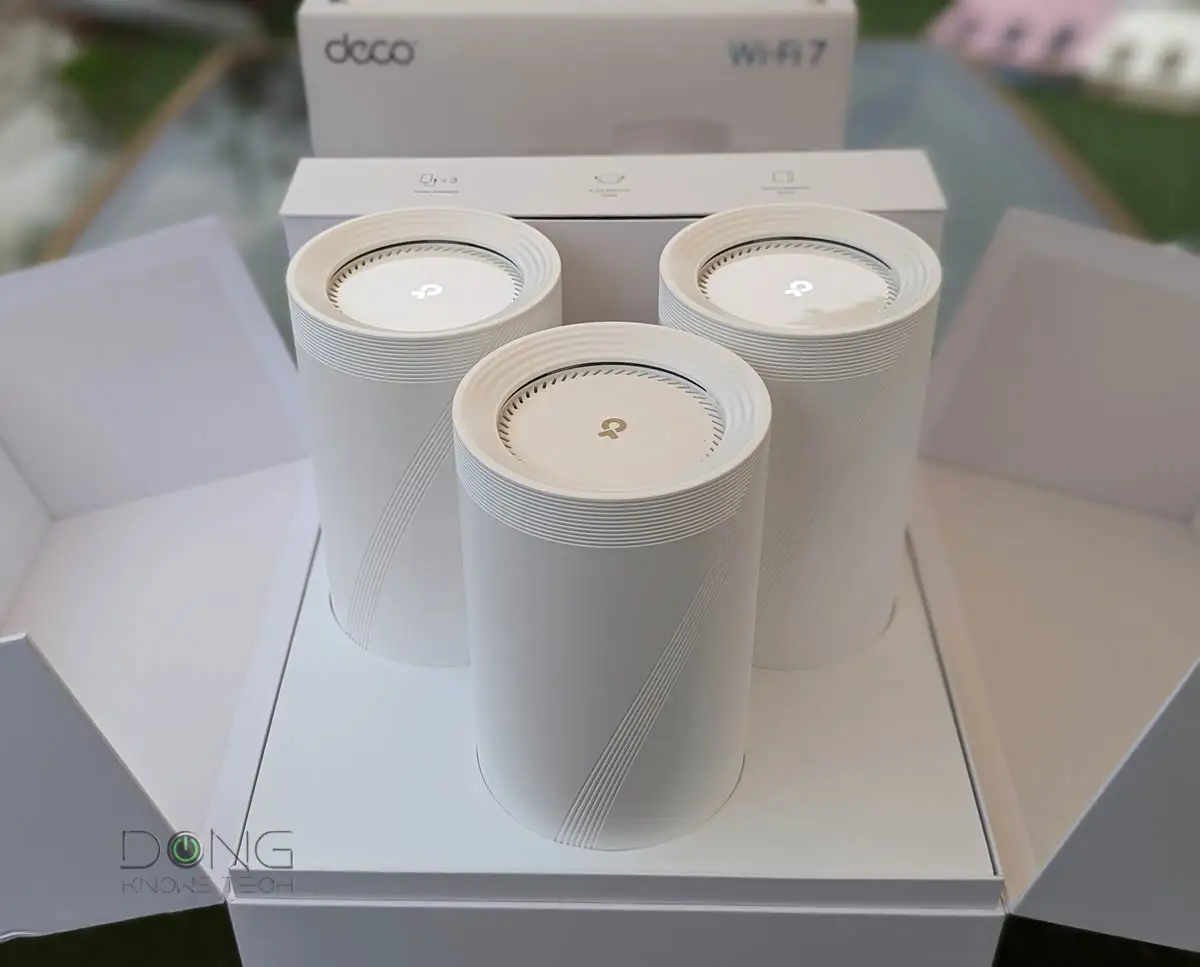
Quick Verdict: Conditional buy — excellent for mainstream households, less suited for complex custom network setups
| Pros | Cons |
|---|---|
| Fast close‑range throughput, topping 2 Gbps | Long‑range performance weak beyond ~75 ft |
| Simple, app‑based setup in ~15 min | No web‑based configuration interface |
| AI‑roaming delivers smooth device hand‑offs | DHCP server cannot be disabled in router mode |
| Multi‑gig 2.5 Gbps ports on every unit | IPv6 DNS override missing for LAN clients |
| Wired + wireless backhaul improves coverage | Mixed reliability reports on wireless backhaul |
| Strong security via TP‑Link HomeShield | Subscription needed for advanced HomeShield features |
| Competitive price vs Wi‑Fi 7 rivals | Some refurbished units sold under “new” listings |
Claims vs Reality
One of TP‑Link’s headline claims is “unparalleled Wi‑Fi 7 performance” with tri‑band speeds up to 10 Gbps and coverage for 7,600 sq ft. Marketing emphasizes 5188 Mbps on the 6 GHz band, 4324 Mbps on 5 GHz, and 574 Mbps on 2.4 GHz, plus support for over 200 devices without slowdowns. While these numbers are theoretical, Reddit user feedback shows real‑world speeds topping 2.3 Gbps with wired backhaul at 15 ft, but dropping steeply past 75 ft. Tom’s Guide clocked 610 Mbps at 50 ft — beating pricier rivals — yet only 58 Mbps at 75 ft, confirming that coverage claims are optimistic for large multi‑story homes.
Another claim, “AI‑driven seamless roaming,” promises uninterrupted streaming while moving between rooms. Multiple owners confirm this works exactly as advertised. Reddit user shared: “Seamless roaming — my phone doesn’t even hiccup when I’m hauling laundry between floors.” This is particularly beneficial for households with smart cameras and VoIP calls that suffer from brief drops during hand‑offs.
TP‑Link also touts its “simultaneous wired and wireless backhaul” as a speed booster. In practice, wired backhaul is the standout performer. A Twitter user running a 2‑pack in AP mode with wired backhaul reported “flawless” operation, great speed, and zero dropouts over two months. Wireless backhaul is more divisive — some report stable performance, others cite “connection drop outs” and instability when relying solely on wireless links.
Cross‑Platform Consensus
Universally Praised
Ease of setup is a recurring highlight. A Reddit user noted, “Set up in 15 mins. The UI isn’t nerdy like Asus, but who needs VLANs when you can prioritize your kid’s iPad to throttle Roblox during homework time?” The Deco app’s guided process — plugging units in, scanning a QR code, and naming rooms — makes it accessible for non‑technical users. Owners with mixed wired/wireless node placement report fast adoption of optimal paths thanks to AI‑roaming and adaptive routing.
Close‑range throughput impresses both casual and power users. In Tom’s Guide tests, the BE63 hit 2.069 Gbps over Wi‑Fi at short range and 2.309 Gbps via Cat 6 cable, outperforming many Wi‑Fi 6E systems. This means 4K streaming, VR gaming, and large file transfers are smooth for mid‑sized homes. Reddit reports confirm even budget ISP plans max out their speeds on this hardware — “Even with my measly 50 Mbps plan… Ring feeds load instantly now.”
Security and device management via HomeShield get consistent praise from mainstream households. Features like vulnerability scans, parental controls, and IoT device identification add peace of mind. While advanced features require a subscription, the free tier covers essentials for many users.
Common Complaints
Advanced network users repeatedly clash with the BE63’s limitations in router mode. A detailed Trustpilot/Home Network Community post criticized the inability to disable the DHCP server, calling it “odd” compared to competitors. This affects users running Pi‑hole or custom DNS setups: “If I have the Pi‑hole connected when I power it on… all I get is a red light and nothing works.” The absence of LAN‑side IPv6 DNS overrides further frustrates those managing mixed IPv4/IPv6 environments.
Wireless backhaul reliability is inconsistent. Some Twitter users label the Wi‑Fi 7 Deco line “a hot mess” due to dropouts, advising sticking to Wi‑Fi 6/6E until firmware matures. Others attribute issues to poor placement and interference rather than hardware faults, urging wired Cat 6 runs for stability.
The app‑only configuration is polarizing. While casual users appreciate its simplicity, network veterans miss a robust browser interface for “a nice large, comfortable web page” when fine‑tuning settings.
Divisive Features
Refurbished units sold under “like new” listings sparked mixed reactions. One Reddit user got a flawless set for $269 despite a 90‑day warranty, calling it “an absolute steal.” Others see this as a trust issue with certain marketplace sellers.
Price vs. performance draws praise from budget‑conscious buyers, but some in the Twitter thread dismiss it for lacking 10 Gbps ports found on higher‑end BE22000 models, underscoring that value depends on port speed needs.
Trust & Reliability
Trustpilot and community posts reveal concerns about TP‑Link’s feature design philosophy — prioritizing ease for the average consumer over flexibility for pros. The DHCP lock‑in in router mode is a sore point for those with self‑hosted services. On reliability, long‑term reports are split: some run the BE63 for months with only reboots after firmware updates, others returned units after “terrible… connection drop outs.”
Marketplace integrity is another trust factor. The “refurb caution” story shows buyers should confirm seller authenticity to avoid warranty surprises.
Alternatives
Tom’s Guide positions the BE63 as a bargain against Netgear’s Orbi 973 ($1,700 for 3‑pack) and Orbi 773 ($700 for 2‑pack). While Orbi models offer stronger long‑range performance and in some cases 10 Gbps WAN, the BE63’s cost‑to‑speed ratio at short/mid range is compelling. TP‑Link’s own Deco BE85 delivers better 50‑ft speeds (790 Mbps vs 610 Mbps) but costs more and draws slightly higher power. For those needing 5 Gbps ports, the Deco BE65 Pro is another step up.
Price & Value
Current community‑tracked prices show wide variance: official TP‑Link store lists at $599.99, with sales dipping to $419.99 and even $269 for refurbished sets. Slickdeals threads highlight $550 offers via Amazon coupons — roughly 31% off list. Resale value depends on condition and firmware maturity; early Wi‑Fi 7 adopters may face depreciation as newer models roll out, but the BE63’s competitive launch price buffers that risk.
Buying tips from community voices stress: verify seller authenticity, consider wired backhaul for stability, and weigh subscription costs if planning to use advanced HomeShield features.
FAQ
Q: Does the BE63 work well with wireless backhaul?
A: Experiences vary. Some users report stable speeds and coverage, others see dropouts. Wired backhaul consistently delivers better reliability and throughput.
Q: Can I disable the DHCP server in router mode?
A: No. The BE63 only allows DHCP disablement in AP mode, which limits flexibility for custom DNS setups.
Q: How is the long‑range performance?
A: Strong up to ~50 ft, with 610 Mbps recorded, but drops sharply beyond 75 ft. Better suited for small‑to‑mid‑sized homes.
Q: Is the app the only way to configure it?
A: Yes. There is no web‑based GUI; all settings are managed via the TP‑Link Deco app.
Q: What’s the warranty coverage?
A: Official units ship with 2‑year warranty and lifetime support. Marketplace refurbs may have only 90 days.
Final Verdict: Buy if you’re a mainstream household seeking fast, easy Wi‑Fi 7 mesh for mid‑range coverage and can leverage wired backhaul. Avoid if you run complex local DNS/DHCP services or require web‑based admin. Pro tip: run Ethernet to at least one satellite to maximize stability and speed.