TP-Link Archer T5E Review: Mixed User Verdict at 7.4/10
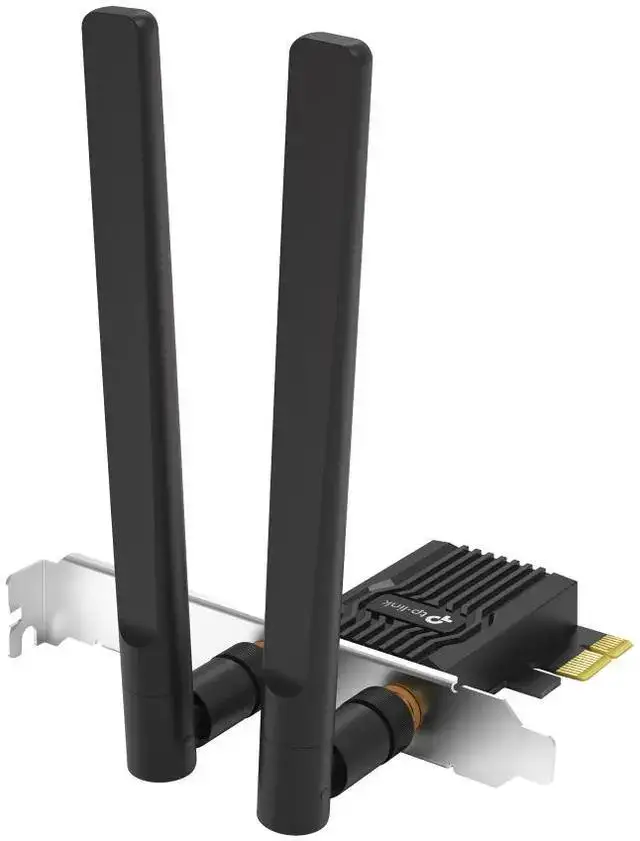
A Reddit post warned bluntly: "AC1200 Archer T5E - Very slow & no 5GHz". That single sentence captures a split in community opinion over the TP-Link Archer T5E AC1200 PCIe WiFi Card with Bluetooth 5.0, a product that has earned both staunch advocates and outright critics. While it packs dual-band 802.11ac speeds, Bluetooth 5.0, and WPA3 security in a budget-friendly PCIe form factor, user experience ranges from flawless plug-and-play to baffling performance drops. Verdict: 7.4/10.
Quick Verdict: Conditional
| Pros | Cons |
|---|---|
| Solid dual-band performance for many users | Some experience drastic speed drops |
| Reliable Bluetooth 5.0 pairing | Bluetooth range can be shorter than expected |
| Easy PCIe installation, Windows & Linux recognition | Needs internal USB cable connection for Bluetooth—sometimes overlooked |
| Compatible with Ubuntu 18.04/20.04 without drivers | Occasional issues detecting 5GHz band |
| WPA3 security support | Antenna positioning options are limited |
Claims vs Reality
TP-Link promotes the Archer T5E as capable of “up to 1200 Mbps Wi-Fi speeds” (867 Mbps on 5 GHz, 300 Mbps on 2.4 GHz), bolstered by two detachable antennas for extended range. While these numbers hold in lab conditions, real-world use varies sharply. A Reddit user reported, "I get speeds between 65 and 144 Mbps… reinstall driver, works for 15 minutes at 800 Mbps, then drops down again.” This contrasts sharply with the official spec, suggesting interference, driver issues, or inconsistent hardware performance in certain setups.
Another marketing highlight is Bluetooth 5.0, touted to offer faster data rates and increased reliability. Trustpilot reviewers largely confirm stability—one noted, "Bluetooth and wifi work perfectly… network quality is not degraded even at long distances"—but others mention shorter-than-expected range: "Bluetooth doesn't have a very wide range…" indicative that environmental factors or antenna placement may limit results.
WPA3 security is also advertised, giving "enhanced protection against brute-force attacks." While few community members tested this explicitly, network-focused users value the inclusion, especially Linux adopters who found the T5E recognized without additional drivers: "Recognised by Linux Mint 21… no driver to install for both wifi and bluetooth." This convenience adds weight to TP-Link’s claims for cross-platform versatility.
Cross-Platform Consensus
Universally Praised
Across Reddit, Trustpilot, and LDLC, easy installation stands out. Multiple verified buyers recounted quick setups without driver hunts. One Trustpilot reviewer wrote, "I plugged it in… turned on my computer and straight away it worked. Connected my speaker to bluetooth." Linux users are especially vocal about plug-and-play recognition, eliminating terminal commands—a plus for GNU/Linux desktop adopters.
Bluetooth/Wi-Fi combo functionality made it popular among desktop PC owners needing both in a single slot. TP-Link's inclusion of full and low-profile brackets catered to varied cases. A reviewer noted using a PCIe x16 slot simply for better physical clearance: "Otherwise it would have been too close to the graphics card." Gamers and streamers appreciated freeing the 5GHz band for bandwidth-heavy use while leaving 2.4GHz for lighter tasks.
Long-range stability under ideal conditions also earned praise: "Works great, even at long distances… network quality is not degraded." For households or offices where router placement cannot change, those antennas become a practical advantage.
Common Complaints
Speed inconsistency and 5GHz detection issues dominate negative feedback. The Reddit user who could not maintain speeds above 144 Mbps saw an occasional spike to 800 Mbps before dropping again, even on an otherwise stable network. TP-Link’s own support suggested channel changes (36/40/44/48), hinting possible compatibility gaps with certain routers or regional channel allocations.
Bluetooth range emerges as a secondary frustration: multiple buyers mention adequate but unimpressive range, affecting wireless peripherals in larger rooms. One stated bluntly, "I was expecting more… the bluetooth works well but beware of the distance between your PC and your box."
Another overlooked hurdle is the internal USB cable requirement for Bluetooth functionality. Several reviewers admitted missing that detail in product descriptions: "You also have to plug a small plug into one of the internal USB ports, which isn't immediately obvious." Those short on available internal USB headers found this problematic.
Divisive Features
Linux compatibility, praised by some, was irrelevant for Windows-focused users. While the WPA3 security function excites network-sensitive buyers, casual users rarely noticed or configured it. Antenna placement flexibility divides users—some are satisfied, others desire a system to fix antennas mid-case for optimal reception. One Trustpilot comment observed, "The only thing missing is a system to offset or fix the 2 external antennas to the back of the tower."
Trust & Reliability
From a reliability perspective, long-term owners report sustained performance—when initial setup succeeds. One LDLC buyer installed it at their parents’ home: "Have had no problems since… they usually have problems with products that are stable and well made." Such endurance suggests solid build quality, reinforced by details like oxidation-resistant gold-plated contacts.
However, anecdotal hardware variance appears possible. Reports of persistent 2.4 GHz-only connectivity show the adapter may falter under certain conditions, even with firmware updates. Trustpilot shows no pattern of product misrepresentation or scam-like behavior; the complaints center on performance quirks rather than defective units or fraudulent selling.
Alternatives
Community conversations did not highlight direct competitor models by name, limiting formal side-by-side comparisons. However, user remarks imply some opt for dedicated Wi-Fi cards plus separate Bluetooth dongles when internal USB headers are scarce—trading combo convenience for possible range improvements or reduced internal cabling complexity.
Price & Value
On eBay, certified refurbished units run about $22.99, while Amazon historical tracking shows new units peaking at $39.99 and dipping to $22.98. This price stability, coupled with its blend of dual-band Wi-Fi and Bluetooth 5.0, offers strong value for general desktop upgrades. Buyers focused on resale can expect modest depreciation—the average used price hovers just over $21, reflecting steady second-hand demand.
Community consensus treats this as an inexpensive way to modernize older desktops, especially given its compatibility with both Windows and Linux systems. Budget-conscious users balancing Wi-Fi upgrade and Bluetooth needs frequently endorse it, provided they check internal USB capacity first.
FAQ
Q: Does the Archer T5E work with Linux without extra drivers?
A: Yes. Multiple users confirmed recognition under Ubuntu 18.04/20.04 and Linux Mint 21 with kernel 5.15, without manual driver installation, for both Wi-Fi and Bluetooth.
Q: Why can't my adapter detect 5GHz Wi-Fi?
A: Users suggest changing the 5GHz channel to 36/40/44/48 in router settings, as some channels may not be compatible or detectable depending on regional constraints.
Q: Is the internal USB cable mandatory for Bluetooth use?
A: Yes. Bluetooth functionality requires connecting the supplied cable to an internal USB header. Without it, Bluetooth will not operate.
Q: Is WPA3 supported out-of-the-box?
A: WPA3 support is included, but your router must also support WPA3 for it to be usable.
Q: Does Bluetooth range meet expectations?
A: Some users find it adequate for close peripherals but limited over larger distances or multiple walls, despite being Bluetooth 5.0.
Final Verdict: Buy if you want an affordable, stable dual-band Wi-Fi + Bluetooth combo, especially for Linux or quick desktop upgrades. Avoid if you have no spare internal USB headers or depend on maximum Bluetooth range. Pro tip from community: check router channels if 5GHz signal is missing and position antennas away from metal obstructions for best results.





