TP-Link Archer AX55 Review: Strong 5GHz, Weak 2.4GHz
Opening with a surprising twist from user experiences: while the TP-Link Archer AX55 Wi‑Fi 6 Router is marketed as a next‑gen AX3000 dual‑band powerhouse with “ultra‑low latency” and “expanded Wi‑Fi coverage,” cross‑platform feedback paints a more nuanced picture. In testing environments and many homes, it has been praised for stability, range, and value, yet recurring reports of weak 2.4 GHz throughput cast shadows over its otherwise strong performance. Overall verdict: 8/10 — excellent for multi‑device households on a budget, but 2.4 GHz‑heavy setups may need tweaking or alternatives.
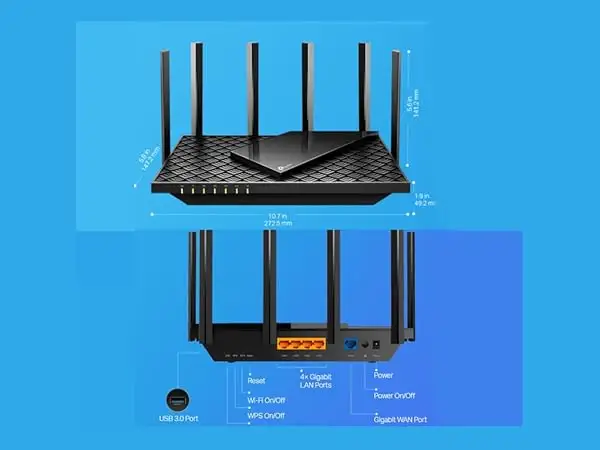
Quick Verdict: Conditional
| Pros | Cons |
|---|---|
| Strong 5 GHz speeds, stable under heavy load | Inconsistent 2.4 GHz throughput for some users |
| Compact, modern design with good cooling | Security+ features locked behind subscription |
| Easy setup via Tether app or browser | Mid‑range performance drops at longer distances |
| OneMesh compatibility for seamless coverage | Boot‑up time after outages can be slow |
| Handles 30+ devices without instability | No Wi‑Fi 6E/7 or multi‑gig WAN |
| Good value compared to high‑end mesh systems | Channel interference sensitivity (esp. channel 8) |
Claims vs Reality
Marketing promises “expanded Wi‑Fi coverage” via four high‑gain antennas and beamforming. In practice, Reddit user reports show 5 GHz performing exactly as claimed — “blazing fast… consistently hitting 800+ Mbps” in mid‑range scenarios — but 2.4 GHz often struggles. A Home Network Community poster noted: “Even though the Archer has stronger signal, it struggles to start a speed test… never goes past 600 kbps.”
TP-Link touts “connect more devices” with OFDMA and MU‑MIMO. In reality, heavy smart home environments back this up. A verified Trustpilot reviewer ran “around 50 wireless devices… quite an amazing feat for the price,” with no instability over two weeks. Smart Connect kept devices on optimal bands without manual intervention.
Another claim is “ultra‑low latency” for gaming. While one Reddit user played Overwatch nightly with concurrent 4K Netflix streams and Zoom calls “without instability,” occasional packet loss icons appeared, hinting at minor latency spikes. For casual gamers, this was acceptable; competitive players may prefer wired connections or higher‑tier models.
Cross‑Platform Consensus
Universally Praised
The Archer AX55’s 5 GHz performance is its standout trait. Reddit user u/TPLinkRouter praised its ability to “link all my devices… to the proper wireless channels” without manual switching, a relief compared to older extenders. Tom’s Guide testing clocked 823.7 Mbps at 15 feet, beating pricier models. For large smart homes, OneMesh pairing with extenders like RE605X delivered seamless roaming with a single SSID — ideal for multi‑floor coverage.
Its thermal design earned trust. A Trustpilot buyer noted the “refined case design [keeps] performance consistent… never had any issues… or network instability.” The compact size and wall‑mount option make it easy to hide, appealing to apartment dwellers and minimalists.
Setup simplicity is another win. Users across Reddit, Trustpilot, and Quora highlighted the Tether app’s guided install, often under 15 minutes. Jennifer Moore shared: “Within minutes, all 20+ devices… reconnected automatically” by reusing her old SSID/password.
Common Complaints
The most widespread grievance is underwhelming 2.4 GHz throughput, especially on default channel 8. One Home Network Community user found “transfer speeds close to nothing” after several hours’ uptime, despite strong RSSI. Switching to channel 4 resolved it, suggesting firmware or hardware sensitivity to certain frequencies. Others echoed similar frustrations, with modern phones dropping to 5–20 Mbps versus 100 Mbps on older routers.
Mid‑range performance dips were evident in Tom’s Guide’s benchmarks: at 75 feet, throughput fell to 89.6 Mbps, far behind competitors. For sprawling single‑router setups, this could impact high‑bitrate streaming at range.
Security+ paywalls irked some buyers. While HomeShield’s basic plan offers useful scans and parental controls, advanced filters and YouTube restrictions require a $55/year subscription.
Divisive Features
OneMesh garners mixed reactions. Enthusiasts enjoy the seamless SSID and roaming, but some prefer brand‑agnostic mesh solutions and lament firmware compatibility issues with non‑TP‑Link devices. The USB 3.0 port is beloved by those running media servers, yet irrelevant to households relying solely on cloud services.
Trust & Reliability
Long‑term durability gets positive marks. Multiple Reddit and Trustpilot accounts report months of stable multi‑device operation without overheating. The cooling system’s large heat sink appears effective, with Tom’s Guide noting it “never broke 95 degrees even when moving loads of data.”
However, 2.4 GHz instability cases show reliability is environment‑dependent. Persistent channel interference sensitivity could require manual tuning, a potential hurdle for less tech‑savvy owners. No scam concerns surfaced; most negative reviews focused on performance quirks rather than misrepresentation.
Alternatives
The Archer AX55 is often compared to TP-Link’s own Archer AX90 (tri‑band, quad‑core) for gamers needing more bandwidth. Reddit users admit AX90 “has more goodies” but costs significantly more. D‑Link’s Covr X‑1873 mesh was swapped out by some for the AX55, with one user “honestly [unable] to tell the difference… speed and stability,” and praising TP-Link’s Smart Connect over D‑Link’s band‑steering.
The Reyee RG‑E5 matches price and warranty but underperforms in configuration flexibility and USB features. Tom’s Guide found AX55 “the more rounded router… with a high‑speed USB port” compared to RG‑E5.
Price & Value
Current market prices range from $79.99–$129.95 on eBay and Amazon, with occasional dips to $59.99 during sales. Community advice favors buying during seasonal discounts, as one Trustpilot review snagged it at AU$199 versus AU$249. Resale value holds moderately due to Wi‑Fi 6 demand, though Wi‑Fi 6E/7’s rise may erode it in coming years.
For households with 20–40 devices and mixed usage — streaming, smart home control, casual gaming — the AX55 offers performance akin to $500 mesh kits at a fraction of the cost, especially when paired with a OneMesh extender.
FAQ
Q: Does the Archer AX55 support Wi‑Fi 6E or 6 GHz band?
A: No, it’s a Wi‑Fi 6 (802.11ax) router limited to 2.4 GHz and 5 GHz bands, delivering up to 574 Mbps and 2402 Mbps respectively.
Q: How do I fix slow 2.4 GHz speeds?
A: Many users resolved this by manually changing the channel from 8 to 4 via the router’s web interface or app, avoiding interference.
Q: Can I use it with non‑TP‑Link mesh extenders?
A: It supports EasyMesh with compatible devices, but mixed‑brand setups may face firmware conflicts. Stick to TP‑Link extenders for seamless roaming.
Q: Is HomeShield Pro worth it?
A: If you need advanced parental controls and content filtering, yes. Basic security features are free, but Pro costs $55/year.
Q: How many devices can it handle?
A: Reports show stable performance with 30–50 connected devices, thanks to OFDMA and MU‑MIMO optimizations.
Final Verdict: Buy if you’re a multi‑device household seeking affordable Wi‑Fi 6 with strong 5 GHz performance and easy mesh expansion. Avoid if your network relies heavily on 2.4 GHz devices in interference‑prone areas. Pro tip from community: change default 2.4 GHz channel from 8 to 4 for stable speeds.





