TI-30XS MultiView Calculator Review: Great Value, Few Quirks
“87% liked the long‑lasting battery life, but 13% experienced sudden battery drain” is the kind of split that defines the Texas Instruments TI‑30XS MultiView Calculator experience. Across Amazon, Best Buy, eBay, and community roundups, the calculator earns strong satisfaction overall and sits in the under‑$20 sweet spot, but a smaller group runs into battery quirks, navigation annoyances, or learning‑curve friction. Verdict: a highly recommended school‑grade scientific calculator with a few recurring caveats. Score from aggregated sentiment: 8.7/10.
Quick Verdict
Yes, with small conditions.
| What users like / dislike | Evidence from users |
|---|---|
| Multi‑line “MathPrint” display helps check work | A Best Buy reviewer noted it “does equations… a real time saver.” |
| Strong value under $20 | An eBay buyer called it “an absolute steal… for under $20.” |
| Durable for school backpacks | BestViewsReviews users said: “durable and can withstand drops.” |
| Some battery/solar frustration | BestViewsReviews users wrote: “battery runs out… cannot figure out how to make the solar power work.” |
| No backlight hurts in dim rooms | Best Buy user Rocios said: “only complaint is… lack of [a backlight].” |
| D‑pad / key layout annoyances | An eBay reviewer said navigation is “annoying because it’s slow unless you mash the button.” |
Claims vs Reality
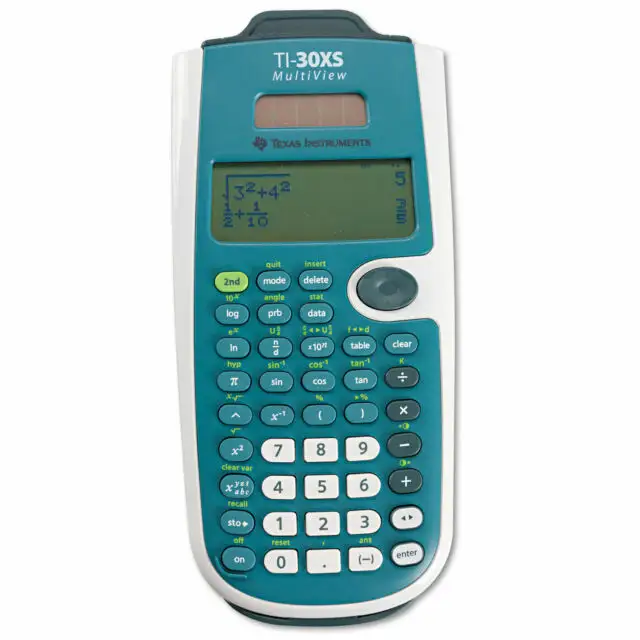
Texas Instruments markets the TI‑30XS MultiView as a four‑line, dual‑power scientific calculator with textbook‑style math notation and test approval. Digging deeper into user reports, most of that lands, but with a few gaps that show up repeatedly.
First claim: dual power and long life. Official specs emphasize “solar and battery powered.” Many users confirm this advantage in practice. BestViewsReviews includes comments like: “the calculator is solar powered, so I never have to worry about running out of batteries,” and “the calculator has amazing battery life.” For students who use it daily in algebra or chemistry, that means fewer mid‑semester battery surprises.
But the same dataset flags a contradictory minority. BestViewsReviews also captures frustration: “the battery runs out even though I have barely used it and I cannot figure out how to make the solar power work,” and another user said it died “after less than 4 months.” While officially positioned as dependable dual‑power, multiple users report sudden drain or confusion about whether the solar panel is really helping.
Second claim: natural “MathPrint” notation and multi‑view screen improves learning. The specs promise stacked fractions, exponents, and a four‑line view. Users largely echo that benefit. BestViewsReviews quotes praise like: “I am amazed by the fraction, exponent and square root displays,” and Best Buy’s Oceanspace described how students can “see both the problem and answer in the same screen,” helping with checking work and pattern recognition. For high‑schoolers transitioning from basic calculators, this is a tangible upgrade.
Reality check: the screen is clear but not universally easy in low light. TI doesn’t advertise a backlight, and several users feel it. BestViewsReviews includes: “sometimes it is hard to read the dark display,” and Best Buy user Rocios explicitly complained about “the lack of [a backlight].” So while the display format is praised, its visibility depends heavily on lighting.
Third claim: intuitive menus and comfortable keys. TI highlights pull‑down menus and ergonomic design. Many users agree. BestViewsReviews has: “smooth buttons,” and “ergonomic design… large buttons, clear labels.” Best Buy reviewers frequently list “ease of use” as a top rating category, with one buyer saying it was “perfect for college students.”
Still, some users push back on button layout and navigation. BestViewsReviews users said: “I prefer the clear button and delete button to be placed differently,” and criticized the arrow keys being “all connected into one button.” An eBay reviewer added that the d‑pad is “slow unless you mash the button repeatedly.” The core interface works, but a subset finds it clunky compared to other TI models.
Cross‑Platform Consensus
Universally Praised
The clearest cross‑platform love centers on the four‑line MultiView screen and MathPrint formatting. Students and tutors describe it as making work feel closer to how problems are written on paper. BestViewsReviews users repeatedly celebrated that “the display is clear, crisp, and easy to read,” and that fraction and radical layouts look “as they appear in textbooks.” For a high‑schooler in Algebra 2, that means less mental translation from “calculator syntax” to classroom notation. Best Buy’s Oceanspace framed the benefit directly for learning, saying the series is “wonderful particularly because students can see both the problem and answer in the same screen.”
A recurring pattern also emerged around value. Across Best Buy, Amazon, and eBay, users highlight how much capability they get at a low price. One eBay review called it “one of the best ones around… for under $20, it’s an absolute steal.” Best Buy user Dancing Lady said it was “a great value for the money… a fraction of the price of calculators with comparable functions.” For families buying school supplies or college freshmen needing a non‑graphing option, this price‑to‑function ratio is a major reason it’s the default pick.
Durability and portability show up as another shared positive. BestViewsReviews users said it has a “robust build quality, ensuring durability for everyday use,” and that they’ve been using it “for a few years and it is still functioning well.” Best Buy reviewers echo that it’s light and backpack‑friendly; one wrote: “great color! very light. perfect size.” For middle‑schoolers and high‑schoolers who toss calculators into bags daily, these stories reinforce that the TI‑30XS survives typical student life.
Users also praise the scroll‑back and copy/paste style editing. BestViewsReviews includes: “I found scrolling back up to be the most helpful feature,” and another user liked being able to review prior entries instead of rewriting work. For test prep or homework checking, this matters: students can verify steps, reuse a result, and avoid retyping long expressions.
Key praised themes
- MultiView/MathPrint display improves clarity for algebra, geometry, and science work.
- Strong price/value for a non‑graphing scientific calculator.
- Durable, compact build that holds up through school years.
- Scroll‑back and editing features save time and reduce mistakes.
Common Complaints
Battery behavior is the biggest recurring negative, even if it’s a minority view. BestViewsReviews quantifies it: “87% liked the long‑lasting battery life, but 13% experienced sudden battery drain.” Users in that frustrated slice describe a confusing mismatch between “solar powered” expectations and real‑world results. Comments like “battery runs out… cannot figure out how to make the solar power work” suggest that for some students, especially those using it infrequently, the dual‑power promise feels unreliable. The ShopSavvy TLDR review repeats this concern with “requires regular battery replacement” and even claims the “solar cell appears to be fake,” reflecting the same user disappointment.
Navigation and key design are another steady gripe. While many like the tactile feel, some find the directional pad and key placements awkward. BestViewsReviews users called out the arrow keys being “all connected into one button,” and placement of Clear/Delete being “a negative point.” An eBay reviewer went further: “navigation using the d‑pad is annoying because it’s slow unless you mash the button.” For fast test‑taking, that slow scrolling can be irritating.
The lack of a backlight also affects users who study in dim rooms or evening environments. Best Buy user Rocios said the only complaint was “the lack of one,” and BestViewsReviews users said the display is “somewhat dark” even after contrast adjustment. This complaint tends to come from those who compare it to pricier models with lighting.
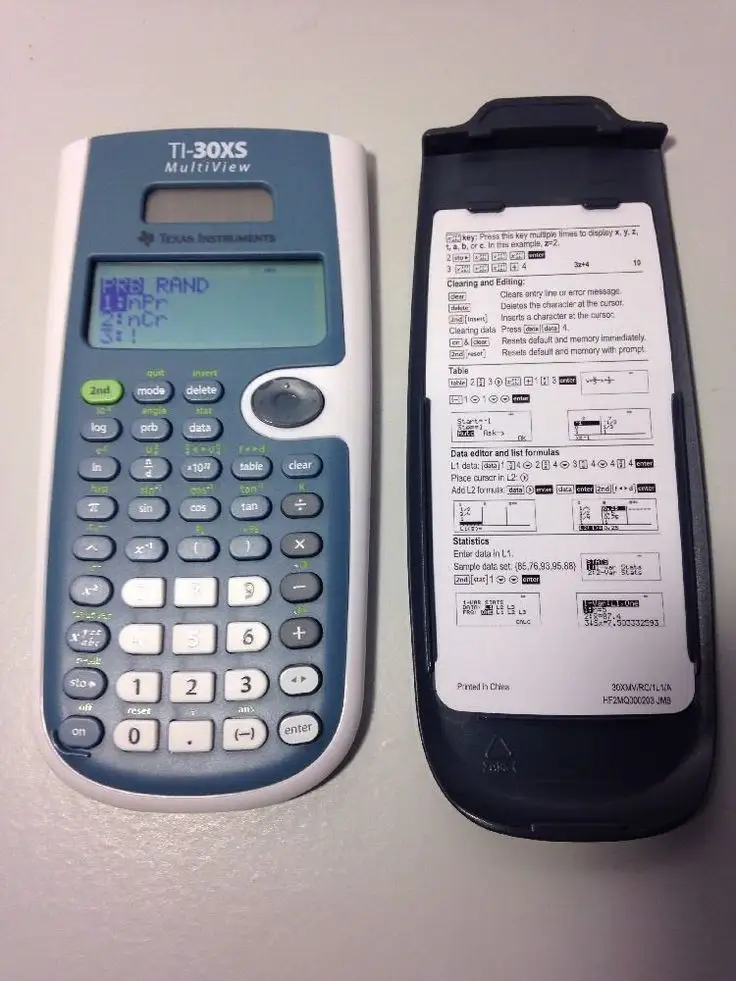
Finally, instructions and learning curve appear in multiple places. ShopSavvy reports directions “poorly written and lacked diagrams,” and that beginners may struggle “without a teacher or extensive practice.” Best Buy user DMCL echoed the experience: as a “newbie to scientific calculators it took me some time to learn how to use it.” The calculator works well once learned, but first‑timers can feel lost.
Key complaint themes
- Occasional battery drain / solar confusion for a minority of users.
- D‑pad slowness and some awkward key placements.
- No backlight makes low‑light use harder.
- Instruction manual and onboarding feel weak for beginners.
Divisive Features
Some features split users depending on expectations. The calculator’s non‑graphing nature is a selling point for test compliance but a limitation for others. Best Buy user Helena liked that it “doesn’t graph which apparently is cheating in college,” framing it as the right tool for proctored classes. On the other hand, Best Buy’s platform summary notes “lack of graphing capabilities” as a recurring downside, especially for students moving into calculus or needing visual functions.
There is also a divide over precision and “exact answers.” One BestViewsReviews user complained about needing to force approximations because it “is not able to give exact answers.” That stands in contrast to users who say it’s “accurate” and easy for “complex expressions.” The split seems tied to whether users expect symbolic algebra‑level outputs from a non‑CAS scientific calculator.
Trust & Reliability
Trustpilot data is represented here via Fakespot analysis, and it raises a flag about review quality rather than product performance. Fakespot claims a “high amount of irrelevant reviews” and estimates that only “16.5% of the reviews are reliable,” suggesting Amazon’s huge volume includes noise. That doesn’t negate real user praise, but it means single glowing or harsh Amazon takes should be weighed against cross‑platform patterns.
Looking at long‑term stories outside Amazon, durability feedback is mostly positive. BestViewsReviews users reported multi‑year use: “I have been using the calculator for a few years and it is still functioning well.” eBay reviewers buying used units still describe them as working fine and “professional” looking. The main reliability risk that persists is power: some owners say it “stopped working shortly after purchase” (ShopSavvy) or experienced early battery death (BestViewsReviews). So longevity seems good for most, with power issues as the main outlier.
Alternatives
Only a few competitors are mentioned directly in user data. Best Buy’s Oceanspace compared it within TI’s own line, recommending: “perfect for kids in algebra 1 and geometry… best to buy the ti‑36 multiview for the 3rd year.” That positions the TI‑36X Pro / TI‑36 MultiView style upgrade as the next step for students heading into higher math who want more advanced functions while staying non‑graphing.
Some eBay and Fakespot snippets reference the “regular TI‑30” and “TI‑30XIIS,” with one buyer saying buying both was “a no brainer” for choosing the MultiView. The implication from those users is that the TI‑30XS MultiView is the better pick if you want multi‑line MathPrint and a more modern interface, while the older TI‑30 variants are simpler but less capable.
Price & Value
Current mainstream pricing clusters around $16–$20. Amazon listings show $18.49, and Best Buy lists $19.99, with several users explicitly praising affordability at that tier. The value perception is amplified by comparisons to graphing calculators. Best Buy user Dancing Lady said it “gives my son’s $100+ TI calculator a run for its money,” framing it as a budget alternative when graphing isn’t required.
Resale markets on eBay show used units in the $4–$15 range, depending on condition and shipping. That low used price suggests wide supply but also means the calculator holds enough utility that buyers still seek it secondhand. Community buying tips implicitly lean toward checking test requirements first—multiple users mention it being “school approved” or required for classes—then deciding if the lack of graphing is acceptable.
FAQ
Q: Is the TI‑30XS MultiView allowed on SAT, ACT, and AP exams?
A: Yes. Official specs state it is “approved for use on SAT, ACT, and AP exams.” Best Buy reviewers also reference buying it because it’s “school approved,” making it a common safe choice for standardized testing.
Q: How good is the battery and solar power in real use?
A: Most owners are happy, with BestViewsReviews showing 87% praising battery life. However, a smaller group reports early drain or solar confusion, saying the “battery runs out… barely used” and they “cannot figure out how to make the solar power work.”
Q: Is it easy for beginners to learn?
A: Mixed. Many call it “easy to use,” but new users often need a learning period. One Best Buy buyer said it “took me some time to learn,” and ShopSavvy notes the instructions are “poorly written,” so first‑timers may rely on teachers or videos.
Q: Can it graph functions?
A: No. Users frequently mention this limitation. Some appreciate it for test compliance (“doesn’t graph… cheating in college”), while others see it as a drawback if they need visual graphing or higher‑level math tools.
Q: Is the display readable in low light?
A: Usually clear, but not perfect in dim settings. BestViewsReviews includes praise for “clear, crisp” readability, yet others complain the screen is “somewhat dark,” and Best Buy users note the lack of a backlight.
Final Verdict
Buy if you’re a middle‑school, high‑school, or early college student who needs a non‑graphing scientific calculator for algebra, geometry, statistics, or science, and you value the MultiView MathPrint screen. Avoid if you study mostly in low light or want guaranteed symbolic exactness or graphing. Pro tip from the community: lean on the scroll‑back and copy/paste features—users say those time‑savers are what make the MultiView “a real time saver.”





