TI-30XIIS Scientific Calculator Review: 9/10 Value Pick
“Lasted for more than 5 years without a battery change” is the kind of line that keeps popping up around this model, and it sets the tone for how people talk about it. Texas Instruments TI-30XIIS Scientific Calculator earns a broadly positive reputation across major retail and community sources, landing at a confident 9/10 verdict based on long-term durability, exam-ready functionality, and value—tempered by recurring gripes about button feel and display viewing angles.
Students, parents, and even working engineers describe it as a dependable “go‑to” scientific calculator that hits a sweet spot: enough functions for most high school through early college math and science, without the price or learning curve of a graphing model. A verified Best Buy reviewer wrote: “very easy, simple, and straight to the point,” while another added it “can do all the necessary calculations needed for up to precalc.”
At the same time, the same cross-platform data reveals a consistent weak spot: input comfort. Multiple users mention that the keys can be “finicky,” “loose,” or require firm presses. That doesn’t erase the overwhelmingly positive scores (Amazon 4.8/5, Best Buy 4.7/5, BestViewsReviews 9.3/10), but it does define the trade‑off.
Quick Verdict
Yes — for most students and general-purpose users.
| Pros (from users) | Cons (from users) |
|---|---|
| Long-lasting dual power; rarely needs battery changes | Buttons can feel sticky/loose or need hard presses |
| Two-line display helps track work and edit entries | Display glare / low-contrast at some angles |
| Solid durability over many years | Not for graphing or advanced math storage |
| Excellent value for school requirements | Small keys slow fast data entry for some |
| Widely accepted on SAT/ACT/AP | Compact screen can feel tight for long expressions |
Claims vs Reality
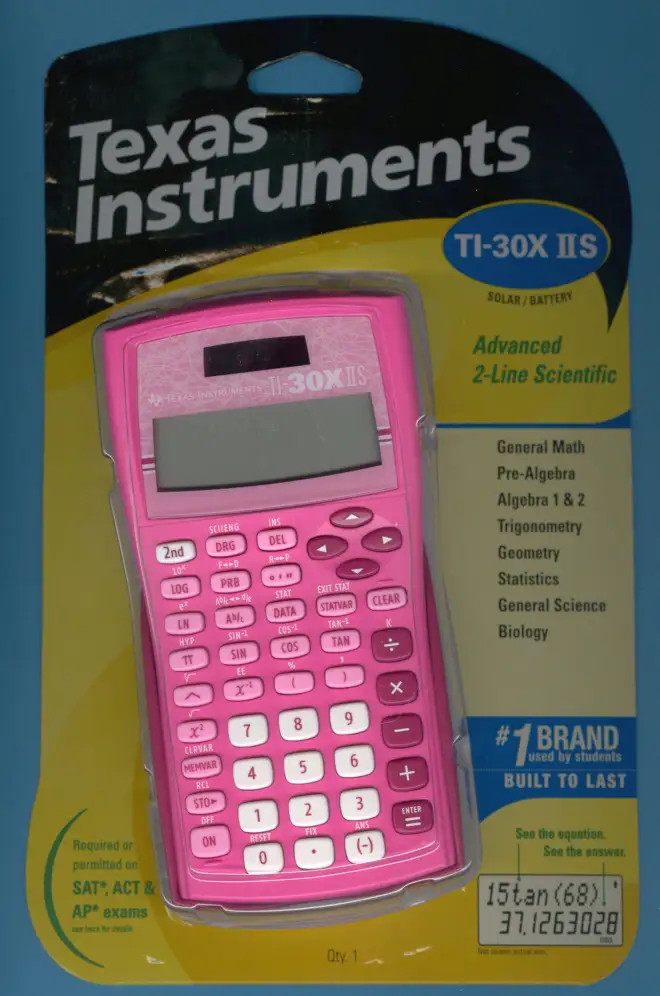
Texas Instruments markets the TI‑30XIIS as a “fundamental, two‑line calculator combining statistics and advanced scientific functions” with dual solar/battery power and exam approval. User feedback largely backs those claims, but not without nuance.
Claim 1: Dual power means maintenance-free use.
The official spec emphasizes solar plus battery backup, and users consistently reinforce that benefit with real longevity stories. A Best Buy reviewer, juanky, said: “lasted for more than 5 years without a battery change,” and noted it only died after being thrown into water. BestViewsReviews’ sentiment summary reports “91% liked the long‑lasting battery life,” with lines like “the calculator is solar powered, so there are no dead batteries.” For students who don’t want test-day surprises, these stories validate the promise.
Digging deeper into user reports, the power system isn’t just a spec—it shapes trust. Parents buying for middle schoolers highlight relief at not needing frequent battery replacements. A verified Best Buy reviewer (anonymous) called it “virtually maintenance‑free with its solar panel,” framing dual power as a set‑and‑forget perk for school use.
Claim 2: Two-line display improves workflow.
Marketing says you can “review previous entries,” and users directly echo that value. The Best Buy anonymous review praised being able to “scroll through expressions without losing track,” especially for complex calculations. The Reddit community review points out the top line shows entry and the bottom shows results, calling it a historically meaningful upgrade and noting the entry line scrolls. For algebra and stats learners, this feature reduces rework and helps catch mistakes.
However, while the display format is praised, readability isn’t perfect. BestViewsReviews shows “87% praised the clear and bright display,” yet “13% found it hard to read in low light,” citing glare and low contrast. So the feature works as intended, but users warn that lighting and angle matter.
Claim 3: Advanced functions for high school and beyond.
The official list includes fractions, trig, statistics, and equation editing. Users confirm it covers standard curricula well. A verified Best Buy reviewer, la chef, said it handles “all the necessary calculations needed for up to precalc,” and another wrote it is “perfect for algebra, geometry, and physics.” Yet the Reddit review flags the boundary clearly: “if you know that you’re going to need graphing capability, then obviously this is not the choice for you.” While marketed as advanced for its class, users see it as a strong entry‑level scientific tool, not a replacement for graphing calculators in higher math.
Cross-Platform Consensus
Universally Praised
A recurring pattern emerged across Best Buy, Amazon ratings, and community summaries: users trust the TI‑30XIIS because it simply keeps working. Longevity stories are common and unusually detailed for a $20–$30 calculator. Reddit user feedback described using it “for over 10 years before it finally stopped working,” even after rough treatment like coffee spills. That kind of narrative matters to students and teachers who want a tool that survives backpacks and semesters.
Durability isn’t only about lifespan; it also supports confidence under pressure. BestViewsReviews notes “90% liked the durable material,” and a sentiment line says users appreciate it being “rugged and long‑lasting.” For test-takers, that translates to reliability over repeated use rather than a fragile device that might fail mid‑term.
The two‑line workflow also wins broad approval, especially for learners building confidence in math. A verified Best Buy reviewer called the two rows “a great feature” because it lets them double‑check steps. Another user, ffff, said: “very easy, simple, and straight to the point,” highlighting that the interface doesn’t overwhelm beginners. Middle school and early high school students are repeatedly named as ideal users; teachers recommending it reinforces that track record.
Finally, value for money is a cross‑platform theme. Users compare it favorably to expensive graphing calculators they were once “forced to purchase.” A verified Best Buy reviewer, rock slider, called it “easy affordable compared to the high price calculators they forced us to purchase in the old days.” Even working adults use it for quick tasks: jimy wrote it “helped with my taxes this year,” suggesting it’s not only a classroom tool.
Common Complaints
Buttons are the most consistent criticism, and they appear in every dataset that includes negatives. BestViewsReviews flags “sticky keys” as the main drawback. Twitter/X sentiment summaries state “66% found the button quality [good], but 34% encountered some lag,” including user lines like “I have to press the buttons hard to get anything to work” and “the buttons on my calculator are loose, making it difficult to enter data quickly.”
This issue affects fast typists most—students doing timed exams or stats entry. Reddit’s long‑term reviewer acknowledged keys are “on the small side and there is a bit of play,” and though they didn’t see it as a deal‑breaker, they admitted it can slow data entry. Best Buy’s ol reliable bigfoot echoed that: “buttons are a bit finicky at times but for the price, its not bad.” The story across platforms is consistent: usable and accurate if pressed carefully, frustrating if you rely on speed.
Display readability is the second common pain point. Even while most users like the two‑line format, a minority struggle with contrast and glare. BestViewsReviews quotes complaints such as “too small and difficult to read at different angles due to glare.” For students in bright classrooms or those who keep the calculator flat on a desk, these angle issues can be annoying. Still, the negative share is clearly smaller than the positive one.
Divisive Features
The compact size creates a split reaction. Many love the portability; BestViewsReviews says “91% liked its compact and lightweight design,” and a Best Buy user praised its “small size [that] makes it easy to carry around.” For backpack users and test-takers, this is a clear advantage.
But a smaller body also means tighter spacing and a compact screen. Some users feel that makes input and viewing harder, especially for long equations. BestViewsReviews includes the note that the display is “a bit compact when entering long strings of an equation.” So the same portability that benefits daily carry can slightly hinder comfort for advanced or rapid work.
Trust & Reliability
Scam or counterfeit concerns don’t meaningfully appear in the provided Trustpilot or community data. Instead, the “trust” story is about long‑term survival. Reddit’s decade‑long use report and Best Buy’s multi‑year owners suggest the calculator rarely fails early. The narrative is less “hoping it works” and more “expecting it to last.”
Longitudinal comments reinforce that expectation. Owners describe using multiple units over years, usually replacing only after loss, not failure. katipachilis wrote: “it is the second one that I have bought… only because first one was lost.” This kind of repeat‑purchase loyalty indicates reliability in daily academic use.
Alternatives
Only Casio is explicitly mentioned in the dataset as a competitor. The Reddit reviewer pointed readers to Casio calculators as the major alternative, but framed the TI‑30XIIS as a value‑packed pick for its category. One Best Buy review noted a student disliked a previous Casio and preferred the TI interface, saying they “had a different kind years ago but did not like it” and that teachers recommended this TI model.
The implication from users is straightforward: Casio may be fine, but the TI layout and exam acceptance are a safer bet for classrooms already standardized on TI. If a course expects TI key conventions or if teachers recommend it, users advise following that path.
Price & Value
Best Buy listings show prices around $25–$29, while eBay prices range widely: new around $14.99 plus shipping, used units as low as $6 before shipping. Users repeatedly anchor the value argument against graphing calculators costing far more. A verified Best Buy reviewer called it “an inexpensive and functional… excellent purchase for a college student who does not want to pay hundreds of dollars.”
Resale isn’t a major theme in user comments, but eBay market listings show steady secondary demand, especially for budget-conscious students. Buying tips implied by reviews: check whether you need graphing first, and confirm exam rules. user433741 said they bought it last‑minute for ACT worries and were relieved it was allowed: “not every calculator is permitted… but it turned out pretty well.”
FAQ
Q: Is the TI‑30XIIS allowed on SAT, ACT, and AP exams?
A: Yes. The Texas Instruments product page states it’s approved for SAT, ACT, and AP use, and users confirm real‑world acceptance. A verified Best Buy reviewer, user433741, said they used it on ACT and “it turned out pretty well.”
Q: How long does the battery last in real use?
A: Users often report years of use without battery changes thanks to solar power. A verified Best Buy reviewer wrote it “lasted for more than 5 years without a battery change,” and BestViewsReviews notes most users praise the long-lasting dual-power setup.
Q: Is it good enough for high school and early college math?
A: For most standard courses, yes. Best Buy reviewers say it covers “up to precalc,” works well for algebra, geometry, physics, and stats, and teachers recommend it. Reddit feedback adds that it’s not meant for graphing-heavy classes.
Q: Are the buttons really a problem?
A: Many users find them fine, but a noticeable minority complain. BestViewsReviews cites “sticky keys,” and multiple sentiment quotes mention needing to “press really hard” or that buttons feel “loose.” Fast typists or timed-test users feel this most.
Q: Does the two-line display help?
A: Most users say yes. They like seeing input and results together and scrolling through past steps. A verified Best Buy reviewer praised being able to review expressions without redoing them, though some note glare makes certain angles harder to read.
Final Verdict
Buy if you’re a middle school, high school, or early college student who needs an SAT/ACT/AP‑approved scientific calculator that lasts for years and handles fractions, trig, and stats without fuss. Avoid if you require graphing capability or do rapid data entry where “finicky” keys could slow you down. Pro tip from the community: check with your teacher first—several buyers said instructor recommendations steered them to this model, and it matched their course needs.





