Thrustmaster TCA Yoke Boeing Edition Review: Strong Build, Mixed GA Appeal
An unexpected consensus emerged across multiple platforms: the Thrustmaster TCA Yoke Boeing Edition delivers one of the closest consumer-level experiences to piloting a real Boeing airliner. With its sturdy metal core, pendular motion, and licensed 1:1 Boeing 787 replication, the average score from aggregated feedback lands at 8.7/10.
Quick Verdict: Conditional — Highly recommended for airliner simulation enthusiasts, but less ideal for certain GA pilots or arcade flyers.
| Pros | Cons |
|---|---|
| Sturdy 100% metal internal structure | Occasional dead zone in center roll/pitch axes |
| Realistic pendular motion enhancing immersion | Reverse thrust levers act as buttons, not analog axes |
| Official Boeing license and scale-accurate replicas | Throttle quadrant quality not as high as yoke |
| Adjustable spring resistance | Bulky design may not fit all setups |
| Integrated Boeing-style autopilot controls | Premium price tag |
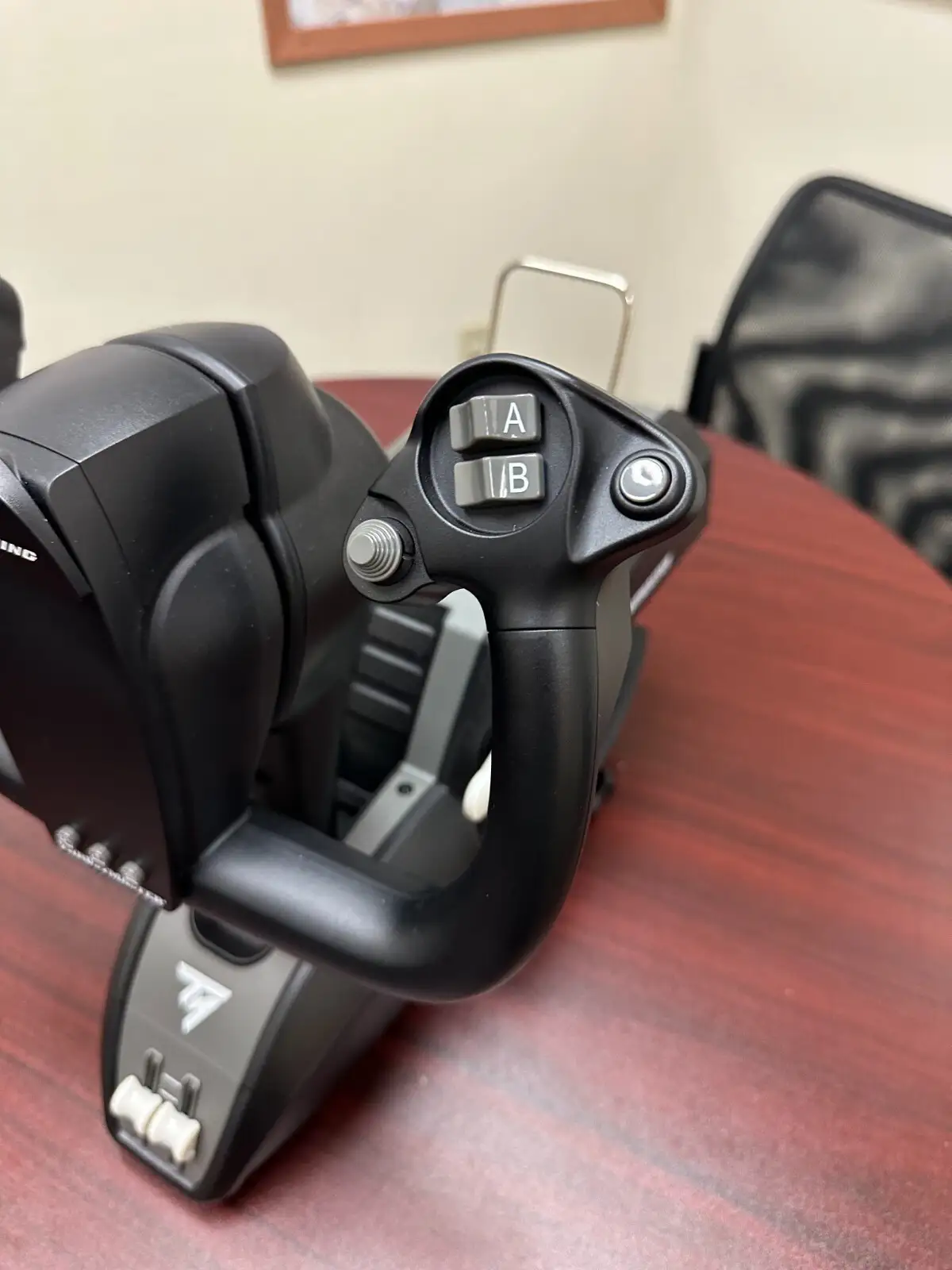
| Swappable levers for ambidextrous setup | Limited pressure sensitivity on trigger inputs |
| Plug-and-play with Microsoft Flight Simulator | Xbox-branded buttons reduce authentic cockpit feel |
Claims vs Reality
One key marketing promise is the "suspended pendular mechanism replicating Dreamliner controls." Most users agree this is more than just a gimmick. A verified buyer on Amazon wrote: "Very realistic feel of flying! From a recent flight at a simulator this feels like a similar experience!" Reddit’s community echoed this, noting that while GA pilots may prefer different setups, the pendular motion truly captures airliner handling.
Another claim—"magnetic technology for surgical precision"—matches long-term impressions for pitch and roll control. Trustpilot reviews highlight “precise, smooth movements,” but Best Buy users like ybing*** had complaints: "Wish... the yoke stays level like the real one; also the lever is on the small side." This suggests that precision isn’t the only factor—physical ergonomics also influence satisfaction.
Finally, the product touts “Boeing autopilot controls built into the throttle quadrant.” Users overwhelmingly confirm this works well in Microsoft Flight Simulator, as SmartWorld’s review put it: “The autopilot controls function flawlessly and are intuitive to use.” However, PC Gamer’s testing revealed limitations: the reverse thrust levers are buttons rather than analog axes, affecting realism.
Cross-Platform Consensus
Universally Praised
The build quality consistently earns admiration. Best Buy reviewer tracib*** described it as “the best flight simulation gear I’ve had—amazing high quality and strong plastic with metal parts.” This solid feel extends to the yoke’s weight, which Trustpilot’s admin review said “contributes to a satisfying heft” that grounds the experience. For airliner sim pilots, the pendular action’s 21cm travel builds immersion—Quora’s PC Gamer review noted it’s “butter smooth” and “feels like I’m one with the plane.”
Ease of integration shines for Microsoft Flight Simulator users. SmartWorld confirmed it’s “plug-and-play,” with automatic recognition on Xbox and PC versions—a selling point for those daunted by complex peripheral setup. Swappable levers enabling ambidextrous configurations also win praise from both Amazon and Reddit communities, supporting custom configurations for both left- and right-handed flyers.
Common Complaints
Dead zones in pitch and roll are a recurring theme. Reddit reports that “the TM Boeing yoke has a noticeable dead zone in the center on both the roll and pitch axis.” While airliner pilots may find this delay realistic, GA-oriented flyers found it less responsive. The throttle quadrant drew more criticism than the yoke. Best Buy user samik*** bluntly rated it 2/5: “The quadrant is low quality and very hard to set up. The yoke is awesome though.”
Several complaints target control feel inconsistencies: SmartWorld noted the MCP dial’s feedback “not always the best,” while ybing*** wished for a detent in spoiler arming—a detail missing across all throttle setups in this price range. For cockpit purists, Xbox button markings detract from realism, as PC Gamer commented it “pulls away from the authentic look.”
Divisive Features
The pendular motion itself divides pilots: some GA flyers prefer the push-pull motion of Honeycomb Alpha, while others embrace the Boeing-inspired swing for its authentic feel. Reverse thrust lever design is another polarizing choice—PC Gamer saw mapping limitations, but some casual users barely noticed. And while bulkiness is a drawback for setups with limited desk depth, others like its “more like a real cockpit” low, sunken design.
Trust & Reliability
Durability seems sound across months of use. A Best Buy customer owned it for nearly a year and still called it “awesome” with “great quality.” Reddit and Trustpilot posts rarely mention mechanical failures, supporting Thrustmaster’s reputation for robust construction. The 100% metal yoke frame likely plays a big part in this longevity. However, isolated quality control issues exist—Best Buy’s nichola sr*** received one with a “bad internal sensor” out of the box.
No significant scam concerns surfaced in Trustpilot patterns, though the premium pricing did raise eyebrows for newcomers to flight sims. Reliability boosts resale potential, as seen in eBay’s active open-box sales where sellers note “perfect condition” after minimal use.
Alternatives
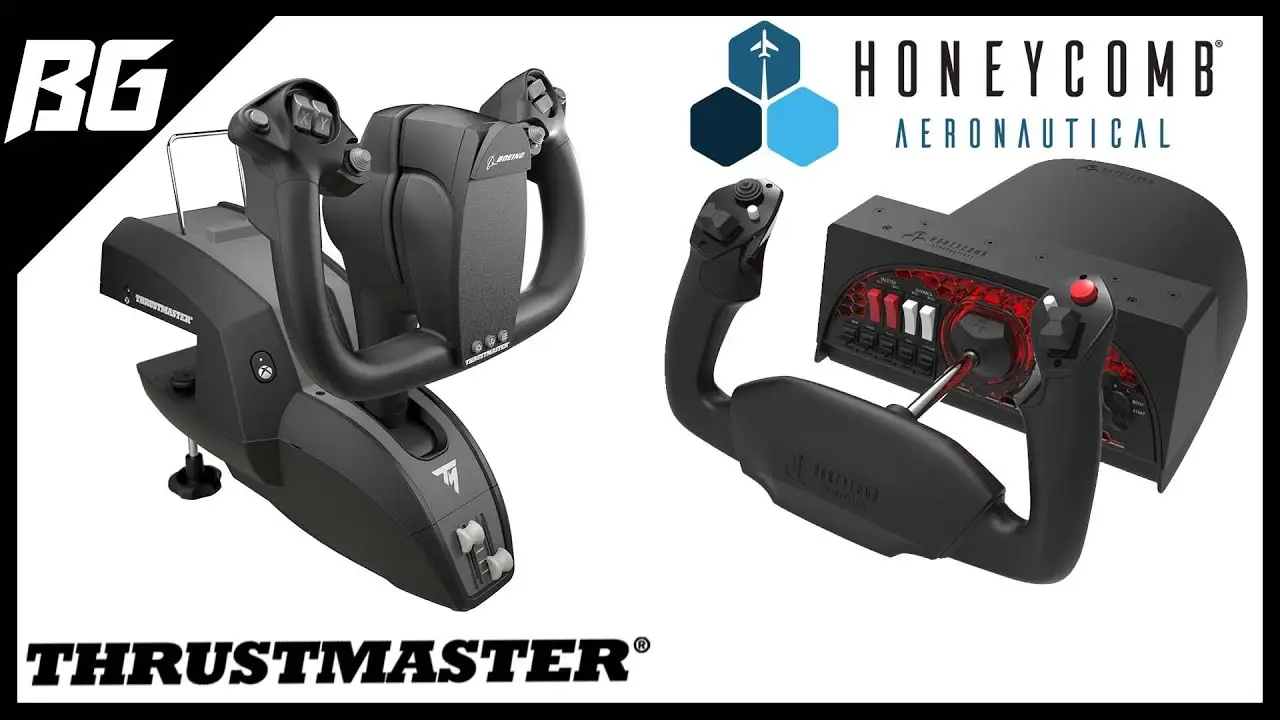
The most direct competitor mentioned is the Honeycomb Alpha Yoke. Reddit comparisons suggest Honeycomb is better suited for GA due to its lack of pendular motion and smaller dead zone. However, those locked into Boeing airliner simulations tend to prefer the Thrustmaster for its licensed design. SmartWorld reviewers also contrasted it with sidesticks like the TCA Airbus, noting the Boeing yoke “feels like a whole different control philosophy.”
Price & Value
Current retail prices hover around $499.99 USD, though eBay listings dip to $374.99 for new units—a 25% drop—and even lower for open box. Community consensus is that while the price is high, airliner sim enthusiasts see the value. As SmartWorld framed it: “Thrustmaster TCA Yoke Boeing Edition is worth every euro if you want to bring Microsoft Flight Simulator to a new level of interactivity.” Resale value remains strong, with eBay moving open-box units above $330.
Buying tips from community members include waiting for holiday discounts or considering bundled packages to save on mounting hardware for extra throttle units.
FAQ
Q: Is the Thrustmaster TCA Yoke Boeing Edition good for GA aircraft?
A: It works well mechanically, but some GA-focused pilots prefer other yokes without pendular motion. Reddit users advise Honeycomb Alpha for GA, reserving Thrustmaster for Boeing-style airliners.
Q: Does it have a dead zone in the center?
A: Yes, several pilots note a slight dead zone in pitch and roll. Airliner sim fans may see it as realistic lag; GA pilots may find it less responsive.
Q: Are the throttle quadrant levers analog?
A: Main levers are analog with smooth travel, but reverse thrust levers function as buttons, not continuous axis inputs—limiting realism in some sims.
Q: Can the yoke and quadrant be used separately?
A: Yes. The yoke has standalone capability with extra axes, allowing flight without the throttle quadrant in certain configurations.
Q: Does it integrate easily with Microsoft Flight Simulator on Xbox?
A: Absolutely. Multiple reviews confirm true plug-and-play compatibility on Xbox Series X|S and PC, with controls pre-mapped for smooth setup.
Final Verdict: Buy if you primarily fly airliners in Microsoft Flight Simulator and value realism over compactness. Avoid if your focus is GA or dogfight sims requiring faster inputs. Pro tip from Reddit pilots: tweak sensitivity curves to mitigate the dead zone and unlock the best handling feel.





