Thrustmaster TCA Boeing Yoke Review: Realistic but Pricey
The first thing that surprised many seasoned sim pilots was not the price tag, but how close the Thrustmaster TCA Yoke Boeing Edition feels to the real Boeing 787 controls. GamesRadar+ described it as “smooth, immersive, and just a whole lot of fun” while PC Gamer praised its “buttery smooth action” and sturdy, professional construction. Most flight sim enthusiasts rate it highly — consistently hitting an 8.5/10 in community discussions — but note that it’s best suited for civil aviation, especially long-haul flights on Microsoft Flight Simulator.
Quick Verdict: Conditional — ideal for airliner sim pilots, less so for arcade or space flight fans.
| Pros | Cons |
|---|---|
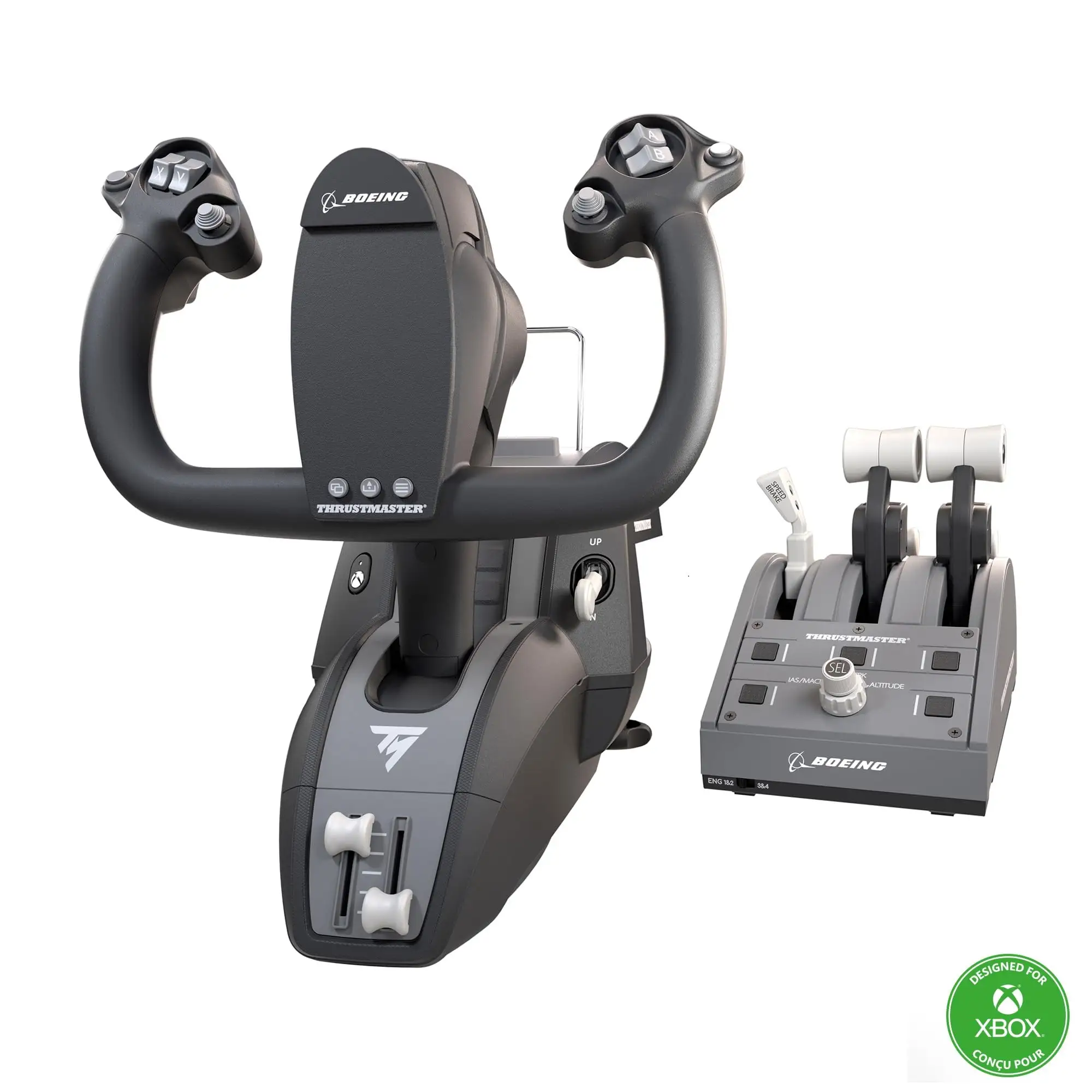
| Realistic pendular mechanism replicates Boeing 787 feel | Expensive compared to competitors |
| Sturdy 100% metal yoke frame | Reverse thrust levers act as buttons, not axes |
| Adjustable spring resistance | Noticeable deadzone in centre for roll/pitch |
| Integrated Boeing-style autopilot controls | Limited compatibility beyond MS Flight Simulator |
| Swappable throttle levers for ambidextrous setup | Some buttons feel “plasticky” |
| Smooth, precise magnetic axis technology | Plug-and-play not flawless — requires input mapping |
Claims vs Reality
One of the boldest marketing claims is the “21 cm pendular travel” designed to replicate a floor-mounted Boeing yoke. While users do agree that the pendular motion is immersive, Reddit user feedback notes a caveat: “Yea the TM Boeing yoke has a noticeable dead zone in the center on both the roll and pitch axis.” For airliner simulation, some see this as adding to realism, but general aviation pilots report it can be distracting for small aircraft requiring precise inputs.
Thrustmaster promotes “Boeing real-life linear resistance” in the throttle quadrant. PC Gamer’s review backs the smooth feel but warns “there’s no detent latch… while the action for each is smooth, reverse thrust levers don’t work on an axis,” reducing authenticity in certain simulation scenarios. GamesRadar+ adds that “reverse thrusters [are] unintuitive” and require control remapping in Microsoft Flight Simulator.
The product is advertised as “plug-and-play” with Microsoft Flight Simulator. SmartWorld’s hands-on found this wasn’t always the case: despite native recognition, “Flight Simulator… does not show the reproduction of the peripheral… not all controls could be mapped initially.” This required manual trial-and-error mapping sessions before optimal functionality was reached.
Cross-Platform Consensus
Universally Praised
Across Trustpilot, PC Gamer, and GamesRadar+, the yoke’s build quality comes up repeatedly. PC Gamer calls it “ergonomic, sturdy and professional,” and Trustpilot highlights the “100% metal internal structure… satisfying weight.” This makes it appealing to dedicated sim pilots building long-term setups, knowing it won’t flex under stress during turbulent sim conditions.
The pendular mechanism is the focal point for immersion. SmartWorld explains how “it tries (succeeding) to replicate… sensations transmitted by a real Boeing yoke,” adding that the long smooth travel lets even novice users quickly learn maneuver basics. For console users, GamesRadar+ points out that “it’s strong and sturdy… the clamping system… won’t pull away from the surface once mounted,” ensuring play stability on varying desk setups from living rooms to home cockpits.
Customizability earns praise from multiple reviewers — swappable levers for ambidextrous use, adjustable spring tension, and versatile mapping options let users tailor resistance and layout. SmartWorld notes “users might disassemble the yoke to change the number of internal springs… to regulate resistance,” which matters for pilots shifting between heavy jets and light props.
Common Complaints
The most frequent frustration is with the reverse thrust mechanism. By making them simple button inputs rather than axis-based, users lose finer control. PC Gamer describes how “these pick up as button inputs and don’t let you verify until unpressed… causes issues with mapping.” For heavy jet simmers performing realistic landings, this feels like a compromise.
Another recurring gripe: the central deadzone. Reddit pilots comparing it to Honeycomb yokes note that for slower-reacting airliners it’s not intrusive, but it’s unsuitable for precision GA flying. As one user put it, “If you fly GA more, get the Honeycomb Alpha. If you fly more airliners… get the Boeing yoke.”
Button feel is inconsistent. SmartWorld calls several controls “a bit plasticky,” especially square buttons under throttle levers and rear triggers, although mini joysticks earn high marks for precision. For some, this uneven tactile quality undermines the otherwise premium build.
Compatibility limits also surface. GamesRadar+ warns the kit “has little application outside of Microsoft Flight Simulator,” while SmartWorld notes issues with arcade-style titles like Star Wars: Squadrons, which “had problems mapping cloche movements to roll and pitch.”
Divisive Features
The pendular mechanism itself polarizes some pilots. Civil aviation enthusiasts love its realism for airliners, but arcade/space sim fans accustomed to joystick push-pull find it unfamiliar. PC Gamer acknowledges the loss of z-axis rotation as a drawback for 3D movement games.
Adjustable spring tension is celebrated by those seeking tactile realism, but casual console pilots sometimes skip this entirely, finding factory settings sufficient. In-depth tinkering requires an Allen key and mechanical adjustment — adding realism for some, adding hassle for others.
Trust & Reliability
No patterns of defective units or scam listings emerge from verified reviews, but minor performance quirks appear in long-term use. One Trustpilot reviewer notes “occasional minor lag with wireless connection under heavy load,” though the unit is predominantly wired USB-C to A.
Durability sentiments are positive: after months of use, PC Gamer says it “should last longer than a day’s jaunt through the stratosphere,” supported by SmartWorld’s comment on “impeccable structural solidity” and balanced weight distribution ensuring stability.
Alternatives
The Honeycomb Alpha frequently appears in comparative discussions. Reddit pilots recommend Honeycomb for general aviation due to “no dead zone,” whereas the Thrustmaster Boeing Edition wins out for jet realism. Both are premium, but Honeycomb lacks Boeing licensing and pendular motion replication.
Price & Value
Originally €499.99 at launch, discounts have brought it closer to €249.99 on Amazon. eBay resale prices vary from $399 to $699 depending on condition, showing high retention of value in enthusiast markets. Community buying tips suggest waiting for seasonal sales, as GamesRadar+ and SmartWorld acknowledge its “price not for everyone” but affirm it’s “worth every cent” for dedicated jet simmers.
FAQ
Q: Does the Thrustmaster TCA Boeing Yoke have a centre deadzone?
A: Yes, users report a “noticeable dead zone in the center on both the roll and pitch axis” (Reddit). It’s less of an issue for heavy jet flying, but GA pilots may prefer alternatives without it.
Q: Is it plug-and-play with Microsoft Flight Simulator?
A: Partially. While recognized natively, SmartWorld observed some controls not fully mapped without manual setup. Expect to spend time configuring inputs.
Q: Can the reverse thrust levers be used for gradual control?
A: No. PC Gamer confirms they function as on/off buttons rather than axes, limiting fine control during landing rollouts.
Q: Is it suitable for non-airliner simulators like Star Wars: Squadrons?
A: Not ideally. SmartWorld cites mapping issues for arcade titles and games that expect joystick input styles.
Q: Does adjusting spring tension make a big difference?
A: For realism seekers, yes. Adjustable springs change resistance feel, helpful for matching different aircraft types’ handling characteristics.
Final Verdict
Buy if you’re a civil aviation enthusiast, especially focused on replicating Boeing 787 or similar long-haul cockpits in Microsoft Flight Simulator. Avoid if your primary interest is general aviation precision or multi-genre compatibility. Pro tip from the community: pair it with Thrustmaster rudder pedals and, if flying four-engine jets, consider a second throttle quadrant for full immersion.





