Thrustmaster T-Flight Hotas X Review: Worth It on a Budget?
“Best cheap HOTAS out there” is the phrase that keeps surfacing—yet it’s often followed by a warning about dead zones and calibration quirks. Thrustmaster T-Flight Hotas X earns a conditional thumbs‑up from budget‑minded pilots, landing around a 7.6/10 based on the balance of enthusiasm and frustration across platforms.
A recurring pattern emerged: newcomers and casual sim fans celebrate getting a real HOTAS feel without a premium price tag, while more precision‑hungry players bump into the stick’s limits. One Elite Dangerous player summed up the entry‑level appeal bluntly: “its the best cheap hotas out there, and should serve you well.” Another DCS community member echoed longevity and value: “it’s actually really good, lasted for 6 years before 1 button broke.”
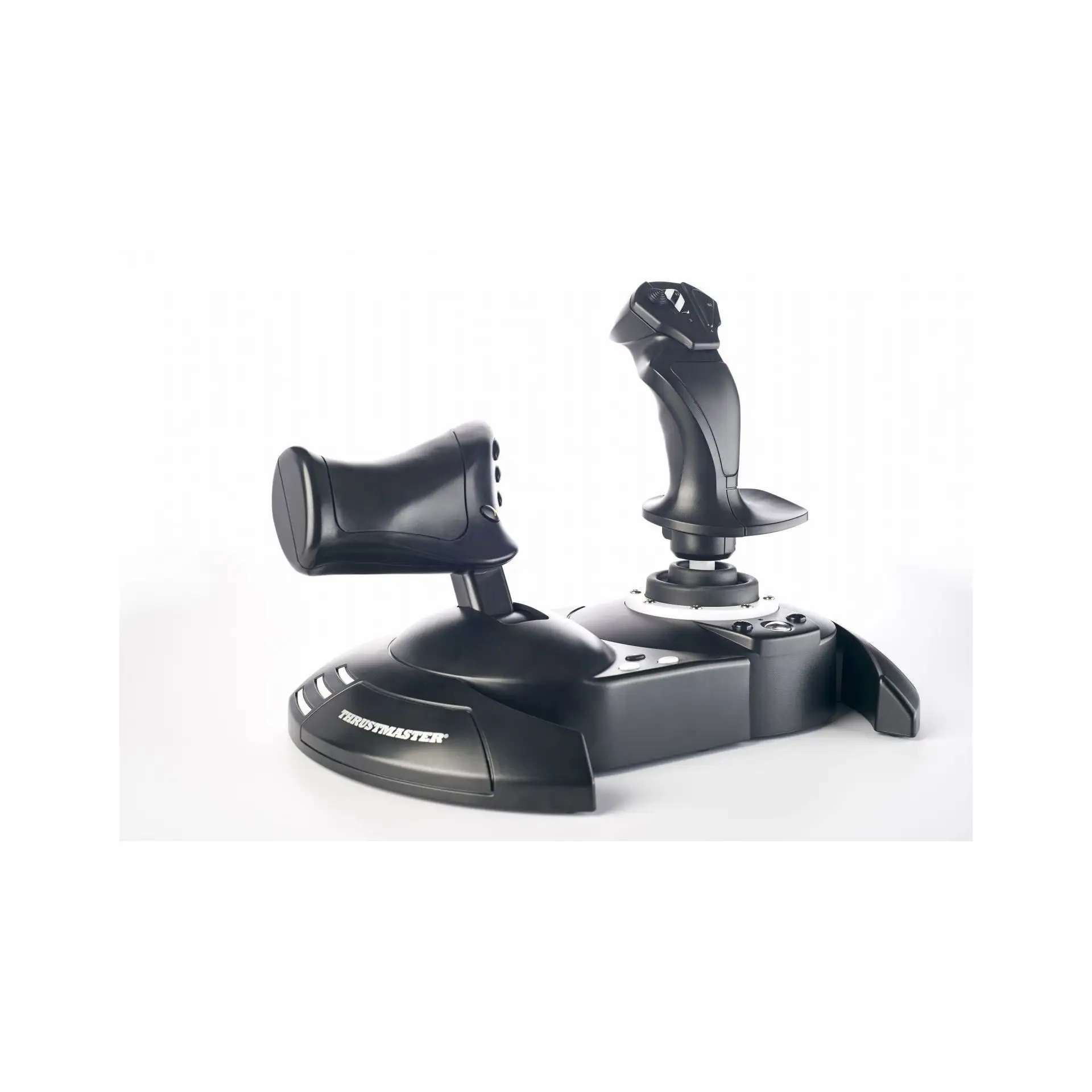
Digging deeper into user reports, the Hotas X seems to deliver on the “two‑handed flight setup” promise—joystick plus throttle, twist rudder, lots of buttons—but expectations need to be set for plastic build, occasional dead zones, and game‑specific setup headaches. The most polarized stories come from space‑sim dogfighters, where subtle aiming and throttle calibration matter most.
Quick Verdict
Conditional yes. If you want a starter HOTAS for Elite Dangerous, DCS, Star Citizen, or Microsoft Flight Simulator and you’re price‑sensitive, many users say it’s worth it. If you need high precision out of the box or hate tinkering with curves and binds, multiple players advise saving for something higher‑end.
| Pros (from users) | Cons (from users) |
|---|---|
| “best cheap hotas out there” for the money (Steam Elite Dangerous) | Dead zones noted on stick/throttle (Reddit, GamesRadar+) |
| Easy to configure once set up (Best Buy, Steam DCS) | Plastic, lightweight feel (Best Buy, GamesRadar+) |
| Throttle + rudder paddle add realism for beginners (Steam DCS) | Calibration issues in some games, esp. Star Citizen/Win10 Elite (Reddit, Steam Elite) |
| Plenty of buttons for most casual pilots (Reddit, Best Buy) | Short cable between stick/throttle for some desks (Best Buy) |
| Long‑term durability stories up to 6 years (Steam DCS) | Some button failures after months (Best Buy) |
Claims vs Reality
Thrustmaster markets the Hotas X as “plug & play,” with a “weighted base providing great stability” and “high‑precision joystick.” In practice, users partly agree—but with caveats.
Claim: Plug & play, preconfigured for immediate takeoff.
While marketing emphasizes effortless setup, multiple players say their first sessions involved binding and tuning. A Best Buy reviewer described the adjustment curve: “having never used a flight stick before it took a bit to get used to… the rebinds are easy to set up and really easy to use.” That’s still a positive story, but it isn’t pure plug‑and‑play.
In Star Citizen, Reddit user captain richard highlighted a bigger mismatch: “the throttle controller… needs to be calibrated to the game, except this joystick didn’t come with any calibration software… no throttle calibration is a big, big issue.” He reported uneven scaling—“25% thrust at the 50% position”—until the game patch improved it. So while officially positioned as instant‑ready, some games demand extra work.
Claim: Weighted base, stable during use.
The spec sheet sells stability, but users regularly note lift and drift. A Best Buy buyer wished it had anchors: “when i’m using the joystick part it likes to lean and come up off my desk.” GamesRadar+ similarly described the lightweight feel causing movement during sharp inputs. The takeaway isn’t that it’s unusable—just that the base doesn’t always behave as “weighted” as advertised.
Claim: High‑precision controls.
Precision is where reality divides by game and expectation. Captain richard said the stick has “good pitch and yaw response, although there is a bit of a dead zone in the middle.” GamesRadar+ also called out “dead zones on both stick and throttle.” Yet another Best Buy reviewer had the opposite experience: “the joystick still feels to be pretty responsive with no dead spot.” While officially pitched as high‑precision, multiple users report center slack that affects fine aiming.
Cross-Platform Consensus
Universally Praised
For budget‑conscious first‑timers, the Hotas X often feels like an unlocking moment. In Elite Dangerous circles, one commenter didn’t hedge: “i have used mine for 6+ months and love it… it works really well.” The benefit here is straightforward: people moving from gamepads or keyboard‑mouse say the two‑hand HOTAS layout makes flying feel natural and immersive.
DCS and broader flight‑sim communities repeatedly credit the separate throttle and rudder options as a huge upgrade at this price. A Steam DCS player explained why that matters: “it has a throttle, and a rudder paddle on the back… a much bigger step up from just a basic single stick than you might think.” For beginners testing whether they’ll stick with sims, that extra realism is the selling point.
Button count is another steady win. Marketing says 12 buttons plus a hat, and users mostly agree that’s enough for casual play. Captain richard pushed back on complaints about missing controls: “some have complained this unit doesn’t have enough buttons… which is ridiculous as it has plenty.” A Best Buy reviewer echoed abundance: “this also has more buttons than i know what to do with!” The implication is clear: for newer pilots, the control surface covers most core functions without forcing a keyboard.
Longevity stories round out the praise. Several users reported multi‑year use without major failures. One Elite Dangerous fan said, “had mine over 2 years, no issues yet.” A DCS player went further: “lasted for 6 years before 1 button broke, and everything else still works.” For an entry‑level stick, those anecdotes build trust.
Common Complaints
Dead zones are the complaint that shows up across platforms. Even users who like the stick mention a soft center or slack that makes micro‑adjustments harder. Captain richard described “a very small circular section of the exact middle where the controller does not detect any movement.” GamesRadar+ reported a similar issue when trying to aim subtly in Star Wars: Squadrons, saying small corrections often turn into oversteer.
Calibration and sensitivity mismatches are the next major pain. Space‑sim players feel it most because dogfights require precise throttle curves and yaw control. Captain richard called the twist rudder “way too sensitive” with “short” twist range, leading to constant overcorrection: “get used to flying like a damn windshield wiper.” Without dedicated calibration software, he couldn’t tune it to preference. Elite Dangerous players on Windows 10 also reported analog problems; one Steam user said it “just acts digital… you cant aim properly,” adding that fixes exist but are “annoying.”
Build quality complaints are more about feel than function. Multiple buyers note it’s plastic and light, which sometimes causes desk lift. A Best Buy review was candid: “it definitely feels cheap, very plastic feeling, but it worked great.” GamesRadar+ also called materials “cheap” and “too lightweight.” The shared implication: it’s fine for entry level, but it won’t mimic the heft of premium HOTAS rigs.
Finally, a few ergonomic quirks appear in user stories: button placement that feels awkward or hidden, and a short connecting cable for split setups. Captain richard mentioned “an awkwardly placed button on the top right corner… kind of odd,” while a Best Buy reviewer said the wire between throttle and stick was “too short” to separate around a laptop comfortably.
Divisive Features
The twist rudder is the most polarizing element. Some love its convenience. A Best Buy reviewer called the twist feature “the best feature this set up offers by far!” especially for players without pedals. But others find it twitchy. Captain richard said it “works very well… way too sensitive,” and with no calibration tool he had to adapt his flying style.
The throttle detent at 50% also splits opinion. Captain richard liked the tactile notch—“i actually like it as… a tactile indicator of my general thrust position.” Yet he noted “some have found [it] annoying.” That suggests users who want smooth, continuous thrust may dislike the midpoint bump, while casual pilots appreciate the reference point.
Trust & Reliability
Across community forums and retailer reviews, there’s little to suggest scam risk or widespread counterfeit panic. Instead, trust discussions focus on durability variance: many long‑term success stories, a few early failures. A DCS user’s six‑year lifespan note (“lasted for 6 years before 1 button broke”) sits alongside a Best Buy buyer whose throttle button died after three months: “tonight one of the buttons on the throttle has gone out.”
Reddit and Steam threads also show a kind of “beginner‑tool trust.” Captain richard planned to keep it for his former‑pilot father because it’s “the best cheap hotas set up out there,” even if imperfect. The consensus is that it’s reliable enough for casual use, but not immune to wear on heavy bindings or aggressive sim sessions.
Alternatives
Only a few competitors are mentioned directly. In DCS discussions, one user suggested the Logitech Extreme 3D Pro as a cheaper alternative: “at least 10 bucks cheaper… doesnt have a seperate throttle… you use a slider for throttle.” The same commenter then framed the Hotas X advantage clearly: “for 10 bucks more why not get the t.flight and have a throttle.” So users see Logitech as a lower‑cost single‑stick fallback, but less immersive.
Captain richard considered the Thrustmaster T.16000M, calling it “an improved version of the hotas x, minus a dedicated throttle… but includes calibration software.” That comparison pins the Hotas X as the budget all‑in‑one choice, while the T.16000M appeals to those prioritizing precision and calibration tools over having a physical throttle.
Price & Value
Price is a core part of nearly every user story. Captain richard bought his for $30 and called it “a bargain indeed.” Elite Dangerous and DCS buyers repeatedly frame it as the sweet spot for those who “cant afford £100+ for a decent hotas.” Even when criticizing flaws, people tend to accept them as tradeoffs for cost.
Resale and used‑market snapshots reinforce that budget positioning. eBay listings show working used units around $40–$50, with new units closer to $70. That spread suggests the Hotas X holds enough value to resell if you upgrade later, but not so much that you’ll regret buying used.
Community buying tips revolve around expectations and tuning. DCS players recommend leaning on in‑game curve tools—“dont forget to meddle with the axis tune option… i love the curve option for axis in dcs.” That aligns with the broader message: value is strongest when you’re willing to tweak settings rather than expecting perfect stock behavior.
FAQ
Q: Is the Thrustmaster T-Flight Hotas X good for beginners?
A: Yes, most beginner pilots say it’s a strong entry‑level HOTAS. Elite Dangerous users call it “the best cheap hotas out there,” and DCS players highlight the separate throttle and rudder paddle as a major realism upgrade for the price.
Q: Does it really work “plug and play”?
A: Partly. Some buyers say rebinding is “easy to set up,” but others—especially in Star Citizen—report needing calibration or curve tuning. Reddit user captain richard said lack of calibration software was “a big, big issue” in early patches.
Q: Are dead zones a real problem?
A: Often, yes. Multiple users report a soft center: captain richard noted “a dead zone in the middle,” and GamesRadar+ saw dead zones in both stick and throttle. A few buyers, though, say they noticed “no dead spot” in their units.
Q: How durable is it long term?
A: Reports vary. Several users cite multi‑year use—one said “over 2 years, no issues,” another got “6 years before 1 button broke.” But there are also early failures, like a Best Buy buyer whose throttle button died after three months.
Q: Should I buy this or a Logitech Extreme 3D Pro?
A: Users say the Logitech is cheaper but not a true HOTAS. A DCS commenter recommended Logitech for budget, then added that for “10 bucks more” the Hotas X’s real throttle makes it more immersive for flight sims.
Final Verdict
Buy if you’re a casual or first‑time pilot who wants a real HOTAS feel for Elite Dangerous, DCS, Star Citizen, or Microsoft Flight Simulator without spending premium money—many call it “splendid” and “great bang for the buck.” Avoid if you demand high precision and flawless calibration out of the box, because dead zones and sensitivity quirks show up often. Pro tip from the community: lean on in‑game axis curves and custom binds—“the curve option for axis in dcs” is repeatedly cited as the key to making it feel right.