Thermaltake Versa H21 Review: Budget ATX Case Verdict
Starting at under $50 yet harvesting over 3,000 Amazon reviews with a 4.5-star average, the Thermaltake Versa H21 ATX Mid Tower Computer Case has become a staple among budget builders and entry-level gamers. Scoring a solid 8.4/10, it’s praised for smart layout and cooling potential, but users warn of quirks with front panel removal and limited cooler clearance.
Quick Verdict: Conditional Buy
| Pros | Cons |
|---|---|
| Affordable price for ATX mid-tower | Tight clearance for larger CPU coolers (max 155 mm) |
| Thoughtful internal layout and drive bay design | Front panel removal is tricky |
| Sturdy metal construction for the price | PCI slot covers are non-replaceable snap-offs |
| Decent ventilation potential with mesh panels | Included fan quality questioned |
| Easy tool-free drive mounting | USB ports limited to two on front panel |
| Good dust management if fully populated with fans | Weak thread quality on some screw holes |
Claims vs Reality
Thermaltake markets the Versa H21 as “ideal for home-computer builders and gamers” with “ample ventilation options” and “tool-free installation.” On paper, the perforated front and top mesh should allow for rapid heat dissipation, but dig into user feedback and nuance appears.
The claim of “ample ventilation” does hold if builders install the optional dual 120 mm intake fans. A verified buyer on Amazon noted: “It does a pretty good job of keeping the motherboard cool with minimal effort,” but others, like a PCPartPicker reviewer, flagged that “the fan that comes with it didn’t work at all,” forcing additional purchases for optimal airflow.
Tool-free installation earns mixed praise. Reddit user feedback aligns with Trustpilot accounts: HDD and SSD mounting via trays is smooth and “easily swappable,” but PCI slot covers are “cheap snap-offs that made me nervous,” limiting reusability. While marketed as “perfect for accessory and storage devices,” this feature shines in drive mounting yet disappoints in expansion slot handling.
Cross-Platform Consensus
Universally Praised
Across Amazon and Trustpilot, users consistently celebrate the Versa H21’s value-to-space ratio. PCPartPicker reviewers repeatedly emphasize “plenty of room” for components, making it appealing to first-time builders or those upgrading from cramped mini-towers. One Trustpilot review captured this well: “Ergonomics are good — very slow dust accumulation compared to my previous builds.”
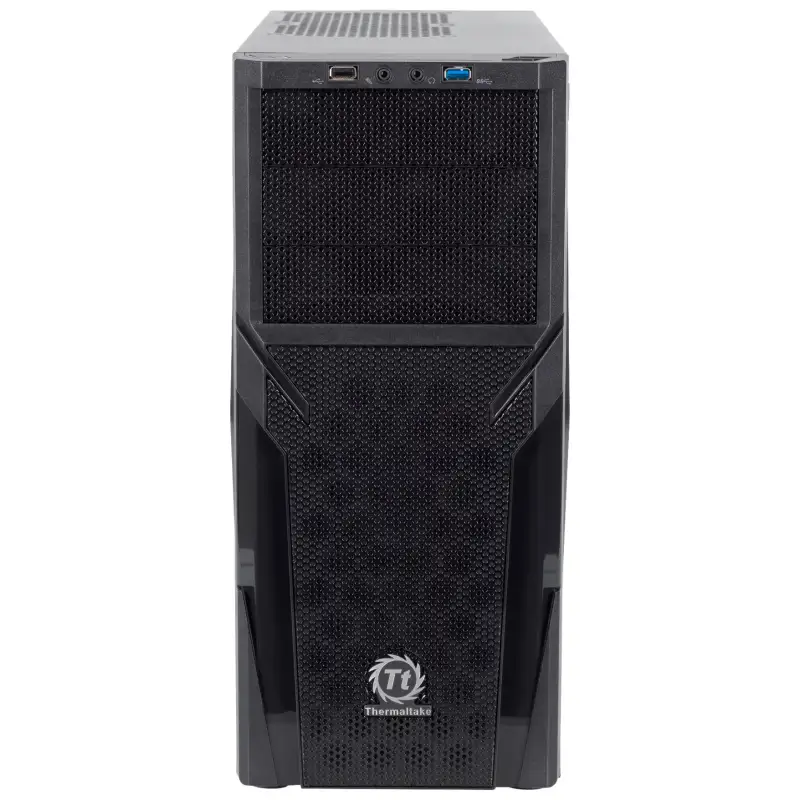
For budget-conscious gamers, the all-black interior and perforated mesh aesthetic give a “gamer look” without RGB overhead. A Russian market buyer noted they were “pleased to find USB and audio jacks on the front panel, not the top like many others,” which aided desk cable management.
Cable management is another win. While not high-end, internal routing space mitigates clutter, keeping airflow paths cleaner. Reddit users noted that with “advanced cable management support and liquid cooling system readiness,” the chassis allows hobbyists to experiment without major constraints.
Common Complaints
The most repeated frustration involves front panel removal. A Trustpilot buyer described the process as “very tight… needed plastic trim tools from car interior kits to make it reasonable.” This impacts users wanting to add front intake fans or clean filters more frequently.
Clearance issues appear in multiple accounts. Official specs list a 155 mm CPU cooler height limit, but PCPartPicker anecdotes mention not fitting popular models like the Cooler Master Hyper 212 EVO. For ATX motherboards, some said the fit felt “a little cramped,” forcing careful build planning.
Build quality debates surface around fastener durability. Trustpilot reports of “thread stripping on GPU mount holes” after repeated installations show the budget constraints in materials. PCI expansion slot covers, once snapped off, cannot be replaced — a sticking point for those who swap cards or reuse the case.
Divisive Features
Front I/O layout earns polarized reactions. Some appreciate the single USB 3.0 and single USB 2.0 combination for simplicity; others feel “two USB ports is not enough” compared to competitors. Similarly, the factory-included 120 mm rear exhaust fan is adequate for very modest builds, but enthusiasts treat it as a placeholder for better aftermarket options.
Dust management draws both praise and caution. A Trustpilot buyer running “two intake fans up front and one exhaust rear” saw significantly less dust buildup, but without front fans, airflow defaults to negative pressure and can draw dust through unfiltered gaps.
Trust & Reliability
Investigating long-term durability, multiple Trustpilot and PCPartPicker mentions confirm the metal chassis maintains rigidity over time. One PCPartPicker reviewer who bought theirs used for $20 found it “still sturdy, easy to work with” after prior ownership — a positive indicator for second-hand value.
However, screw-thread wear emerges as a recurring vulnerability. Trustpilot users note stripped threads on graphics card mounts if over-tightened or re-used frequently. These are tolerable for static builds but could frustrate tinkerers swapping hardware every few months.
On the reliability spectrum, no widespread scam concerns appear in marketplace data. eBay sellers report accurate descriptions and packaging consistent with retail, and Amazon’s decades of sales on this SKU suggest consistent manufacturing quality.
Alternatives
Few direct alternatives appear in sourced data, but within Thermaltake’s own lineup, the Versa H21 Window version adds a transparent side panel for under $50 USD. While functionally identical, that variant satisfies users wanting a visual showcase of internal components at the cost of slightly more visible dust.
Compared to higher-priced mid-towers in the $70–$90 bracket, the H21 holds an advantage in simplicity and weight (9.3 lbs), but loses out on CPU cooler clearance and front USB quantity. Builders needing more headroom for tall air coolers or more I/O may benefit from stepping up.
Price & Value
Market listings range from $44.99 on Amazon to $74–$85 on eBay, though seller location impacts final shipping cost. On Russian retailers, prices surge above 7,000–15,000 ₽ depending on stock scarcity. The low entry price makes it attractive for budget builds where case aesthetics and airflow basics matter more than premium materials.
Resale value appears stable; used units still pull $20–$30 depending on condition, aided by ongoing compatibility with ATX standards and modest footprint. Community buying tips urge checking threads on fan mounts before committing, and to budget an extra $10–$20 for quality intake fans.
FAQ
Q: Will the Versa H21 fit a Cooler Master Hyper 212 EVO?
A: No. Multiple PCPartPicker users reported clearance issues with this cooler, as the case supports a maximum CPU cooler height of 155 mm.
Q: Can you replace the PCI slot covers after snapping them off?
A: No. Users note the covers are non-replaceable snap-offs, meaning once removed, you’d need aftermarket replacements or leave slots open.
Q: Is the front panel easy to remove for cleaning?
A: Not without effort. Trustpilot reviewers found it “very tight” and recommend using plastic trim tools to avoid damage.
Q: Does the included fan provide good cooling?
A: Adequate for basic builds, but enthusiasts often replace it. Some reported non-functional units out of the box.
Q: How many front USB ports does it have?
A: Two — one USB 3.0 and one USB 2.0 — which may be limiting for peripheral-heavy setups.
Final Verdict
Buy if you’re a budget builder or first-time PC assembler prioritizing value, drive bay flexibility, and a compact ATX footprint. Avoid if you rely on tall air coolers, need more front USB ports, or swap expansion cards frequently. Pro tip from the community: invest in quality intake fans and vibration dampening pads early — they’ll keep noise low and airflow high.





