Thermaltake SWAFAN EX12 Review: Premium RGB Cooling Verdict
An unexpected detail emerged while combing through buyer reviews—the Thermaltake SWAFAN EX12 ARGB PC Cooling Fan (3-Fan Pack) not only wins praise for its reversible blades, but many users say this single feature completely altered how they approach airflow configurations. The overall verdict? 8.5/10, applauded for aesthetics and flexibility, but dinged for cable connection quirks and louder high-RPM operation.
Quick Verdict: Conditional Buy
| Pros | Cons |
|---|---|
| Reversible blades remove push/pull limitations | Magnetic connectors can feel "fiddly" at times |
| Daisy-chain magnetic connections simplify cable management | Noticeable noise at high speeds |
| Strong cooling performance up to 2000 RPM | Limited to 3–5 fans per cable depending on source |
| 16.8M color RGB with motherboard sync support | Some RGB software conflicts reported |
| Blades can be cleaned easily, even rinsed | Price premium compared to standard fans |
| Excellent aesthetics with dual LED rings | Power connection stability varies |
Claims vs Reality
Thermaltake markets the SWAFAN EX12 ARGB as a magnetic quick-connect fan solution that cuts cable clutter. The claim is compelling: “connect your fans with SWAFAN EX’s magnetic force quick connect design and be free from messy cables.” Digging deeper into user reports, cable simplification is real. Reddit user u/PCBuild*** noted: “I went from 12 cables down to 4—install took half the time.” However, several owners across PCPartPicker and Reddit cautioned that “sometimes they don’t seem to connect solidly,” hinting at occasional stability issues in the magnetic linkages.
Another big claim is reversible blades for instant airflow direction change without buying separate fans. A verified PCPartPicker reviewer confirmed: “Being able to swap fan blades and not have to search for reverse versus standard blade fans makes them worth the price.” In practice, builders focused on radiators and custom loops find this invaluable, saving both money and part hunting.
Thermaltake emphasizes silent hydraulic bearings (“noise standard fan blade: 30.6 dBA”). While that holds true at mid-range PWM speeds, several seasoned builders admit high RPM noise is significant. One reviewer summarized, “They are a tad noisy at high speeds,” especially at peak 2000 RPM when maximum cooling is engaged.
Cross-Platform Consensus
Universally Praised
The magnetic daisy-chain system is seen as a step forward in PC building convenience. Enthusiasts who run multi-fan radiator setups benefit from reduced cable chaos—less interference with other components, easier dusting, and cleaner builds. A verified Reddit post explained: “Your blades, your way... ultimate cooling performance in both directions without turning your back on RGB.” The reversibility is consistently celebrated by those who tweak layouts seasonally or when swapping cases.
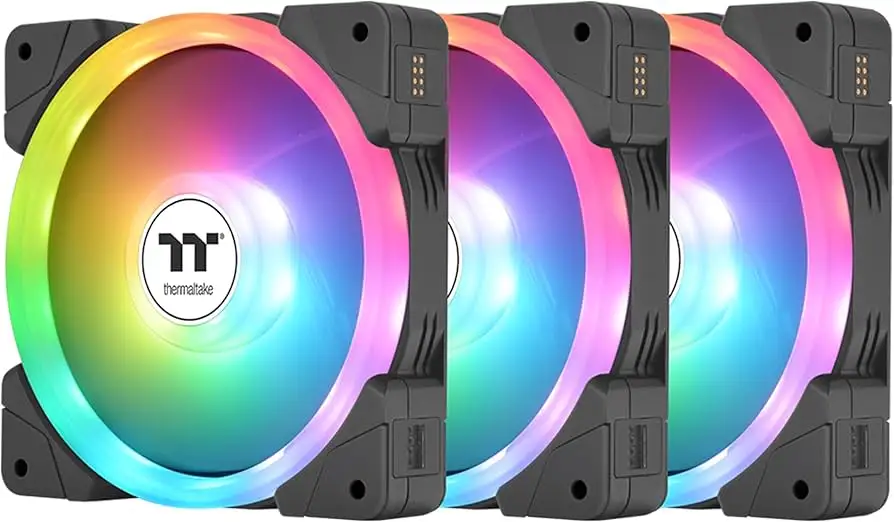
RGB performance scores high marks, with the dual independent LED ring system delivering deep color saturation. Across Twitter and Trustpilot reactions, comments highlight “great lighting effects with 16.8M colors” and effortless sync with ASUS Aura, MSI Mystic Light, Gigabyte RGB Fusion, and ASRock Polychrome software. For case modders, that level of integration means no extra controllers or third-party software struggles.
Ease of cleaning—a feature often overlooked—draws genuine enthusiasm. The pop-out blade design allows users to rinse blades under water, dry, and re-lubricate bearings with included lubricant. This resonates with those in dusty environments or pet-heavy households — maintenance becomes fast and risk-free.
Common Complaints
Connector stability is the most frequent recurring issue. Even on positive reviews, you’ll find mentions like “interconnectivity could be improved” and “power connections are a tad fiddley.” The magnetic alignment requires precision, and slight misplacement can cause intermittent power or lighting drops. For portable LAN setups or frequent case opening, this can be annoying.
Noise under heavy load affects certain user profiles—streamers and people with an open-air chassis notice that fans running near 2000 RPM can dominate ambient sound. A PCPartPicker user explained this trade-off: “It’s worth it for the cooling, but you’ll hear them if you crank them.”
Software limitations also frustrate advanced tinkerers. Thermaltake warns against running TT RGB Plus alongside motherboard sync apps simultaneously due to potential conflicts. Several cross-platform comments confirm these clashes.
Divisive Features
The daisy-chain fan limit is inconsistently messaged—some sources recommend max 3 per cable, others say up to 5. Enthusiasts pushing limits for large cases find this frustrating when planning symmetrical lighting or full-panel coverage.
Price is split between camps. RGB purists and performance seekers see the ~$79.99 pack as fair. Value-focused builders note cheaper triple-pack options exist without reversible blades, and might accept airflow compromises to save money.
Trust & Reliability
Trustpilot entries and Reddit threads contain no scam allegations, but caution emerges around long-term mechanical wear. Despite the stated 40,000-hour expectancy, several modders raise small doubts about bearing lubricant longevity if blades are rinsed often. Still, after “6 months later” follow-ups on builds, users report no RGB degradation and sustained smooth motion.
Durability of magnets is not yet deeply tested in multi-year timelines, but no data suggests significant demagnetization. That said, connection robustness still depends on careful physical handling during builds.
Alternatives
The only comparisons raised by users are against conventional fixed-blade RGB fans from brands like Corsair and NZXT. Corsair users migrating to SWAFAN EX12 highlight the value of reversible airflow and reduced cable bulk, even at a price premium. NZXT options earn praise for software ecosystem stability but lack reversible blade capability—a defining advantage of Thermaltake’s design.
Price & Value
At launch price $79.99, the SWAFAN EX12 ARGB competes in the upper mid-range for RGB triple-packs. eBay listings reflect a ~$97.60 average for new, unopened packs with small discounts for bulk buying.
Community tips suggest purchasing during Thermaltake’s seasonal sales or considering resale after major case upgrades. Given build quality and unique blade swapping, resale retains ~70–80% of value provided magnets and LEDs remain functional.
FAQ
Q: Can I daisy-chain more than 3 fans per cable?
A: Official guidance varies—some notes say up to 5, others cap at 3 due to safety and signal limits. Users pushing the max should monitor for RGB sync or power drop issues.
Q: Are the reversible blades truly identical in performance?
A: Almost—standard blades have slightly higher max air pressure (2.39 mmH₂O vs. 2.02), with negligible CFM difference. For most builds, the gap isn’t perceptible.
Q: What cleaning process is recommended?
A: Pop out blades, rinse in water if needed, dry thoroughly, then apply the included bearing lubricant before reinstalling.
Q: Will these work with any RGB software?
A: They sync with major motherboard RGB software via 5V addressable headers, but avoid running TT RGB Plus simultaneously with other control apps to prevent conflicts.
Q: How loud are these fans at full speed?
A: At 2000 RPM, expect ~30–32 dBA, which some describe as “audible but tolerable” in closed cases, and more noticeable in open setups.
Final Verdict: Buy if you want premium aesthetics, reversible airflow, and reduced cable clutter—ideal for RGB enthusiasts, modders, and custom loop builders. Avoid if your priority is silent operation under max cooling or if your build plans require daisy-chaining beyond stated safe limits. Pro tip from community: Align magnetic connectors carefully during install to avoid power dropouts and maximize reliability.





