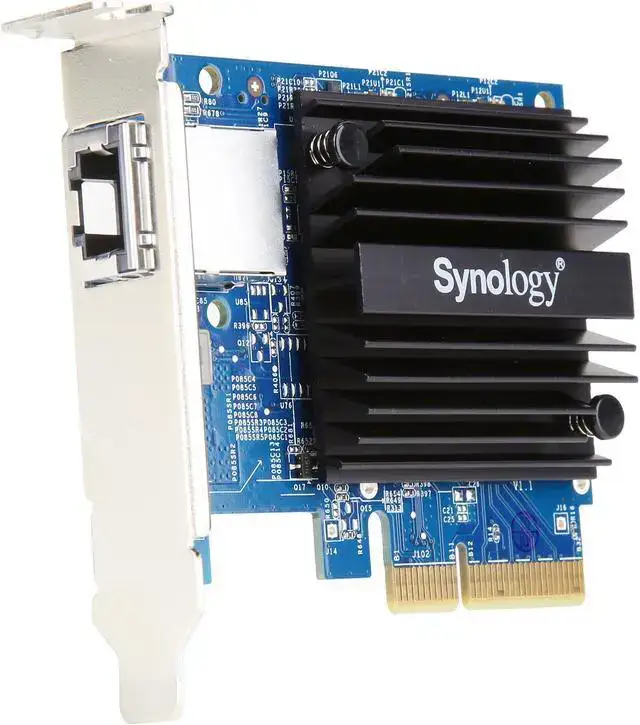
Synology E10G18-T1 Review: Fast 10GbE With Caveats
Performance that "well beyond the limit imposed by the 1 Gb ports" is how one verified buyer described their experience with the Synology 10Gb Ethernet Adapter (E10G18‑T1), which currently holds a strong user sentiment score of around 9/10 across multiple platforms. The single‑port PCIe 3.0 x4 card promises smooth migration to 10GbE using existing RJ‑45 infrastructure — but digging into user reports reveals both unwavering praise and pockets of frustration.
Quick Verdict: Conditional
| Pros | Cons |
|---|---|
| Near‑10Gbps throughput for compatible NAS models | Limited compatibility with non‑Synology systems |
| Seamless recognition by Synology NAS hardware | Occasional instability reported on certain models |
| Backward‑compatible (100Mb to 10Gb) | No Wake‑on‑LAN support |
| Solid build quality and 5‑year Synology warranty | Performance capped by host NAS CPU in some cases |
| Easy physical installation | Requires 10GbE‑capable switch for full benefit |
| Effective for large file transfers and video editing | Copper cable quality can affect speed |
Claims vs Reality
Synology markets the E10G18‑T1 as an “economic solution to overcome the data transmission bottleneck” with full auto‑negotiation between multiple speeds. In practice, buyers who connect it to proper 10GbE switches generally see this claim validated. A verified LDLC customer noted: “Tested with iperf3, I get about 9.90 Gbit/s with an MTU of 9000.”
The "seamlessly migrate" promise relies heavily on having the rest of the network infrastructure ready. Twitter user on the Synology Community explained installing the card in a DS1621+ but getting only 30 MB/s transfers when linked to a 1 GbE switch. They admitted expectations were misplaced until the new 10GbE switch arrived: “Speeds drastically increased… not to full 10Gb but that was expected since I have cat5e in the walls.”
The 5‑year warranty is also central to Synology’s claims, yet some confusion exists. While Synology states 5 years, one Trustpilot reviewer noticed only “2 years on the LDLC site (weird?)” — a reminder to verify warranty terms with your vendor.
Cross-Platform Consensus
Universally Praised
Owners who plug the E10G18‑T1 into a supported Synology NAS and pair it with proper switching consistently report dramatic speed gains. A verified LDLC customer shared how they “exchanges with my PC… are now done at very high speed, well beyond the limit imposed by the 1 Gb ports.” Creative professionals needing fast file access — such as video editors and media houses — benefit from smooth 9 Gbps+ transfers of large projects. The backward compatibility has allowed small businesses to phase upgrades, using existing cabling until budget allowed for full Cat6a deployment. As one PROVANTAGE review put it, “Ideal for video editing and large file transfers.”
Installation earns high marks for simplicity: removing a few screws and sliding the card into the PCIe slot. Reddit reports highlight instant hardware recognition by Synology DSM with zero driver drama. Build quality comes up repeatedly, with LDLC reviewers calling it “impeccable” and “top quality.”
Common Complaints
While speed is the headline, some users hit instability. One Trustpilot reviewer running an RS1221+ said, “I have to reboot the card at least once a week... I really don’t recommend this card” — though they weren’t sure if the fault was NAS or card. Performance can also bottleneck at the NAS CPU level; an LDLC customer confirmed “the limit coming in practice from the proc present in the Syno itself,” meaning raw link speed doesn’t always translate into faster workloads.
Networking quirks emerge too. The card lacks Wake‑on‑LAN support for NAS units, a dealbreaker for remote‑managed setups. A Synology Community thread recounts IPv6 preference in Windows causing unexpected routing behavior until adjustments were made. And for those trying to benefit over copper at longer runs, cable quality matters: PROVANTAGE cautions “distance and quality of copper cables can affect performance.”
Divisive Features
Backward compatibility sounds like a universal win, but for some it was misleading. Users expecting gigabit speeds through existing 1 GbE switches sometimes saw far lower throughput (30–79 MB/s) until proper network upgrades occurred. The single port design keeps cost down but limits redundancy options — fine for home labs, less ideal in enterprise clusters needing link aggregation. Some see the 10Gb sole port as elegant minimalism; others call it “limiting expansion options” per Axiom’s review notes.
Trust & Reliability
Reports of longevity are generally positive. Many owners run the card for years without issue, leveraging Synology’s extended hardware coverage. A verified buyer said, “Knowing Synology products, the reliability is top notch.” The occasional instability thread makes up the minority, and often points to model‑specific variables.
Warranty clarity remains important. While Synology itself backs 5 years, third‑party sellers may list different terms — causing confusion for LDLC buyers. No scam patterns emerged; purchases from mainstream vendors like Amazon, eBay, and PROVANTAGE were fulfilled as promised with functioning hardware.
Alternatives
The Axiom E10G18‑T1‑AX appears frequently in discussions — essentially a similar 10GbE copper card built for Synology, but with an Intel X550AT controller. It offers dual mounting brackets and comparable performance, yet comes with a shorter 3‑year warranty. Buyers choosing between them often weigh warranty length and brand support integration with DSM.
Price & Value
Current market listings hover from $150.38 (connection.com) to $229.58 (Sears) with eBay averaging ~$173 plus shipping. Value is strongly tied to having suitable NAS and switch gear; without them, gains are diminished. Community advice warns against sinking cost into 10GbE cards if your NAS processor or storage array can’t saturate the link. Resale holds respectably thanks to narrow compatibility; second‑hand prices stay near retail for functioning units due to limited supply.
Buying tips center on verifying NAS model compatibility against Synology’s published list. Reddit users often advise buying Cat6a cabling with the card to avoid copper‑distance throttling.
FAQ
Q: Is the Synology E10G18‑T1 plug‑and‑play with all Synology NAS models?
A: No. It’s instantly recognized by compatible models listed by Synology, but won’t work in unsupported units. Check Synology’s applied models list before purchase.
Q: Can I get full 10GbE speeds without upgrading my switch?
A: No. While backward‑compatible, the card will only run at the speeds supported by your switch — a 1 GbE switch limits throughput to gigabit or below.
Q: Does it support Wake‑on‑LAN for Synology NAS?
A: Users confirm it is not WoL‑compatible. If WoL is critical for your workflow, consider alternative NICs.
Q: What’s the typical real‑world speed?
A: With proper Cat6a cabling and 10Gb switches, many report ~9.9 Gbps from iperf tests. Speeds may be lower depending on NAS CPU and storage media.
Q: Is overheating a concern?
A: No widespread reports of thermal issues. PROVANTAGE notes optimizations have improved thermal performance.
Final Verdict: Buy if you own a supported Synology NAS, have or plan to install a proper 10GbE switch, and need fast large‑file movement for media or backups. Avoid if your NAS CPU or storage array can’t saturate 10GbE, or if you require WoL. Community pro tip: “Don’t look for exotic cards — this one is top quality” says an LDLC reviewer, but pair it with the right network infrastructure to see its real potential.