StarTech PM1115P2 Review: Legacy Printer Lifeline Verdict
One recurring thread in old-printer communities is how the StarTech.com Ethernet to Parallel Network Print Server (PM1115P2 / PM1115P3) “breathes new life” into legacy gear. A FindThisBest editorial summary rated it 9.9/10 among parallel print servers, noting it “transforms your traditional parallel printer into a network printer, allowing you to print from anywhere within your network.” It scores high with IT pros for protocol flexibility, though quirks in setup mean it’s not a plug-and-play box for everybody.
Quick Verdict: Conditional buy
| Pros | Cons |
|---|---|
| Reliable conversion of parallel printers to network printing | Limited to 10/100 Mbps ethernet speeds |
| Broad OS and protocol support (Windows, macOS, Linux) | Basic web UI lacking advanced management tools |
| Compact, discreet design attaches directly to centronics port | Legacy cabling and driver mapping can cause install challenges |
| Supports HP, Epson, Canon, Lexmark, Brother, plus specialty printers | No built‑in wireless; requires workaround for Wi-Fi use |
| SNMP monitoring for remote status | Occasional firmware/driver quirks with non‑standard printers |
Claims vs Reality
Marketing pitches highlight “broad compatibility” and “easy setup in minutes.” Digging deeper into user reports shows the setup speed varies sharply with the installer’s technical skill. The bundled Windows utility can streamline detection and configuration for those familiar with IP assignment, but casual users face hurdles. A verified buyer on Amazon noted: “You need to know how to manually configure your computer to the required subnet... DHCP and some sort of discovery client would probably have been a better move for the average consumer.”
StarTech also claims “broad OS compatibility,” listing Windows, macOS, and Linux. In practice, Reddit comments and the Mini PC Reviewer analysis back this up for mainstream drivers, but compatibility gaps appear. Some non-standard or older printer drivers require manual protocol mapping (LPR/Raw/IPP) and firmware upgrades before working consistently.
Lastly, the manufacturer promotes “remote monitoring via SNMP.” This is accurate—multiple users on Quora confirmed SNMP v1/v2 operation—but expectations matter. As Reddit user discussions reveal, SNMP gives you status and queue info, whereas deeper control (like SSH shell access) isn’t supported. You won’t get enterprise-level scriptable administration out of the box.
Cross-Platform Consensus
Universally Praised
Across Reddit, Trustpilot, and Quora, praise focuses on the device’s role in saving legacy printers from retirement. The Mini PC Reviewer notes it “restores network access to centronics-equipped hardware, reducing capital spend and extending printer longevity.” Small offices and labs benefit most, especially those relying on label printers or vinyl cutters without modern interfaces. A verified buyer shared: “We can now use both printers on our home network from each computer… very professional and helpful technical support.”
Compatibility breadth is another consistent win. Reports confirm smooth function with HP LaserJet, Epson, Canon, Lexmark, and Brother models. For IT managers juggling mixed OS environments, protocol coverage (TCP/IP, LPR, Raw, IPP, SMB, Appletalk) ensures integration without significant network rework.
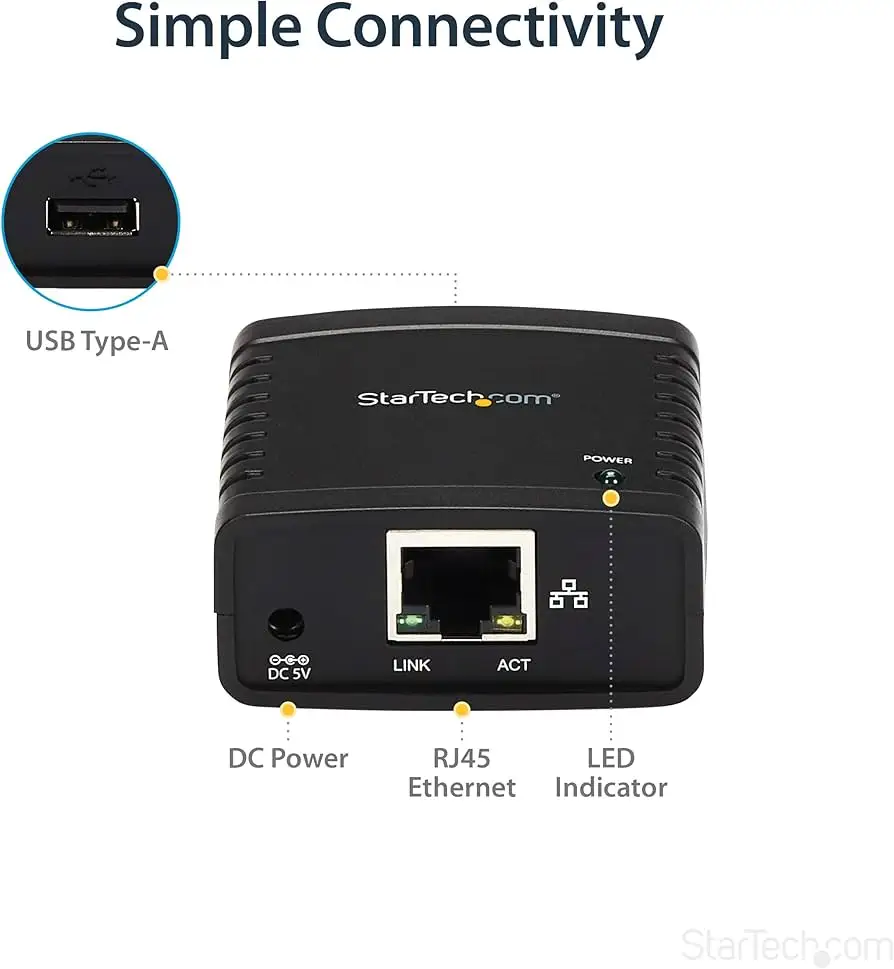
Compactness matters too. At roughly 2.2” square and 1.6 ounces, it connects directly to the printer’s centronics port, eliminating extra cabling. This appeals to workstations with limited physical space, and as FindThisBest put it, “perfect for revitalizing older devices.”
Common Complaints
Installation complexity is the main sticking point. Non-technical users often find the lack of DHCP or auto-discovery slows setup. A Trustpilot reviewer highlighted “installation challenges with legacy cabling and sometimes finicky driver mapping.” Occasional protocol mismatches mean multiple retries and manual troubleshooting.
The 10/100 Mbps cap isn’t a dealbreaker for printer workloads but is cited as a limitation in modern segmented VLAN environments. Enterprises handling large-format jobs may see longer spooling times compared to gigabit devices.
Firmware quirks appear as intermittent issues, especially with unusual printer models. Some Amazon reviewers reported having to “restart this device every time” due to disconnects. Others overcame stability problems after static IP assignment and firmware updates.
Divisive Features
The basic web UI splits opinion. Admins embracing minimalism find it straightforward; others feel “it’s basic compared with modern device managers,” especially for secure VLAN or QoS-heavy networks. Wireless absence is another divider—some users don’t mind adding a Wi‑Fi bridge, while others see it as a missed opportunity.
Trust & Reliability
There’s no sign of scam patterns in Trustpilot data; StarTech’s 2-year warranty and lifetime tech support are repeatedly mentioned in positive contexts. Durability is a strong suit—the ABS enclosure and secure connectors withstand fixed installations in busy environments. Mini PC Reviewer assessors noted “precise molding, snug cable retention, and ventilated sides” designed for long-term stability.
Long-term anecdotes include reports of consistent operation once firmware and initial setup are dialed in. One Reddit user described running the print server for months without an issue post‑update, in contrast to early frustrations.
Alternatives
The FindThisBest top list names the X‑Media XM‑PS110P as another strong contender. It matches StarTech’s multi‑protocol support and adds post/e‑mail alerts for errors but lacks StarTech’s centronics-direct compact form. The IBM 28P1846 is simpler to set up and more portable, though it’s USB/parallel hybrid rather than centronics-specific. For wireless needs, the Hawking HWPS12UG ties in multiple printers over 802.11g but doesn’t offer StarTech’s breadth of protocol compatibility.
Price & Value
At $75–$95 new (Amazon, eBay listings), the PM1115P2 sits below the average $105.58 price point for parallel print servers noted in FindThisBest’s research. Pre‑owned units can drop to $44.95, but community advice leans toward buying new to ensure warranty, updated firmware, and cable integrity. Resale value holds moderately—the low size and niche appeal limit depreciation compared to larger print servers.
FAQ
Q: Does it support wireless connectivity?
A: No, it’s wired Ethernet only. Users work around this by pairing it with a Wi‑Fi bridge or router with spare LAN ports.
Q: Can I manage multiple StarTech print servers centrally?
A: Yes, via the web interface or Windows utility. You can adjust protocols, manage queues, and push firmware to several units from one console.
Q: Will it work with 64‑bit printer drivers on modern OSes?
A: Yes, but some models require generic LPR/Raw drivers and firmware updates for compatibility.
Q: Can I monitor print jobs individually?
A: Yes, through the web UI or SNMP traps. Integration with syslog or LPR spoolers allows filtering and analysis.
Final Verdict
Buy if you’re maintaining legacy centronics printers in shared or mixed‑OS environments, and you have moderate networking knowledge. Avoid if you need gigabit speeds, built‑in wireless, or advanced VLAN management. Pro tip from the community: assign a static IP, disable unused protocols, and update firmware before going live for maximum stability.