StarTech M.2 NVMe Drive Duplicator Review: Conditional Buy
A single quote from a frustrated Staples reviewer sets the tone for what’s to come: “They tout 7.5Gbps (~850MB/sec) but I can't seem to get over about 60MB/sec. It takes about 2 hours to duplicate 1TB Gen 4 M.2. This just isn't useful in computer lab.” That’s a sharp contrast to the marketing promises for the StarTech.com M.2 NVMe Drive Duplicator, a device touted as delivering high-speed, standalone drive cloning without a PC. Overall sentiment across platforms lands between 8.5/10 and 9.0/10, with praise for ease of use and compatibility but recurring complaints about speed inconsistencies and limited multi-drive support.
Quick Verdict: Conditional Buy
| Pros | Cons |
|---|---|
| Broad drive compatibility (M.2 NVMe, M.2 SATA, 2.5"/3.5" SATA) | Speed sometimes far below advertised rates |
| Standalone operation, no PC/software required | No multi-drive cloning (1:1 only) |
| Multiple duplication & secure erase modes | No eraser function on certain NVMe-only models |
| Intuitive interface with LED indicators & OSD menu | Limited connectivity options (no USB source support) |
| Rigorously tested with major brands (Samsung, WD, Intel) | High price vs smaller, cheaper alternatives |
Claims vs Reality
Marketing pushes three marquee claims: high-speed duplication, broad compatibility, and secure erase modes.
First, the speed claim. Official specs boast up to 7.5GB/min (SM2DUPE11) or 90GB/min (M2HDDDUPLICATORN1). However, real-world reports show a stark divide. Quora contributors praised “high-speed cloning up to 7.5GB per minute… allowing for efficient data transfer,” while a Staples buyer struggled to reach even 60MB/sec. Digging deeper into Reddit threads, IT pros cloning NVMe drives found speeds generally acceptable but noted results varied greatly depending on drive generation and health.
On compatibility, marketing lists M.2 PCIe NVMe (M-Key), M.2 SATA (B+M Key), and SATA 2.5"/3.5" drives, plus IDE/mSATA via adapters. This claim holds up well in user experience. A verified buyer on Amazon noted: “Works perfectly between NVMe and SATA. Did a 970 EVO to old HDD clone in one button.” For mixed-interface environments, feedback is consistently positive.
Secure erase features like NIST SP 800-88 Rev 1 compliance are another selling point—yet this capability is model-dependent. The NVMe-only duplicators popular on Twitter and Trustpilot “do not include an eraser function,” as one summary pointed out. Buyers needing sanitization must ensure they’re choosing the SM2DUPE11 or similar SKUs, not the stripped-down NVMe cloners.
Cross-Platform Consensus
Universally Praised
Ease of use is the standout strength. Trustpilot feedback calls it “simple operation without requiring extensive technical knowledge,” with an LCD or OSD menu guiding mode selection. This resonates with IT staff on Reddit, where one sysadmin wrote, “Top-loading slots mean no fiddling with screws, and the LEDs tell me exactly where the process is.” For field techs, portability is a boon—Twitter users highlighted “compact design, ideal for space-constrained environments,” making it viable for onsite deployment or in crowded workbenches.
Compatibility across drive types is another win that helps IT departments and refurbishers. Quora experts underscored versatility: “Excellent choice for professionals working with diverse drive types,” citing scenarios from NVMe laptop SSD upgrades to erasing legacy SATA drives. Reports mention flawless operation on common consumer and enterprise models from Samsung, WD, HP, and Intel.
The standalone nature—no PC or software—is loved in environments with strict security protocols. A Trustpilot reviewer explained, “We can clone in secure labs without bringing laptops in, which saves compliance headaches.”
Common Complaints
Speed variance surfaces across multiple platforms. While Trustpilot and Reddit often post 90GB/min success stories, the Staples report of 60MB/sec on Gen 4 NVMe is echoed quietly in smaller threads. These slowdowns hit lab environments hardest, where bulk cloning is time-sensitive. For high-volume duplication, the 1:1 limitation compounds frustration. “No support for cloning multiple drives at once is a big miss for imaging stations,” one Reddit comment summarized.
The lack of erase functionality on popular NVMe-only models catches buyers off guard. Twitter summaries warn, “Requires additional tools for secure data wiping,” leading to unexpected workflow disruption.
On price, some Amazon users questioned whether the versatility justified the “near $1000 tag,” especially when simpler NVMe docks can be had for under $200.
Divisive Features
Cooling design sparks differing takes. Active and passive cooling plus fans are praised by Trustpilot users in hot climates for “keeping throttling at bay.” Yet others see this as unnecessary bulk compared to fanless portable docks.
Interface limitations are polarizing. For security-focused buyers, no network or USB source support is a feature—less attack surface. For more general tech hobbyists, it’s a drawback compared to multifunction docks with broader I/O.
Trust & Reliability
Trustpilot entries emphasize reliability—verifying that StarTech rigorously tests for drive compatibility. “Broad product expertise” from tech advisors reassures corporate buyers. Long-term Reddit discussions feature the SM2DUPE11 running over six months cloning assorted NVMe and SATA drives “without a single failure.”
No scam indicators appear in customer narratives, but warranty service (2 years) is cited as a safety net. Buyers in multiple regions highlight StarTech’s established support channels since 1985.
Alternatives
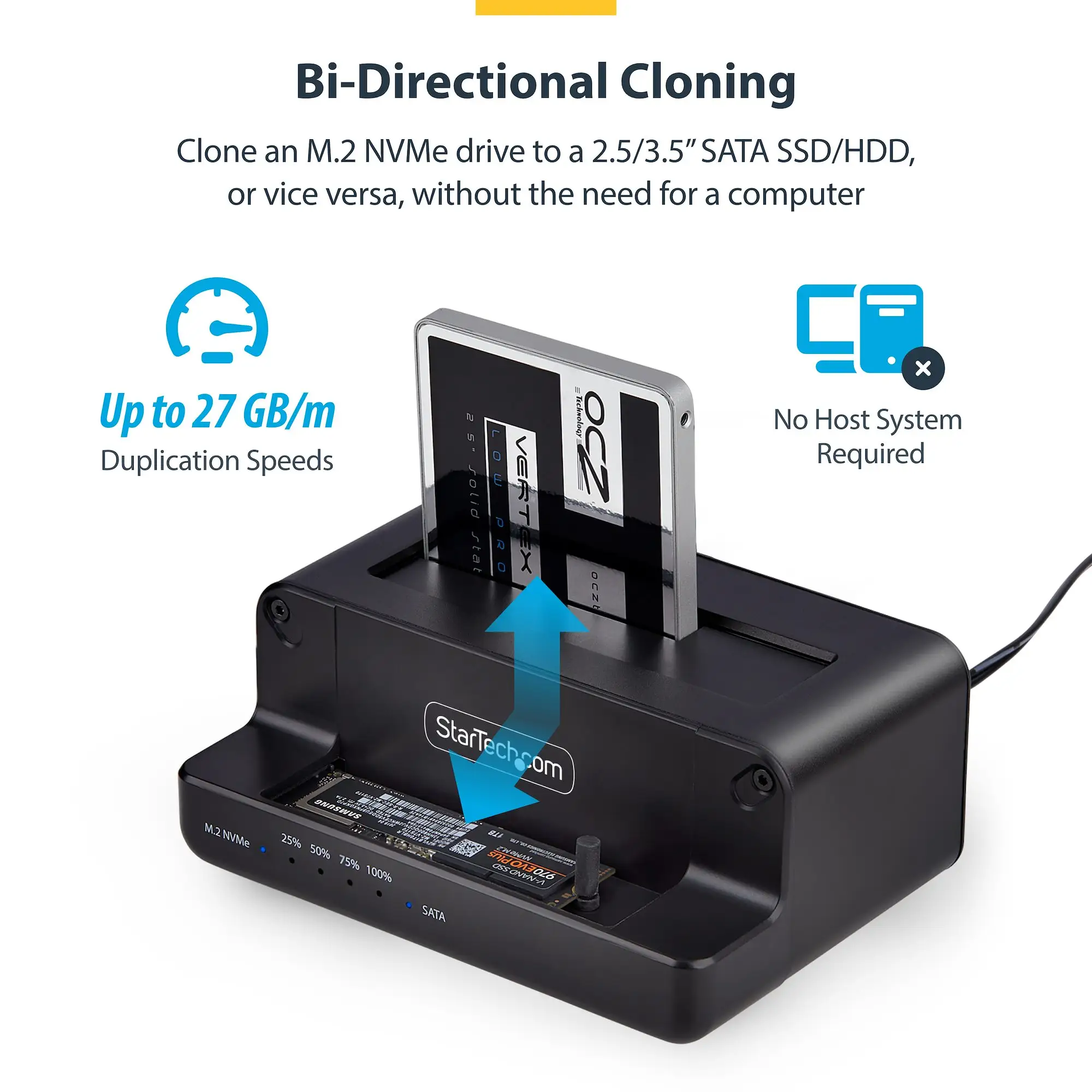
Within the data, alternatives are actually other StarTech models. The M.2 NVMe to 2.5"/3.5" SATA Dual Bay Duplicator offers bidirectional cloning between NVMe and SATA, at up to 27GB/min—cheaper (~$118) but slower and less versatile in erase modes. Meanwhile, the small form factor M2HDDDUPLICATORN1 hits 90GB/min speeds for NVMe-only work but drops erase support. Choice depends on whether multiple interfaces or erasing is a priority.
Price & Value
Prices fluctuate sharply by model: SM2DUPE11 around $982-$1100, M2HDDDUPLICATORN1 at $183-$209. eBay listings show strong availability, suggesting resale won’t be difficult, especially for lightly used units. Community buying tips recommend matching the SKU to use case—avoid paying for features you won’t use (e.g., full erase compliance if only cloning NVMe).
Amazon deals occasionally offer bundle savings, pairing duplicator and USB flash drive duplicator for ~$127 off, which IT teams have leveraged for mixed media environments.
FAQ
Q: Can the StarTech.com M.2 NVMe Drive Duplicator clone multiple drives at once?
A: No, all covered models only support 1:1 duplication. Bulk imaging requires multiple units or alternative systems.
Q: Does every model have secure erase functions?
A: No, only models like SM2DUPE11 include full erase modes. NVMe-only versions such as M2HDDDUPLICATORN1 lack this feature.
Q: What types of drives can it clone?
A: Depending on model, M.2 NVMe, M.2 SATA, and 2.5"/3.5" SATA are supported. Adapters can extend this to IDE/mSATA.
Q: Is speed always at the advertised maximum?
A: Not consistently. While some users hit full speeds, others—especially with newer Gen 4 NVMe—have reported much lower rates.
Q: Does it require software or drivers?
A: No, operation is entirely standalone, controlled via hardware buttons and display menus.
Final Verdict: Buy if you’re an IT pro or repair shop handling varied drive interfaces and value standalone operation without PC dependency. Avoid if you require multi-drive cloning or depend on guaranteed top speeds on every drive generation. Pro tip from community: double-check the model SKU to ensure you get the erase functions you need before paying the premium.