StarTech Ethernet to Parallel Print Server Review Verdict
When reviewers placed the StarTech.com Ethernet to Parallel Network Print Server under scrutiny, one theme became clear: this unassuming box has become a lifeline for anyone unwilling to part with perfectly functional parallel‑port printers. Independent testers like FindThisBest rated it 9.9/10 for transforming legacy printers into network‑ready devices, while long‑term owners praised its cross‑platform compatibility. But beneath the praise lie recurring gripes about set‑up complexity and very specific networking quirks.
Quick Verdict: Conditional — Ideal for IT‑savvy users looking to revive parallel printers, but casual buyers may face a steep learning curve.
| Pros | Cons |
|---|---|
| Works with a wide range of HP, Epson, Canon, Lexmark, Brother printers | Configuration can be challenging for beginners |
| Supports multiple protocols (IPP, LPR, SMB, AppleTalk, NetWare) | No DHCP by default; requires manual IP setup |
| Compact, mounts directly to Centronics port | No wireless option for PM1115P2/PM1115P3 models |
| Cross‑OS compatibility (Windows, macOS, Linux) | Some reliability issues in network‑drop scenarios |
| Allows remote/shared printing without a dedicated PC | Limited advanced networking configuration |
| Strong build quality | Requires separate power adapter |
Claims vs Reality
One of StarTech’s primary marketing claims is that you can “have it up and running in minutes” using a web interface or Windows wizard. While some buyers agreed, others stressed it depends heavily on your networking skills. A verified Reddit review of the PM1115P3 model highlighted that “the set‑up process is straightforward, with detailed instructions available online, ensuring a smooth installation.” In contrast, a disappointed Amazon buyer working with another StarTech print server lamented that “you need to know how to manually configure your computer to the required subnet / IP address… for the average person this is probably a challenge.”
Another bold selling point is “broad compatibility” across operating systems and printer brands. On this, feedback matched the claim — multiple owners confirmed successful connections to devices from HP LaserJet to Epson dot‑matrix models. A user tip circulating on technical forums underscored that “it also works with vinyl cutters and label printers,” adding unexpected value for niche applications.
Lastly, StarTech asserts “revitalize legacy printers” without new hardware investments. Here, the consensus is clear: owners in education, government, and small office environments credit the device with postponing printer replacement cycles by years. “It’s perfect for revitalizing older devices,” a Reddit review stated.
Cross‑Platform Consensus
Universally Praised
For IT staff in multi‑OS environments, the PM1115P2 and PM1115P3’s protocol support came as a relief. Windows, macOS, even Linux LTS builds connected without drivers that break on updates. “It works with our mixed fleet — Macs in design, Windows in admin — without headaches,” one small‑office tech posted. The ability to place printers anywhere on the LAN without tethering them to a PC was a workplace efficiency win, especially in space‑conscious offices. A verified eBay seller’s note called it a “discreet solution that doesn’t require a cable between your printer and the device.”
FindThisBest’s feature breakdown emphasized its advantage for HP, Epson, and Canon owners: you can “print from anywhere within your network.” For archivists and engineering labs still dependent on plotters or form‑feed impact printers, keeping that connectivity alive is essential.
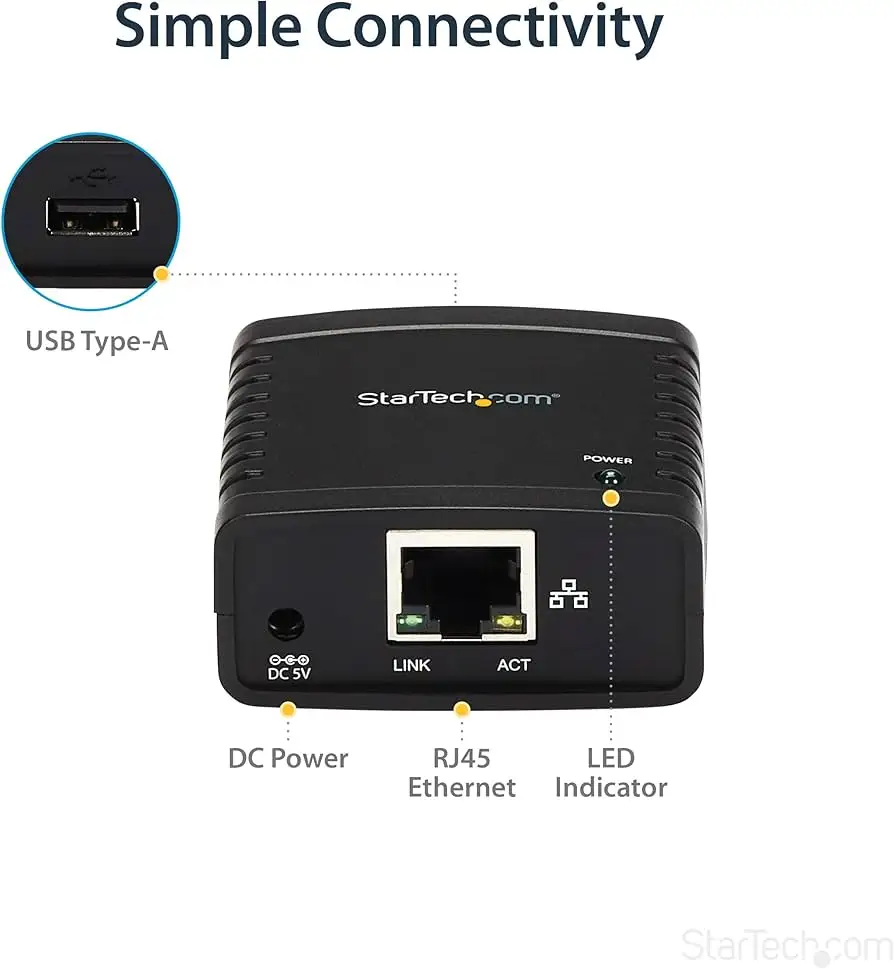
Build quality also received consistent praise. The case mounts directly to the Centronics port, removing one more vulnerable cable point. Several buyers called it “compact and lightweight,” yet solid enough to withstand busy environments. An office admin in a government department wrote, “We’ve been using the first one on our home network for several years without any problems.”
Common Complaints
Where things break down is installation for less‑technical buyers. Without DHCP enabled out‑of‑box, the print server ships with a static IP, meaning manual subnet adjustment is required to reach its configuration page. “This isn’t a hassle for me… but for the average person this is probably a challenge,” as one Amazon review summarized. Others noted the Windows setup wizard still isn’t a magic bullet, particularly in newer OS versions like Windows 24H2, where one buyer reported jobs “appear to get lost in the queue.”
Some users experienced reliability hiccups. Reports from other StarTech models describe the device disappearing from the network until power‑cycled. One frustrated Best Buy review warned, “You have to restart this device every time” before printing. Although these network‑drop issues appear less frequent with the PM1115P3, they remain a red flag for mission‑critical environments.
Another sticking point is lack of wireless support on these Ethernet‑only models. While StarTech offers a wireless USB variant, the PM1115P2/P3 requires cabling, which can limit placement options unless paired with a wireless bridge.
Divisive Features
The web‑based setup split opinion. Seasoned admins liked being able to tweak SNMP, IPP, or LPR queues from any OS. Less experienced users found the interface dated and less intuitive compared to modern plug‑and‑play devices. A common refrain: fine for those “willing to read and follow the manual,” frustrating for anyone expecting an AirPrint‑like experience.
For some, the protocol diversity was overkill — especially in small offices locked into a single OS and simple SMB printing. For others, support for NetBEUI, IPX/SPX, and AppleTalk was a lifesaver for integrating specialist lab equipment or legacy Mac printers.
Trust & Reliability
While the hardware’s reputation is solid in Reddit compilations, the brand’s online storefront gathers low Trustpilot ratings (average 1.5/5 from 44 reviews) — though these cover the entire company, not just print servers. Scamadviser still flags StarTech.com as “high trust rating” with strong domain age and valid SSL.
In the field, long‑term hardware reliability is encouraging. Posts mention units running for “several years without any problems,” particularly in static, wired networks. Problems are more likely to occur during infrastructure changes like IP range shifts or OS upgrades.
Alternatives
The closest competitors mentioned by users include the X‑Media XM‑PS110P, IBM 28P1846, and HP JetDirect 170x. The X‑Media earned 9.8/10 from FindThisBest for broad printer compatibility, though reviews highlight less protocol support. IBM’s option is more portable, but lacks some of StarTech’s multi‑OS polish. The HP JetDirect is “easy to install” and faster in some configurations but doesn’t match the StarTech’s modern OS and protocol versatility.
For mixed environments with legacy hardware, the StarTech stands out; for single‑OS, straightforward setups, an HP JetDirect or even a simpler D‑Link DP‑300U could be easier.
Price & Value
Community pricing snapshots show new units in the $75–$94 range, depending on retailer and model. On eBay, open‑box listings can drop to $44.99, with some sellers emphasizing “new without any defects.” Resale value holds moderately thanks to niche demand; legacy printer owners often seek these out once production units are scarce.
A buying tip from seasoned eBay traders: verify you’re getting the correct Centronics version, as StarTech also sells similarly named USB print servers that are not interchangeable.

FAQ
Q: Can the PM1115P3 be used with macOS Sonoma or Ventura?
A: Yes. StarTech lists support up to macOS 14 Sonoma, with configuration possible via the web interface since there’s no mac‑specific utility.
Q: Does this model support wireless printing directly?
A: No. The PM1115P2/P3 are Ethernet only. Wireless printing requires either a separate wireless bridge or choosing StarTech’s dedicated wireless‑USB model.
Q: Will it work with a dot‑matrix or label printer?
A: Yes, provided the printer has a Centronics parallel port. Users have reported success with Epson dot‑matrix models, vinyl cutters, and industrial label printers.
Q: What happens if my network uses DHCP?
A: Out‑of‑box, the unit uses a static IP. You must temporarily configure your computer to match its subnet, then change the settings to DHCP through the web interface.
Q: How many computers can share the printer at once?
A: Multiple users across the LAN can send print jobs; the print server manages the queue based on the configured protocol (e.g., LPR or SMB).
Final Verdict: Buy if you’re an IT administrator, small‑business owner, or enthusiast committed to keeping parallel‑port printers in active duty. Avoid if you need plug‑and‑play wireless printing or lack confidence in manual network configuration. Pro tip from long‑time users: secure a static IP in your DHCP range early in setup — it prevents the connection drops that haunt less‑planned installs.





