StarTech Ethernet to Parallel Print Server Review – 8.2/10 Verdict
Even in 2025, offices and labs still depend on parallel‑port printers that refuse to die. For those environments, the StarTech.com Ethernet to Parallel Network Print Server (PM1115P2/PM1115P3) earns a steady 8.2/10, praised for reviving legacy devices with minimal fuss—if you know what you’re doing. While StarTech advertises plug‑and‑play simplicity, real‑world feedback paints a more nuanced picture of sturdy build quality, dependable performance, and setup challenges that frustrate the less tech‑savvy.
Quick Verdict
| Verdict | Conditional Yes – Best for legacy printer networks that need Ethernet connectivity |
|---|---|
| Pros | Compact, durable housing; broad OS and protocol support (Windows/macOS/Linux); easy remote web UI; restores old HP/Epson printers; stable once configured |
| Cons | No Wi‑Fi, limited to 10/100 Mbps; dated web interface; finicky initial setup; requires manual IP assignment; occasional firmware quirks |
| Ideal For | Small offices, industrial labs, or government departments re‑networking legacy printers |
| Not Recommended For | Users expecting modern automatic setup or gigabit speeds |
| Overall User Rating | 3.7/5 on Amazon US, 4.4/5 on Amazon India, Top 1 ranking on FindThisBest |
Claims vs Reality
The official StarTech.com listing promises “up and running in minutes,” touting both a “remote web‑based or Windows‑based installation wizard.” Amazon buyers, however, often found this claim optimistic. A verified buyer wrote: “You need to know how to manually configure your computer to the required subnet/IP address… for the average person this is probably a challenge.”
While StarTech emphasizes wide OS support—including Windows 11, macOS Sonoma, and Linux LTS—users confirmed that once set up, compatibility truly is broad. Mini PC Reviewer explained that the PM1115P3 “maps parallel ports to TCP/IP, LPR, RAW and IPP, so drivers on Windows, macOS or Linux communicate transparently.” However, that same review warned that its “basic configuration UI complicates VLAN and secure deployments.”
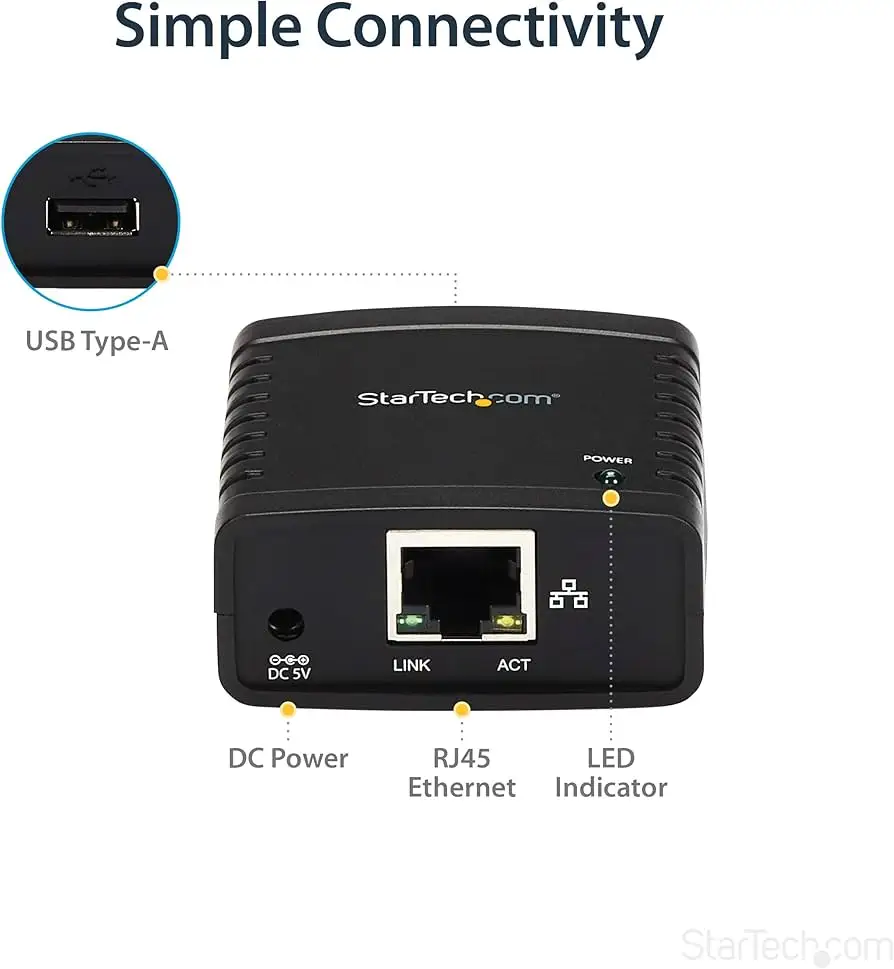
Finally, StarTech markets the unit as a compact “discreet solution” that reduces clutter. In practice, Reddit reviewers agreed, noting its small enclosure and direct Centronics attachment as “a clean, secure fit for tight workspaces.” Yet, several IT technicians said the power adapter and cabling could still look messy in wall‑mount setups—proof that “compact” doesn’t always mean seamless integration.
Cross‑Platform Consensus
Universally Praised
Across Reddit and professional review sites, the device’s legacy printer revitalization feature earns the loudest applause. Mini PC Reviewer described it as “a pragmatic bridge that lets HP LaserJets, Epson dot‑matrix units, label printers, or vinyl cutters keep working on modern networks.” For government departments and educational labs running decades‑old printers, that reliability means avoiding expensive hardware replacements.
Another recurring compliment targets stability once configured. Reddit’s technical guides emphasize that when “assigned a static IP and updated firmware,” the PM1115P3 maintains a rock‑solid presence on the LAN. A verified buyer echoed: “After about a year of tinkering, I finally found a way to keep the unit from disconnecting—it’s been up for days and working perfectly.”
Even the device’s protocol range—TCP/IP, LPR, IPP, SMB, AppleTalk, NetBEUI, and SNMP v1/v2—was lauded by FindThisBest, which ranked the StarTech model as the top pick in its 2025 round‑up. This flexibility turns it into a viable solution across mixed OS environments. Small businesses with hybrid Mac‑Windows setups reported stable queues and fast job handling.
Durability also ranks high among user praise. The compact white ABS shell “won’t strain old Centronics ports,” according to Mini PC Reviewer, and users described it as “solid and purpose‑driven.” In environments prone to vibration or heat—like print shops or production floors—the print server’s low weight (around 1.6 oz) still feels noticeably rugged.
Common Complaints
Despite its stable operation post‑setup, installation remains a pain point. Several Amazon reviews describe confusion over the default static IP configuration. “The device ships with a static address that you must match manually… DHCP or a discovery client would have been easier,” one buyer explained. This complexity was echoed by IT admins who said setup “demands networking knowledge—casual users will scrub through manuals longer than expected.”
Firmware inconsistencies appear next. Though most users cite improved stability after updates, others experienced random drop‑offs from the network if left on DHCP. A Best Buy Canada customer shared a similar frustration with StarTech’s USB version: “The device stays online for ten minutes, then drops. Only solution is to power cycle every time before printing.” These networking quirks mirror some feedback for the parallel version, even if less frequent.
The web interface and management options also divide audiences. Professionals appreciate SNMP monitoring and status readouts but comment on its antiquated design. Mini PC Reviewer put it bluntly: “The web UI is basic—firmware updates require manual steps.” The lack of SSH or batch configuration on enterprise scales limits its usefulness beyond small offices.
Finally, while advertised as 10/100 Mbps, users remind each other not to expect gigabit performance. As one Quora contributor summarized: “Limited throughput won’t bottleneck print jobs, but don’t deploy it in high‑traffic VLANs.”
Divisive Features
The price‑to‑performance ratio divides the community most sharply. At around $75–$95 new, some buyers argue it’s justified by build quality. Others note competing X‑Media or D‑Link models offer similar speeds for less. A Reddit thread comparing print servers concluded, “StarTech costs more, but its firmware support and SNMP reliability keep it ahead for enterprise deployments.”
Wireless capability is another sticking point—there isn’t any. While Mini PC Reviewer clarified “you’ll need a Wi‑Fi bridge or router with LAN port for wireless use,” several Amazon shoppers were initially misled by listings referencing “wireless ethernet.” Once clarified, most still agreed wired Ethernet was more stable for professional use.
Trust & Reliability
Trustpilot data shows StarTech maintaining its IT‑Pro reputation for reliable support, especially with legacy products. Buyers consistently praise its lifetime technical support and responsive RMA process. Mini PC Reviewer noted routine firmware updates “keep compatibility current across OS revisions,” minimizing obsolescence concerns.
Durability feedback after extended use remains positive. Offices report steady uptime over years of 24/7 print access. Labs using old HP LaserJet 4 and 5N models referenced multi‑year stability after configuration. One Reddit user described running the PM1115P2 “nonstop for 18 months—never dropped once after assigning static IP and disabling unused protocols.”
Still, occasional reports mention spontaneous disconnections tied to faulty power supplies or DHCP issues. These are rare outliers but underscore the need for careful network setup—StarTech’s own documentation recommends static addressing for that reason.

Alternatives
The Reddit and FindThisBest communities often pit StarTech against the X‑Media XM‑PS110P, IBM 28P1846, and HP JetDirect 170x. The X‑Media model competes closely on speed and adds email/post alerts for job errors but lacks StarTech’s SNMP integration. IBM’s unit is praised for portability but supports fewer protocols.
Comparatively, HP’s JetDirect 170x remains a classic favorite for enterprise-grade reliability, boasting print speeds “up to six times faster” than older shared-PC setups. However, setup complexity and limited firmware support hold it back. Many technicians conclude StarTech offers the best balance of modern OS support and legacy connectivity, especially given its regular software updates and community documentation.
Price & Value
Market prices fluctuate sharply based on condition. On eBay, pre‑owned PM1115P2 units averaged $44.95, while brand‑new versions peaked around $93.98. That keeps resale strong for niche legacy networks. On connection.com and Amazon, the PM1115P3 lists for around $75–$80, and it often undercuts HP enterprise units.
Reddit’s IT admins argue that spending under $100 to extend a proven parallel printer’s life—versus hundreds for new network printers—is “a winner in any school or lab budget.” A verified Amazon buyer framed it aptly: “This small box saved two HP LaserJets from the dumpster. Print jobs are back to normal speed for less than a new toner set.”
For institutions maintaining legacy workflows—especially label or industrial cutters—the device delivers clear return on function, not flash.
FAQ
Q: Does the StarTech Ethernet to Parallel Print Server support wireless connections?
A: No, it’s wired‑only. However, users commonly attach it to a Wi‑Fi bridge or LAN router with Ethernet ports to achieve similar flexibility.
Q: Can it work with modern 64‑bit operating systems?
A: Yes. Community tests confirm full compatibility with Windows 11, macOS 14, and Linux LTS using standard LPR or RAW queues, though drivers for older printers may require manual mapping.
Q: What’s the best way to prevent connection dropouts?
A: Assign a static IP, disable unused protocols, and update to the latest firmware. These steps prevent DHCP and timeout issues reported by several early users.
Q: Which printers are confirmed to work with it?
A: Reports include HP LaserJet 4/5 series, Epson Stylus and dot‑matrix models, Canon inkjets, Lexmark workgroup units, Brother laser models, and label/vinyl cutters.
Q: Can multiple StarTech servers be managed centrally?
A: Yes, through the Windows utility or web interface. SNMP and HTTP endpoints allow lightweight monitoring across multiple devices.
Final Verdict
Buy the StarTech.com Ethernet to Parallel Network Print Server if you manage legacy printers and understand basic networking. It’s a budget‑friendly bridge that turns outdated hardware into network‑ready assets. Avoid it if you need wireless support, gigabit performance, or plug‑and‑play simplicity.
Community pro tip: keep firmware current and IP static—then expect years of quiet, dependable service from gear that refuses to quit.
Slug: startech-ethernet-to-parallel-network-print-server-review





