Sharp EL-1901 Review: Conditional Buy Verdict (8.2/10)
A former office manager summed up the appeal in plain language: “no messy paper to deal with.” That single line captures why Sharp Paperless Printing Desk Calculator (EL-1901) keeps pulling strong sentiment despite some real usability friction. Verdict: Conditional buy — 8.2/10.
Quick Verdict
For people who want “printing-calculator” workflow without a noisy printer, Sharp Paperless Printing Desk Calculator (EL-1901) lands well—especially in offices that don’t need to archive paper tapes. Amazon reviewers repeatedly describe it as desk-friendly and easy to operate once you learn its quirks, while user summaries elsewhere keep circling back to quiet operation.
The biggest caveat isn’t performance—it’s process. A recurring frustration is learning and “reset/clear” behavior, where at least one reviewer felt the simplest action was oddly complicated and the documentation too thin.
| Verdict | Evidence-backed Pros | Evidence-backed Cons |
|---|---|---|
| Conditional Yes | “perfect for our busy office” (Amazon review) | “didn’t come with a box or instruction manual” (Amazon review) |
| Conditional Yes | Quiet, no tape/ink workflow (BestViewsReviews summary) | “must press the reset button with the tip of a pen” to clear (Amazon review) |
| Yes (office desks) | “small and we can still check the entries” (Amazon review) | “display… is not backlit” (Amazon review) |
| No (if you need battery-only) | Paperless, scrolling history aligns with “check entries” use (Amazon reviews + specs) | Power-source expectations clash: some users want battery-only (BestViewsReviews quote) |
Claims vs Reality
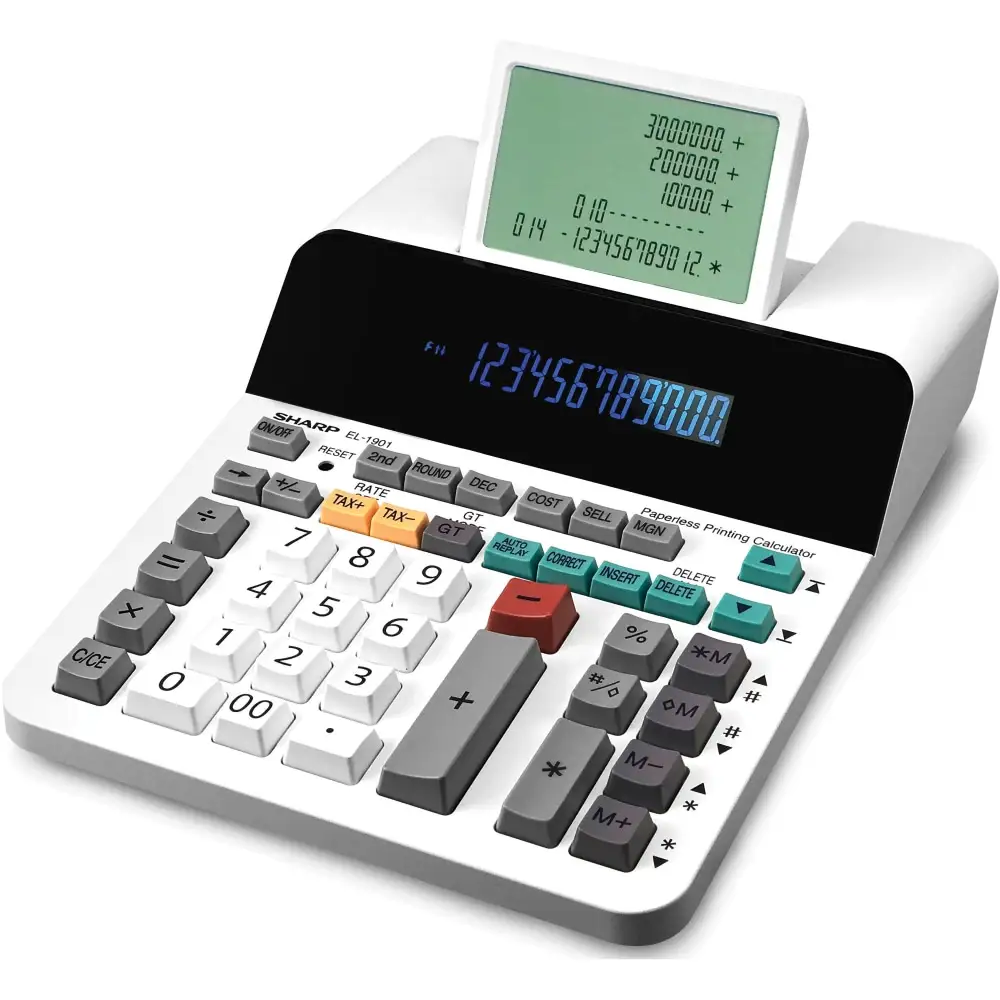
Sharp’s messaging frames the Sharp Paperless Printing Desk Calculator (EL-1901) as a “paperless printing calculator” that’s “whisper quiet” and stores “up to 300 entries,” replacing paper tape with a scrolling display. Digging deeper into user reports, the quiet claim largely holds up in the way people describe using it day-to-day—especially for shared offices where printer noise would normally be a constant irritant. BestViewsReviews’ aggregated user insights say “68% appreciated the quiet operation,” summarizing the same theme: “Without paper and ink, the adding machine does not make a lot of noise.” (BestViewsReviews)
The “paperless printing” promise also matches how buyers talk about it in practice: not having to deal with rolls, tape alignment, or ink. An Amazon reviewer who moved on from an old Canon tape calculator framed it as a space-and-supply solution: “don’t often use the tape… this is small and we can still check the entries so it works well for us.” (Amazon Customer Reviews)
Where marketing and lived experience diverge most sharply is usability around “clear/reset” and learning resources. One detailed Amazon review praises the concept but calls out an unexpectedly clumsy workflow: “the most simplistic function… pressing the c/ce button to clear… on this particular calculator you must press the reset button with the tip of a pen,” adding that this “clears all data and history” and even wipes “tax rate” settings. (Amazon Customer Reviews) In other words: while the product sells “check & correct” convenience, at least one user experienced the “start fresh” action as disruptive.
Finally, the product is positioned as an office-style device with AC power, and that’s consistent with official listings that emphasize an adapter. But user expectations aren’t always aligned. BestViewsReviews includes a direct user preference that cuts the other way: “I prefer a battery-operated calculator over one that requires an awkward dc power supply.” (BestViewsReviews) While officially an AC-powered unit with a backup battery, some shoppers are clearly evaluating it against truly portable, battery-first calculators—and that mismatch shapes satisfaction.
Cross-Platform Consensus
Universally Praised
A recurring pattern emerged around one central benefit: this calculator lets people keep the familiar “adding machine” flow without the physical tape. For office users, that translates into fewer supplies and fewer interruptions. One Amazon buyer described it as “perfect for our busy office,” specifically appreciating that “it displays the totals lined up and they do not disappear.” (Amazon Customer Reviews) That’s a workflow story: the value isn’t a flashy feature, it’s the relief of being able to look back and confirm numbers without scrambling for paper.
Another cluster of praise comes from people replacing old-school tape models. The “no paper roll” angle isn’t just environmental—it’s logistical. An Amazon reviewer wrote: “our 25 year old canon calculator gave up… don’t often use the tape… this is small and we can still check the entries.” (Amazon Customer Reviews) For a desk that was physically “allocated” to a compact tape machine, the EL-1901’s appeal is that it keeps the checkable history while fitting the same space constraints.
The third praise thread is ease and familiarity once it’s on the desk and plugged in. Multiple Amazon comments use plain, workmanlike language: “works great, easy to operate,” and “this is the perfect portable adding machine.” (Amazon Customer Reviews) Even when a user flags limitations—“it does need to be connected to an electrical outlet” and “the display… is not backlit”—they still end with “this is a great product.” (Amazon Customer Reviews) That’s the kind of endorsement that suggests the core job (fast totals, reviewable entries) is being met.
- Strongest praise themes: quiet workflow, checkable on-screen history, desk-friendly size.
- Most consistent user types benefiting: office admins, bookkeeping-heavy desks, people replacing tape calculators.
Common Complaints
The most pointed complaint is about clearing and resetting—because it hits the daily rhythm of how people actually use calculators. Digging deeper into that long Amazon review, the user’s frustration isn’t that the device can’t store history; it’s that the history is hard to intentionally “close out” without collateral damage. They wrote that instead of a normal clear, “you must press the reset button with the tip of a pen,” and that it wipes “all data and history” plus programmed settings like “tax rate.” (Amazon Customer Reviews) For anyone doing multiple jobs or clients in one sitting, that kind of reset behavior can feel like the machine is fighting the workflow.
A second complaint pattern is documentation and packaging quality. One Amazon reviewer expected a “new” purchase experience but said: “it didn’t come with a box or instruction manual,” and worried about whether it might be “open box” or even “a fake.” (Amazon Customer Reviews) Even though they add it “appears to function fine” and feels “comfortable for 10-key,” the missing materials undermined trust at unboxing—an issue that matters most for gift purchases, office procurement, or anyone needing quick onboarding without hunting for instructions.
Finally, display expectations appear in negative comments. The same “perfect portable adding machine” reviewer calls out: “the display… is not backlit.” (Amazon Customer Reviews) That detail matters for dim offices, nighttime work, or anyone used to modern backlit displays—especially since some official listings describe the display as “backlit,” creating a credibility gap when users explicitly report the opposite.
- Biggest operational friction: clearing/reset behavior and reprogramming after reset.
- Biggest buying friction: inconsistent packaging/manual expectations and authenticity worries.
- Biggest comfort friction: lack of backlight for some setups.
Divisive Features
The EL-1901’s identity—“paperless printing calculator”—is also what divides opinions. People who hate tape clutter celebrate it. One Amazon reviewer framed the lifestyle upgrade: “no messy paper to deal with… ‘ideal’… ‘looks great, works great’.” (Amazon Customer Reviews) For that user type, the lack of paper isn’t a compromise; it’s the whole point.
But others still judge it through the lens of a classic printing calculator, where “clear,” “paper trail,” and simple resets are muscle memory. The same long Amazon review praises the “ingenuity” but argues it wasn’t “thoroughly thought through” for basic clearing—at least until they learned a workaround from the community and revised their rating upward. (Amazon Customer Reviews) That arc—initial frustration, then acceptance once the workflow is understood—suggests the product is polarizing mainly for first-time learning curve, not ongoing performance.
Trust & Reliability
One trust signal that surfaces directly in user feedback is the fear of receiving something other than a clean, new retail unit. The Amazon reviewer who didn’t receive a box or manual wrote, “if it was an open box item, it should have said so,” and added, “i also hope it isn’t a fake?” (Amazon Customer Reviews) That kind of doubt doesn’t accuse the product itself—it questions the fulfillment chain, and it can color the entire ownership experience even if the machine works.
On longer-term reliability, the provided dataset offers more aggregated confidence than multi-month personal stories. BestViewsReviews summarizes sentiment as “87% positive” and highlights “88% found the battery life to be long-lasting” alongside “96% appreciated the quiet operation.” (BestViewsReviews) That “battery life” note is particularly interesting because official positioning emphasizes AC power with a backup battery; some shoppers still experience the backup as meaningful day-to-day, while others dislike needing a cord at all.
Alternatives
Only one direct competitor brand appears in user commentary: Canon. The most concrete comparison comes from the Amazon reviewer replacing “our 25 year old canon calculator,” who explains that tape models weren’t the right fit for their desk space and usage because they “don’t often use the tape.” (Amazon Customer Reviews) In that story, the EL-1901 wins not on raw calculation power, but on fitting a constrained desk footprint while keeping reviewability.
Another Amazon buyer notes it’s “different from my canon calculator,” specifically around programming tax rate being “not as easy” until reading directions. (Amazon Customer Reviews) So, if someone’s switching from Canon tape machines, the likely tradeoff is: less paper hassle and noise, but potentially more learning around settings and clearing behavior.
Price & Value
Current pricing signals vary by channel in the provided data: Amazon shows a list price around “$83.99” with a lower price around “$73.72,” while an eBay used listing advertises “$49.99” and describes it as “pre-owned and in excellent condition… ‘zero scratches on the screens’.” (Amazon listing; eBay listing)
That spread tells a simple value story: buyers who want “new, office-ready, with adapter” may accept the Amazon price, while bargain hunters can find meaningful savings used—especially if they’re comfortable without pristine packaging. A separate liquidation-style listing shows “brand new” sold at “$25.00” against an “$79.00” MSRP reference, reinforcing that pricing can swing widely depending on channel and timing. (bidFTA listing)
Buying tips grounded in user experience: if documentation matters, the Amazon packaging complaint suggests verifying “new-in-box” expectations before purchase. And if corded power is a dealbreaker, the BestViewsReviews quote—“I prefer a battery-operated calculator…”—is a reminder to treat this as primarily an AC desk unit, not a truly portable calculator. (BestViewsReviews)
FAQ
Q: Does the Sharp EL-1901 really replace a printing calculator tape?
A: It replaces the “tape checking” workflow for many users by letting you review entries on-screen. One Amazon buyer said it “displays the totals lined up and they do not disappear,” and another liked that they could “still check the entries” without using tape. (Amazon Customer Reviews)
Q: Is it quiet enough for a shared office?
A: Many users frame quiet operation as a major benefit because there’s no printer mechanism. BestViewsReviews summarizes that “68% appreciated the quiet operation,” noting that “without paper and ink, the adding machine does not make a lot of noise.” (BestViewsReviews)
Q: Can you clear calculations easily between tasks?
A: Some users find this frustrating. One Amazon reviewer wrote that instead of a normal clear, “you must press the reset button with the tip of a pen,” which also clears history and programmed settings like the tax rate. Others report getting used to it over time. (Amazon Customer Reviews)
Q: Is the display backlit?
A: At least one Amazon reviewer explicitly says it isn’t: “the display on the led readout is not backlit.” If backlighting is essential for your workspace, user feedback suggests double-checking expectations before buying. (Amazon Customer Reviews)
Q: Does it come with instructions and retail packaging?
A: Not always, according to one Amazon buyer who said it “didn’t come with a box or instruction manual” and deducted a star because it felt like “open box.” If you need a clean new retail experience, confirm listing details. (Amazon Customer Reviews)
Final Verdict
Buy Sharp Paperless Printing Desk Calculator (EL-1901) if you’re an office user who wants “adding machine” speed, quiet operation, and the ability to check prior entries without dealing with tape—like the Amazon reviewer who loved having “no messy paper to deal with.” Avoid it if you require battery-only portability or if frequent “clear and start fresh” workflows are critical, because at least one user found the reset process intrusive.
Pro tip from the community arc: if the clearing behavior or settings programming feels confusing at first, expect a learning curve—one initially frustrated Amazon reviewer eventually said, “i’m happy with my purchase” after their question was answered through the community. (Amazon Customer Reviews)





