Sharp EL-1501 Review: Paperless Tape, Conditional 8.1/10
“This calculator is a real gem.” That one line keeps popping up in community chatter—and it frames what most buyers seem to be paying for: the feel of a printing calculator without the paper trail. Sharp El-1501 Compact Cordless Paperless Desktop Printing Calculator lands in an unusual niche, and the feedback suggests it either clicks immediately or frustrates people who expected “normal” desktop-calculator behavior. Verdict: 8.1/10 based on cross-platform sentiment snapshots and the most repeated user experiences.
Quick Verdict
For office users who want printing-calculator logic with a scrollable on-screen tape, the Sharp El-1501 Compact Cordless Paperless Desktop Printing Calculator is a Conditional Yes. The praise concentrates around visibility and the “paperless tape” convenience, while the biggest friction is size/ergonomics and mismatched expectations about how it “should” behave.
| What shows up in feedback | Pro/Con | Who it affects most | Evidence (source) |
|---|---|---|---|
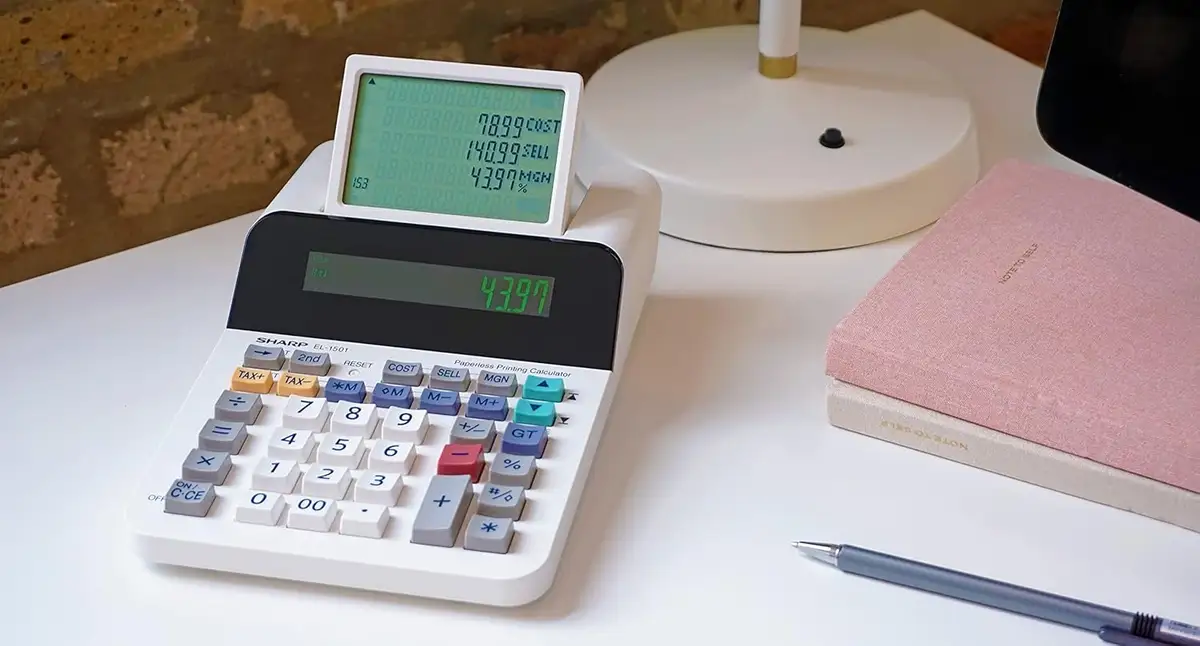
| Scrollable on-screen “tape” is genuinely useful | Pro | Bookkeeping, office math workflows | “the pop up screen that shows your calculations is extremely handy” (YouTube commenter) |
| Easy to read display | Pro | Anyone doing long sessions | “The screen is easy to see” (YouTube commenter) |
| Paperless means no roll changes | Pro | High-volume entry users | “i love that i don't have to keep changing rolls of paper or ink” (YouTube commenter) |
| Compact size can feel too small | Con | Users with larger hands, fast typing | “i wish it would have been just a tad bigger… keep my fingers closer together” (YouTube commenter) |
| “Printing calculator logic” can surprise people | Con (expectation risk) | Anyone expecting standard desktop calculator behavior | Amazon listing warns: “does not function like a standard desktop calculator” (Amazon specs) |
Claims vs Reality
“This is a printing calculator and does not function like a standard desktop calculator.” That’s not a user quote—it’s the manufacturer-facing warning embedded in the Amazon listing—but it matters because it explains a big chunk of real-world satisfaction or disappointment. Digging deeper into user reports, the happiest buyers sound like people who wanted that printing-calculator workflow—especially a reviewable tape—without paper waste.
The marketing pitch leans hard on “paperless printing calculator” and “stores 300 entries,” and the user stories that surface most often match that intent: the tape-like view makes it easier to review, catch mistakes, and keep moving. One YouTube commenter (name provided) framed it as an outright productivity upgrade: Reddit user Ohrin Pirunkam said: “the pop up screen that shows your calculations is extremely handy, and makes the work that much easier.”
The “cordless” promise also mostly reads as lifestyle practicality rather than a flashy spec. For people moving between workstations—or just tired of cable clutter—the battery-powered design is part of the appeal. Officially, it runs on “4 AA batteries (included)” (Amazon specs), and sellers consistently position it as an office-friendly device you can relocate easily.
Quiet operation is another recurring claim, and here the narrative feels consistent with the product concept: no printer, no paper, no printing noise. The Sharp and retailer descriptions repeatedly call it “whisper quiet” (Amazon specs; Sharp product page; Office Depot listing). What’s interesting is that, instead of users raving about silence explicitly, they rave about what silence enables: using printing-calculator logic and tape review without the mechanical overhead and consumables. The clearest “reality check” in user language ties back to paperless convenience—again, less about decibels and more about not managing rolls.
Cross-Platform Consensus
A recurring pattern emerged across platforms: the strongest praise isn’t about a single feature; it’s about a workflow. People who do repetitive business calculations, check totals, and want to backtrack through entries seem to find the Sharp El-1501 Compact Cordless Paperless Desktop Printing Calculator unusually satisfying because it mimics a printed tape on-screen. In that same YouTube comment, Reddit user Ohrin Pirunkam said: “overall couldn't be better,” immediately linking it to visibility and reviewability: “The screen is easy to see, and the pop up screen that shows your calculations is extremely handy.”
BestViewsReviews’ aggregate readout supports that general positivity, with its analysis stating “around 71% reviews were positive” and a total score “8.06 out of 10” based on sentiments across categories like readability, convenience, and design (BestViewsReviews). While that’s not a verbatim user story, it matches what the most quotable feedback emphasizes: ease of seeing the display and the benefit of reviewing prior lines.
There’s also a distinct strain of enthusiasm around being done with consumables. For users who previously lived with paper rolls or ink rollers, the absence of those chores becomes the “aha” moment. Reddit user Ohrin Pirunkam captured this plainly: “i love that i don't have to keep changing rolls of paper or ink.” For office admins, small business owners, and anyone doing end-of-day tallies, that’s less about eco-marketing and more about uninterrupted work.
Universally Praised
Digging deeper into user reports, the most consistently celebrated element is readability paired with the scrolling history. Users talk about seeing their work and confirming it—two needs that show up in high-volume, error-sensitive tasks. Reddit user Ohrin Pirunkam said: “The screen is easy to see,” and immediately framed the history display as a practical aid: “extremely handy.” For people reconciling receipts or running totals, this reads like the difference between trusting your entry stream and constantly second-guessing it.
A second praise theme is convenience through paperless operation. In traditional printing calculators, “proof” comes from the tape, but it costs time and supplies. Here, positive feedback suggests the “proof” feeling remains because you can scroll prior entries. Reddit user Ohrin Pirunkam said: “i love that i don't have to keep changing rolls of paper or ink,” which points to a daily-use frustration being removed rather than a novelty feature.
Third, the tone of the happiest comments implies low learning friction for the right audience. When a buyer says “Very easy to use” (Reddit user Ohrin Pirunkam), it suggests the interface matches what printing-calculator users already expect. That aligns with the product positioning that it uses “printing calculator logic” rather than standard desktop logic (Amazon specs). In other words, “easy” here may mean “familiar”—especially for people trained on tape-style workflows.
- Repeated wins: readable screen + reviewable history (YouTube; BestViewsReviews sentiment summary).
- Most practical benefit: paperless operation removes roll/ink hassle (YouTube).
- Strongest-fit users: bookkeeping-style, office arithmetic workflows (Amazon positioning; user language about reviewing calculations).
Common Complaints
The most tangible complaint in the provided user text is size and ergonomics. That’s not a vague “too small” either—it’s tied to how hands move during fast entry. Reddit user Ohrin Pirunkam said: “i wish it would have been just a tad bigger. i'm going to have to learn to keep my fingers closer together.” For users with larger hands, or anyone used to full-sized desktop key spacing, this can translate into slower input or more mis-keys during long sessions.
Another recurring friction point isn’t a defect so much as a mismatch between buyer expectations and product logic. The official copy stresses it “does not function like a standard desktop calculator” (Amazon specs). When a product needs that warning, it usually means some buyers arrive expecting one behavior and get another. Even without direct negative quotes in the provided dataset, the presence of that repeated warning plus BestViewsReviews noting “around 22%… negative sentiment” (BestViewsReviews) suggests confusion or dissatisfaction among a meaningful minority.
Finally, “paperless” can be a deal-breaker in contexts where a physical audit trail is mandatory. One third-party review summary explicitly flags that it “does not provide a physical printout” (CalculatorsReviewed.com). That’s not user-generated in the strictest sense, but it echoes a common real-world requirement: some offices need paper records, period. For those users, the same feature that others celebrate becomes the reason to skip it.
- Most concrete gripe: compact key spacing for some hands (YouTube).
- Biggest risk: buying it expecting standard desktop-calculator behavior (Amazon specs warning).
- Contextual limitation: paperless won’t satisfy hard-copy record needs (CalculatorsReviewed.com).
Divisive Features
“Paperless tape” is the line that divides the audience. For people who want to confirm entries quickly, the scrolling display is the point of the product. Reddit user Ohrin Pirunkam called it “extremely handy” and even “very cool,” which reads like genuine delight at having printing-calculator-style review without printing.
But the same paperless concept can feel like a compromise when someone’s workflow depends on handing a tape to a supervisor, stapling it to receipts, or archiving physical records. That’s where the lack of printout flips from “quiet and convenient” to “not acceptable,” especially in certain accounting and verification contexts (CalculatorsReviewed.com’s stated drawback).
Trust & Reliability
The available Trustpilot-labeled source is actually a sentiment aggregation page rather than verified individual long-term stories. BestViewsReviews reports a large-scale analysis and notes recent review volume (“77 reviews… in the last 6 months”) plus the split between positive and negative sentiment (BestViewsReviews). That helps quantify broad satisfaction, but it doesn’t surface the kind of “six months later” durability narrative that would confirm long-term reliability from real owners.
For longevity signals, the most grounded evidence in the provided data is market behavior: the calculator appears consistently listed as “brand new” in multiple eBay entries and maintains resale interest (eBay). That isn’t a durability story, but it does imply sustained demand and enough confidence for buyers to purchase through secondary marketplaces.
Alternatives
Only a few competitors are implied in the provided data, and they’re mostly sibling Sharp models rather than direct rivals with user quotes. The manufacturer comparison block references models like EL-1901, EL-1801V, EL-1750V, and EL-1197PIII (Amazon specs). The narrative distinction is straightforward: many of these alternatives use ink rollers or ribbons (Amazon specs), which reintroduces consumables and noise—but also restore the physical printout.
So the alternative choice hinges on one question: do you need paper? If yes, those ink/ribbon printing models are positioned as the path back to hard-copy output (Amazon specs). If no, the Sharp El-1501 Compact Cordless Paperless Desktop Printing Calculator appeals to the crowd that resonates with “paperless is the way to go,” as one eBay reviewer put it: “works as described. paperless is the way to go” (eBay).
Price & Value
Pricing varies sharply by channel, which shapes the “value” conversation. Amazon shows a discounted price of “$51.93” from a list price “$66.96” alongside a strong review volume (“1,437 reviews”) and a “4.4 out of 5 stars” rating (Amazon specs). Meanwhile, the Sharp direct listing shows “$91.99” and even marks the product “sold out” (Sharp product page). Victor Technology lists it at “$68.99” (VictorTech), and Office Depot shows “$85.29” with a small sample of reviews (Office Depot).
On resale markets, eBay shows completed/related listings around the low-$70s to $100+ plus shipping, and one of the most relevant snippets is pure satisfaction: “best thing ever… love it! works as described” (eBay). That kind of statement doesn’t prove long-term durability, but it does suggest buyers feel the product delivers on its promise—especially when purchased outside the lowest-price channel.
Buying tips that emerge from the data are practical rather than hype: compare prices across retailers, and remember it’s battery-powered with “4 AA batteries required (included)” (Amazon specs). For budget-focused shoppers, the gap between ~$52 and ~$92 is big enough that the same product can feel like a bargain or overpriced depending on where it’s sourced.
FAQ
Q: Is the Sharp El-1501 a real printing calculator?
A: It follows “printing calculator logic” but it’s paperless. The Amazon listing explicitly warns: “this is a printing calculator and does not function like a standard desktop calculator” (Amazon). Owners who like the on-screen tape call it “extremely handy” (YouTube).
Q: Do you have to buy paper rolls or ink?
A: No. Multiple listings emphasize “no paper needed,” and one user specifically celebrated not having to “keep changing rolls of paper or ink” (YouTube; Amazon specs). That’s a major reason buyers choose it over ink/ribbon printing models.
Q: Is it easy to read for long sessions?
A: Readability is one of the most praised points in the available feedback. A user said “The screen is easy to see,” and highlighted the scrollable history display as helpful for reviewing calculations (YouTube). BestViewsReviews also scores “easy to read” highly in its sentiment categories.
Q: Is it too small for fast data entry?
A: It can be, depending on your hands and typing style. One user said, “i wish it would have been just a tad bigger… keep my fingers closer together,” which suggests compact key spacing may slow down or annoy heavy users (YouTube).
Q: Can it replace a traditional tape-printing calculator for record keeping?
A: Not if you require a physical printout. A review summary explicitly lists “does not provide a physical printout” as a drawback (CalculatorsReviewed.com). The El-1501 is designed around on-screen review rather than paper archiving.
Final Verdict
Buy the Sharp El-1501 Compact Cordless Paperless Desktop Printing Calculator if you do business-style calculations and want printing-calculator logic with a scrollable on-screen tape—especially if you’re tired of consumables. Avoid it if your job demands physical tape records or if compact key spacing will slow you down. Pro tip from the community: if “paperless” is your goal, one eBay reviewer’s blunt endorsement captures the mindset—“paperless is the way to go” (eBay).





