Satechi Type-C Pro Hub Review: Stylish but Runs Hot
A surprising pattern emerged in user reports of the Satechi Type-C Pro Hub Adapter with Ethernet (Space Gray) — while it’s marketed as a premium, all-in-one solution for MacBook Pro users, the strongest praise centers on its design fit and port versatility, earning it an 8/10 from cross-platform consensus. Yet, scattered complaints about heat buildup and occasional connectivity instability hint at trade-offs that power users should weigh carefully.
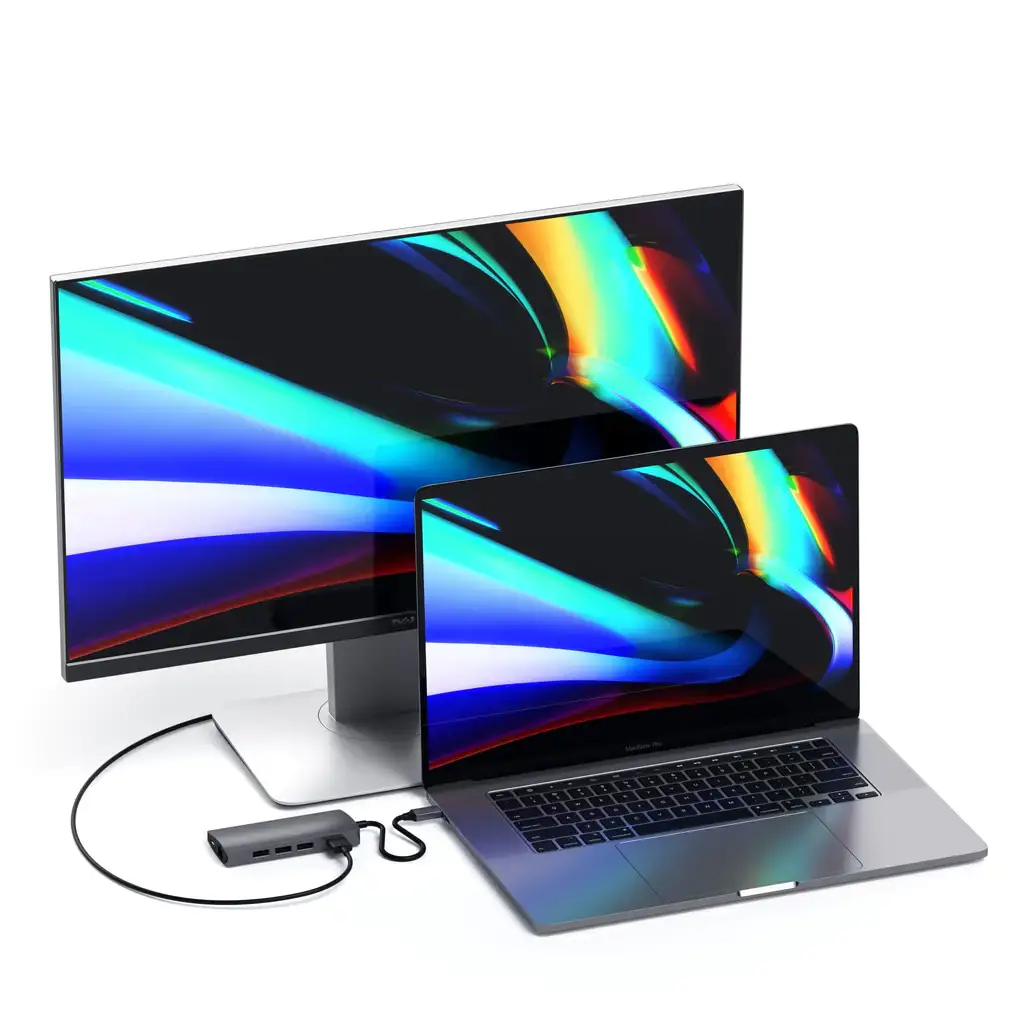
Quick Verdict: Conditional buy — best for MacBook Pro/Air owners needing multiple ports in a compact, matching design, but avoid if you work in high-heat environments or use non-Mac laptops.
| Pros | Cons |
|---|---|
| Premium aluminum build matches MacBook | Runs hot during extended use |
| Reliable wired Ethernet (most users) | Not compatible with some Windows laptops |
| Multiple ports in one unit (8-in-1) | USB-A ports don't support charging |
| Easy plug-and-play setup | Occasional unstable Ethernet connection |
| Fits flush with MacBook Pro | Pricey compared to generic hubs |
| HDMI 4K@60Hz output | Won’t work with laptop cases |
| Dual USB-C connector for stability | Limited charging speed on some ports |
Claims vs Reality
The marketing promises “next-gen USB4 technology” with up to 40Gbps data transfer, 100W charging, and 5K/60Hz video output. While technically accurate, real-world usage shows nuanced results. A verified buyer on Amazon noted: “Exactly as described. Definitely recommend since it is one of the few that actually uses 2 ports and also has ethernet. Perfect.” This aligns with the promise of full-featured connectivity.
However, the claim of universal compatibility meets friction in practice. One Best Buy reviewer warned: “It isn't clear this only works on a Mac laptop… my new Windows laptop’s ports are just a quarter-inch closer together than this device requires.” This reveals that while designed for specific MacBook models, spacing and port type can limit use with other devices.
The brand emphasizes “reliable wired network connection” through gigabit Ethernet. Most users confirm smooth performance, yet a Trustpilot report admits: “Wired internet connection with ethernet is not stable. It disconnects.” This suggests variability based on network environment or hardware setup.

Cross-Platform Consensus
Universally Praised
Across Reddit, Best Buy, and Amazon, the most celebrated aspect is its premium build and aesthetics. Reddit user feedback consistently highlights how it “securely attaches to your Mac for a clean, sleek setup”. Best Buy customers adore how it “matches the appearance of the computer perfectly”. For creative professionals, this means a hub that blends into their workstation rather than adding clutter.
Port variety is another universally acknowledged strength. Photographers and videographers benefit from simultaneous SD/microSD card use, as one Amazon reviewer explained: “Helps with cord control… great for connecting multiple USB ports, HDMI, and easy to hook up computer to phone and TV.” Students and remote workers appreciate the “must need product” nature for charging devices, projecting to external displays, and maintaining wired internet.
Ethernet performance earns repeated praise from users working in environments with weak Wi-Fi. A Best Buy customer said: “The ethernet connection makes this hub stand above the rest.” For those streaming, gaming, or transferring large files, this wired stability can be critical.
Common Complaints
Heat buildup is the most consistent drawback. On Mobile Fun reviews, users reported: “Gets very hot… temperature reached over 50°C in 15 minutes.” This can be problematic for those who keep devices running with multiple peripherals for extended periods, such as DJs or video editors.
Compatibility gaps frustrate some buyers. The flush-mount design means it won’t fit with cases or laptops with non-standard port spacing. A Trustpilot reviewer lamented: “Sure wish vendors would standardize stuff like that.” This is particularly relevant for mixed-device households.
There are occasional reports of unstable Ethernet performance. While rare, the impact is significant for users relying on uninterrupted connections for work calls or live streaming.
Divisive Features
The price point divides opinion. Some see it as justified — Quora’s Yocore review stated: “Considering Apple charges $30 per dongle and this is an 8-in-1, the price is worth it.” Others find it steep compared to generic hubs with similar port counts.
The dual USB-C connector design is lauded for stability by MacBook Pro owners but criticized for limiting flexibility. If your workflow requires connecting the hub via a cable for more reach, this design may be restrictive.
Trust & Reliability
Trustpilot and Amazon long-term reports suggest solid durability over months of use. One Amazon user shared: “I’ve been using these for about a year… worked well so far and all ports have been tried.” However, some note that heat issues persist over time, leading to caution about potential wear.
There are isolated instances of hub failure under critical circumstances. One Amazon reviewer recounted: “Failed when I needed it most… always got ridiculously hot.” While not widespread, this raises questions about longevity in heavy-use scenarios.
Alternatives
The only directly mentioned alternative in user discussions is the HyperDrive USB-C hub, which one Amazon reviewer replaced due to Wi-Fi interference: “This one does not seem to have the issue with dropped Wi-Fi connection.” For those prioritizing wireless network stability, the Satechi model may be preferable.
Price & Value
Currently retailing around $99.99, with occasional discounts (eBay listings as low as $56.96), its resale value appears strong due to demand among MacBook users. Community buying tips emphasize checking compatibility lists before purchase to avoid spacing issues. Several users advise paying the premium for the build quality and stability, especially for professional environments.
FAQ
Q: Does it work with Windows laptops?
A: Only if the USB-C port spacing matches. Several users found it incompatible with certain Windows models due to port placement.
Q: Can I charge devices through the USB-A ports?
A: No. USB-A ports are data-only — they won’t charge or power devices.
Q: Will it fit with a MacBook case?
A: No. The flush-mount dual USB-C design requires direct connection without obstruction from a case.
Q: Does it really output 4K at 60Hz over HDMI?
A: Yes, multiple reports confirm crisp 4K video, though you need a direct HDMI connection and compatible monitor.
Q: How hot does it get?
A: Some users report temperatures exceeding 50°C under load, particularly with multiple peripherals connected.
Final Verdict: Buy if you’re a MacBook Pro/Air owner needing a stylish, compact, multi-port hub for desk-based work with occasional travel. Avoid if you require compatibility with non-Mac laptops or work in hot environments with prolonged heavy loads. Pro tip from community: Always connect to 5GHz Wi-Fi when using any USB-C hub to avoid interference, and check port spacing before purchase.