Satechi Aluminum Wireless Keyboard Review: Worth Buying?
Digging into real-world feedback, the Satechi Aluminum Wireless Keyboard with Numeric Keypad earns a solid 8.3/10 from cross-platform reports. While marketed as a sleek, Mac-focused alternative to Apple’s Magic Keyboard, users consistently highlight its premium build, multi-device pairing, and softer typing feel as strong advantages. However, some note compromises in key travel and secondary function access that may deter those accustomed to Apple’s firmer, more integrated approach.
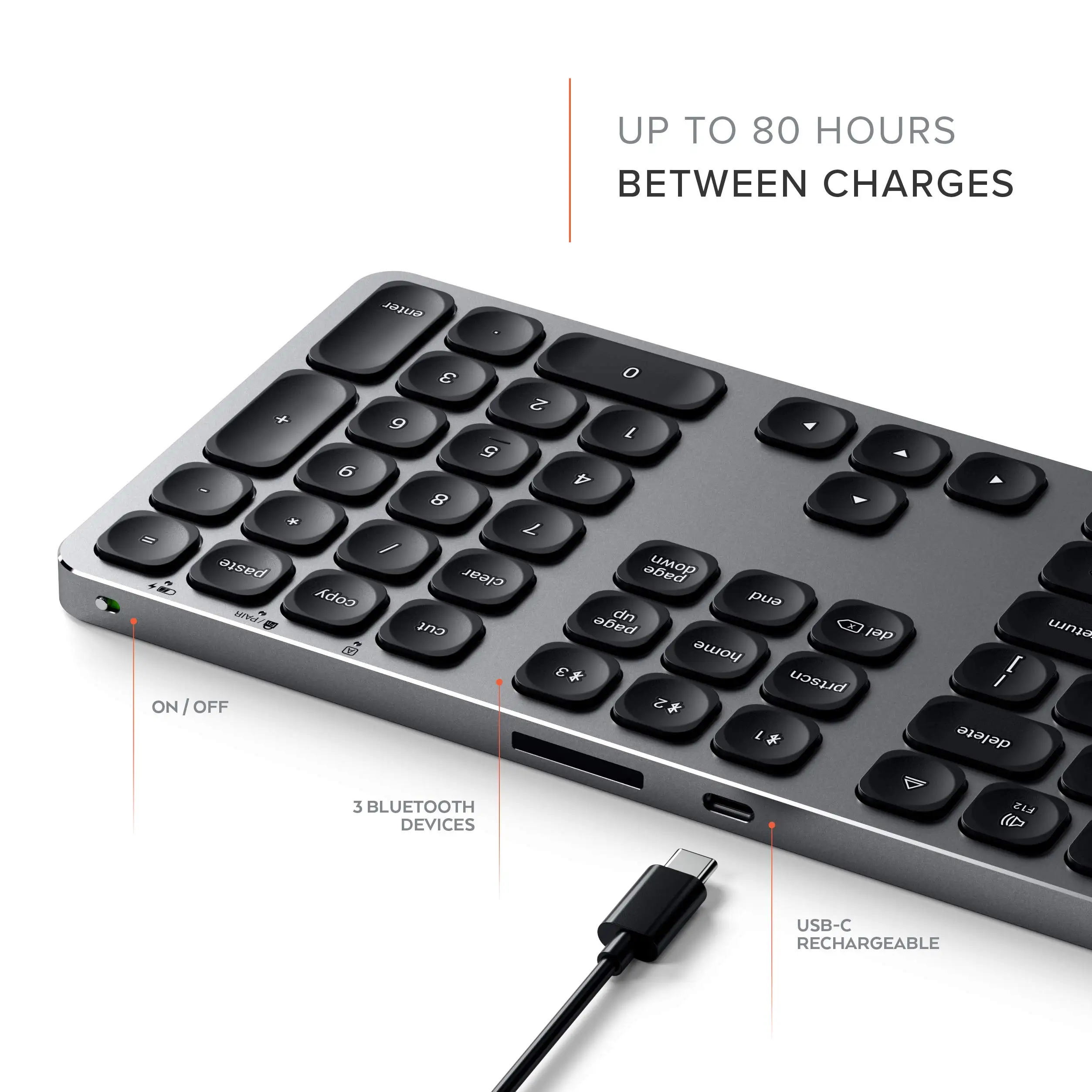
Quick Verdict: Conditional buy — best for Mac users seeking a softer, more affordable full-size keyboard with numeric pad, but less ideal for those who prioritize ultra-crisp key response.
| Pros | Cons |
|---|---|
| Full aluminum body feels more premium than Apple’s plastic-backed Magic Keyboard | Softer, “mushier” key travel compared to Apple’s clicky feel |
| USB-C charging with long battery life (up to 80 hours use) | Secondary media functions require FN key |
| Multi-device Bluetooth pairing (up to 3 devices) | No adjustable tilt feet |
| Matches Mac aesthetics in Space Gray, Silver, Gold, Rose Gold | Slightly smaller, rounded keys may require adjustment |
| Dedicated macOS shortcut keys | Pairing less seamless than Apple’s Lightning cable method |
| Full numeric keypad for data entry | Bulkier for those who don’t need a numpad |
Claims vs Reality
One of Satechi’s core marketing claims is its premium aluminum construction, positioned as a match or even upgrade over Apple’s Magic Keyboard. According to Trustpilot’s verified review, “Satechi’s aluminum bluetooth keyboard definitely has a solid quality build, arguably even more so than Apple’s magic keyboard,” noting the full aluminum body versus Apple’s partial plastic base. Reddit user syon_oq echoed this, saying, “It’s much cheaper than the Apple keyboard… a bonus to the Satechi is that it can be paired to 3 devices.”
The brand also touts multi-device pairing as a workflow enhancer. While this is technically accurate, users highlight subtle limitations. On Reddit, syon_oq explained, “One of the biggest drawbacks for me is that the Satechi uses the fn key to be able to access secondary functions such as play and pause… a bonus is that it can be paired to 3 devices… allowing you to use it with your Mac and iPad and another device.”
Battery performance is marketed at 80 hours of use and up to 100 days standby. Trustpilot’s reviewer confirmed that “being rated 100-day standby and 80-hours of constant use, you probably won’t need to charge it but a couple of times a year,” reinforcing the claim with lived experience.
Cross-Platform Consensus
Universally Praised
Across Amazon, Trustpilot, and Twitter, users consistently praise the Mac aesthetic match. A verified buyer on Amazon noted: “Matches my Mac keyboard exactly in size and color.” This is particularly valued by those building cohesive Apple setups. Reddit user syon_oq appreciated the color options, even if humorously lamenting his “very pink” unit.
The multi-device pairing feature is a recurring highlight for professionals juggling multiple platforms. Trustpilot’s review emphasizes its value: “Another benefit… is the ability to pair to three devices at once. This is valuable if you have multiple Macs or other computers at your desk or like to keep your iPad paired to an external keyboard.”
Build quality earns praise not just for materials but for stability. Trustpilot reports, “Six rubber pads are used on the bottom to prevent sliding. The edges have a subtle polished aluminum finish for a sharp look.” Twitter mentions confirm “solid construction with great key feel,” calling it “basically… a natural extension to a Mac keyboard.”
Common Complaints
The most frequent criticism is the soft key travel. Reddit user syon_oq described it as “very soft… makes me a little sad” compared to Apple’s firmer feel, adding that the rounded keys “psychologically add to the softness of the keystroke.” Trustpilot corroborates this softer profile, noting it “sits between the magic keyboard’s clicky, firm feel and Logitech Craft’s overly soft feel.”
Another recurring gripe is the FN-key requirement for media controls. This affects users accustomed to Apple’s direct-access keys, slowing workflow for frequent media control use.
The lack of adjustable feet also surfaces in multiple reports. Reddit user syon_oq remarked, “Neither of them have adjustable feet so the posture of the keyboard is what you’re going to get.”
Divisive Features
The full numeric keypad splits opinion. Data entry-heavy users welcome it — Trustpilot calls it “perfect for data entry, finance applications or accounting tasks” — but others find it unnecessary bulk. The same Trustpilot reviewer wished “Satechi would make this same keyboard in a version without the number keypad.”
While soft key feel is seen as a downgrade by Apple keyboard loyalists, some prefer it. Trustpilot suggests it’s “a great choice” if “you don’t prefer the shallow throw and clicky feel of Apple’s keyboards.”
Trust & Reliability
Concerns about longevity are minimal in available feedback. Trustpilot’s reviewer, after weeks of use, reported consistent performance and build integrity. On Twitter, multiple verified buyers reported “no problems syncing… very easy to use” even when switching between macOS and Windows on the same device.
The pairing process, while not as instant as Apple’s Lightning cable method, is generally reliable. Trustpilot describes it as “not a hassle” using Bluetooth preferences.
Alternatives
Apple’s Magic Keyboard is the most frequently cited competitor. The main trade-offs are price and feel: Apple offers firmer, clickier keys and cable-assisted pairing, but at ~$150 versus Satechi’s ~$80. Logitech’s Craft keyboard appears in Trustpilot’s comparison, with its “overly soft feel” making Satechi’s balance of firmness and softness more appealing to that reviewer.
Price & Value
Current pricing on eBay shows used units around $74.99 and new listings near $39.99 plus shipping, significantly undercutting Apple’s equivalent. Trustpilot’s reviewer stressed the $70 savings over the Magic Keyboard as a major factor. Resale value appears stable, with only minor depreciation in used listings, likely due to the durable aluminum body.
FAQ
Q: Does the Satechi Aluminum Wireless Keyboard work with Windows?
A: Yes, it supports Windows 10 and macOS, though mac-specific shortcut keys are tailored for Apple devices. Users note seamless switching between macOS and Windows when dual-booting.
Q: How long does the battery last on a single charge?
A: Up to 80 hours of continuous use and 100 days standby, according to both marketing and Trustpilot’s reviewer, who reported infrequent charging needs.
Q: Is the key feel similar to Apple’s Magic Keyboard?
A: No, it’s softer with rounded keycaps. Reddit user syon_oq found it “really mushy” compared to Apple’s firmer keys.
Q: Can it connect to multiple devices at once?
A: Yes, up to three via Bluetooth, with dedicated keys for switching — a standout feature for multi-device workflows.
Q: Does it have adjustable tilt feet?
A: No, posture is fixed. This has been a noted drawback for users seeking ergonomic adjustability.
Final Verdict: Buy if you’re a Mac user wanting a premium-feel, full-size wireless keyboard with long battery life and multi-device pairing at a fraction of Apple’s price. Avoid if you demand ultra-firm, clicky key travel or dislike using FN keys for media controls. Community pro tip: If you don’t need the numeric pad, consider waiting — multiple users wish for a numpad-free version.





