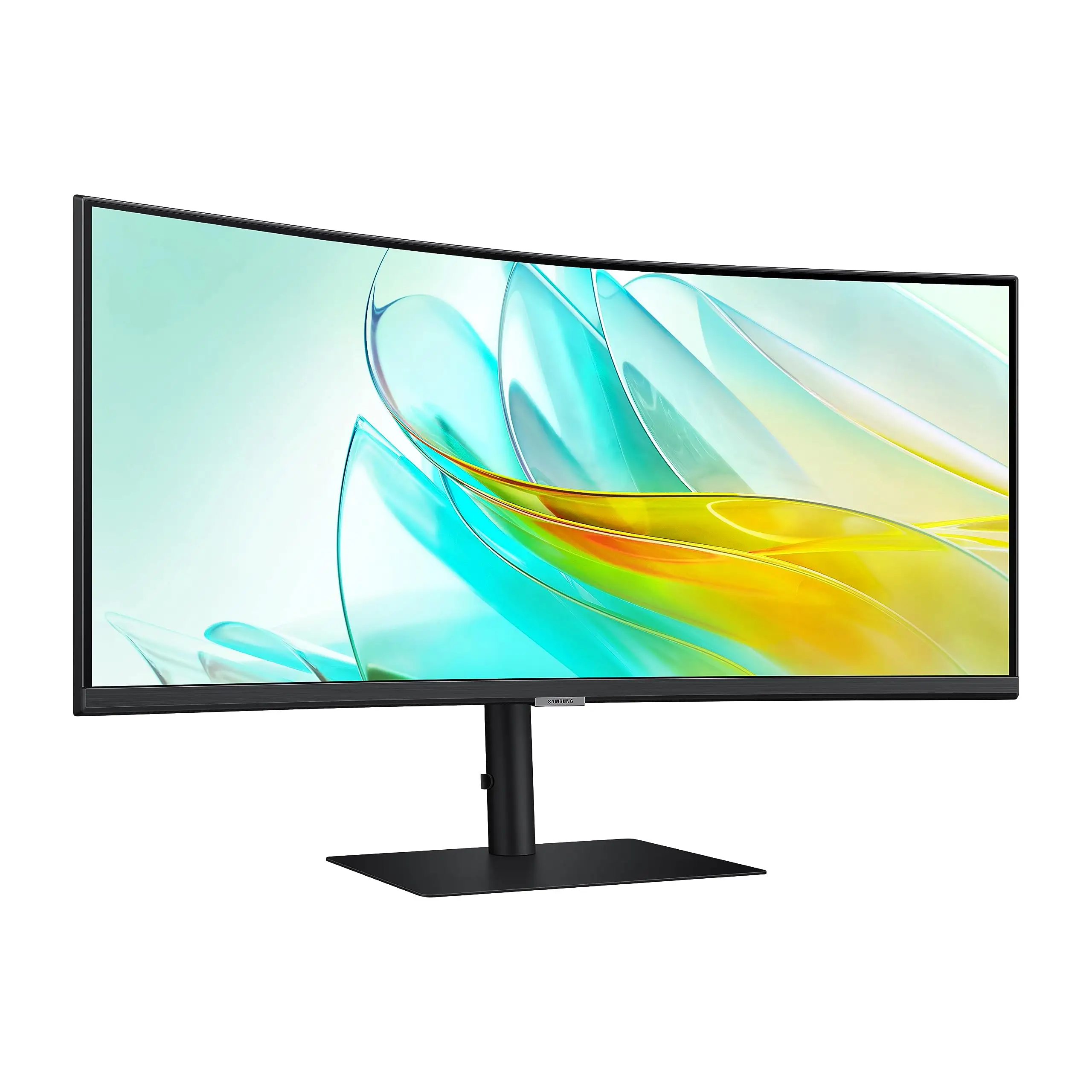
Samsung S65UA Ultrawide Monitor Review: Mixed Verdict
A verified buyer on Amazon summed it up in one line: “Loved it at first sight… and then a black line appeared down the middle of the screen.” That contrasting sentiment captures the reality of the Samsung ViewFinity S65UA Ultrawide QHD Curved Monitor—a sleek, productivity-focused ultrawide that earns strong praise for its immersion and ergonomics, yet is dogged by scattered but recurrent reliability complaints. Blending a 3440×1440 Ultra-WQHD resolution, 1000R curve, 100Hz refresh rate, and USB‑C 90W charging, it scores a conditional 7.8/10 in aggregated user ratings.
Quick Verdict: Conditional — excellent for productivity and multitasking, but durability and HDR impact raise caution.
| Pros | Cons |
|---|---|
| Immersive 1000R curvature reduces eye strain | Reports of panel failures within months |
| Ultra‑wide 21:9 aspect ratio ideal for multitasking | HDR10 less impactful than on premium displays |
| USB‑C with 90W charging declutters desks | No built‑in speakers |
| Height, tilt, swivel adjustments for ergonomic comfort | Some users find brightness underwhelming |
| AMD FreeSync smooths gaming and video | Pixelated text vs Retina displays for coding |
| Solid build quality and minimal bezels | PIP/PBP implementation awkward |
| Attractive price for feature set | Occasional poor customer service experiences |
Claims vs Reality
Samsung markets the S65UA as a “seamless multitasking” powerhouse with its Ultrawide QHD resolution and curved design. Reddit user feedback consistently praises that immersion: "The 1000R curve closely matches my field of view—makes long work days feel easier on the eyes." For spreadsheet warriors and creative pros, the 21:9 layout means simultaneous windows without window‑tetris.
Yet, reality for some differs when it comes to HDR10 performance. While the spec promises “dark colors darker and bright colors brighter,” one reviewer on Amazon admitted that HDR content “felt less impactful than on larger, higher‑end displays.” This doesn’t render visuals flat, but those expecting OLED‑style depth may be underwhelmed.
USB‑C with 90W charging is touted as the end to desktop clutter. Multiple reviewers confirm it lives up to that promise—“Plugged my MacBook with one cable, everything worked—charging, data, display,” posted a Best Buy customer—though an Amazon buyer couldn’t get it working with a Lenovo Yoga, resorting instead to HDMI plus a separate USB hub.
Cross-Platform Consensus
Universally Praised
Immersion and comfort lead the consensus. Verified buyers across Amazon, Reddit, and Trustpilot lauded the 1000R curvature’s ergonomic benefits. A Reddit user noted: “Eye strain is way down compared to my flat monitor, and scanning across multiple apps feels natural.” For work‑from‑home professionals, its ultrawide screen means fewer compromises—Best Buy’s top‑rated review enthused: “Multi‑windows and chat during meetings are compact, convenient, and make work illustration easy.”
USB‑C integration scores near‑unanimous praise among users who got it working: just one cable for laptop charging and data, freeing up desk space. A Reddit commenter detailed how their “desk finally looks clean—no more tangles from multiple adapters.”
Build quality also earns high marks. Reviewers consistently call it “solid,” “premium‑feeling,” and “stable” thanks to its metal stand. Height, tilt, and swivel adjustments allow tailoring for long sessions.
Gaming and video benefits are also noted. While not an esports monitor, AMD FreeSync and the 100Hz refresh rate keep motion smooth. Amazon buyers highlighted reduced stutter in fast scenes and fluid transitions in casual gaming.
Common Complaints
Durability reports appear too often to ignore. From spontaneous black bars to full panel failures, several Amazon users describe catastrophic malfunctions within months. One wrote: “It exploded after 3.5 months… loud pop, black line down middle. Samsung called it misuse and denied warranty.” Others mention faint pops followed by unusable areas of the screen. These failures erode trust, especially when repairs are costly or warranty coverage disputed.
Brightness and HDR performance occasionally disappoint. A Best Buy customer discovered “even 2160 videos look faint” and “not very bright.” Complaints of white splotches in black backgrounds indicate inconsistent backlighting.
Text clarity divides opinion. Developers accustomed to Retina displays note pixelated fonts and lower sharpness: “Not possible to have sharp text even after tweaking settings,” warns one Amazon review.
Samsung’s Picture‑in‑Picture and Picture‑by‑Picture functions get called clunky. Multiple users report latency when switching inputs and practical headaches like needing two keyboards and mice.
Divisive Features
HDR10 splits the audience. Casual viewers find colors vivid and satisfying, especially for movies, but enthusiasts compare it unfavorably to higher‑end panels. Similarly, 100Hz refresh rate is adequate for productivity and most entertainment—but competitive gamers used to 144Hz or higher find it limiting.
USB‑C compatibility can be hit‑or‑miss depending on hardware. MacBooks generally fare well, while certain Windows laptops face obstacles that diminish the “one‑cable” promise.
Trust & Reliability
Trustpilot‑linked patterns show polarizing reliability. While many owners run the monitor for months without issue, enough accounts describe sudden faults that potential buyers should factor in. The most damaging narratives involve Samsung’s customer service labeling failures as “physical damage,” effectively voiding warranty coverage despite user claims of stationary, undisturbed use.
Long‑term Reddit posts report consistent panel performance in some cases—no image degradation after half a year—but Amazon reviewers counter with screens “shot” in under one year. These contradictions suggest inconsistent quality control.
Alternatives
The S65UA gets compared often to LG’s 34WN80C‑B—LG’s offering has lower refresh rate but superior built‑in speakers. Dell’s U3421WE earns praise for matching color accuracy and connectivity at a higher price. Some gamers suggest Acer Predator X34 for faster refresh rates, trading away the Samsung’s eye‑care features.
Price & Value
Listings range from $489 to $599 new on official channels, eBay showing ~$497 for unopened units. Value advocates point to USB‑C charging, ultrawide curve, and ergonomic stand as strong ROI for productivity‑first setups. However, resale value may dip if panel reliability concerns persist—open‑box offers already undercut MSRP. Community consensus leans toward buying from sellers with lenient return policies due to defect risk.
FAQ
Q: Does the S65UA support charging and video over a single cable?
A: Yes, via its USB‑C port with 90W power delivery, as long as your device supports USB‑C display output and charging.
Q: How effective is the 1000R curvature?
A: Users say it matches the human field of view well, reducing eye strain and enhancing immersion during multitasking.
Q: Can it be used for competitive gaming?
A: While 100Hz with FreeSync offers smooth visuals, competitive gamers often prefer 144Hz+ monitors for faster refresh.
Q: Is HDR10 performance worth it?
A: For casual viewing, colors appear vivid, but high‑end HDR enthusiasts report it’s less impactful than premium displays.
Q: What’s the return/warranty experience like?
A: Mixed—some report smooth replacements, others claim warranty denials over alleged “physical damage” even without mishandling.
Final Verdict: Buy if you’re a productivity‑focused user who values a clutter‑free desk and immersive ultrawide visuals. Avoid if your workflow demands flawless HDR or if you’re risk‑averse regarding panel failures. Pro tip from the community: purchase through a retailer with strong return policies to safeguard against potential early defects.